Model-viewer: Programmatically launch AR, skipping the scene viewer
This is a simple ask, but I'm wondering how to directly activate the AR functionality. Imagine I have a custom button called, "Launch AR."
-- Those are non-examples, as they don't work on my mobile device.
Somewhat related: #547
How would I accomplish this? Is model-viewer, a plug-and-play DOM component, the best solution for programmatically launching AR?
 danksky
All 21 comments
Potential duplicate: https://github.com/GoogleWebComponents/model-viewer/issues/597
 pushmatrix
on 12 Jun 2019
pushmatrix
on 12 Jun 2019
@danksky Thanks for filing an issue! Can you clarify what you mean by "skipping the scene viewer"?
 cdata
on 12 Jun 2019
cdata
on 12 Jun 2019
@cdata Sorry, I should've clarified that I was thinking of iOS's ( 3D | AR ) toggle button and Android's "View in your space" button that appears above (iOS)/beneath (Android) the scene viewer whenever you press the bottom right icon (in the screenshot).
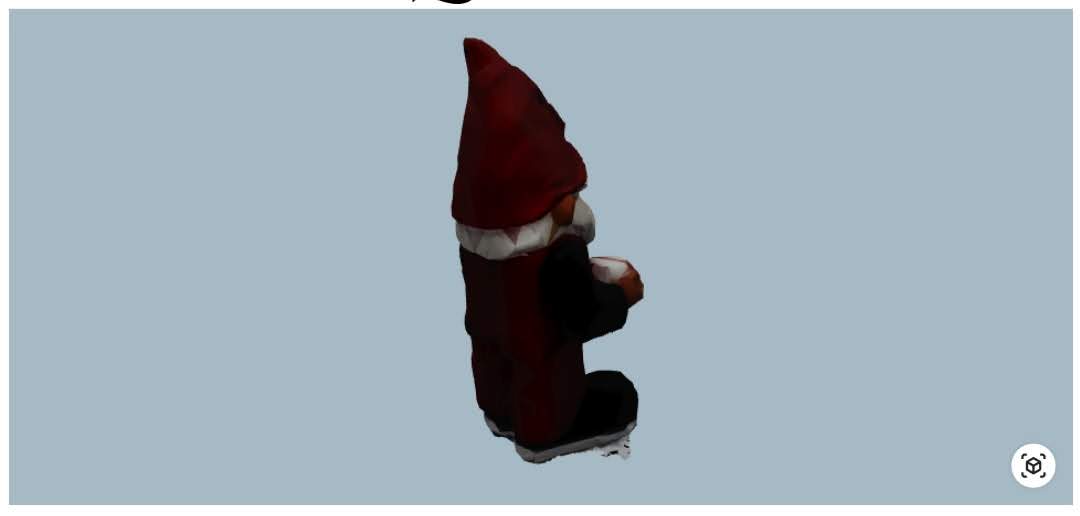
I just want to launch AR with an event like this:
Somewhere in javascript...
// model-viewer component already included in the DOM
var gnomeViewer = document.getElementById('gnome-viewer');
or
// model-viewer injected into the DOM
var gnomeViewer = ModelViewer({ divContainer: 'gnome-viewer-containter', asset: '../media/gnome-model.glb'})
Somewhere in the DOM...
<button id="my-own-custom-button" onclick="(event) => {gnomeViewer.launchAR()}"> See Gnome in AR! </button>
Have you tried gnomeViewer.activateAR()?
pushmatrix
on 12 Jun 2019
Have you tried
gnomeViewer.activateAR()?
I will. This is definitely a duplicate now that you've referenced it, but I'm still curious to know _how_ to make the API call.
Status: going to lunch. When I get back I'll try & report back.
danksky
on 12 Jun 2019
Not sure what you mean by how? It should just be
var gnomeViewer = document.getElementById('gnome-viewer')
gnomeViewer.activateAR()
I was confused because I wouldn't have expected the modelviewer object you mentioned in
modelviewer.enterAR()
to be a reference to the return value of document.getElementById('model-viewer');. Other heavier-weight framework elements (Google Maps, Mapbox, three.js canvases) typically create elements programmatically and inject them into the DOM. Even the <model-viewer> component itself injects child elements.
danksky
on 12 Jun 2019
This is what I see when I click my "Launch AR" button
https://photos.app.goo.gl/HuHU65R6iGPPV5Q38
danksky
on 12 Jun 2019
@danksky <model-viewer> is an HTML custom element. Unlike those other APIs you mentioned, <model-viewer> takes advantage of core semantics and implementation of the web platform in order to deliver an API that is more similar to what you would expect from a built-in element like the <video> tag.
If you are seeing a loading spinner, it is probably because Scene Viewer (a native Android app separate from the browser) is having trouble loading the model. A common reason for this is that the model is not being loaded from a "secure" origin. For Scene Viewer to load a model, it must be loadable over https:// on a domain with a valid SSL certificate. Can you try that out and let us know if that fixes the loading spinner issue?
cdata
on 12 Jun 2019
A common reason for this is that the model is not being loaded from a "secure" origin.
@cdata Oddly, the same model is loading on one of my websites hosted on Heroku and delivered over https, but not for the example above (also hosted on Heroku and delivered over https). I tried clearing my mobile cache and history to no avail
having trouble loading the model
I don't think it's having a problem loading the model, since in the video you see the model is blown to full screen, which I think is in the ARCore app at that point.
danksky
on 12 Jun 2019
It's also possible that there is a Scene Viewer bug, although that seems less likely. Are you able to share the model that does not work with us?
Also, if you are feeling ambitious, I could walk you through getting logs from your phone via adb... but that's a bit more involved.
cdata
on 12 Jun 2019
Let's do it! Want to continue on here or get on a call?
danksky
on 12 Jun 2019
- Download / install the Android SDK tools for your platform
- On a Mac you can do this with Homebrew:
brew install android-sdk
- On a Mac you can do this with Homebrew:
- Enable "developer" mode on your device
- Enable USB debugging in the "developer" menu of settings
- Connect your device to your workstation over USB
- Accept the prompt on your device's screen
- Open a terminal on your workstation and run
adb logcat - Launch the demo that hangs at the spinner screen and cause the spinner to show up
- Copy the logs from the terminal and paste them here
Easy peasy 😉
cdata
on 12 Jun 2019
BTW if you can share the model that doesn't work, I can do these steps for you on my device
cdata
on 12 Jun 2019
Tried again this morning, and it ended up working fine. I didn't reset ARCore since yesterday, but maybe the OS reloaded it since then, and that's why it's working?
BTW, I installed android-sdk through brew cask but zsh is saying command not found :(. That's on me, but that's the reason I'm not providing logs. And everything that's output in android studio is a mess. Either way, it's working, and I'm assuming its glitch earlier was no fault of model-viewer.
danksky
on 13 Jun 2019
Okay, thanks @danksky . In that case, it sounds like everything is resolved and I'm going to close out this issue. Please add a comment if you think it should be re-opened.
cdata
on 13 Jun 2019
Hey there guys,
Apologies for re-opening the thread, but could someone provide a full code implementation of a button that can open the AR viewer directly from a page. Been trying to get this to work with no results and based on my search, the documentation for this feature does not exist yet.
Thanks in advance
 charpstar
on 24 Jun 2019
charpstar
on 24 Jun 2019
@Dezec You are correct: this behavior is currently undocumented. The <model-viewer> implementation is open source, so if you peek at our code you will see how it works.
But be warned: until the method for launching Scene Viewer is documented, it is subject to change without notice, potentially breaking your implementation.
cdata
on 24 Jun 2019
@cdata Thanks for the reply, I was able to get it to work with a little searching. Regarding the potential for changes breaking the implementation, do you perhaps have an estimated date when you think it will be production ready?
I work for a development studio involved with multiple eCommerce companies who currently have enabled AR Quick Look on their website and we're looking to integrate/replace it with this. However since we don't want the website visitors to go through multiple pages on their mobile devices (default experience with Model Viewer AR) before they get to the AR experience, we figured having a AR Badge icon that directly leads to QuickLook/Google AR to be a much better solution.
Thanks again
charpstar
on 24 Jun 2019
@dezec unfortunately, I am not at liberty to disclose the information you are requesting. The best I can do is offer that <model-viewer> will make releases in a timely manner so that our users will have as painless an experience as possible if anything changes.
In the future, the API will be documented publicly and at that time you will have some guarantee of stability.
cdata
on 25 Jun 2019
Hey @cdata,
I've been facing a strange issue with activateAR(). If the website is loaded in chrome on my phone, it doesn't launch scene viewer. But if I issue the loading from Dev-Tools, the scene viewer launches properly. I am attaching a video that better explains the issue. Any help is appreciated.
https://www.dropbox.com/s/ony86i77yqszvn0/Untitled720.mov?dl=0
Here's the page:
https://perceptimagery.com/ar-embeds/test
 satputerohan
on 2 Dec 2019
satputerohan
on 2 Dec 2019
Related issues
 ebrayton
·
37Comments
pushmatrix
·
34Comments
pushmatrix
·
22Comments
cdata
·
15Comments
ebrayton
·
37Comments
pushmatrix
·
34Comments
pushmatrix
·
22Comments
cdata
·
15Comments
 calin-ciobanu
·
13Comments
calin-ciobanu
·
13Comments