Materialdesigninxamltoolkit: Problem with Material Design Textbox
I'm new to programming and started to make an application for school. For that I use C# WPF and for a good-looking Application I installed Material Design.
First I started the Demo of Material Design and after a quick view I found a nice TextBox with a border and a Checkbox on top of it. The code to copy was this (It's the example from Fields -> Outlined Text field in the Demo)
<StackPanel>
<CheckBox
    x:Name="MaterialDesignOutlinedTextFieldTextBoxEnabledComboBox"
    IsChecked="True"
    Margin="32,0,0,8">
  Enabled
</CheckBox>
  <TextBox
    Style="{StaticResource MaterialDesignOutlinedTextFieldTextBox}"
    Margin="32,0,0,0"
    VerticalAlignment="Top"
    Height="100"
    AcceptsReturn="True"
    TextWrapping="Wrap"
    VerticalScrollBarVisibility="Auto"
    materialDesign:HintAssist.Hint="This is a text area"
    IsEnabled="{Binding Path=IsChecked, ElementName=MaterialDesignOutlinedTextFieldTextBoxEnabledComboBox}" />
</StackPanel>
Because I just needed the Textbox, I deleted the Code of the CheckBox and implemented the rest inside my application. So the code now is like this:
<TextBox
    Style="{StaticResource MaterialDesignOutlinedTextFieldTextBox}"
    Margin="32,0,0,0"
    VerticalAlignment="Top"
    Height="100"
    AcceptsReturn="True"
    TextWrapping="Wrap"
    VerticalScrollBarVisibility="Auto"
    materialDesign:HintAssist.Hint="This is a text area"
 />
The problem now is, that I can't edit the textbox.
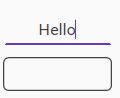
As you can see in the picture above, the TextBox on the top is a normal TextBox (which I can edit) and the TextBox below is with Style="{StaticResource MaterialDesignOutlinedTextFieldTextBox}" (which I cant edit/type in).
I guess the TextBox is still linked to the CheckBox and because I deleted it, somehow i can't write in it anymore. It all works fine with a standard textbox, but with the copied code i cant do anything, just see the TextBox with its rounded border.
How can I fix the problem, so I have the TextBox with the rounded border while I can edit it?
I would appreciate it, if somebody could help me.
Thank you.
 DrKissko
All 8 comments
Could you provide a sample repository? I can't reproduce your issue. Guessing you have something behind as you're writing
Because I just needed the Textbox, I deleted the Code of the CheckBox and implemented the rest inside my application
 jespersh
on 26 Nov 2018
jespersh
on 26 Nov 2018
Hey @jespersh , I just created a new public repository with my problem. https://github.com/DrKissko/Example_TextBox
Thanks for your help. :)
DrKissko
on 26 Nov 2018
You can edit in it, it is just that the text is somewhere... else
Try entering into the box "1234", ctrl-a to select all and copy it.
Paste it in somewhere else.
Simply remove the Height
<TextBox Width="85" Style="{StaticResource MaterialDesignOutlinedTextFieldTextBox}" />
I suspect that you're trying to achieve something with MaterialDesignOutlinedTextFieldTextBox that it wasn't intended to do.
The Outlined trigger is setting some values that are hardcoded:
https://github.com/MaterialDesignInXAML/MaterialDesignInXamlToolkit/blob/e1d240de3155654cfae52c31799bc9341f767582/MaterialDesignThemes.Wpf/Themes/MaterialDesignTheme.TextBox.xaml#L163-L176
My recommendation would be to create your own textbox style to suit your specific needs
(it is the margin and padding values that were screwing you over)
jespersh
on 26 Nov 2018
Holy moly, I would never have discovered that.
Okay, how can I create my own textbox style? It's simply the TextBox with the style of Material Design is giving to me, but with the Width and Height of above i specified. Is there a simple way to do that?
Beside that thanks you very much for that fast help. I really appreciate that. :)
DrKissko
on 26 Nov 2018
@jespersh I tried a couple things to make this textbox work, but it wasn't succesful at all...
I would really appreciate it, if you could tell me as a C# WPF Noob, how I can exactly do that or if there is an even easier solution, to get that Material Design TexBox with the Height of 25 and Width of 85....I'm really desperate :(
DrKissko
on 28 Nov 2018
There's nothing I can recommend you to do, except not to try to use the MaterialDesignOutlinedTextFieldTextBox in the height restricted way you're attempting.
As I see it, then you would end up with triple borders, reimplementing the entire style or breaking the validation or other effects.
If you want to ignore that, then copy paste https://raw.githubusercontent.com/MaterialDesignInXAML/MaterialDesignInXamlToolkit/master/MaterialDesignThemes.Wpf/Themes/MaterialDesignTheme.TextBox.xaml into a new file in your project, modify and rename the styles and add the style file in your app.xaml
jespersh
on 29 Nov 2018
Alright, thank you jespersh. That helped me a lot. Thanks for your help and patieance. :)
DrKissko
on 29 Nov 2018
I had the same problem a few days ago with the exact same element.
The way I got the text to appear was to add Padding="0,-25,0,0". The text for you was invisible since the top padding was pushing it down, but the text was still being written "outside of textbox bounds"
 Precigus
on 31 Jan 2020
Precigus
on 31 Jan 2020
Related issues
 MoshiMoshi0
·
4Comments
MoshiMoshi0
·
4Comments
 gitjsdr26
·
3Comments
gitjsdr26
·
3Comments
 Tyrrrz
·
4Comments
Tyrrrz
·
4Comments
 nrmohan
·
3Comments
nrmohan
·
3Comments
 mgnslndh
·
4Comments
mgnslndh
·
4Comments