Materialdesigninxamltoolkit: ComboBox ClearButton not clickable
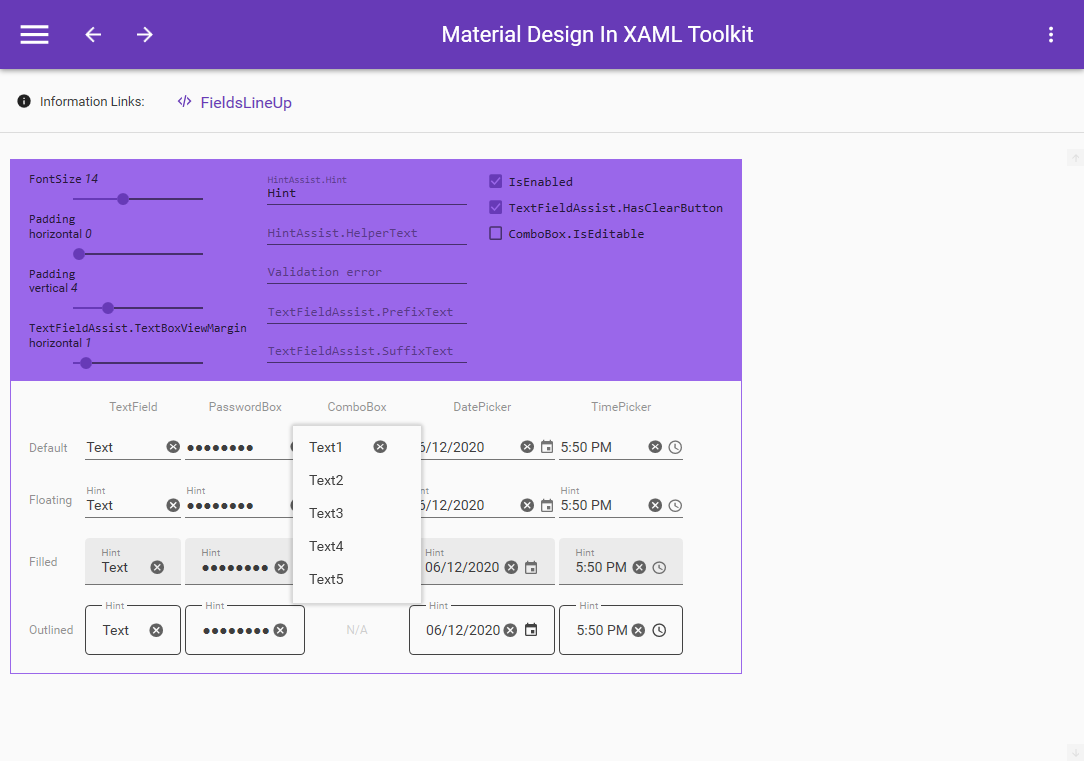
I updated to latest ci build (4.0.0-ci2273) and noticed that you can no longer click on the clear button of comboboxes, if you click it, it opens the combobox popup as if the click is passing thru it. The clear button also has some z-index issues as it appears always on top.
Im assuming this bug was introduced in #2072, and is easily reproducible in the "FieldsLineUp" page in the demo project.
 MoshiMoshi0
All 4 comments
Just to update, the main issue seems to be Panel.ZIndex="1" on the MaterialDesignFloatingHintComboBoxTemplate.Grid.ToggleButton. Removing the ZIndex makes the ClearButton clickable but the ComboBox popup does not work.
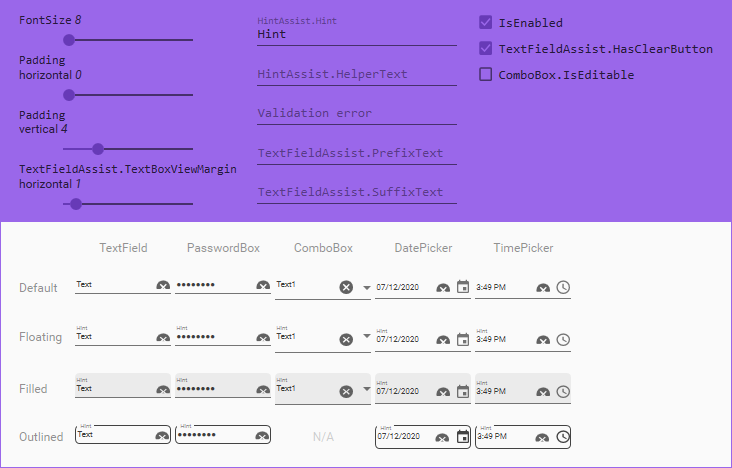
While I tried to look for a fix but I also found a few more issues with that PR. I assume that the reason for #2072 was to keep the look of those controls consistent, but they are only kinda consistent for FontSize of 13 and up.
Issues that happen for FontSize 12 and below:
- ClearButton gets cropped, but not on ComboBox
- There are 3 different heights of controls, TextField+PasswordBox, ComboBox, DatePicker+TimePicker
Other small inconsistency issues:
- The height of the ComboBox arrow icon is different on each type (filled/floating/default)
- TimePicker clock icon has only 1px padding on the right, everything else has 2px
- ComboBox arrow icon has no padding on the right
MoshiMoshi0
on 7 Dec 2020
This is really great information! Thank you for digging into it.
 Keboo
on 7 Dec 2020
Keboo
on 7 Dec 2020
I am working on this.
 greuelpirat
on 12 Dec 2020
greuelpirat
on 12 Dec 2020
Fixed with #2193:
- ComboBox ClearButton not clickable
- ClearButton gets cropped, but not on ComboBox
- There are 3 different heights of controls, TextField+PasswordBox, ComboBox, DatePicker+TimePicker
About other issues:
The height of the ComboBox arrow icon is different on each type (filled/floating/default)
I think this is due to the different layouts.
TimePicker clock icon has only 1px padding on the right, everything else has 2px
Looks like this comes from the icon itself. I would not fix this via layout arrangements.
ComboBox arrow icon has no padding on the right
The Padding can be easily set. If the default layout should have padding than this is a design decision, no bug.
greuelpirat
on 13 Dec 2020
Related issues
 wongjiahau
·
17Comments
wongjiahau
·
17Comments
 StephanBis
·
16Comments
StephanBis
·
16Comments
 rrs
·
18Comments
greuelpirat
·
12Comments
rrs
·
18Comments
greuelpirat
·
12Comments
 oSethoum
·
10Comments
oSethoum
·
10Comments
Most helpful comment
Fixed with #2193:
About other issues:
I think this is due to the different layouts.
Looks like this comes from the icon itself. I would not fix this via layout arrangements.
The Padding can be easily set. If the default layout should have padding than this is a design decision, no bug.