Material-theme-jetbrains: Font ligatures do not display within the editor when the theme is active.
Summary
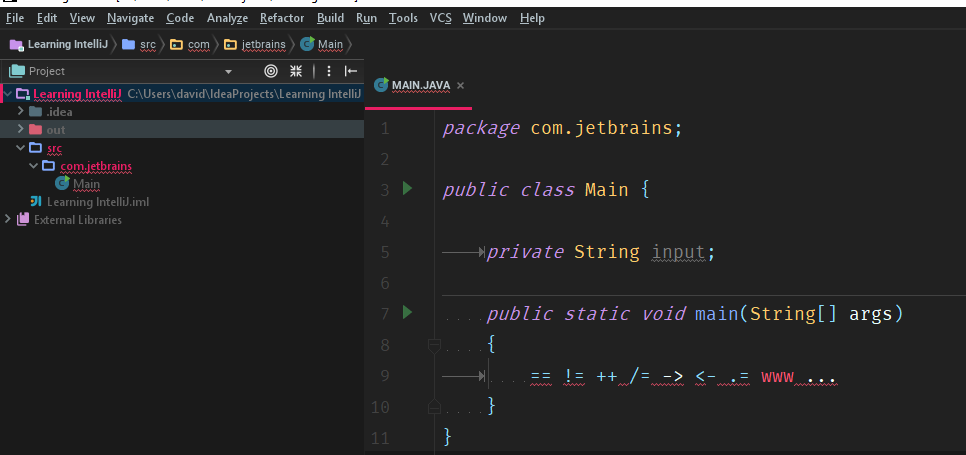
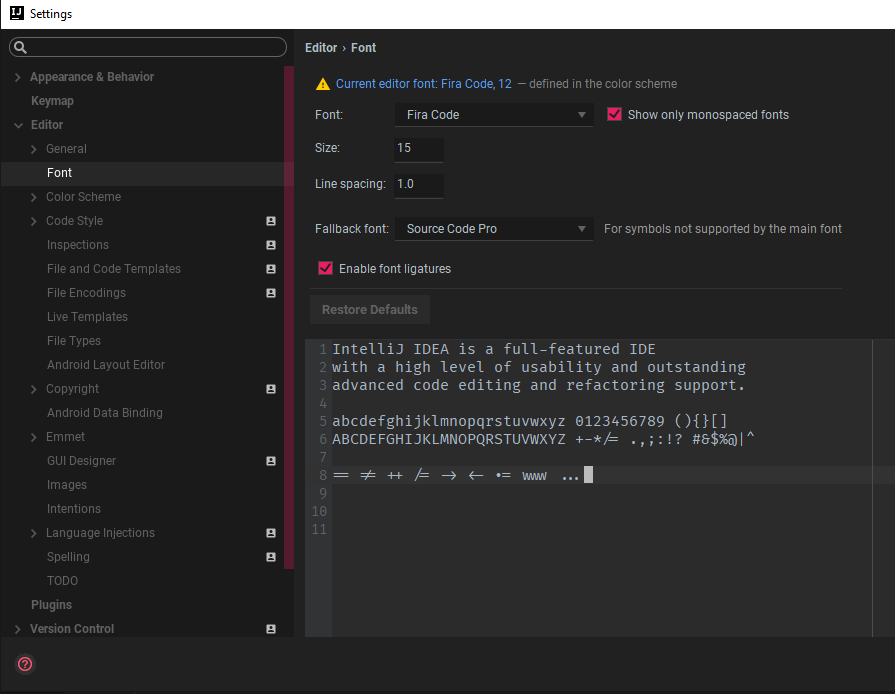
When using fonts with ligatures such as FiraCode while the theme is active, the ligatures do not render! However, in the Editor Settings preview [Settings -> Editor -> Font], they are rendered correctly.
Expected behavior
The font dependant font ligatures to be rendered.
Actual behaviour
Ligatures are not rendered.
Environment
- IntelliJ IDEA 2017.2.6
- Build #IU-172.4574.11, built on November 13, 2017
- Windows 10 10.0
- Material Theme UI 1.3.3.1
- ```
Screenshots
 davzzar
>All comments
You need to activate it in Settings -> Editor -> Color Scheme Font.
 mallowigi
on 26 Nov 2017
mallowigi
on 26 Nov 2017
👍6
Was this page helpful?
0 / 5 - 0 ratings
Related issues
 ddnexus
·
3Comments
ddnexus
·
3Comments
 nammaianh
·
3Comments
nammaianh
·
3Comments
 sanderboom
·
4Comments
sanderboom
·
4Comments
 NikoGrano
·
4Comments
NikoGrano
·
4Comments
 cryzed
·
4Comments
cryzed
·
4Comments
Most helpful comment
You need to activate it in Settings -> Editor -> Color Scheme Font.