Material-theme-jetbrains: Split editor windows have no border.
Using RubyMine 2017.2 and just updated to the latest version of the theme plugin. I often split my windows so I have two editor tabs visible at the same time, top and bottom. Everything works and looks great however there's nothing between the two windows to indicate where they start and stop. Between the project files column and the tabs column (I have tabs arranged vertically on the left) there's a nice black, or nearly black line that clearly shows the separation. Can this be added between the split editor windows?
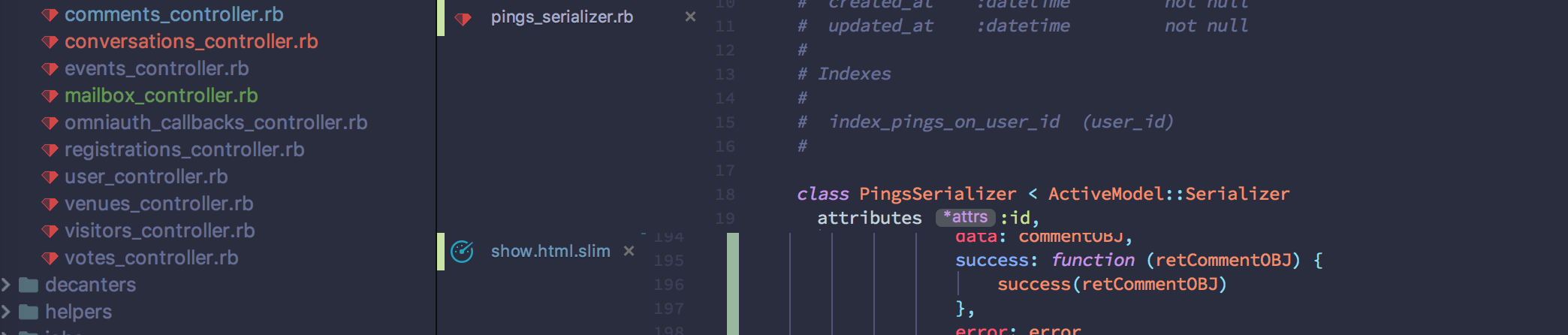
In the screenshot you can see the class and attributes line are in one window and the data line is at the top of the second window. It's quite confusing visually. I don't know if this is a change everyone would want so maybe an option in the settings to include a demarcation line would be appropriate? I'm willing to do the coding to make this happen but I'd need guidance as I've never worked on a theme before.
 blimey85
All 11 comments
There is a property for split window color, I just never thing this was an issue before.
I will try to play with it and tell you the results
 mallowigi
on 1 Aug 2017
mallowigi
on 1 Aug 2017
Any update on this? Such a simple thing but it drives me crazy.
blimey85
on 9 Aug 2017
I dont have a fix for this, except changing the gutter background to something other than the default background.
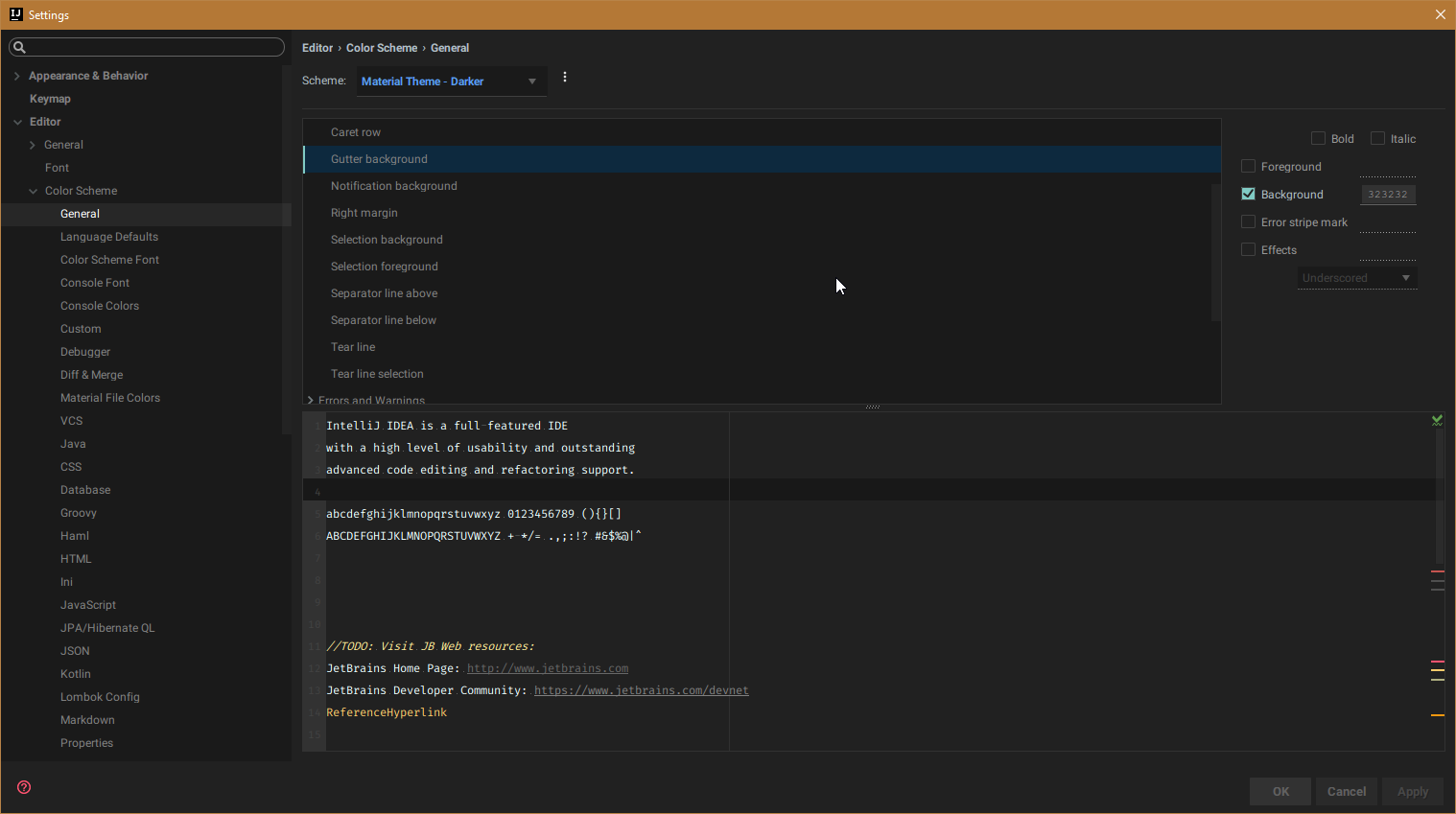
But I don;t like it, so I won't insert it in the theme.
mallowigi
on 10 Aug 2017
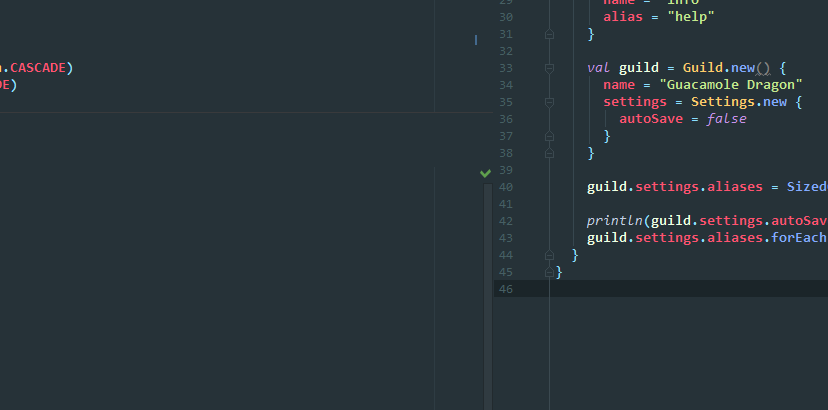
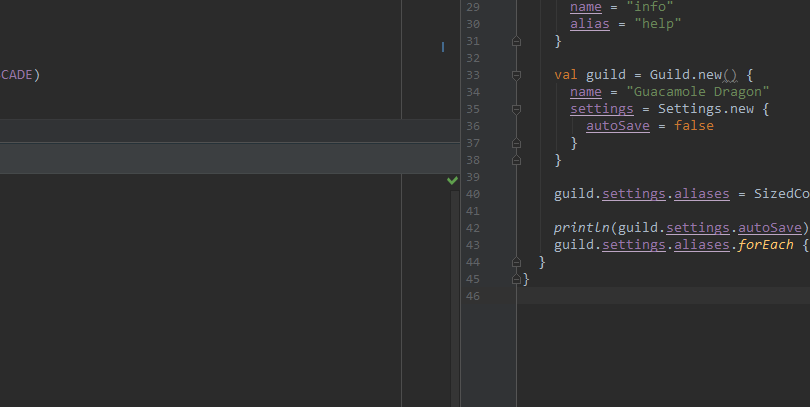
I hope it's not bad form to comment on a closed issue, but I'm not clear on the resolution. The gutter color isn't exactly what the OP was talking about. Sure, changing the gutter helps for side by side, but as you can see below Material Theme vs Darcula. It is very clear on Darcula where one editor ends and another begins. Is the resolution simply "won't fix"? Is there anything I could provide to help out?
 jvtrigueros
on 11 Aug 2017
jvtrigueros
on 11 Aug 2017
Given that this seems to only be a problem in this particular theme, it stands to reason that it's a configurable setting. I tried to find documentation on how themes work, what the settings are, and that stuff but couldn't find anything. I'm definitely willing to help solve this, I just don't know what I can do. At this point I've stopped using split editor windows as it's too visually confusing.
blimey85
on 11 Aug 2017
Let me explain: the 1px splitter is of color of the JPanel, e.g., the color of the whole interface (263238 in Material Default). However in Dracula, the background color of the editor is not of the same color as the interface, as opposed to the material themes. Therefore you are seeing the line.
If you are using different material themes between the editor and the UI, say Darker editor and Palenight UI, you will indeed see your splitter. But this is not something I can configure, or at least for the moment I haven't found it.
You can still change the background of the gutter as I proposed, or even change the background color of the color scheme. It doesn't need to be extreme, just do a darker shade of oceanic blue and that's it.
--
Elior
On Aug 11, 2017, 07:49 +0300, Gary Traffanstedt notifications@github.com, wrote:
Given that this seems to only be a problem in this particular theme, it stands to reason that it's a configurable setting. I tried to find documentation on how themes work, what the settings are, and that stuff but couldn't find anything. I'm definitely willing to help solve this, I just don't know what I can do. At this point I've stopped using split editor windows as it's too visually confusing.
—
You are receiving this because you modified the open/close state.
Reply to this email directly, view it on GitHub, or mute the thread.
mallowigi
on 11 Aug 2017
Thank you for the explanation. That makes sense. I just wasn't understanding what the difference was. So it's not something that can be resolved within a theme and I don't want to change the color because all of my tools match right now. I'd propose the change to JetBrains but I'm still waiting for them to fix an actual bug with slim syntax that's been open for two years. So I'll just live with this. I'm getting used to not doing split windows anymore.
blimey85
on 12 Aug 2017
To be honest, I'm using split windows all the time and I don't understand why you struggle so hard
mallowigi
on 12 Aug 2017
Vertical tabs. Windows split top and bottom rather than side by side. I provided a screenshot of how it looks for me.
blimey85
on 12 Aug 2017
I have actually found something! Will post updates later
mallowigi
on 12 Aug 2017
should be good on version 0.9.2
mallowigi
on 21 Aug 2017
Related issues
 dg00GT00
·
3Comments
dg00GT00
·
3Comments
 CeramicTitan
·
3Comments
CeramicTitan
·
3Comments
 Izopi4a
·
4Comments
Izopi4a
·
4Comments
 anstarovoyt
·
3Comments
anstarovoyt
·
3Comments
 MiracleWisp
·
3Comments
MiracleWisp
·
3Comments
Most helpful comment
There is a property for split window color, I just never thing this was an issue before.
I will try to play with it and tell you the results