Manageiq-ui-classic: Inconsistency with Check Compliance of Last Known Configuration, depending on navigation steps
There is an issue regarding _Check Compliance of Last Known Configuration_: this action is available for a selected VM but only if the VM is not displayed in a nested list. So the action is available for some item in some place, but for the same item displayed as a result of different navigation steps, it is suddenly not possible to check compliance: after selecting the item and hovering over the appropriate button in the toolbar, it says: No Compliance Policies assigned to this virtual machine.
Steps:
- _Compute > Infrastructure > VMs_
- Select some VM (checkbox)
- _Policy > Check Compliance of Last Known Configuration_
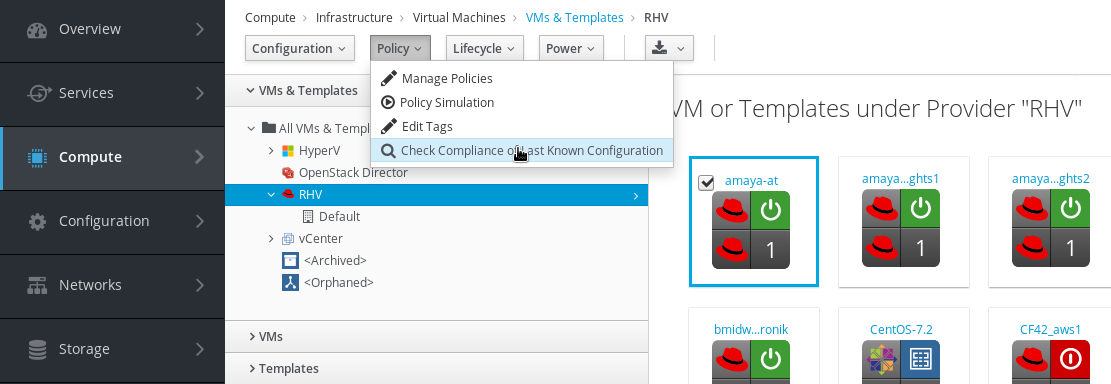
=> it is possible to click on the button and Check Compliance is being initiated (flash message is displayed) - _Compute > Infrastructure > Providers_
- Display the provider's dashboard, you have to choose the same provider related to the VM from step 2
- Click on _VMs_ in provider's dashboard and select the same VM as in step 2 (nested list of VMs)
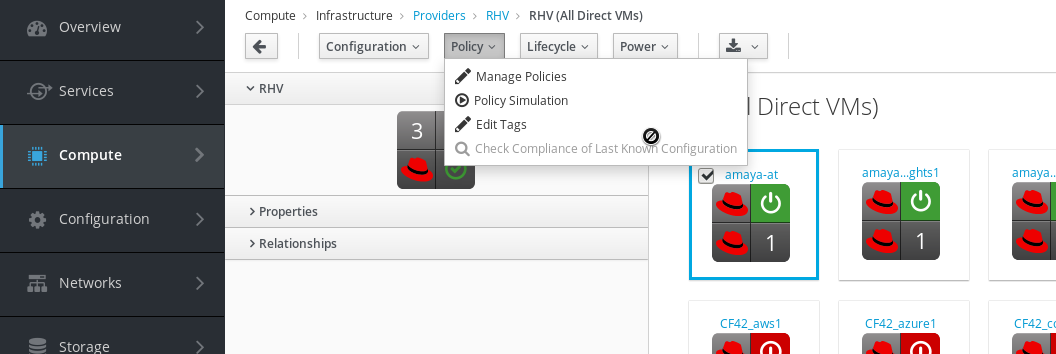
- _Policy > Check Compliance of Last Known Configuration_
=> the button is disabled and says:No Compliance Policies assigned to this virtual machine!
Other issues:
After I perform _Check Compliance of Last Known Configuration_ action on VMs under _Compute > Infra > VMs_ which don't have any policies assigned, this action is initiated, too! Looks like the only check related to this is only when checking if the button should be disabled or enabled here - but this is not useful when displaying list of items where some of them do have VM Compliance Policy assigned and some of them don't (and it even totally does not work for _nested_ list of items because @record there is for example provider, and not the selected VM). We need some check for the selected items, after we click on the action in toolbar.
I was able to reproduce this in an appliance with RHV provider, for ivanchuk, too.
In _Compute > Clouds > Instances_, Check Compliance action does not work at all, it throws an error:
[----] F, [2019-11-21T11:32:12.690628 #13556:5c070b0] FATAL -- : Error caught: [NoMethodError] undefined method `validate_check_compliance_queue' for #<ManageIQ::Providers::Openstack::CloudManager::Vm:0x00007efcc4cf41b8>
Did you mean?  validates_acceptance_of
/home/hstastna/.rbenv/versions/2.5.4/lib/ruby/gems/2.5.0/gems/activemodel-5.1.7/lib/active_model/attribute_methods.rb:432:in `method_missing'
/home/hstastna/manageiq/manageiq/app/models/mixins/availability_mixin.rb:24:in `is_available?'
/home/hstastna/manageiq/manageiq-ui-classic/app/helpers/application_helper.rb:203:in `block in records_support_feature?'
/home/hstastna/manageiq/manageiq-ui-classic/app/helpers/application_helper.rb:199:in `each'
/home/hstastna/manageiq/manageiq-ui-classic/app/helpers/application_helper.rb:199:in `find'
/home/hstastna/manageiq/manageiq-ui-classic/app/helpers/application_helper.rb:199:in `records_support_feature?'
/home/hstastna/manageiq/manageiq-ui-classic/app/controllers/application_controller/ci_processing.rb:592:in `generic_button_operation'
/home/hstastna/manageiq/manageiq-ui-classic/app/controllers/application_controller/ci_processing.rb:392:in `check_compliance_vms'
/home/hstastna/manageiq/manageiq-ui-classic/app/controllers/application_controller/explorer.rb:89:in `x_button'
 hstastna
All 7 comments
I can't reproduce it on my DB, so I'd suggest you to check it out on a clean appliance with a live provider.
 skateman
on 6 Nov 2019
skateman
on 6 Nov 2019
I was able to reproduce in appliance with RHV provider, performed SSA before checking compliance, set policies etc. Looks like the issue is in application helper in one toolbar. I'm working on the fix.
hstastna
on 14 Nov 2019
@miq-bot assign @hstastna
hstastna
on 15 Nov 2019
@ZitaNemeckova it looks like this issue was introduced by changes in https://github.com/ManageIQ/manageiq-ui-classic/pull/3810 , when navigating to list of VMs thru Infra provider, @record is present causing the button to be disabled.
 h-kataria
on 18 Nov 2019
h-kataria
on 18 Nov 2019
@h-kataria I have the fix (but not yet for all of the controllers where we have VMs in Relationships, so PR is in progress but I can create WIP if we need to have at least something immediately). Could you please assign the issue back to me? :)
Anyway, the problem is not Zitas PR by itself. The problem is that Zitas PR just does not take care about all of the cases that can happen. It fixes only one issue. There are some more problems with checking compliance, for example checking selected items in the list and their policies before the action - looks like this has never happened and it should.
hstastna
on 18 Nov 2019
@miq-bot assign @hstastna
hstastna
on 3 Dec 2019
The issue was fixed by https://github.com/ManageIQ/manageiq-ui-classic/pull/6426. Closing the issue.
hstastna
on 18 Dec 2019
Related issues
h-kataria
·
5Comments
 epwinchell
·
5Comments
hstastna
·
8Comments
epwinchell
·
5Comments
hstastna
·
8Comments
 miq-bot
·
7Comments
hstastna
·
11Comments
miq-bot
·
7Comments
hstastna
·
11Comments