- Device: LG G5 (H850)
- OS: Latest official release based on Android 8.0.0
- Magisk: Latest Canary as of today (12/07/2020)
So while I am waiting for my new device to come I had to use my old LG G5. Nothing extraordinary or any special changes. Pure stock ROM.
Magisk is failing to hide with some "zygote64" error entries and just popping up a Toast reporting failure.
I'm attaching two logcat files:
logcat_07-12-2020_17-33-46[1].txt
logcat_07-12-2020_17-42-01[1].txt
 DenyDarko
All 53 comments
What I had to to to make it work is:
- Downgrade to "Beta" MM release
- Hide manager. It worked there.
- Switch to canary channel
- Let the older MM do the hide for the newer version
- Worked
It's clear something with the changes on the Canary code.
DenyDarko
on 12 Jul 2020
@Tornado15550 you also have the G5 and ROM as in the issue post?
 osm0sis
on 15 Jul 2020
osm0sis
on 15 Jul 2020
@Tornado15550 you also have the G5 and ROM as in the issue post?
AND use the canary release to originally hide the manager?
It works on beta
DenyDarko
on 15 Jul 2020
beta = stable currently, both are 20400/267.
osm0sis
on 15 Jul 2020
beta = stable currently, both are 20400/267.
Just referred to the release channel used.
Make my statement "stable/beta" then xD
DenyDarko
on 15 Jul 2020
Getting reports this is happening on CarbonROM for OnePlus 7 Pro with 290 as well, so seems like a more general issue.
osm0sis
on 17 Jul 2020
Any luck with Canary 291?
osm0sis
on 17 Jul 2020
I can confirm even 291 doesnt work. The only workaround for me was installing 280 and hidingagic manager then upgrading to 291.
 famaTV
on 17 Jul 2020
famaTV
on 17 Jul 2020
@DenyDarko I need the full logcat output when the failure occurs, please do not filter the logs
 topjohnwu
on 18 Jul 2020
topjohnwu
on 18 Jul 2020
@topjohnwu I'm trying to re-collect logs.
Canary is misbehaving way too much on the G5.
Trying to have a stable canary but this one makes it hard:
DenyDarko
on 18 Jul 2020
Pixel 4 XL Android 11 beta using Magisk canary
也有相同問題
Log: https://drive.google.com/file/d/10n8IR-NAqaiumHJudLizLqyp1LottA38/view?usp=drivesdk
 Trevor1112
on 19 Jul 2020
Trevor1112
on 19 Jul 2020
Pixel 4 XL Android 11 beta using Magisk canary
也有相同問題
Log: https://drive.google.com/file/d/10n8IR-NAqaiumHJudLizLqyp1LottA38/view?usp=drivesdk
@Trevor1112 can you grab a logcat? This one is not really useful for magisk manager app.
DenyDarko
on 19 Jul 2020
@DenyDarko I need the full logcat output when the failure occurs, please do not filter the logs
Does this help: Logs ?
For me on OnePlus5 AICP/MSMX and Samsung M305F Stock/Debloated Magisk does not hide.
- Set hide name to anything but Manager (say "
killme", and it still keeps the name asManage. - Try to open any root detector bank app or any secure app, it still detects root.

 vdbhb59
on 24 Jul 2020
vdbhb59
on 24 Jul 2020
Same here, Magisk Manager 291 fails to hide on OnePlus 8 Pro. Sometimes with a toast "Magisk Manager ausblenden fehlgeschlagen" (MM failed to hide), sometimes without a message/reacation.
 lexilexi
on 27 Jul 2020
lexilexi
on 27 Jul 2020
The same on galaxy tab s6 lite
 mu198
on 27 Jul 2020
mu198
on 27 Jul 2020
Same on Android 6 (HOMTOM HT20). What I've noticed: it starts the patching process as soon as the name input "Manager" changes _(remove a character, add a character, select-all+paste)_. It doesn't wait for the ok button to be pressed. (or cancel for that matter)
And it'll run indefinitely if the manager got closed / runs in background _(you see the download symbol with "hiding magisk manager" notification)_
 White-Tiger
on 27 Jul 2020
White-Tiger
on 27 Jul 2020
Hiding Manager works after disabling Google Play Protect. However, only to the suggested "Manage". Selecting any other name will fail without an error message.
lexilexi
on 27 Jul 2020
I am floss, not with foogle. Still same.
vdbhb59
on 27 Jul 2020
Hiding Manager works after disabling Google Play Protect. However, only to the suggested "Manage". Selecting any other name will fail without an error message.
you're genius! Going to the Play Store and disabling Play Protect worked for me.
I even got to change the name to my liking by copying it from outside and pasting it into the hide name input. Like I said before, it starts to hide as soon as the input got changed and the buttons do nothing.
White-Tiger
on 27 Jul 2020
Disabling Play Protect working here too.
Nice tips @lexilexi 👍
 edzamber
on 29 Jul 2020
edzamber
on 29 Jul 2020
Again, please do not make this a google workaround. This is not just for that, and people without any google or microG are facing this too.
vdbhb59
on 29 Jul 2020
Again, please do not make this a google workaround. This is not just for that, and people without any google or microG are facing this too.
Yes, sorry.
Uninstalling Magisk Manager, next install MM v280, hide magisk then update to latest MM also working.
edzamber
on 29 Jul 2020
Hiding Manager works after disabling Google Play Protect. However, only to the suggested "Manage". Selecting any other name will fail without an error message.
you're genius! Going to the Play Store and disabling Play Protect worked for me.
I even got to change the name to my liking by copying it from outside and pasting it into the hide name input. Like I said before, it starts to hide as soon as the input got changed and the buttons do nothing.
@vvb2060, sounds like your method added in #2916 might not be completely sufficient?
osm0sis
on 7 Aug 2020
Again, please do not make this a google workaround. This is not just for that, and people without any google or microG are facing this too.
Hiding Manager works after disabling Google Play Protect. However, only to the suggested "Manage". Selecting any other name will fail without an error message.
you're genius! Going to the Play Store and disabling Play Protect worked for me.
I even got to change the name to my liking by copying it from outside and pasting it into the hide name input. Like I said before, it starts to hide as soon as the input got changed and the buttons do nothing.@vvb2060, sounds like your method added in #2916 might not be completely sufficient?
Play protect is not the case here. That was happening without it / it being disabled.
They're facing a different issue
DenyDarko
on 7 Aug 2020
I'm not referring to the truncated name portion of the issue, but the Play Protect portion also discussed.
osm0sis
on 7 Aug 2020
@osm0sis It's possible, but all my devices is working, so I don't know why. I will try to be more consistent with normal apps, for example, using v2 signatures. Upload test apk later.
 vvb2060
on 7 Aug 2020
vvb2060
on 7 Aug 2020
source code #3055
test apk app-debug.zip
vvb2060
on 7 Aug 2020
Can one of you who definitely required Play Protect disabled to be able to hide try the above test APK?
osm0sis
on 8 Aug 2020
Can one of you who definitely required Play Protect disabled to be able to hide try the above test APK?
Would you like me (non foogle, non proprietary) to try it too?
vdbhb59
on 8 Aug 2020
@DenyDarko, 292 has @vvb2060's signing changes merged, please test
osm0sis
on 12 Aug 2020
And the renaming portion of the issue should be fixed by #3077 once merged, thanks to @diareuse. 👍
osm0sis
on 12 Aug 2020
The test apk (20419) does not work for me. Same as before: Renaming only works after disabling Google Play protection.
lexilexi
on 12 Aug 2020
Try this after failed hide
pm install /data/data/com.topjohnwu.magisk/cache/patched.apk
What does it output?
And use Package installer to install the apk, does this work?
vvb2060
on 12 Aug 2020
FYI i rooted my s3 neo with LineageOS 16 and Magisk Hide on the latest canary version doesnt work either, even "manage" doesnt work.
 DeltaOn3X
on 14 Aug 2020
DeltaOn3X
on 14 Aug 2020
@vvb2060 I can replicate on my OP7T with latest Canary 293:
:/ $ su
/data/com.topjohnwu.magisk/cache/patched.apk                     <
Failure [INSTALL_FAILED_VERIFICATION_FAILURE]
1|:/ #
Also, can confirm renaming dialog seems fixed by examining patched.apk, (e.g. mine was renamed to MM correctly). 👍
osm0sis
on 14 Aug 2020
Can you give me a log?
logcat -s Finsky --pid `pidof com.android.vending`
like this
31232 31232 I Finsky  : [2] afbw.a(7): Verification requested, id = 70
31232  4436 I Finsky  : [2136] afds.a(8): Single user settings service is not running, bind it now
31232 31232 I Finsky  : [2] afdr.onServiceConnected(1): Single user settings service is connected
31232  4436 I Finsky  : [2136] ltd.a(9): Task 7 requested foreground
31232  4436 I Finsky  : [2136] ltd.a(20): Not entering foreground
31232  4802 I Finsky  : [2171] afkh.b(3): Verify: Verification package=ru.aaaaaaaw.installer, id=70 response=3
31232 31232 W Finsky  : [2] csc.a(8): No LoggingContext in the bundle, which breaks event chain!. Creating a new logging context.
31232  4802 I Finsky  : [2171] afke.a(2): User selected -1 for id=70
31232 31232 I Finsky  : [2] VerifyInstallTask.c(15): Verifying id=70, result=-1
31232 31232 I Finsky  : [2] VerifyInstallTask.ik(6): Verification complete: id=70, package_name=ru.aaaaaaaw.installer
31232 31232 I Finsky  : [2] VerifyAdvancedProtectionInstallTask.ik(2): Reported verification result: REJECT
31232 31232 I Finsky  : [2] VerifyInstallTask.b(3): Verification stage already finished, ignoring sub-task callback
31232 31232 I Finsky  : [2] VerifyInstallTask.b(3): Verification stage already finished, ignoring sub-task callback
31232  4436 W Finsky  : [2136] VerifyInstallTask.a(10): Exception reading file:///data/app/vmdl1357608619.tmp in request id=70 java.lang.NullPointerException: Attempt to get length of null array
31232  4436 I Finsky  : [2136] VerifyMissingSplitsInstallTask.c(7): Could not tell if Splits is installed due to null packageInfo for id=70. Assuming not.
31232  4436 I Finsky  : [2136] VerifyMissingSplitsInstallTask.d(1): Assuming split not required due to null packageInfo for id=70
@vvb2060 I can replicate on my OP7T with latest Canary 293:
:/ $ su
/data/com.topjohnwu.magisk/cache/patched.apk                     <
Failure [INSTALL_FAILED_VERIFICATION_FAILURE]
1|:/ #
Also, can confirm renaming dialog seems fixed by examining patched.apk, (e.g. mine was renamed to MM correctly). 👍
Try something else than MM, example "why", "random", anything but acronyms and near about Manager, or letter M. I tried letters other than LMNO and all fail. These 4 did not try.
vdbhb59
on 14 Aug 2020
Naming it "random" was fine for me, though of course it still failed verification.
@vvb2060
08-14 13:40:02.437 15832 15832 I Finsky  : [2] afbw.a(7): Verification requested, id = 15
08-14 13:40:06.883 15832 18421 I Finsky  : [2966] afkh.b(3): Verify: Verification package=com.g.ck.vll.psdk.xa, id=15 response=3
08-14 13:40:06.891 15832 18418 I Finsky  : [2965] VerifyInstallTask.c(15): Verifying id=15, result=-1
08-14 13:40:06.893 15832 18418 I Finsky  : [2965] afjv.a(7): Verify: Installation silently blocked. package=com.g.ck.vll.psdk.xa
08-14 13:40:06.898 15832 15832 I Finsky  : [2] VerifyInstallTask.ik(6): Verification complete: id=15, package_name=com.g.ck.vll.psdk.xa
08-14 13:40:06.924 15832 15832 I Finsky  : [2] VerifyAdvancedProtectionInstallTask.ik(2): Reported verification result: REJECT
08-14 13:40:06.927 15832 15832 I Finsky  : [2] VerifyInstallTask.b(3): Verification stage already finished, ignoring sub-task callback
08-14 13:40:06.928 15832 15832 I Finsky  : [2] VerifyInstallTask.b(3): Verification stage already finished, ignoring sub-task callback
@vdbhb59
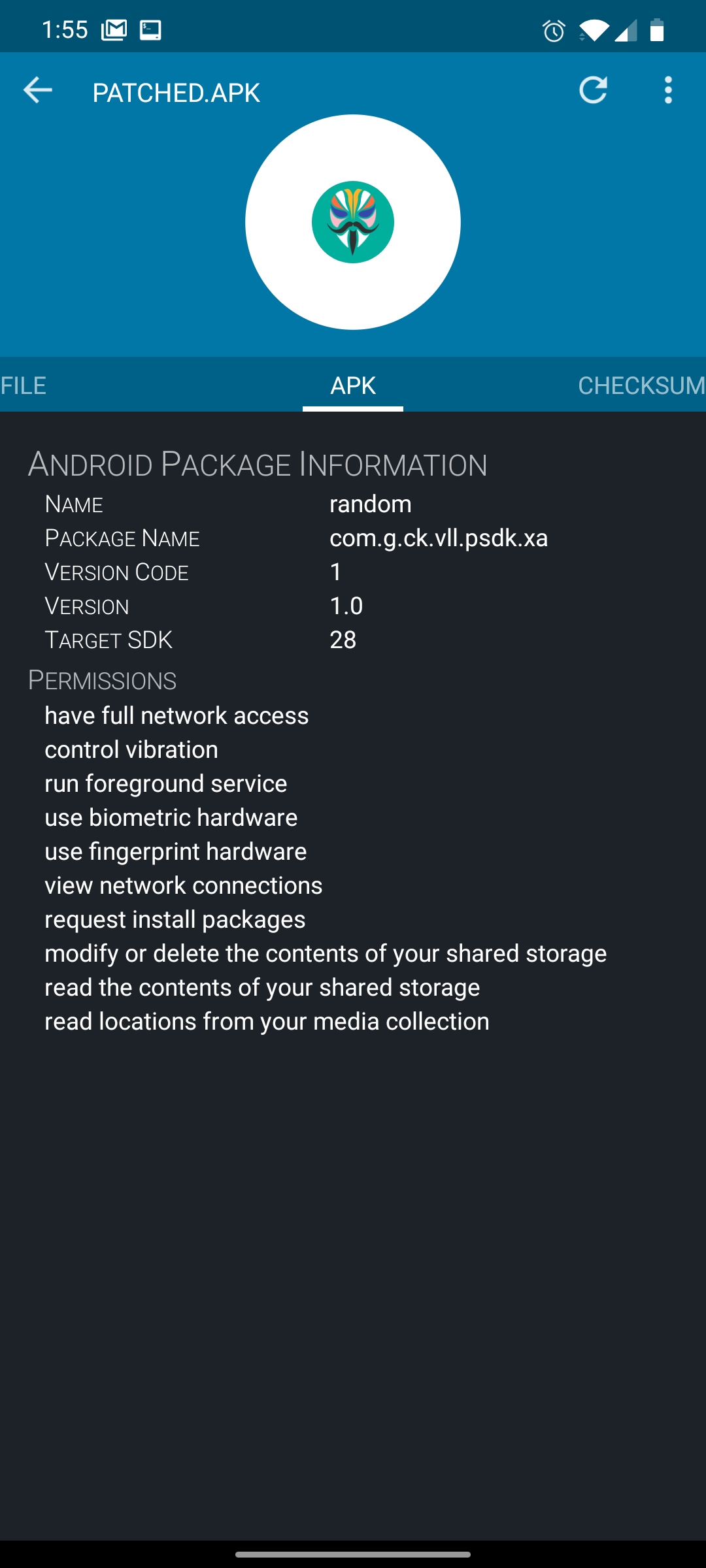
Manually with Package Installer, you get the option to install anyway!

(Though I think since it isn't automated, it doesn't get recognized as proper Manager so isn't usable)
osm0sis
on 14 Aug 2020
@osm0sis app-debug.zip
vvb2060
on 14 Aug 2020
@osm0sis app-debug.zip
Works!! 😁
osm0sis
on 15 Aug 2020
@osm0sis app-debug.zip
I can confirm that this works too on my S3 neo, renaming to managg worked fine. Great work !!
DeltaOn3X
on 15 Aug 2020
Oh yeah, for reference 288 was the last which worked, so that pretty much confirms 08818e85424a5bfa7ef8f4eb6635fe390334c29a to be the breaking commit, just in case that helps to do it on root uid again and remove another workaround.
osm0sis
on 16 Aug 2020
Is the problem solved? How can I hide Magisk Manager now?
 Saya47
on 18 Aug 2020
Saya47
on 18 Aug 2020
It will be resolved in Manager Canary 294, once released.
If you can't wait until then, unhide, uninstall Manager, get Manager Canary 288, install, then hide.
osm0sis
on 18 Aug 2020
Is the problem solved? How can I hide Magisk Manager now?
For now, until v294 will be out, you can uncheck Play Protect into Playstore settings, Then hide magisk manager and re-check Play Protect it will do the trick.
edzamber
on 18 Aug 2020
Somehow this doesn't work for me. Any Canary APK doesn't want to hide, no matter which version.
Beta/stable hide well.
Edit: Correction, 288 actually works, it seems to auto update to the newest release after installation though.
 pannal
on 31 Aug 2020
pannal
on 31 Aug 2020
@pannal does manually turning off Play Protect beforehand as mentioned above work for you?
osm0sis
on 1 Sep 2020
@pannal does manually turning off Play Protect beforehand as mentioned above work for you?
I had play protect off, but didn't reboot after turning it off. Should I have?
pannal
on 1 Sep 2020
@pannal does manually turning off Play Protect beforehand as mentioned above work for you?
I had play protect off, but didn't reboot after turning it off. Should I have?
No idea why 288 would work then, the main difference there is it forces PP off. Please unhide to install latest Canary, then upload the command line output of attempting to install after it fails and logcat of attempting to hide with it, per @vvb2060's instructions above.
osm0sis
on 1 Sep 2020
Installed the new Magisk Manager that just came out, and I still can't hide the Magisk Manager :(
Saya47
on 5 Oct 2020
Does disabling Play Protect manually get it working again? Provide logs as described above.
osm0sis
on 5 Oct 2020
I've disabled Play Protect for months now and it didn't help me.
So I did adb shell and then: logcat -s Finsky --pid `pidof com.android.vending`
And tried Hiding the Magisk Manager, but nothing showed up on the CMD. So I tried again without filtering the logcat at all:
https://pastebin.com/NBu5LkCV
Saya47
on 6 Oct 2020
@osm0sis Did I logcat correctly btw?
Saya47
on 12 Oct 2020
Related issues
topjohnwu
·
96Comments
 okij1
·
39Comments
okij1
·
39Comments
 QuinTeknoLife
·
37Comments
topjohnwu
·
96Comments
QuinTeknoLife
·
37Comments
topjohnwu
·
96Comments
 0x192
·
40Comments
0x192
·
40Comments
Most helpful comment
It will be resolved in Manager Canary 294, once released.
If you can't wait until then, unhide, uninstall Manager, get Manager Canary 288, install, then hide.