Magisk: Unreliable MagiskHide Process Monitor
For some people, the MagiskHide process monitor is not 100% reliable, which leads to random root detections on hidden apps.
 topjohnwu
All 96 comments
Until now, All the devices report this issue is Oneplus...
Maybe some special things in Oneplus H2OS/OOS system?
 lialosiu
on 24 Dec 2018
lialosiu
on 24 Dec 2018
An XDA user reported at https://forum.xda-developers.com/showpost.php?p=78498587&postcount=29972 that disabling "phone" permission for Google Play made it working for him/her.
I didn't check this myself (I currently reverted to a previous Magisk version to prevent root detections), but possibly a useful tip for finding the reason for the issue in Magisk v18.
Update 2019-01-02:
Tested the suggestion above in Magisk v18 now, but unfortunately doesn't work for me.
 paarnoutse
on 24 Dec 2018
paarnoutse
on 24 Dec 2018
Not only oneplus it seems. I am having this issue with the Galaxy Note 9. Also, I don't know if it's related, but everytime I open outlook, safetynet check fails until I restart the device
 hkalltheway
on 24 Dec 2018
hkalltheway
on 24 Dec 2018
Fails on 9.0 OmniROM (OnePlus 5T) - Response payload validation failed. Play Store is certified.
Worked on previous OmniROM and Magisk.
 Madis0
on 25 Dec 2018
Madis0
on 25 Dec 2018
My problem was disabling magskhide after minutes enabling it... It was 17.1 What I did was i removed some apps and kept 3 to 4 apps only in magiskhide list... It worked... After flashing uninstaller zip and then again installing 18.0 it works for me grate now.. Im on miui 10 Whyred.... (8.1.0 oreo)
 stargazer39
on 26 Dec 2018
stargazer39
on 26 Dec 2018
An XDA user reported at https://forum.xda-developers.com/showpost.php?p=78498587&postcount=29972 that disabling "phone" permission for Google Play made it working for him/her.
I didn't check this myself (I currently reverted to a previous Magisk version to prevent root detections), but possibly a useful tip for finding the reason for the issue in Magisk v18.
Thanks a lot, this works for me. After clear play store user data and disable it's phone permission, all the safetynet detect app now can be shown as before (version 17.1)
 null4n
on 27 Dec 2018
null4n
on 27 Dec 2018
this problem occur on my phone after Magisk was upgraded to 18.0.
After using the phone for a while, it can not pass SaftNet. However, After cleaning back ground process, MagiskHide works again.
MagiskHide works find with Magisk Version17.1
ROM MIUI GLOBAL 10.0
Phone MI 6
Magisk version 18.0
 zt-chen
on 27 Dec 2018
zt-chen
on 27 Dec 2018
Fail on Pixel 3 after running for a while
 xingoxu
on 28 Dec 2018
xingoxu
on 28 Dec 2018
Fail on Pixel 3 after running for a while
Same here. Reverted back to Magisk 17.3 and it works fine
 sfai05
on 28 Dec 2018
sfai05
on 28 Dec 2018
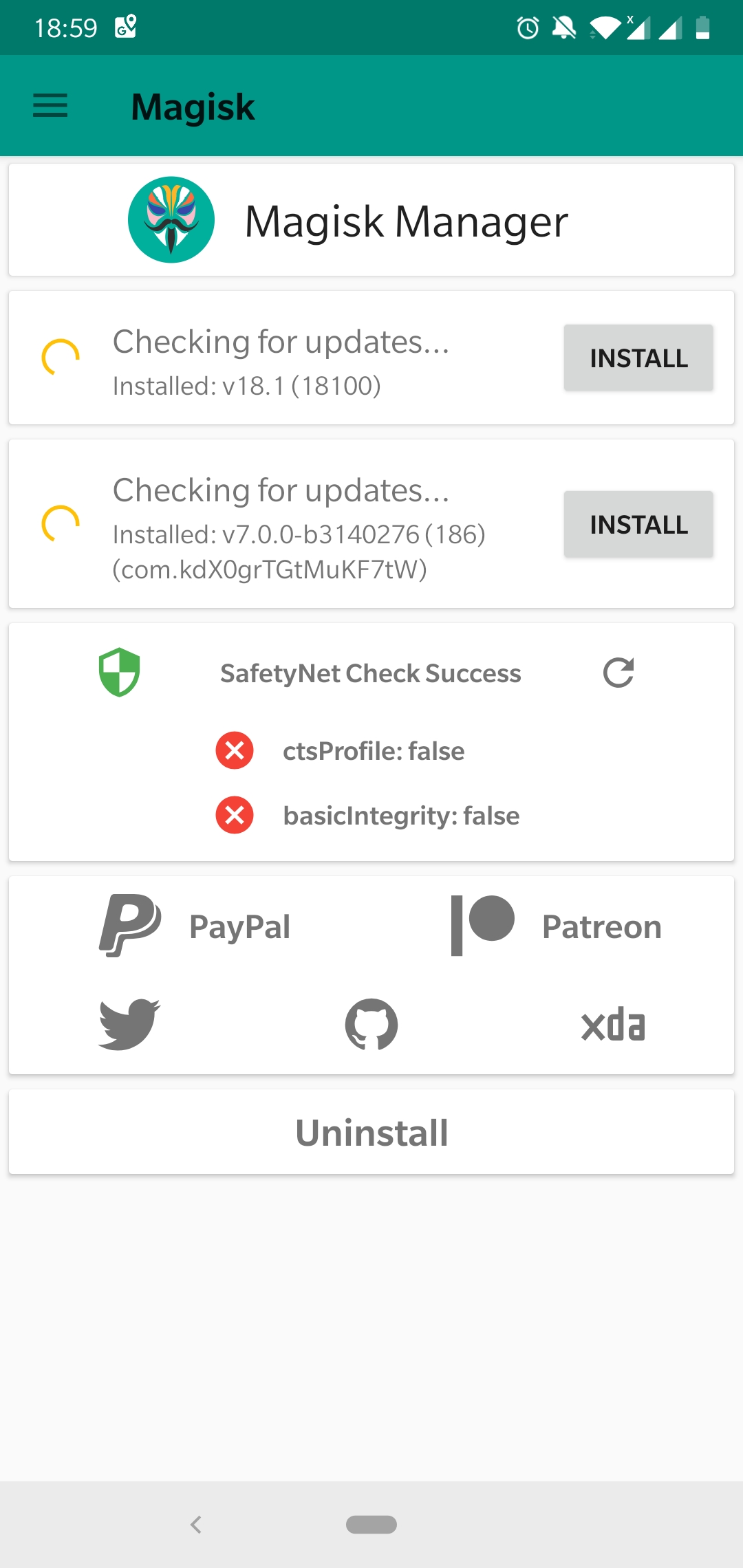
I am using Oneplus 5 running Oxygen OS Pie. I had no problems with Magisk 17.1 on Oreo but since dirty flashing to Pie and also updating Magisk to Version 18 - I am finding that Safetynet passed initially - after phone is in standby for some time - safetynet fails (both ctsProfile & basicIntegerity) - after reboot safetynet passes again. Also if I go to Magisk Manager and turn off Magisk Hide and switch it back on again - then the Safetynet paases again - only for sometime - after standby it fails again. Any solution?
 DocJaat
on 31 Dec 2018
DocJaat
on 31 Dec 2018
On a OnePlus 6T. Doesn't work with 18.0, works fine after flashing back to 17.3.
On 18.0 it appears to be intermittent; after a reboot, SafetyNet will pass for a little while, then it will not until another reboot. I'll stick with 17.3 for now.
 hamid-elaosta
on 3 Jan 2019
hamid-elaosta
on 3 Jan 2019
I've the same issue with Galaxy S7Edge. Android 8.0.0. Stock ROM. I need to disable MagiskHide and Re-Enable it to make it worked properly.
 xksefa
on 3 Jan 2019
xksefa
on 3 Jan 2019
I can confirm that disabling and enabling Magisk Hide fixes this. Is there a way to do this via the command line? I would like to setup a tasker profile to do this. On my Pixel 2 XL I am having to do this like 5 times per day as the daemon(?) seems to stop running frequently for me
 scottismyname
on 4 Jan 2019
scottismyname
on 4 Jan 2019
@skaforey Take a look in the docs: https://topjohnwu.github.io/Magisk/tools.html
 Didgeridoohan
on 4 Jan 2019
Didgeridoohan
on 4 Jan 2019
I report same issue, with one plus 6 pie, few apps detect root, even on hide, intune as well, installed intune hider module .. worked for solid 10 min thing again detected,
Version of magisk used is 18
 Danz17
on 4 Jan 2019
Danz17
on 4 Jan 2019
Same problem (both SafetyNet checks failing sometimes) on my Pixel 2 XL with latest Android and Magisk 18.0. Now trying if Magisk 17.3 works reliable...
 sbaum
on 4 Jan 2019
sbaum
on 4 Jan 2019
I have this problem too, passes after toggle. OP6T but funny thing is, when failing safetynet everything that checks for root/safetynet still works. I don't even bother toggling anymore. Google pay, PoGo, bank apps all working with safetynet failing. Odd. It does pass on boot though.
 dalm3000
on 4 Jan 2019
dalm3000
on 4 Jan 2019
For me, when this problem happens, Pogo stops working, as well as Google Pay. I wrote a tasker script:
/sbin/magiskhide --disable ; sleep 2 && /sbin/magiskhide --enable
Make sure to tick the use root box. I'm not sure if the "sleep 2" is required, but without it, sometimes magiskhide would not be enabled after execution.
Then I placed a shortcut for this task on my home screen for easier execution.
scottismyname
on 4 Jan 2019
Device: Pixel 1
Android Version: 9
Security Patch: January 5th, 2019
Magisk: v18.1-1df65940
SafetyNet passes for about 10-20 minutes after a reboot, after which it fails. Toggling MagiskHide fixes this issue temporarily.
Edit: All Google apps are selected in the MagiskHide menu
 JRoy
on 8 Jan 2019
JRoy
on 8 Jan 2019
On OP 6, OOS 9.0.3, deleting cache/memory and removing phone permission of the Play Store doesn't help.
 AlphaDE
on 8 Jan 2019
AlphaDE
on 8 Jan 2019
I downgraded to Magisk 17.2 and Safetynet status check is successful again and MagiskHide works.
AlphaDE
on 8 Jan 2019
This was originally raised here and a thread on XDA.
--SSS
 bettyvschmartz
on 8 Jan 2019
bettyvschmartz
on 8 Jan 2019
I'm also experiencing the problem on a Nexus 6P and a Pixel 2.
EDIT: In both cases I'm experiencing a failure of SafetyNet and failure to hide, both of which occur after the phone has been running for a while and are temporarily fixed by rebooting. I've gone back to v17.3 and it also appears to have fixed the problem.
 shellster
on 9 Jan 2019
shellster
on 9 Jan 2019
Same problem on Galaxy S8
 robross0606
on 9 Jan 2019
robross0606
on 9 Jan 2019
Running into this issue on Pixel 3 XL Build PQ1A.181205.006 / Magisk 18
 asumos
on 10 Jan 2019
asumos
on 10 Jan 2019
Been having this issue on my OnePlus 6. Happens on both stable OOS 9.0.3 and the latest beta 10.
 fredskis
on 14 Jan 2019
fredskis
on 14 Jan 2019
Moto G6 Plus (evert), LOS 16 + Havoc OS.
ctsProfile and basic Integrity fails after some times of usage phone. Reboot solved the problem.
Downgrade do Magisk 17.3 solve the problem permanently.
Edit: the same problem on stock Pie (PPW29.116-11)
 alpetrus
on 14 Jan 2019
alpetrus
on 14 Jan 2019
Also occurs on my Pixel 2
 NYCJames
on 17 Jan 2019
NYCJames
on 17 Jan 2019
Confimerd on OnePlus 5T (Android 9 OSS beta 23)
 fawkes15
on 18 Jan 2019
fawkes15
on 18 Jan 2019
Also present on OnePlus 6 (OOS 9.0.3, Android 9.0) and Mi 6X (MIUI 10.2, Android 8.1 - 9.1.17).
Oneplus 6 is on 1st Dec 2018 patch and Mi 6X is on 1st Jan 2019 patch level
 DeliriousMetro
on 22 Jan 2019
DeliriousMetro
on 22 Jan 2019
I'm on Xiaomi A1 Oreo 8.1 facing smiliar issue. I even tested with Magisk core only on Magisk v18
 myself379
on 22 Jan 2019
myself379
on 22 Jan 2019
Same problem here, Motorola Z2 stock ROM, I have to reboot system to pass safety net, and sometimes toggling magisk hide doesn't work so I have to reboot again.
I've noticed this behaviour is prominent to happen after automatic updates from play store kick in whilst charging the phone. Meaning play store could be the real vilan here.
 heynando
on 26 Jan 2019
heynando
on 26 Jan 2019
I'm on XZ Premium with CarbonROM and having similar issues.
The phone currently cannot pass ctsProfile (only basicIntegrity), but after a while (usually when the phone went to sleep for an extended amount of time), basicIntegrity won't pass anymore. And when that happens, games that detect root would refuse to start, indicating Magisk Hide has been broken.
Toggling Magisk Hide on and off could fix it for a while, but due to the amount of apps I added into the Magisk Hide, toggling it would result in restart of SystemUI as well as reinitialization of SIM card (and occasionally cellular data couldn't be brought up and I have to toggle it again).
I suspect services/threads Magisk Hide use might get killed when the phone goes to sleep for an extended amount of time so not sure if these could be made into something privileged that'll stay active, at the expense of battery life, to see if this makes a difference. If not, then the possibility that the background process management might be involved would be ruled out.
EDIT: Seems that disabling battery optimization on Magisk Manager would mitigate the issue a bit, but maybe not. I don't know if there's a way to set battery optimization at service level.
 lss4
on 29 Jan 2019
lss4
on 29 Jan 2019
Issue confirmed on Galaxy S8 on oreo and several pie custom roms
 dandyrow
on 31 Jan 2019
dandyrow
on 31 Jan 2019
Does the latest Canary build fix this? I've seen a couple suggest so.
 Habylab
on 2 Feb 2019
Habylab
on 2 Feb 2019
tried a few weeks ago on a pixel 3... same issue
 myzar472
on 2 Feb 2019
myzar472
on 2 Feb 2019
Same issue. Nexus 5X, LineageOS 15.1 (some fo the laatest builds).
ctsProfile is false, basicIntegrity is true. Disabling MagiskHide makes boths false.
Pokemon Go works, but can't pay with Google Pay.
EDIT: Same with 18.1 canary.
 Pitel
on 4 Feb 2019
Pitel
on 4 Feb 2019
Confirming first and latest 18.1 Canary doesn't fix the issue. It's been acknowledged in stable release notes though.
Habylab
on 4 Feb 2019
Confirming it is not solved on 18.1 but I couldn't see any statement saying it is solved in release notes.
xksefa
on 4 Feb 2019
Same issue. Nexus 5X, LineageOS 15.1 (some fo the laatest builds).
ctsProfileis false,basicIntegrityis true. Disabling MagiskHide makes boths false.Pokemon Go works, but can't pay with Google Pay.
EDIT: Same with 18.1 canary.
No, you do not have the same issue. That you have basicIntegrity reporting as true means that MagiskHide is working on your device, but that LineageOS doesn't use a certified device fingerprint (which I believe the official builds never will). There are modules available in the Magisk repo that can help with that...
Didgeridoohan
on 4 Feb 2019
Same problem here on oneplus 6, lineageOS 16 but only since 18.1 it was working with 18. It seems to stop working the moment my payment app checks safetynet.
 diemadedrei
on 5 Feb 2019
diemadedrei
on 5 Feb 2019
anyone using magisk with adguard? I found adguard might break magisk hide, but thy fixed in the yesterday nightly build.

 amanteae
on 7 Feb 2019
amanteae
on 7 Feb 2019
I was using with AdAway not Adguard. But still the same issue.
xksefa
on 7 Feb 2019
Is that Adguard issue related to _this_ issue with Magisk?
 James-Oakley
on 7 Feb 2019
James-Oakley
on 7 Feb 2019
I still believe it's Magisk issue. i still have safetynet failure after upgrading to the adguard nightly build. I'm using magisk canary build btw.
amanteae
on 7 Feb 2019
I find it strange that new versions are released and the author is not even reacting to this major issue, making Magisk 18.x useless fir me and many others..
And it's more than the title states, on my device, MagiskHide isn't working at all.
AlphaDE
on 7 Feb 2019
An update. I've been back on 17.3 for about a month now, and it has been rock solid. Zero root detections. As far as I'm concerned, there is definitely a bug that was introduced in v18+ releases.
shellster
on 7 Feb 2019
Hi @topjohnwu
Could you update us on your findings?
I was thinking that this might be due to a change in target API. I know that latest API have different battery saving options, which may result in a more aggressive background killing of process/services, such as MagiskHide.
 papjul
on 7 Feb 2019
papjul
on 7 Feb 2019
An update. I've been back on 17.3 for about a month now, and it has been rock solid. Zero root detections. As far as I'm concerned, there is definitely a bug that was introduced in v18+ releases.
Magisk hide is ok on 17.3, but repacking the magisk manager is not ok. I haven't tried magisk manager v7 + magisk v17.3 yet.
amanteae
on 7 Feb 2019
An update. I've been back on 17.3 for about a month now, and it has been rock solid. Zero root detections. As far as I'm concerned, there is definitely a bug that was introduced in v18+ releases.
Magisk hide is ok on 17.3, but repacking the magisk manager is not ok. I haven't tried magisk manager v7 + magisk v17.3 yet.
You can't. Magisk Manager V7 dropped support for Magisk < 18.0: https://github.com/topjohnwu/Magisk/blob/v18.1/app/src/full/res/raw/changelog.md
papjul
on 7 Feb 2019
You can repackage magisk manager on 17.3 if you use the manager app from 18.0, just pull it from the zip. If you restore original package it will wipe with the version that doesn't work, but you can just reinstall using the zip from 18.0 zip.
dalm3000
on 7 Feb 2019
Definitely has nothing to do with ad modules as I have never used any of them.
diemadedrei
on 8 Feb 2019
I did a few things all at once. One or more of them fixed the problem.
- I got rid of the Safetypatcher module
- I unhid everything except for Google Pay, Google Pay Send, Google Play Store, Google Play Services Framework, and Market Feedback Agent. You have to show system apps to see all of these. (I was under the mistaken impression that I need to hide everything Google but apparently not!)
- I cleared all data from the Play store.
Everything is green for the last twelve hours and Google Pay worked at my local Safeway. It took a few hours but The Play Store shows my device as certified too. I hope this helps.
 jwinstonsf
on 8 Feb 2019
jwinstonsf
on 8 Feb 2019
Updated to the latest version of my Pocophone F1 after some weird stuff started happening after I updated to the latest version of Magisk 18.1, first it started saying almost every time I connected to the internet that there was a new version was available, when I went into the Magisk Manager it said it required further setup, when pressing install it just popped up with an error "setup failed".
I then wiped all cache, uninstalled Magisk completely, updated to the latest firmware and Lineage OS build for my phone and re-installed Magisk, now I noticed that most if not all my apps that were originally hidden (even though I've checked the apps in Magisk Hide PLUS enabled the option to hide Magisk (repack it)) made sure to remove all zips/folders or whatever that had Magisk in its name, made sure to remove the cache, but sadly nothing has worked.
Now my banking apps and verification apps won't work anymore as they detect root as well as certain games like PoGO and others. Safetynet works fine and everything is up to date, so nothing should cause a problem, but I guess this is purely a Magisk problem?
I had no problems at all with the 17.X versions of Magisk and could work and play with the apps as should, but with this new 18.X version everything just is being detected!
Does anyone have any idea how to solve this or get around this? Should I uninstall everything and go back to V17.X or wait for a fix?
 RafaelDeJongh
on 10 Feb 2019
RafaelDeJongh
on 10 Feb 2019
Version 18 was working okay. I don't remember having this issue. Then I upgraded to 18.1, and safetynet starts failing left and right. So, I uninstall 18.1 and MM 7.0 completely and install 18.0 again. Safetynet is still failing! Is there some remnant that the uninstaller didn't catch?
What I don't understand is why my root-a-phobe apps aren't complaining, even though safetynet is failing...
 cousinit99
on 10 Feb 2019
cousinit99
on 10 Feb 2019
I did a few things all at once. One or more of them fixed the problem.
- I got rid of the Safetypatcher module
- I unhid everything except for Google Pay, Google Pay Send, Google Play Store, Google Play Services Framework, and Market Feedback Agent. You have to show system apps to see all of these. (I was under the mistaken impression that I need to hide everything Google but apparently not!)
- I cleared all data from the Play store.
Everything is green for the last twelve hours and Google Pay worked at my local Safeway. It took a few hours but The Play Store shows my device as certified too. I hope this helps.
Done this and hid those Google applications mentioned and locked the process on Oxygen OS for my OP6 and on miui on Mi 6X.
No errors so far. Not too sure if locking apps prevents them from being cleared in memory (for OOS but for MIUI, it appears to be doing its job) - but it appears to be working for me anyway in combination with the hiding of mentioned apps and then the clearing of Play Store data.
DeliriousMetro
on 10 Feb 2019
Update on my site:
I've used the Magisk Uninstaller once again,
Flashed to the latest framework again
Dirty Flashed to the latest Lineage OS again
Installed the latest Magisk Build 18.1
Installed MagiskHide Props Config and set a custom fingerprint as well as device emulation which required another magisk module called Busybox for Android NDK.
Repacked the Magisk Application (in the settings of the Magisk manager)
Use the Magisk Hide to hide pretty much everything
Made sure to remove all saved profile data and cache from the apps to then also uninstall/reinstall them to be extra sure.
At the current time and after various reboots it seems to be working with the apps I mentioned that weren't anymore. I am not sure if this is temporary or will be consistent but it's at least something!
RafaelDeJongh
on 11 Feb 2019
Spoke too soon.
Still broke and temporarily working. Not too sure why banking apps don't care about this...
As a temporary workaround, why not make some type of modification that re-enables magiskhide every x hours, or once the phone has been dozed? As re-enabling the option passes the safetynet check.
I have disabled battery optimisation for the manager app but not too sure if that would help...
DeliriousMetro
on 11 Feb 2019
Staying on v17.3 is still the best solution for now. If you really want to use v18.1, using tasker with script mentioned in previous posts:
It will toggle your magisk hide off and on to reactive Magisk hide. Then make a shortcut to desktop or just put it run every hr/mins, or while turning on display / unlocking your phone whatever. Not to mention it consumes battery, and will fail if the bug randomly happens in the time gap.
New tasker > (code) > (run) shell > (command) :
/sbin/magiskhide --disable ; sleep 2 && /sbin/magiskhide --enable
amanteae
on 12 Feb 2019
+1
AlphaDE
on 12 Feb 2019
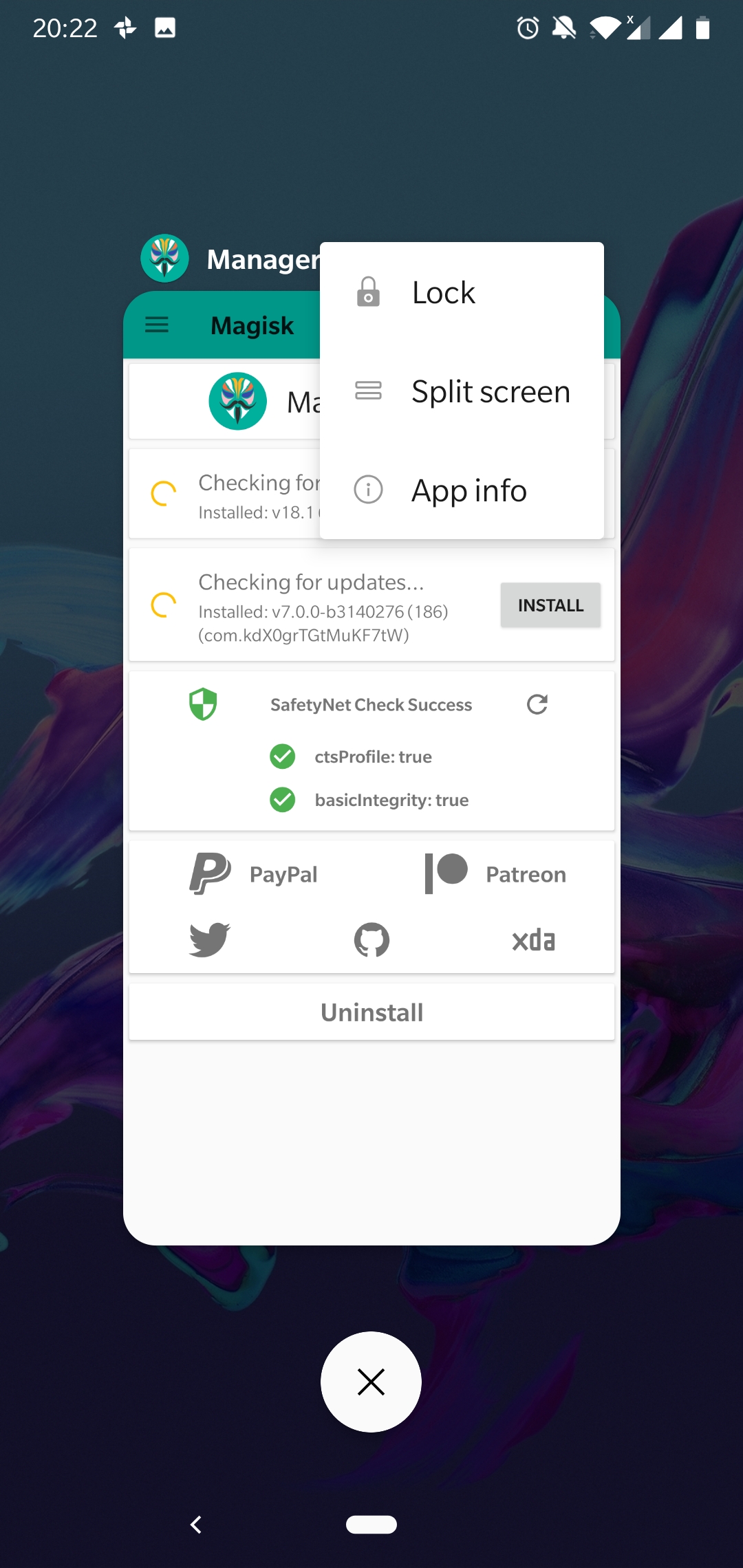
... locked the process on Oxygen OS for my OP6 and on miui on Mi 6X.
This seems to have "fixed" (or rather, worked around) the problem for me on OnePlus 6T. Locking the Magisk Manager process in Recents ensures MagiskHide doesn't stop working every couple of hours. While both SafetyNet checks still fail after a while, none of my apps (Barclays, Revolut, Google Pay) actually care about that and work just fine.
 piit79
on 12 Feb 2019
piit79
on 12 Feb 2019
... locked the process on Oxygen OS for my OP6 and on miui on Mi 6X.
This seems to have "fixed" (or rather, worked around) the problem for me on OnePlus 6T. Locking the Magisk Manager process in Recents ensures MagiskHide doesn't stop working every couple of hours. While both SafetyNet checks still fail after a while, none of my apps (Barclays, Revolut, Google Pay) actually care about that and work just fine.
To prevent that Magisk Manager could be killed, I had already set "Don't Optimize" in Battery settings for Magisk Manager at my device since Magisk v16, and also 'locked' Magisk Manager in Recent apps. However, unfortunately it doesn't prevent the regular root detections for hided apps at my device since Magisk v18.
Device: OnePlus 5 running OxygenOS 5.1.7.
paarnoutse
on 12 Feb 2019
for now i rather user version 17.3 as currently it has no issues at all
 zunurain222
on 13 Feb 2019
zunurain222
on 13 Feb 2019
Magisk Hide is causing a different sort of problem for me.
In my case it's not Safety Net that is not working, but rather Magisk hide hiding Magisk from Magisk Manager.
PS: I haven't repackaged MM to hide it, I'm aware of this issue, which is not the case for me.
When I first reboot, Magisk Manager works fine and detects Magisk as installed,
At first Safety Net fails (if I check immediately after reboot)
however after a little while it passes (I'm assuming that there is a delayed start of Magisk hide, so safety net fails until Magisk Hide kicks in, just a guess)
However once Magisk Hide kicks in, it causes MM not to see Magisk as installed (root apps continue working),
If I kill MM or wait a while (I suppose battery optimization is killing it), and start it, MM does not detect Magisk as installed and prompts me to install, but Safety Net still passes.
The only way I can get MM working again is
Reboot and start MM before Magisk Hide kicks in
Or
- Disable Magisk Hide ( /sbin/magiskhide --disable)
- Start MM (Make sure MM is started before enabling Magisk Hide again)
- Enable Magisk Hide (/sbin/magiskhide --enable)
- Go back to MM settings and enable Magisk Hide
As previously stated, in my case Magisk Hide is hiding magisk, saftey net passes when MH is enabled.
Its just doing too good of a job and hiding Magisk from MM.
Thanks
BB
 badabing2005
on 13 Feb 2019
badabing2005
on 13 Feb 2019
I finally caved and reverted back to 17.3. It's hard to complain about a free product that has been worked on for so many hours, but it would be nice if there was an update on any progress being made or ideas for people to try?
scottismyname
on 13 Feb 2019
I learned on xda-developers to monitor the author's Twitter thread and here the commits..
Btw I found on Twitter that John set up a Patroneo page where one can support his work.
AlphaDE
on 13 Feb 2019
Rejoice guys!
Commits e5940168fe5d61d4ba34a9fad07b22fc61682c25...6412bfc7b5cbf42e23e6aff9d9cf718061008803 address this issue with a 100% rewritten from scratch MagiskHide implementation. Huge kudos to @arter97 for the contribution!
topjohnwu
on 16 Feb 2019
Yay it's fixed. When will we see 7.0.1?
asumos
on 16 Feb 2019
Not fixed! It's broken now. See xda for details.
Pitel
on 16 Feb 2019
@Pitel - Could you please link to the relevant post on XDA?
James-Oakley
on 16 Feb 2019
Note to people updating: remove everything from magisk hide before updating!
JRoy
on 16 Feb 2019
how do we update? download a new 7.0 from release thread? i am not seeing an option in app to update to a new version
asumos
on 16 Feb 2019
@asumos you need to be on canary channel
JRoy
on 16 Feb 2019
@JRoy ahhh okay thx. guess i will make the switch manually later..... or just wait either or, thanks again.
asumos
on 16 Feb 2019
@James-Oakley https://forum.xda-developers.com/apps/magisk/dev-magisk-canary-channel-bleeding-edge-t3839337, look at the latest posts.
And I also has both safety net check false now, while having them pass before 18106.
Pitel
on 16 Feb 2019
@James-Oakley https://forum.xda-developers.com/apps/magisk/dev-magisk-canary-channel-bleeding-edge-t3839337, look at the latest posts.
And I also has both safety net check false now, while having them pass before 18106.
On my old Xperia Z5, we used a safetynet cleaning tools flashable zip which removed drm folders from the data partition.
Might do the job like a clean install?
https://drive.google.com/file/d/0BxKcqvQU0FNMZnV3ZjdfQjU3NXM/view
From what I think, it's probably not this and something else.
DeliriousMetro
on 16 Feb 2019
@Pitel There's practically zero chance of this being caused by the same bug that this issue was about. If there's a new issue, it would be good if those affected could investigate and gather information on what that could be (you know, logs and stuff). Since MagiskHide has been completely remade it's not strange if there are new bugs popping up.
But, before anything else: have you tried turning MagiskHide off and on again? If MagiskHide fails after a Magisk update that has been known to fix it.
Didgeridoohan
on 16 Feb 2019
Been testing on canary channel since release and so far, so good. Magisk Hide process continues to function reliably and no need to toggle off and on.
-- SSS
bettyvschmartz
on 17 Feb 2019
I probably was different bug, but 18107 build works fine again. :+1:
Pitel
on 18 Feb 2019
I'm currently using 18106 for almost 2 days. No safetynet failure for now.
-Device: Pixel3
amanteae
on 18 Feb 2019
Canary is not working for me. Magisk keeps saying it isn't installed after a bit, and I can't use root. Going to revert back to 17.3 yet again.
shellster
on 18 Feb 2019
I am on an ASUS ROG phone and on 18.1 (18100) and safetynet fails after a few hours but a reboot fixes it
 mbze430
on 25 Feb 2019
mbze430
on 25 Feb 2019
I am on an ASUS ROG phone and on 18.1 (18100) and safetynet fails after a few hours but a reboot fixes it
Try the newest magisk canary build v18.2 (18109). The magisk hide issue is fixed.
amanteae
on 26 Feb 2019
I've installed latest (18114) to see if this issue is fixed. I can't say whether or not I'm encountering the _same_ issue, but Safetynet failed straight away, and again after a reboot.
James-Oakley
on 8 Mar 2019
@James-Oakley What happens if you toggle MagiskHide off and on?
Didgeridoohan
on 8 Mar 2019
@Didgeridoohan: I wasn't sure whether you meant toggling Hiding Magisk (renaming the package name), or the "Magisk Hide" toggle further down the settings screen. The former didn't help (and was a fiddle, because each time you turn that on / off it restores the update channel to Stable). But the latter has fixed it for now. Is that a known issue, where you sometimes have to toggle that off and on after installing? Does it recur, or only once after first install?
James-Oakley
on 8 Mar 2019
@James-Oakley Yes, MagiskHide not working after an update can happen (especially when we're talking about such major changes as is currently being introduced). Toggling it off and on (not repackaging the Manager) restarts Hide and everything's dandy.
Didgeridoohan
on 8 Mar 2019
Hi there! Last weekend out of the blue, the Tap & Pay on my Pixel 2 Jan 2019 update stopped working and detect root even though Magisk 18 was passing SafetyNet. Also, 2 root sensitive apps were not allowing Fingerprint login and I had to toggle MagiskHide each time. I had BusyBox so I thought I must have edited /system at some point...
Today I updated the Pixel 2 to Mar 2019 release via clean install (applied Feb update first) and then I installed Magisk 18.1. From the start I had the same issue with the 2 root sensitive app (cannot test Tap & Pay as I am at home), even though I had cleared data/cache for each AND SafetyNet says test passed. The 2 apps would detect root around 5 mins after toggling MagiskHide and opening the app successfully.
Comments:
- toggling USB debugging did not make a difference
- SafetyNet was showing green, then red and then green again (toggled MagiskHide each time without rebooting)
- removing any MAGISK suffix from filenames on the Internal Storage seemed to have kept the 2 apps ok in the last 30 mins (maybe unrelated)
- clearing from recent apps the sensitive app before opening another one as well seemed to have kept the 2 apps ok in the last 30 mins (maybe unrelated)
- rooting is fine and working as in I don't loose root
I will monitor now and feed back.
PS: if this is not the right place for such lengthy feedback, let me know (I am used to XDA forums)
PPS: apps hidden are:
- 2 apps (banking app and energy supplier app)
- com.google.android.gms
- com.google.android.ims
- con.android.vending
- com.google.android.gsf
 Djtrip83
on 8 Mar 2019
Djtrip83
on 8 Mar 2019
@Djtrip83 You say you installed 18.1. Do you mean 18100?
If so, then yes it has a bug (the one being discussed here) where Safetynet randomly keeps dropping out. The solution is to use the latest canary build that fixes that issue.
Or are you already using 18114 or similar?
James-Oakley
on 8 Mar 2019
I am using 18100.
18114 fixes the issue?
Djtrip83
on 8 Mar 2019
I am using 18100.
18114 fixes the issue?
That's the claim, yes: https://github.com/topjohnwu/Magisk/issues/907#issuecomment-464308411
I'm just testing that myself. For a long while I stayed on 17.x to avoid this problem which first appeared in the 18.x releases. 3 weeks ago there was a major commit that claims to fix the problem. Others are reporting that it has, so I've just now switched over to Canary to try this for myself.
James-Oakley
on 8 Mar 2019
I don't know if it is the same issue or not, as safety net still passed, but after the latest canary build update, Outlook is detecting root again. It is checked under MagiskHide. I had to revert back to 17.3 again.
shellster
on 8 Mar 2019
Same here, safetynet pass but can't make a payment, a message saying "you cannot pay in shop anymore with Google Pay" (translate from French).
My last successful payment was on March 2nd (v17.3)
 alescdb
on 9 Mar 2019
alescdb
on 9 Mar 2019
I am using 18100.
18114 fixes the issue?That's the claim, yes: #907 (comment)
I'm just testing that myself. For a long while I stayed on 17.x to avoid this problem which first appeared in the 18.x releases. 3 weeks ago there was a major commit that claims to fix the problem. Others are reporting that it has, so I've just now switched over to Canary to try this for myself.
@James-Oakley which Play Services version do you have? And is it stable or beta? I heard of an issue coming from Play Services v15 and above so I just downgraded to Play Services 14.7.99 and kept Magisk 18100. I had to re-setup Google Pay (confirm card, etc.) and no root warning came up (which I take as a good sign). I will see how it goes but wanted to share it with you.
Djtrip83
on 9 Mar 2019
Not sure how related this is. GP hasn't worked on my S5 for over a month. SafetyNet passes. Noticed that there is a _lot_ of logcat traffic (as in 1000+ lines a minute).
 fiatCurrency
on 19 Mar 2019
fiatCurrency
on 19 Mar 2019
Just a little sharing here..
After a clean flash to Mokee ROM (both Oreo and Pie) on my Mi 3W (cancro) and install Magisk, both ctsProfile & basicIntegerity are false. Both will only become true when I toggled MagiskHide, and will remain that way until the phone is rebooted. So every reboot I have to re-toggle MagiskHide.
What I did is add the following script in service.d
#!/system/bin/sh
sleep 20
magiskhide --disable
sleep 2
magiskhide --enable
And that somehow save me the trouble of manually re-toggling.
 hongtaat
on 1 Jul 2019
hongtaat
on 1 Jul 2019
Related issues
 usmanmughalji
·
49Comments
usmanmughalji
·
49Comments
 0xCCD
·
72Comments
0xCCD
·
72Comments
 coderobe
·
56Comments
coderobe
·
56Comments
 Msprg
·
83Comments
Msprg
·
83Comments
 DeltaOn3X
·
48Comments
DeltaOn3X
·
48Comments
Most helpful comment
Rejoice guys!
Commits e5940168fe5d61d4ba34a9fad07b22fc61682c25...6412bfc7b5cbf42e23e6aff9d9cf718061008803 address this issue with a 100% rewritten from scratch MagiskHide implementation. Huge kudos to @arter97 for the contribution!