Magisk: magiskboot can't dump /dev/bootimg (NAND device)
Hi, I want to install magisk to my older tablet, but the installation of the zip fails with something like it does no know how to patch my boot.img, and I could provide you with my boot.img.
So here I am. Dev: Lenovo A7-40 (Lenovo a3500-fl), running stock Android Kit-Kat 4.4.2.
boot.img: https://drive.google.com/open?id=1xtBvCOUIJIMnGav6I09jT__92IlObSu9
Thank you!
 Msprg
Msprg
All 83 comments
@osm0sis may you check this out for me? If this is nothing trivial to fix I'll simply close it
 topjohnwu
on 30 May 2019
topjohnwu
on 30 May 2019
@topjohnwu, it's MTK and magiskboot itself unpacks it just fine:
```ata/adb/magisk/magiskboot unpack -h boot.img <
Parsing boot image: [boot.img]
HEADER_VER [0]
KERNEL_SZ [3418456]
RAMDISK_SZ [828601]
SECOND_SZ [0]
EXTRA_SZ [0]
RECOV_DTBO_SZ [0]
DTB [0]
PAGESIZE [2048]
NAME [23]
CMDLINE []
CHECKSUM [85f1358c0be651ec5c99d0ea98a5d8377db48641]
MTK_KERNEL_HDR
KERNEL [3417944]
NAME [KERNEL]
MTK_RAMDISK_HDR
RAMDISK [828089]
NAME [ROOTFS]
KERNEL_FMT [raw]
RAMDISK_FMT [gzip]
:/data/local/tmp #
Also appears to patch just fine in latest Magisk Manager Canary:
```- Device platform: arm64-v8a
- Existing zip found
- Copying image to cache
1022+1 records in
1022+1 records out
1047368 bytes (1022.8KB) copied, 0.003241 seconds, 308.2MB/s
- Unpacking boot image
Parsing boot image: [/data/user_de/0/com.zImlCG.k1ujOAAnM/install/boot.img]
HEADER_VER [0]
KERNEL_SZ [3418456]
RAMDISK_SZ [828601]
SECOND_SZ [0]
EXTRA_SZ [0]
RECOV_DTBO_SZ [0]
DTB [0]
PAGESIZE [2048]
NAME [23]
CMDLINE []
CHECKSUM [85f1358c0be651ec5c99d0ea98a5d8377db48641]
MTK_KERNEL_HDR
KERNEL [3417944]
NAME [KERNEL]
MTK_RAMDISK_HDR
RAMDISK [828089]
NAME [ROOTFS]
KERNEL_FMT [raw]
RAMDISK_FMT [gzip]
- Checking ramdisk status
Loading cpio: [ramdisk.cpio]
- Stock boot image detected
- Backing up stock boot image
Loading cpio: [ramdisk.cpio]
- Patching ramdisk
Add entry [init] (0750)
Patch with flag KEEPVERITY=[true] KEEPFORCEENCRYPT=[true]
Loading cpio: [ramdisk.cpio.orig]
Backup mismatch entry: [init] -> [.backup/init]
Create directory [.backup] (0000)
Add entry [.backup/.magisk] (0000)
Dump cpio: [ramdisk.cpio]
- Repacking boot image
Parsing boot image: [/data/user_de/0/com.zImlCG.k1ujOAAnM/install/boot.img]
HEADER_VER [0]
KERNEL_SZ [3418456]
RAMDISK_SZ [828601]
SECOND_SZ [0]
EXTRA_SZ [0]
RECOV_DTBO_SZ [0]
DTB [0]
PAGESIZE [2048]
NAME [23]
CMDLINE []
CHECKSUM [85f1358c0be651ec5c99d0ea98a5d8377db48641]
MTK_KERNEL_HDR
KERNEL [3417944]
NAME [KERNEL]
MTK_RAMDISK_HDR
RAMDISK [828089]
NAME [ROOTFS]
KERNEL_FMT [raw]
RAMDISK_FMT [gzip]
Repack to boot image: [new-boot.img]
HEADER_VER [0]
KERNEL_SZ [3418456]
RAMDISK_SZ [1059905]
SECOND_SZ [0]
EXTRA_SZ [0]
RECOV_DTBO_SZ [0]
DTB [0]
PAGESIZE [2048]
NAME [23]
CMDLINE []
CHECKSUM [c5c0f93db2040cac992ca71e086aa3c33dc76fce]
****************************
Output file is placed in
/storage/emulated/0/Download/magisk_patched.img
****************************
- All done!
So, hard to know with no logs, but.. user error?
Edit: Maybe it couldn't find the boot partition or something. @Msprg, you need to upload /tmp/recovery.log from directly after flashing the latest Magisk Canary zip, before rebooting.
 osm0sis
on 30 May 2019
osm0sis
on 30 May 2019
Hi, I am installing the magisk 19.2 via TWRP recovery, not tried to indirectly patch boot image yet, just direct install via recovery. My:
recovery Magisk 19.2 release.log,
recovery Magisk v19.3-76c88913 DEBUG.log (CANARY)
recovery Magisk v19.3-76c88913 RELEASE.log (CANARY)
Edit: recovery output (for all three is the same):
Skipping Digest check: no Digest file found
*************************
* Magisk v19.2 Installer
*************************
- Mounting system
- Target image: /dev/bootimg
- Device platform: arm
- Constructing enviroment
- Unpacking boot image
! Unsupported/Unknown image format
- Unmounting partitions
Updater process ended with ERROR: 1
I sucessfully patched my boot.img with Magisk Manager 7.2.0 (213) // Magisk 19.2 (19200) indirectly:
- Device platform: armeabi-v7a
- Downloading zip
... 100%
- Copying image to cache
- Unpacking boot image
- Checking ramdisk status
- Stock boot image detected
- Backing up stock boot image
- Patching ramdisk
- Repacking boot image
***************************
Output file is placed in
.../magisk_patched.img
***************************
- All done!
Flashed modified boot image through TWRP recovery, no bootloop, and... The Magisk Manager now crashes... every time I try to open it...
Msprg
on 30 May 2019
Meanwhile did some progress. I remember usng superSU, but it was some time ago, and I recall that I have done full unroot from superSU. So I restored stock boot.img, and applied @osm0sis script to remove superSU//unroot. (Thank you!)
Then I flashed modified boot.img by Magisk, and reboot. After bootup, the Magisk Manager app vanished, ( ...? ) so I installed it again by apk file (android installed it as update of an app not as new app ( ...? ) ). After that, Magisk Manager demanded some "additional setup" and rebooted.
It is looking to work fine for now so far.... We will see... Should I still send you the Magisk.log @osm0sis ?
Msprg
on 30 May 2019
Okay, so aside from the bootsigner issue in recovery @topjohnwu will need to check into, sounding like some user error overall and now you've got it working. :+1:
No magisk.log required now.
osm0sis
on 30 May 2019
Well, user error... I did the usual procedure, and properly uninstalled superSU, ( according to the maybe unofficial wiki is "full unroot" from within the SuperSU app enough...) and in the recovery tried to install the latest stable Magisk which failed on its own... I personally/subjectively, do not see user err in there 😄 but nevermind, at least I got somewhat working Magisk, so as I said we wil see, if it does keep working, or break somehow. Hopefully not 😄
Nevertheless, I believe in you guys, you did amazing work with not only Magisk, but other projects too. Thanks so far, and keep the good work up @topjohnwu, @osm0sis!
Msprg
on 30 May 2019
This should probably be reopened. It's actually failing with that /dev/bootimg location, so maybe something needs fixing in the partition detection script.
osm0sis
on 31 May 2019
Okay, so you gonna work on to fix that issue with locating the bootimg, or you want me to do something for you?
Also, shall I reopen right now then?
Msprg
on 31 May 2019
Yeah. My current guess is it's an issue with dumping your /dev/bootimg partition.
osm0sis
on 31 May 2019
@Msprg in case you're not aware, you can use the patch boot image method to install Magisk on your device.
topjohnwu
on 31 May 2019
Hi @topjohnwu, I think you didn't read the whole thread, but nevermind, just check this: https://github.com/topjohnwu/Magisk/issues/1526#issuecomment-497340549
And maybe some other posts if you are interested and have time.
Anyways, thank you for responding!
Msprg
on 1 Jun 2019
1103
 HemanthJabalpuri
on 1 Jun 2019
HemanthJabalpuri
on 1 Jun 2019
So it looks like we have some problems overall... It looks like no app can request superuser access. Normally when some app tries to get root privileges, the Magisk Manager app would run and display a confirmation dialog for me. What's happening to me, is that after requesting root privileges, nothing happens, and then app determine that the request was denied, even though it wasn't, but app didn't get granted su privileges, it is like if the request was denied.
Just: when I run the "su" command in the terminal emulator, it just hangs for about 3 minutes, and then doesn't get superuser anyways. I get no confirmation dialog from Magisk. And setting autoresponse to "allow" changes nothing.
Msprg
on 2 Jun 2019
Well, on the flashing front first, you guys need to figure out why it fails. Since you have Magisk installed manually right now this should be pretty easy to test.
In recovery go to terminal in advanced and type:
/data/adb/magisk/magiskboot unpack /dev/bootimg
And let us know what the output is.
osm0sis
on 3 Jun 2019
Okay, let´s see:
/data/adb/magisk # ./magiskboot unpack /dev/bootimg
Parsing boot image: [/dev/bootimg]
/data/adb/magisk #
While there is not an explicit success, nor is the explicit error, so regardless what magiskboot did I think it succeeded.
Also as you can see I did not called magiskboot by an absolute path, but I do not think this is an issue. If it is, please tell me.
TY.
Msprg
on 3 Jun 2019
Okay, well you probably shouldn't have unpacked it into /data/adb/magisk, hence the path, but sure. What's in /data/adb/magisk now after that command?
osm0sis
on 3 Jun 2019
Ah, so this it what the command does. :rofl: Well nevermind, I have rebooted the tablet meanwhile so maybe Magisk did some cleanup, but I tried the following:
/data/adb/magisk # ls
addon.d.sh
boot_patch.sh
busybox
chromeos //actually a folder
magisk
magiskboot
magiskinit
util_functions.sh
/data/adb/magisk # mkdir unpacked_boot
/data/adb/magisk # cd unpacked_boot/
/data/adb/magisk/unpacked_boot # ../magiskboot unpack /dev/bootimg
Parsing boot image: [/dev/bootimg]
/data/adb/magisk/unpacked_boot # ls
So IF I am doing this correctly, it looks like magiskboot unpacked ... nothing?
I do not know what the recovery script in the magisk.zip actually does, but if it is calling this command as I just did, and it should output some file(s), it looks like magisk recovery script fails because there are no expected bootimg files present... it is possible? May be TWRP recovery error?
Msprg
on 3 Jun 2019
Yeah looks like it tries to parse/unpack it but then silently fails and unpacks nothing, (cc: @topjohnwu).
Next, can you do cat /dev/bootimg > /sdcard/boot-cat.img and dd if=/dev/bootimg of=/sdcard/boot-dd.img from recovery and then upload be boot-cat.img and boot-dd.img from your sdcard?
osm0sis
on 3 Jun 2019
@osm0sis On it, just do not know why the cat-ting :smile_cat: is taking forever to finish...
Oh, so this is why...
/dev # cat bootimg > /sdcard/bootimg_via_cat_MagiskPatched.img
cat: write error: No space left on device
/dev #
Though I do not understand, I have a bit more space than 6MB (size of boot partition shown on TWRP backup screen). Nevermind, got to try to write it on an external_sd...
/dev # cat bootimg > /external_sd/bootimg_via_cat_MagiskPatched.img
cat: write error: No space left on device
Okay, so no way there, i will try now with dd...
/dev # dd if=/dev/bootimg of=/external_sd/bootimg_via_dd_MagiskPatched.img
^C
/dev #
So I did not let dd to finish, because it already took more than 5 minutes, and I see that it will end up just filling my SD as cat did... So I see there is clearly a problem there at least I am giving you the TWRP backup of the boot partition. Hope it helps somehow.
https://drive.google.com/open?id=1nNOm50pEKesMZD4w4bv-VsWcnqy75pVs
Msprg
on 3 Jun 2019
It doesn't help. The question is how does TWRP back it up successfully where neither dd or cat can.
Try nanddump -f /sdcard/boot-nand.img /dev/bootimg and upload me the file it creates please.
osm0sis
on 4 Jun 2019
Yeah, nanddump worked fine.
bootimg-via-nanddump-MagiskPatched.zip
Msprg
on 4 Jun 2019
@topjohnwu, you may have to adapt to stream from nanddump and nandwrite from mtd-utils as fallbacks for cat/dd-style streaming to fully support nand devices.
@Msprg can you change the title of this issue to "magiskboot can't dump /dev/bootimg" ?
osm0sis
on 4 Jun 2019
@Msprg can you change the title of this issue to "magiskboot can't dump /dev/bootimg" ?
You're welcome!
Msprg
on 4 Jun 2019
This looks just like https://github.com/topjohnwu/Magisk/issues/226.
 XRevan86
on 5 Jun 2019
XRevan86
on 5 Jun 2019
Yup, it absolutely is. Looks like fixing this properly would close quite a number of issues.
osm0sis
on 5 Jun 2019
@osm0sis is there any way to detect whether the target file is nand or not? If there isn't a clean and easy way, unfortunately I won't be able to add a fix into Magisk since it won't be general.
topjohnwu
on 5 Jun 2019
@topjohnwu Not sure. I've never owned one to play around with it. Could you do it on a fallback basis? Either within magiskboot when the cat/dd-style stream dump fails use a new added nanddump-style stream dump, or even by script if magiskboot unpack exits with a return code to indicate the dump failed try with nanddump (from busybox).
osm0sis
on 5 Jun 2019
@osm0sis Just want to remind: Running cat or dd, waiting until it finishes, and then checking wether it has failed, is not exactly good idea, since these has not finished running, until they either succeeded or filled up all availible space. While it would work, in case of these failing, the Magisk installer would be running very long...
By checking exit code of magiskboot unpack it would be much better way I think.
Regardless which of these options you choose there is still possibility that some of the executed commands will fail the similiar way like the cat and dd did in my case, ran untill "no free space left" event forced them to stop. The best way in my opinion, would be to make custom program/(script?) for this purpose, with these eventualities in mind, so it fails instantly if it detect's that it is picking up some crap or got stuck in the loop. But It is not very realistic... is it?
Anyways please note, that I am not really a programmer, so I may be saying bullshit there...
Msprg
on 5 Jun 2019
I'm not talking about actual cat or dd. magiskboot does it itself and doesn't hang forever when it fails.
osm0sis
on 5 Jun 2019
Och, I thought that magiskboot is just script which is using some other applications from busybox. In that case then, use magiskboot and if that fails, try nanddump. (?)
Msprg
on 5 Jun 2019
@Msprg Nope, magiskboot is a binary, and yes, that's one of the options I already pitched to topjohnwu above.
osm0sis
on 5 Jun 2019
@Msprg can you give me the output of ls -l /dev/bootimg in recovery?
osm0sis
on 7 Jun 2019
Sure I can:
~ # ls -l /dev/bootimg
__bionic_open_tzdata: couldn't find any tzdata when looking for localtime!
__bionic_open_tzdata: couldn't find any tzdata when looking for posixrules!
crw------- root root 238, 9 2019-06-07 21:41 bootimg
~ #
But something strange is happenning there, when I issue the same command, but from adb shell on Windows, I get one more error:
~ # ls -l /dev/bootimg
__bionic_open_tzdata: couldn't find any tzdata when looking for localtime!
__bionic_open_tzdata: couldn't find any tzdata when looking for GMT!
__bionic_open_tzdata: couldn't find any tzdata when looking for posixrules!
crw------- root root 238, 9 2019-06-07 21:41 bootimg
~ #
It may be nothing, just in case.
Msprg
on 8 Jun 2019
Awesome, so it's another character device issue, just like #1562, and @topjohnwu that's how you'll know when to access it with nanddump/write-style code. :+1:
osm0sis
on 8 Jun 2019
Wow, it's great to see that you're working on full MTD device support! (I figured I would just always manually patch and flash the boot image.) If you need any testing/debugging, please let me know. I'd be glad to help.
 nonnymoose
on 8 Jun 2019
nonnymoose
on 8 Jun 2019
nanddump, flasherase and nandwrite will likely need to be adapted from mtd-tools: http://www.linux-mtd.infradead.org/
osm0sis
on 11 Jun 2019
I used nandwrite from busybox to flash a manually patched boot image and it bricked my device. I'm going to investigate later today.
Edit: never mind, looks like user error :man_shrugging:
nonnymoose
on 11 Jun 2019
Honestly I had a similar issue but with busybox nanddump not being trustworthy in the past. That's why proper mtd-utils source is the way to go.
Edit: Oh wait, it was busybox nandwrite causing trouble.. but only if I didn't flash_erase? Waayyy back: https://forum.xda-developers.com/showpost.php?p=47363488&postcount=45
osm0sis
on 11 Jun 2019
Are we talking about the char device backed by the dumchar driver that exposes the boot partition? My workaround has been to dd the partition out to a file, supply that as the boot image to the patcher, then write the patched boot image back to the dumchar device.
https://github.com/GMMan/Magisk/commit/4509ef74fe05dc21498e42c40812a276ac680d19
BTW, dumchar is a bit special in that it doesn't care about partition boundaries. It'll just keep reading past the end of the partition. I assume it stops when it reaches the end of storage, but in any case, that's why I pulled out the partition size from /proc/dumchar_info.
 GMMan
on 17 Jun 2019
GMMan
on 17 Jun 2019
@Msprg Is your device running on a MediaTek chip? If it is, then the reason you can't request superuser is because of MediaTek's special init. The failure is caused by missing BOOTCLASSPATH env var, where MediaTek init loads it after the Magisk component responsible for starting the prompt has launched. My current workaround is to bring it back to the top of init.rc where it usually is. Currently looking into a way to automate this.
GMMan
on 17 Jun 2019
@GMMan Woah, I had no idea you could read directly from a device using the dumchar driver. I'm not sure I would recommend writing to it directly as in https://github.com/GMMan/Magisk/blob/4509ef74fe05dc21498e42c40812a276ac680d19/scripts/util_functions.sh#L288 because I don't know if that would result in the dumchar driver erasing an eraseblock multiple times though. (We _really_ don't want to erase any blocks more than necessary, because if even _one_ goes bad in the region that's used by the bootloader, your device is hard-bricked.)
@osm0sis I also verified that you could still use nandwrite/nanddump on /dev/bootimg just in case, and of course, you can. I recommend preferring this for at least writing since I couldn't find any documentation on whether the dumchar driver will erase an eraseblock immediately after a write. (If it did, and Magisk used a smaller block size when writing than the eraseblock size, then it would erase each eraseblock more than once.) It's highly likely that it does, though, because there's no way the driver could know if more data was going to be written to the device, so it would be most logical not to wait for data that might not even exist and to just write any data immediately.
nonnymoose
on 17 Jun 2019
@nonnymoose Good point. I didn't pay too much attention to that because my device uses eMMC, so it should be taking care of wear leveling. The source code for the dumchar device is here. Looks like they might be operating directly on the MTD as a proxy, so using a proper tool for writing is well advised.
BTW, seems like for eMMC dumchar implements some sort of MTD interface, but using a writer designed for MTD seems extraneous if it's going to erase blocks before writing to it. You can find the device type and base device path by reading /proc/dumchar_info. Here's an example:
Part_Name Size StartAddr Type MapTo
preloader 0x0000000000880000 0x0000000000000000 2 /dev/misc-sd
mbr 0x0000000000080000 0x0000000000000000 2 /dev/block/mmcblk0
ebr1 0x0000000000080000 0x0000000000080000 2 /dev/block/mmcblk0p1
pro_info 0x0000000000300000 0x0000000000100000 2 /dev/block/mmcblk0
nvram 0x0000000000500000 0x0000000000400000 2 /dev/block/mmcblk0
protect_f 0x0000000000a00000 0x0000000000900000 2 /dev/block/mmcblk0p2
protect_s 0x0000000000a00000 0x0000000001300000 2 /dev/block/mmcblk0p3
seccfg 0x0000000000020000 0x0000000001d00000 2 /dev/block/mmcblk0
uboot 0x0000000000060000 0x0000000001d20000 2 /dev/block/mmcblk0
bootimg 0x0000000000600000 0x0000000001d80000 2 /dev/block/mmcblk0
recovery 0x0000000000600000 0x0000000002380000 2 /dev/block/mmcblk0
sec_ro 0x0000000000040000 0x0000000002980000 2 /dev/block/mmcblk0
misc 0x0000000000080000 0x00000000029c0000 2 /dev/block/mmcblk0
logo 0x0000000000300000 0x0000000002a40000 2 /dev/block/mmcblk0
expdb 0x0000000000a00000 0x0000000002d40000 2 /dev/block/mmcblk0
android 0x000000002bc00000 0x0000000003740000 2 /dev/block/mmcblk0p4
cache 0x0000000017800000 0x000000002f340000 2 /dev/block/mmcblk0p5
usrdata 0x000000004fa00000 0x0000000046b40000 2 /dev/block/mmcblk0p6
fat 0x000000004f340000 0x0000000096540000 2 /dev/block/mmcblk0p7
bmtpool 0x0000000001500000 0x00000000ff7700a8 2 /dev/block/mmcblk0
Part_Name:Partition name you should open;
Size:size of partition
StartAddr:Start Address of partition;
Type:Type of partition(MTD=1,EMMC=2)
MapTo:actual device you operate
Okay guys, just wanting to ask about the progress of this Issue, and if you need me to test something or anything like that...
Msprg
on 5 Sep 2019
Looks like I had overlooked that there _is_ a flash_erase utility in busybox, it just isn't enabled by default with the other nand* utils.
I'm going to look into supporting this with script once we get all 3 utils built into Magisk's busybox. :+1:
osm0sis
on 1 Nov 2019
@Msprg Is your device running on a MediaTek chip? If it is, then the reason you can't request superuser is because of MediaTek's special init. The failure is caused by missing
BOOTCLASSPATHenv var, where MediaTek init loads it after the Magisk component responsible for starting the prompt has launched. My current workaround is to bring it back to the top ofinit.rcwhere it usually is. Currently looking into a way to automate this.
Hi. I'm sorry, @GMMan, but could you elaborate on this? I also own a MediaTek device, and I'm facing the same issue as Msprg after manually flashing the modified boot.img. I've compared my device's init.rc and a Qualcomm device, and I noticed that MediaTek's init has three entries (for user, userdebug and eng builds, respectively) instead of one as the Qualcomm's file, but I don't know how I should proceed. I'll attach it if you happen to find it useful.
init.zip
 Jenmet-cy
on 11 Jan 2020
Jenmet-cy
on 11 Jan 2020
@Jenmet-cy Copy line 30 of your init script to the block of exports around line 50.
GMMan
on 11 Jan 2020
@Jenmet-cy Copy line 30 of your init script to the block of
exports around line 50.
Thanks for your help. Unfortunately, copying line 30 around line 50 causes the device to not boot. I also tried deleting the rest of the lines and formatting it like the init.rc of my other device, but that didn't work either.
Jenmet-cy
on 12 Jan 2020
Around means somewhere in that block of exports, not at that line.
GMMan
on 13 Jan 2020
Sorry for the late reply. Yes, I get what you mean. Here's how I modified the init.rc file. The first is like you told me to do it (copying the BOOTCLASSPATH line around the "Setup global environment" variables). The second one deletes the BOOTCLASSPATH lines at the start of the file and just leaves the one on "Setup global environment". Unfortunately, none of them work.
init-examples.zip
Jenmet-cy
on 16 Jan 2020
The first one should work. Try moving the line just below PATH.
GMMan
on 20 Jan 2020
Hello, @osm0sis
I'm with tablet Alcatel Pixi 3 (7) - 9002x (with Mediatek MT8312 CPU)(Android 4.4.2)
I encountered this "Unsupported/Unknown image format" problem too. Only manual patching with Magisk Manager worked for me. Yes, this is a solution, but in my opinion, you must make Magisk able to detect boot.img
I also have another serious problem. Android apps do not receive root permissions from Magisk.
Magisk Manager does not ask me if I want to allow root access when I open for example Kernel Auditor, the app show me "No root". I never receive prompts for root in any app.
Link for my stock untouched boot.img and patched boot.img:
https://my.pcloud.com/publink/show?code=VZD3X2kZBQmPIAE95FydGDWIYdp61j3d0Fsy
(sorry if my English is bad, I use a translator)
 turb1te
on 20 Jan 2020
turb1te
on 20 Jan 2020
Missing root prompt is caused by the BOOTCLASSPATH problem I outlined above. Patch your init script before applying Magisk to your boot.img.
GMMan
on 20 Jan 2020
Missing root prompt is caused by the
BOOTCLASSPATHproblem I outlined above. Patch your init script before applying Magisk to your boot.img.
Thank you very much! The problem is fixed! ❤️
turb1te
on 20 Jan 2020
@martobg10 This is the init.rc from your patched boot.img. As you can see, there is no BOOTCLASSPATH on or around line 76. It's not in your original boot.img either. So try to copy the line first.
GMMan
on 20 Jan 2020
@Msprg, now that nandwrite, nanddump and flash_erase are all available in Magisk's busybox can you test them to make sure they work on your device?
For example I want to make sure busybox nanddump works as well as the one the ships with your ROM. nanddump -f /sdcard/boot-romnand.img /dev/bootimg vs. /data/adb/magisk/busybox nanddump -f /sdcard/boot-bbnand.img /dev/bootimg then upload both for me to take a look please.
osm0sis
on 6 Mar 2020
Guys, you're derailing the purpose of this issue, please take it to another issue.
osm0sis
on 6 Mar 2020
Wow I am so glad I see progress! Have thought the issue got stuck 😸.
I am very excited, @osm0sis, to report back to you that both nanddump and nandwrite from Magisk´s busybox are working wery well!
I have:
- Updated magisk to the newest version by manual patch through Magisk manager and flashing patched bootimg through recovery.
- Read bootimg using nanddump from included busybox,
- Read bootimg using nanddump from Magisk´s busybox,
- Written bootimg using nandwrite from Magisk´s busybox,
- Made a readback using nanddump from Magisk´s busybox,
- Compared the hashes of all three files, to find out they are exactly the same, which means it works! 😃
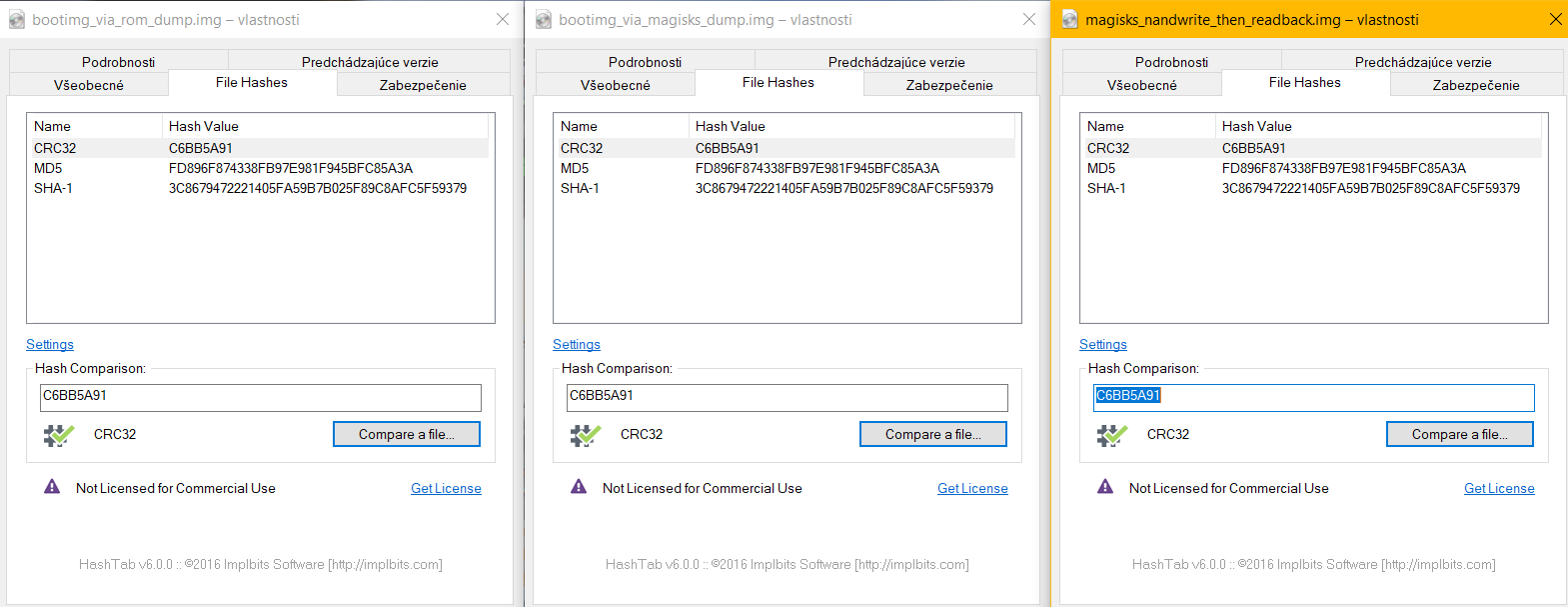
I am currently at newest version of Magisk and manager with no any problems so far.
Msprg
on 6 Mar 2020
@Msprg, what command did you use to nandwrite on your device? (I use nandwrite -p $MTD_PARTITION $IMAGE with mtd-utils nandwrite.)
Also, can you test busybox's flash_eraseall? That's normally how one would/should zero the boot partition before writing the new image.
With the actual mtd-utils flash_erase the command is flash_erase $MTD_PARTITION 0 0 but I'm not sure about the busybox flash_eraseall equivalent.
For reference, from mtd-utils flash_erase:
```Usage: flash_erase [options] MTD_DEVICE
Erase blocks of the specified MTD device.
Specify a count of 0 to erase to end of device.
-j, --jffs2 format the device for jffs2
-N, --noskipbad don't skip bad blocks
-u, --unlock unlock sectors before erasing
-q, --quiet do not display progress messages
--silent same as --quiet
--help display this help and exit
--version output version information and exit
```
osm0sis
on 6 Mar 2020
@osm0sis, yes, i did nandwrite $MTD_PARTITION $IMAGE but without -padding, because the bootimg I was writing was the one I dumped right before so it already had padding.
I have not tried flash_erase for... obvious 👀 reasons - I do not want to brick my device, but, if you promise me that in case I brick my device, you will help me fix it, then I can do try flash_erase as many times as you would like. 😄
Msprg
on 7 Mar 2020
@Msprg If you have the ROM dumped through SP Flash Tool, there should be no problems recovering. The ROM can be flashed back with the same app.
GMMan
on 7 Mar 2020
Also if you have the backup of the partition you're erasing, and nandwrite works then it should be fine.
My guess is busybox flash_eraseall $MTD_PARTITION with no additional switches is equivalent to mtd-utils flash_erase $MTD_PARTITION 0 0
So I would run the busybox command on /dev/bootimg then dump it to verify it wiped it correctly, then busybox nandwrite -p an actual magisk-patched.img back to it, then dump that again to verify it's good still.
osm0sis
on 7 Mar 2020
I would be careful operating on dumchar devices. They don't really have good bounds checks.
GMMan
on 7 Mar 2020
I would be careful operating on dumchar devices. They don't really have good bounds checks.
How does one wipe the partition before writing then? I've only worked directly with /dev/mtd devices before.
If busybox nanddump doesn't read forever from the /dev/bootimg char device, then why would flash_eraseall go past the end?
osm0sis
on 7 Mar 2020
Just a precaution and would be good to check the driver source to make sure it's sane before trying to use it. At least reading/writing the device as a file it runs across partition boundaries.
GMMan
on 7 Mar 2020
Just a precaution and would be good to check the driver source to make sure it's sane before trying to use it. At least reading/writing the device as a file it runs across partition boundaries.
But how can we then support /dev/bootimg in Magisk safely if the source is trash on some devices' implementations?
osm0sis
on 7 Mar 2020
Eh, @osm0sis ? I might be doing something wrong but when I am trying to run flash_eraseall, from TWRP terminal, in $PATH there seems to be no flash_eraseall binary, nor in included busybox nor in /data/adb/magisk/busybox.
To be clear I am trying to run:
~ # flash_eraseall Returns: sh: flash_eraseall: not found
~ # busybox flash_eraseall Returns: flash_eraseall: applet not found
/data/adb/magisk/ # ./busybox flash_eraseall Returns: flash_eraseall: applet not found
So either I am stupid or it is not included.
By the way there are binaries in the $PATH such as flash_image, flash_lock, flash_unlock and flashcp. Might be irrelevant, might not...
Msprg
on 7 Mar 2020
No, it's definitely in /data/adb/magisk/busybox.. observe:
BusyBox v1.31.1-Magisk (2020-01-20 20:36:54 CST) multi-call binary.
BusyBox is copyrighted by many authors between 1998-2015.
Licensed under GPLv2. See source distribution for detailed
copyright notices.
Usage: busybox [function [arguments]...]
or: busybox --list[-full]
or: busybox --show SCRIPT
or: busybox --install [-s] [DIR]
or: function [arguments]...
BusyBox is a multi-call binary that combines many common Unix
utilities into a single executable. Most people will create a
link to busybox for each function they wish to use and BusyBox
will act like whatever it was invoked as.
Currently defined functions:
[, [[, acpid, adjtimex, ar, arch, arp, arping, ash, awk, base64,
basename, bbconfig, beep, blkdiscard, blkid, blockdev, brctl, bunzip2,
bzcat, bzip2, cal, cat, chat, chattr, chcon, chgrp, chmod, chown,
chroot, chrt, chvt, cksum, clear, cmp, comm, conspy, cp, cpio, crond,
crontab, cttyhack, cut, date, dc, dd, deallocvt, depmod, devmem, df,
dhcprelay, diff, dirname, dmesg, dnsd, dnsdomainname, dos2unix, du,
dumpkmap, dumpleases, echo, ed, egrep, eject, env, ether-wake, expand,
expr, factor, fakeidentd, false, fatattr, fbset, fbsplash, fdflush,
fdformat, fdisk, fgconsole, fgrep, find, findfs, flash_eraseall,
flash_lock, flash_unlock, flock, fold, free, freeramdisk, fsck,
fsck.minix, fsfreeze, fstrim, fsync, ftpd, ftpget, ftpput, fuser,
getenforce, getopt, grep, groups, gunzip, gzip, hd, hdparm, head,
hexdump, hexedit, hostname, httpd, hush, hwclock, id, ifconfig, ifdown,
ifenslave, ifplugd, ifup, inetd, inotifyd, insmod, install, ionice,
iostat, ip, ipaddr, ipcalc, ipcrm, ipcs, iplink, ipneigh, iproute,
iprule, iptunnel, kbd_mode, kill, killall, killall5, klogd, less, link,
ln, loadfont, loadkmap, logread, losetup, ls, lsattr, lsmod, lsof,
lspci, lsscsi, lsusb, lzcat, lzma, lzop, lzopcat, makedevs, makemime,
man, matchpathcon, md5sum, mesg, microcom, mkdir, mkdosfs, mke2fs,
mkfifo, mkfs.ext2, mkfs.minix, mkfs.reiser, mkfs.vfat, mknod, mkswap,
mktemp, modinfo, modprobe, more, mount, mountpoint, mpstat, mv, nameif,
nanddump, nandwrite, nbd-client, nc, netstat, nice, nl, nmeter, nohup,
nologin, nslookup, nuke, od, openvt, partprobe, paste, patch, pgrep,
pidof, ping, ping6, pipe_progress, pivot_root, pkill, pmap, popmaildir,
poweroff, powertop, printenv, printf, ps, pscan, pstree, pwd, pwdx,
raidautorun, rdate, rdev, readlink, readprofile, realpath, reboot,
reformime, renice, reset, resize, restorecon, resume, rev, rfkill, rm,
rmdir, rmmod, route, rtcwake, run-init, run-parts, runcon, rx, script,
scriptreplay, sed, selinuxenabled, sendmail, seq, sestatus, setconsole,
setenforce, setfattr, setfont, setkeycodes, setlogcons, setpriv,
setserial, setsid, setuidgid, sh, sha1sum, sha256sum, sha3sum,
sha512sum, showkey, shred, shuf, slattach, sleep, smemcap, sort, split,
ssl_client, start-stop-daemon, stat, strings, stty, sum, svc, svok,
swapoff, swapon, switch_root, sync, sysctl, syslogd, tac, tail, tar,
tc, tcpsvd, tee, telnet, telnetd, test, tftp, tftpd, time, timeout,
top, touch, tr, traceroute, traceroute6, true, truncate, ts, tty,
ttysize, tunctl, tune2fs, ubiattach, ubidetach, ubimkvol, ubirename,
ubirmvol, ubirsvol, ubiupdatevol, udhcpc, udhcpc6, udhcpd, udpsvd,
uevent, umount, uname, uncompress, unexpand, uniq, unix2dos, unlink,
unlzma, unlzop, unshare, unxz, unzip, uptime, usleep, uudecode,
uuencode, vconfig, vi, volname, watch, watchdog, wc, wget, which,
whoami, whois, xargs, xxd, xz, xzcat, yes, zcat, zcip
And:
:/ # /data/adb/magisk/busybox flash_eraseall
BusyBox v1.31.1-Magisk (2020-01-20 20:36:54 CST) multi-call binary.
Usage: flash_eraseall [-jNq] MTD_DEVICE
Erase an MTD device
-j Format the device for jffs2
-N Don't skip bad blocks
-q Don't display progress messages
Oh, okay, I think I see the problem @osm0sis ,
My busybox is from, topjohnwu but yours has more recent buld date, mine has 2019-11-02
I have already installed latest Magisk yesterday via patching the bootimg, so how do I get the latest version of your busybox in /data/adb/magisk ?
Msprg
on 7 Mar 2020
No, that's BusyBox v1.31.1-Magisk, so Magisk's busybox. I'm guessing you aren't on the latest Canary or something, so do that then you'll have it in there.
osm0sis
on 7 Mar 2020
@osm0sis I linked the source for the driver earlier, check through it to see if there are any obvious red flags. It's probably not that different for different devices.
GMMan
on 7 Mar 2020
So, @osm0sis, anything I do, I can not get canary Magisk manager to patch my bootimg, because as soon as I hit "let´s get started" (or something similiar) after the options and picking image to patch, the manager just crashes.
So, if you want, you can patch one of my bootimages from my hash comparison, and I will gladly test it asap, but if you will not, it will not be today, as where I live is going to be midnight soon, and I do not have energy to troubleshoot Magisk manager not behaving.
Msprg
on 7 Mar 2020
Ugh, yeah, Canary Manager is broken right now. 🙄
Thought you already had a patched boot.img?
osm0sis
on 8 Mar 2020
Well yeah, I do have patched bootimg, but it is patched with non-canary version of Magisk, and I can't do direct install, that's basically how this issue has began.
Ok, in current stable Magisk manager there is option to provide custom url as update channel, can you please get me the canary channel url?
I don't know where to find it myself :disappointed:
Msprg
on 8 Mar 2020
Just switch it back to stable and use stable. Uninstall manager and install the apk from the stable zip.
You can install my busybox from the repo, it also has all those mtd applets.
osm0sis
on 8 Mar 2020
Ugh, okaaay so, I did a thing... online... (means, done while the full android was loaded and running).
So, the flash_eraseall seems to be working fine... just I do not like how the hashes do not match, I mean not between the normal and blanked bootimg - _of course they will not match_, but they does not match after I flashed the same magisk_patched bootimg again... so, using your busybox NDK module from repo.... anyways here you all go:

A3500F:/ # busybox flash_eraseall /dev/bootimg
Erasing 128 Kibyte @ 600000 - 100% complete.
A3500F:/ # busybox nanddump -f /sdcard/bootimg-dumptest/erased_bootimg.img /dev/bootimg
A3500F:/ # busybox nandwrite /dev/bootimg /sdcard/Download/magisk_patched.img
Writing at 0x00000000
===OUTPUT OMITTED===
Writing at 0x004c0000
A3500F:/ # busybox nanddump -f /sdcard/bootimg-dumptest/reflashed_patched_bootimg.img /dev/bootimg
A3500F:/ # busybox nandwrite -p /dev/bootimg /sdcard/Download/magisk_patched.img
Writing at 0x00000000
===OUTPUT OMITTED===
Writing at 0x004c0000
A3500F:/ # busybox nanddump -f /sdcard/bootimg-dumptest/reflashed_patched_bootimg_padding.img /dev/bootimg
A3500F:/ #
Yeah, thought the padding will change the hash, so it matches the one from prevoiusly dumped bootimg but it did not change anything apparently...
@osm0sis, is it safe now to reboot into recovery? I have full nandroid backup from TWRP but not from SPflash tool.
Msprg
on 9 Mar 2020
The main thing was making sure flash_eraseall wiped correctly and by the looks of it erased_bootimg.img is properly empty.
Presumably since you erased it first the page-aligned image is already fine, since everything else was erased. The fact that they match is good I think. Should be safe from what I can see here.
osm0sis
on 9 Mar 2020
Okay, so do you have any other task for me, or is it all for now? 😉
Msprg
on 9 Mar 2020
Haha I think we're good! I should be able to put together some script changes for the installer for you to test when I get the chance. I've got a couple of things I want to get done first, but you're on the list. :+1:
osm0sis
on 9 Mar 2020
@Msprg, once the next Canary comes out (will fix Manager issues, etc.), I'm thinking the above script changes might be enough to add support. 🤠
You'll just have to make the changes to the util_functions.sh in the Canary zip. Once you can confirm it works I'll submit the PR. 👍
osm0sis
on 11 Mar 2020
@osm0sis, Okay, took a peak at the changes, lookin good to me! 🚀
Msprg
on 11 Mar 2020
@Msprg please test by modifying 20307's zip.
osm0sis
on 15 Mar 2020
Good news everyone!
Tested on Magisk-v72f6770d(20307), where in folder commonwas replaced util_functions.sh.
This was then flashed by TWRP on an actual mtd/NAND based device which generated the following output:
Skipping Digest check: no Digest file found
*****************
Magisk Installer
*****************
- Mounting /system
- Target image: /dev/bootimg
- Device platform: arm
- Removing system installed root
- Constructing enviroment
- Adding addon.d survival script
- Unpacking boot image
- Checking ramdisk status
- Magisk patched boot image detected
- Patching ramdisk
- Repacking boot image
- Flashing new boot image
- Unmounting partitions
- Done
Updating partition details...
...done
Device then booted to system just fine, Magisk manager recognized installed version of Magisk correctly, and also everything else seems to be working correctly.
I also suggest that these changes would be applied also in uninstall.zip, as well, so I can later test "fresh install" of Magisk on device with original bootimg, how it behaves, but I believe it will be working as well.
I approve!
Msprg
on 15 Mar 2020
Related issues
 vdbhb59
·
44Comments
vdbhb59
·
44Comments
 usmanmughalji
·
49Comments
usmanmughalji
·
49Comments
 sabpprook
·
62Comments
sabpprook
·
62Comments
 0x192
·
40Comments
topjohnwu
·
96Comments
0x192
·
40Comments
topjohnwu
·
96Comments
Most helpful comment
Good news everyone!
Tested on Magisk-v72f6770d(20307), where in folder
commonwas replacedutil_functions.sh.This was then flashed by TWRP on an actual mtd/NAND based device which generated the following output:
Device then booted to system just fine, Magisk manager recognized installed version of Magisk correctly, and also everything else seems to be working correctly.
I also suggest that these changes would be applied also in
uninstall.zip, as well, so I can later test "fresh install" of Magisk on device with originalbootimg, how it behaves, but I believe it will be working as well.I approve!