Magisk: Do Not Submit MagiskHide Requests
Unless you provide any insights on a new detection method, all MagiskHide related requests will be ignored.
99% of the time, you are not following the best practices for MagiskHide, please check this tutorial:
https://www.didgeridoohan.com/magisk/MagiskHide
 topjohnwu
All 96 comments
I'd like to join the discuss for MagiskHide.
However, before discussing, I must know the idea from you:
hijack app, then hide.
The implementation is like this.
In this way, as app is hijacked, normally, there is way to find it.hide before hijack.
If you want to implement this, I will continue.
 liudongmiao
on 2 Mar 2019
liudongmiao
on 2 Mar 2019
@liudongmiao welcome :), I've heard many things about you through @vvb2060
如果想加入的話,給我你的電子信箱,我把你邀請到 Slack 群內
topjohnwu
on 2 Mar 2019
However, before discussing, I must know the idea from you:
2. hide before hijack.
If you want to implement this, I will continue.
The 2nd method seems more reliable, but is there any method making all apps except magisk manager ( obfuscated package itself) in magisk-hided by default (i.e. change from black-list to white-list approach)?
Even It is hard to do so at this moment, as the kernel itself could not prescient the obfuscated manager package in any means.
But anyway, it is strange that apps in Google Store (and Policy) could do anything temper the system to anti-root/modification likely as Trojans and no one could stop that.
 KagefumiMerry
on 4 Mar 2019
KagefumiMerry
on 4 Mar 2019
@liudongmiao @KagefumiMerry check e6b1254d0d6de7cf8ec60164a2bf30e52e48f884
topjohnwu
on 5 Mar 2019
MagiskHide on any build not working with Google Pay
 ghost
on 5 Mar 2019
ghost
on 5 Mar 2019
@topjohnwu I never build succesfully.
And I'm lazy to fix the requirements, will just wait for your build.
*** Android NDK: Invalid NDK_TOOLCHAIN_VERSION value: 4.9. GCC is no longer supported. See https://android.googlesource.com/platform/ndk/+/master/docs/ClangMigration.md.
It seems something related with busybox.
liudongmiao
on 7 Mar 2019
Hi @topjohnwu
It seems that anyone on the beta version of Google Play Services which is v16 or higher, Magisk fails the SafetyNet checks.
Reminder to everyone, that downgrading or leaving the Google Play Services beta will fix your Magisk SafetyNet failures.
The Verison should be v15, not v16 or higher. Find the APK of Google Play Services on apkmirror and then sideload it (if you don't know how to do that, just Google it!
Thanks,
Slats
ghost
on 7 Mar 2019
@liudongmiao I fixed some build issues, please check again
topjohnwu
on 7 Mar 2019
Hi @topjohnwu
It seems that anyone on the beta version of Google Play Services which is v16 or higher, Magisk fails the SafetyNet checks.Reminder to everyone, that downgrading or leaving the Google Play Services beta will fix your Magisk SafetyNet failures.
The Verison should be v15, not v16 or higher. Find the APK of Google Play Services on apkmirror and then sideload it (if you don't know how to do that, just Google it!
Thanks,
Slats
That I did not know (about the beta version) and it made me check!
I did have beta services installed. Not sure if it impacted my issues directly but no harm in testing.
Thanks for sharing.
 Djtrip83
on 8 Mar 2019
Djtrip83
on 8 Mar 2019
Google pay not working again
ghost
on 10 Mar 2019
Xiaomi Note 5, Google Play Services 16.0.87
SafetyNet working fine
 hexdra
on 16 Mar 2019
hexdra
on 16 Mar 2019
@hexdra May I please know what version of Magisk (Stable/Canary) and if safetynet is true throughout the course of using your device? Because some users experience MagiskHide working for sometime, but then fail.
 microtechton
on 17 Mar 2019
microtechton
on 17 Mar 2019
Can anyone please tell me what Magisk Canary or Stable works with what Google Play Services which then works with Google Pay? Right now I'm on the Play Services Beta with the latest Magisk Canary build with magiskhide enabled but doesn't work!
ghost
on 17 Mar 2019
Magisk Build 17.2 & Magisk Manager 6.1.0 seem to work fine with Google Pay and Google Play Store is certified. It's only the builds later on which are causing problems.
_(Edit: Just added an extra line)_
microtechton
on 18 Mar 2019
@Slats2 @microtechton Im using magisk Stable 18.1. Maybe try MagiskHide Props Config module.
hexdra
on 19 Mar 2019
MagiskHide is detected on UDS and STAT.
ghost
on 20 Mar 2019
Hi,
I've been looking into this, here's what I did and found out:
A few days after updating to 18.2 Canary I tried enabling in-store payments and Google Pay said the phone was rooted or altered. I then wiped /data/data/com.google.android.gms in recovery, and it worked again for approximately 12 hours (with default MagiskHide settings, only "unstable" enabled in the list). I then wiped data again and enabled MagiskHide on all the Play Services + Google Pay, and it worked for several days, so I considered it to be a pass.
I then disabled MagiskHide on Google Pay and it still worked for several days.
Thus:
the result of the google pay root check is stored in the /data/data/com.google.android.gms folder (Google Play Services data folder), for all other apps Android just wipes the /data/data folder but that's not the case for Play Services as there's a custom UI for deleting data which doesn't seem to remove everything, and obviously, this data isn't removed. You can wipe /data/data/com.google.android.gms in recovery to remove the result of the check.
the check is done apparently randomly in the span of a day or two. That's probably to achieve what happened in this thread, conflicting reports and people having no idea what triggers the check and how to deal with it.
the check is done by Google Play Services, but by something other than the "unstable" (SafetyNet) process.
not sure about this one, but given that Magisk 18.1 and older have imperfect MagiskHide functionality (the hiding can be "raced" and thus defeated with some tricks, according to John himself), it's possible Google is also doing that. Using 18.2 is your best bet as it enables hiding on a process as soon as possible.
I'm now trying to pinpoint which component of play services is doing the check, so the default MagiskHide list can be updated (I'll report on GitHub once I'm sure).
Reporting that renaming com.google.android.gms to com.google.android.gms.bak worked for me. I was able to successfully add a card where before it was detecting root.
Magisk Canary 18.2-945f8810
Magisk Manager 7.0.0-8893cbd6
Magisk Hide on all Google Pay and Google Play Services
Google Pay 2.84.237487748
Google Play Services 15.0.90
Nokia 6.1 (2018)
February 2019 Security Update
Stock Rooted
ghost
on 20 Mar 2019
@Slats2 At least credit the person you stole that post from. You didn't do the work, they did.
https://forum.xda-developers.com/showpost.php?p=79171459&postcount=469
 Flouzr
on 22 Mar 2019
Flouzr
on 22 Mar 2019
@Slats2 At least credit the person you stole that post from. You didn't do the work, they did.
https://forum.xda-developers.com/showpost.php?p=79171459&postcount=469
I managed to do the same research, but did want to write the whole thing out, I also did change stuff around in it!!!
ghost
on 22 Mar 2019
@Slats2 At least credit the person you stole that post from. You didn't do the work, they did.
https://forum.xda-developers.com/showpost.php?p=79171459&postcount=469
So I did use it as a template, so back off! BIG DEAL!
ghost
on 22 Mar 2019
@Slats2 Just want to put it on record that copy-pasting someone else's work (and there's nothing changed, nothing, you only added the last part about renaming the folder which you also copy pasted from here: https://forum.xda-developers.com/showpost.php?p=79152118&postcount=340) without giving any kind of credit is a crappy move.
Trying to score some kind of confirmation points by piggybacking off of someone else's hard work and research is a big deal. Don't...
If you really did any kind of research into this, that became null and void as soon as you did this. Your credibility is now zero.
 Didgeridoohan
on 22 Mar 2019
Didgeridoohan
on 22 Mar 2019
If you're not aware "root beer fresh" (available on Play Store https://play.google.com/store/apps/details?id=com.kimchangyoun.rootbeerFresh.sample) is using a new method to successfully detect Magisk. The new method is "Magisk Unix Domain Socket(UDS) and File Stat Check Added".
It's open source if you want to check it out. https://github.com/KimChangYoun/rootbeerFresh
 jancm
on 4 Apr 2019
jancm
on 4 Apr 2019
@jancm
For UDS: I have reported uds to @topjohnwu (via friend) some days ago, it should have been fixed last month. However, if someone are using magisk, it can be detect.
For File Stat Check, I have told friend last year, however, it's unstable for third-party rom. Some ROM would modify file stat after OTA.
And there's maps and mapinfo check. I have reported to @topjohnwu too (via friend). It shouldn't be detected in latest magisk, however, it can be detected if magisk module modify system.
liudongmiao
on 5 Apr 2019
And for those guys want to detect root, you can look for Genuine. It check many things, except root.
liudongmiao
on 5 Apr 2019
@jancm And, /proc/net/unix is unavailable in android q (no permission).
liudongmiao
on 5 Apr 2019
Can anyone find out what root detection method is being used by these apps:
https://play.google.com/store/apps/details?id=com.hyundaicard.appcard
https://play.google.com/store/apps/details?id=com.btckorea.bithumb ?
They are using the same security solution, Lockin Company's Liapp(https://liapp.lockincomp.com/ ).
 Ingan121
on 8 Apr 2019
Ingan121
on 8 Apr 2019
There is a trick for google pay to work and that is:
Go to settings > apps > Google play services > permissions > Turn off the Telephone permission.
then install google pay it will work
Or by command
magiskhide --add com.google.android.apps.nbu.paisa.userpm revoke com.google.android.gms android.permission.CALL_PHONE
This works in my case.
 androidneha
on 8 Apr 2019
androidneha
on 8 Apr 2019
It looks like that those two apps are using UDS method, since it saves all UDS information on (private data)/files/dxshield.map.
Ingan121
on 8 Apr 2019
I made a simple script to bypass UDS detection.
It is available here: https://github.com/Ingan121/UDSBypass
Ingan121
on 10 Apr 2019
I can confirm Magisk hide is working fine on a Moto G7, Android 9 with Magisk v18.1
Google pay is the only thing I've found that using magisk hide on doesn't work, but I don't have NFC so it doesn't effect me. Also absurdly CPU-Z can recognize root
I can confirm apps like Sophos Mobile Security, Capital One, PayPal, etc do not detect root with them in magisk hide. On top of that, Android setting does not recognize my bootloader being unlocked (under OEM unlock it doesn't say bootloader already unlocked)
 unixandria-xda
on 15 Apr 2019
unixandria-xda
on 15 Apr 2019
I can confirm 19.0 beta hide works way better
Thanks for all your hard work @topjohnwu. If I knew more about this stuff, I'd certainly offer to help
unixandria-xda
on 21 Apr 2019
Revue Starlight Re LIVE detect Root with magisk hide
 asagichan
on 28 Apr 2019
asagichan
on 28 Apr 2019
It looks like that those two apps are using UDS method, since it saves all UDS information on (private data)/files/dxshield.map.
Any idea what Snapchat uses to detect root or system changes?
 Newkydawg
on 30 Apr 2019
Newkydawg
on 30 Apr 2019
It looks like that those two apps are using UDS method, since it saves all UDS information on (private data)/files/dxshield.map.
Any idea what Snapchat uses to detect root or system changes?
When does it detect root? I had no problems while just starting the app.
Ingan121
on 2 May 2019
SC detects something right after starting the app up on my Pixel 3 XL and locks me out. I have a Nexus 6P with the same installed apps, running Pie just like the P3XL, both with the same Magisk Canary builds and settings but the N6P never gets blocked. Thoughts?
Newkydawg
on 4 May 2019
the decision is that I will ignore all 'hide not working' reports from now on.
Does this just mean you won't be looking into obscure root detection methods used by specific apps, or is Magisk Hide actually not getting any more developer support at all?
Is it still going to be updated to keep passing SafetyNet (at least BasicIntegrity)?
Assuming the Magisk project as a whole is still moving forward, it seems like it would be odd to stop supporting the main thing that sets it apart from the simpler non-masked root solutions (such as Superuser) that don't bother trying to placate root-hating apps.
I don't think that's what this is saying, but it could be read that way and I'm not really sure.
 nlburgin
on 5 May 2019
nlburgin
on 5 May 2019
##

please i want hide Samba banking app.
 fox215
on 10 May 2019
fox215
on 10 May 2019
@nlburgin MagiskHide is of course not abandoned and is continuing to improve alongside Magisk. What this means is that any request to look at a specific apps root detection will be ignored.
@fox215 Tested and it was rather easy. Manager repackaged and the app on the Hide list was all it took...
https://www.didgeridoohan.com/magisk/MagiskHide#hn_Hiding_root_from_apps
Didgeridoohan
on 10 May 2019
@nlburgin MagiskHide is of course not abandoned and is continuing to improve alongside Magisk. What this means is that any request to look at a specific apps root detection will be ignored.
@fox215 Tested and it was rather easy. Manager repackaged and the app on the Hide list was all it took...
https://www.didgeridoohan.com/magisk/MagiskHide#hn_Hiding_root_from_apps
thank you i try but can not open root detected .
fox215
on 11 May 2019
@androidneha maybe your method to make pay used to work but now pay won't run if phone permission isn't given to play Services
unixandria-xda
on 24 May 2019
What about the system apps? Hide does not work on those either, apps such as Youtube Music, Google Play Music, Google Play Film, Google News...
I have a Pixel 3 (blueline) with the May 5th security patch.
 marcofugaro
on 29 May 2019
marcofugaro
on 29 May 2019
Guys i have same issue with google apps i also check from system apps in magisk hide but some apps like chrome not shown.
Like before i also check system apps and there is no way to hide root.
List: youtube and chrome
 minutesinch
on 20 Jun 2019
minutesinch
on 20 Jun 2019
Please stop trying to hide chrome. I have seen people elsewhere wondering why they can't do that.
It's intended: https://github.com/topjohnwu/Magisk/blob/bf9ac8252bea97b8900492a0dafefb1c1ab2bd92/app/src/main/java/com/topjohnwu/magisk/data/repository/MagiskRepository.kt#L95
https://twitter.com/topjohnwu/status/1039528958289760256
And for youtube you should activate "show system apps" but there is no point in hiding youtube.
 towlie
on 20 Jun 2019
towlie
on 20 Jun 2019
With newest Update (19306) Rootbeerfresh cant detect magisk anymore, nice work John Wu.
hexdra
on 17 Jul 2019
I was not able to get the following app to work with magisk hide: https://play.google.com/store/apps/details?id=de.direkt1822.tanplus
I followed the tutorial with all options for hiding, but the only thing that made the app work in the end was uninstalling magisk completely.
I tested with both the stable and canary versions of magisk.
 Yky
on 8 Sep 2019
Yky
on 8 Sep 2019
With Magisk stable (19.3/7.3.2) and canary (19.4-084b451e (19308)/7.3.3-86481c74 (233)) and recent versions of LineageOS 16, the open-source RootBeer library detects su binary, su exists and root native.
This doesn't occur on older LineageOS 16 builds. Hiding succeeded in LOS 15 and in LOS 16 builds at least until May 2019, but on LOS 16 it required uninstall and reinstall of Magisk after each LOS update.
Logs with canary debug (19.4-084b451e (19308)/7.3.3-86481c74 (233)):2019-09-09_10.08.zip
EDIT: This has been fixed, either by LineageOS 16.0-20190912, or by formatting data (internal storage), wiping all partitions, flash LOS + gapps, reboot system, reboot recovery, flash Magisk canary.
EDIT 2: The fix only lasted a few days, see this post below.
 elahn
on 9 Sep 2019
elahn
on 9 Sep 2019
@elahn thanks, I'm on the LOS 16 07-07-19 build. I see in the XDA thread some 09-07 builds, https://forum.xda-developers.com/galaxy-s9/samsung-galaxy-s9--s9-cross-device-development/rom-t3945595/post80222300#post80222300, but don't see any 09-12 builds. Can you reference where you're seeing that build? Can't find it.
I'm running that LOS build, and Magisk canary 7.3.3-f383d11d (234), 19.4-f383d11d (19309). SafetyNet passes, SELinux is disabled (from Magisk), and GooglePay won't setup any CC for NFC payments.
EDIT: And just saw the Rootbeerfresh in this thread, cool. Currently, it sees Root Management Apps, and SELinux flag is enabled fails (as it's disabled).
EDIT2: And now I see a 09-11 build https://forum.xda-developers.com/galaxy-s9/samsung-galaxy-s9--s9-cross-device-development/rom-t3945595/post80235190#post80235190
 Drizzt321
on 16 Sep 2019
Drizzt321
on 16 Sep 2019
Hi, @Drizzt321. Unfortunately, after several days on LOS 16.0-20190912, RootBeer started detecting su binary, su exists and root native again.
Magisk canary debug 19.4-f383d11d (19309)/7.3.3-f383d11d (234) and LOS 16.0-20190916 didn't fix it. Logs: 2019-09-19_09.46.zip
This means it was the super clean install that fixed the issue for a short time, not that particular LOS nightly. In that time I updated apps through Play Store and restored some app data using oandbackup. I don't know when I'll be able to, but I'll try a super clean install, then not update or restore anything and see if that lasts; if not, it'll show the issue is endemic to LOS, Magisk or a combination of both.
On my kltedv (Samsung Galaxy S5, SM-G900i) with plain LOS with no apps, no Magisk, RootBeer detects dangerous props and selinux flag enabled. Magisk hides both of those permanently. The RootBeer Sample app is on Play Store and the library is open source on GitHub.
elahn
on 19 Sep 2019
@elahn Blast! That sucks :(
I suspect it might be in part that you probably had to update the Play Store to load apps from it. I suspect I'm so close. I've tried getting my selinux back to enabled, but can't seem to override Magisk, even via doing the config-props module to set the ro.build.selinux back to 1, but that didn't seem to do anything. The Trust setting section still shows it disabled.
Like I said, rootbeerfresh, at least from the App Store, nearly passes everything, just 2 things. So close...
Drizzt321
on 19 Sep 2019
@Drizzt321 Great news, all rootbeer checks are passing!
I uninstalled Magisk using the latest installer in TWRP, updated to lineage-16.0-20191016-nightly-kltedv (dirty flash), cleared cache & dalvik, rebooted into system, rebooted into TWRP, installed Magisk 20.1-59fd38bb (20001)-debug, rebooted into system, installed Magisk Manager 7.3.5-5ffb9eaa (246)-debug, hide Magisk Manager.
Since then I've installed an app through Play Store, rebooted and everything is still perfect. Thank you, topjohnwu & contributers for all your great work!
elahn
on 18 Oct 2019
https://play.google.com/store/apps/details?id=com.irdeto.kplus
MyK+ app does not work after Magisk v20.
I uninstalled MyK+ app, uninstalled Magisk, rebooted, installed Magisk v20, rebooted into system, installed Magisk Manager 7.3.5. Then i have installed MyK+ from Play Store, but still same issue. Please give advice for this case. Thank all!
 nduyhien
on 22 Oct 2019
nduyhien
on 22 Oct 2019
I just read Best Practices for MagiskHide but it didn't help me out. I saw you have written Report to me and I will hack up a solution ASAP. So here is the app:
https://play.google.com/store/apps/details?id=com.vokal.dscout
dscout app detects root despite following all the methods. Magisk Version 20.1 & Magisk Manager 7.4.0. Thank You!
 Arjun44
on 4 Nov 2019
Arjun44
on 4 Nov 2019
No it does not.
This before hiding:

This is after. Normal launch.

 DenyDarko
on 4 Nov 2019
DenyDarko
on 4 Nov 2019
But it keeps crashing on my device. And, are you testing it on Stock Rom? Also, the app works at first launch but once we close the app from the background, it will force close like above.

Arjun44
on 4 Nov 2019
Please help me.
I want to install Magisk on fujitsu's F-04G, but F-04G does not have boot loader mode or TWRP.
Can you tell me how to install Magisk on F-04G?
 snake696
on 2 Dec 2019
snake696
on 2 Dec 2019
@snake696 this issue is not the place to ask. Go ask in Q&A on XDA
unixandria-xda
on 3 Dec 2019
As we should not open any new issues upon magisk hide I will leave a comment here:
Since the last update of my banking app it somehow detects magisk. What I've tried is:
- Uninstall the manager apk, still detects root
- Disable usb debugging, still detects root
- Disable developer mode, still detects root
Because all these things won't help to get the app to work, I'm sure they have a new method to track down the process of magisk itself. If anyone wants to try the app on his own phone, here is the link:
https://play.google.com/store/apps/details?id=com.ubs.swidK2Y.android&referrer=utm_source%3Daccessapp_productpage
If any logs can be provided to solve the issue, let me know!
 Tkkg1994
on 15 Dec 2019
Tkkg1994
on 15 Dec 2019
@Tkkg1994 not sure if you actually have to sign in to get the detection but I had zero issues.
Setup:
Pixel 2 XL running Pixel Dust X
Using props module to pass CTS
Using stub manager apk, also hidden
MagiskHide on the app
Development options on, usb debugging off
unixandria-xda
on 15 Dec 2019
As we should not open any new issues upon magisk hide I will leave a comment here:
Since the last update of my banking app it somehow detects magisk. What I've tried is:
- Uninstall the manager apk, still detects root
- Disable usb debugging, still detects root
- Disable developer mode, still detects root
Because all these things won't help to get the app to work, I'm sure they have a new method to track down the process of magisk itself. If anyone wants to try the app on his own phone, here is the link:
https://play.google.com/store/apps/details?id=com.ubs.swidK2Y.android&referrer=utm_source%3Daccessapp_productpageIf any logs can be provided to solve the issue, let me know!
Some apps need to be logged in first to detects whether the device is rooted or not. Your app is similar to Grab Driver when it comes to detects the device.
 MikuDroid
on 16 Dec 2019
MikuDroid
on 16 Dec 2019
@Tkkg1994 not sure if you actually have to sign in to get the detection but I had zero issues.
Setup:
Pixel 2 XL running Pixel Dust X
Using props module to pass CTS
Using stub manager apk, also hidden
MagiskHide on the app
Development options on, usb debugging off
I deleted all app data to simulate the new install and the pop up was there right away. I can't even sign in with the rooted phone. So how the fuck does this work for you. I've tried it on 3 devices now:
- Nexus 5X with lineageos, latest Magisk + Manager hidden + safetynet pass
- Galaxy S10+ with stock rom, latest Magisk + Manager hidden + safetynet pass
- OnePlus 7 with stock rom, latest Magisk + Manager hidden + safetynet pass
(I tried it with core mode only as well... doesn't help)
I have to find out what you've done to pass the check! Because my device was working till the company updated the app like a week ago.
As we should not open any new issues upon magisk hide I will leave a comment here:
Since the last update of my banking app it somehow detects magisk. What I've tried is:
- Uninstall the manager apk, still detects root
- Disable usb debugging, still detects root
- Disable developer mode, still detects root
Because all these things won't help to get the app to work, I'm sure they have a new method to track down the process of magisk itself. If anyone wants to try the app on his own phone, here is the link:
https://play.google.com/store/apps/details?id=com.ubs.swidK2Y.android&referrer=utm_source%3Daccessapp_productpage
If any logs can be provided to solve the issue, let me know!Some apps need to be logged in first to detects whether the device is rooted or not. Your app is similar to Grab Driver when it comes to detects the device.
It detects right away you don't have to login first
Tkkg1994
on 16 Dec 2019
@Tkkg1994 not sure if you actually have to sign in to get the detection but I had zero issues.
Setup:
Pixel 2 XL running Pixel Dust X
Using props module to pass CTS
Using stub manager apk, also hidden
MagiskHide on the app
Development options on, usb debugging offI deleted all app data to simulate the new install and the pop up was there right away. I can't even sign in with the rooted phone. So how the fuck does this work for you. I've tried it on 3 devices now:
* Nexus 5X with lineageos, latest Magisk + Manager hidden + safetynet pass

* Galaxy S10+ with stock rom, latest Magisk + Manager hidden + safetynet pass

* OnePlus 7 with stock rom, latest Magisk + Manager hidden + safetynet pass
  (I tried it with core mode only as well... doesn't help)
I have to find out what you've done to pass the check! Because my device was working till the company updated the app like a week ago.
As we should not open any new issues upon magisk hide I will leave a comment here:
Since the last update of my banking app it somehow detects magisk. What I've tried is:
- Uninstall the manager apk, still detects root
- Disable usb debugging, still detects root
- Disable developer mode, still detects root
Because all these things won't help to get the app to work, I'm sure they have a new method to track down the process of magisk itself. If anyone wants to try the app on his own phone, here is the link:
https://play.google.com/store/apps/details?id=com.ubs.swidK2Y.android&referrer=utm_source%3Daccessapp_productpage
If any logs can be provided to solve the issue, let me know!Some apps need to be logged in first to detects whether the device is rooted or not. Your app is similar to Grab Driver when it comes to detects the device.
It detects right away you don't have to login first
I tested it too, working great after i added the App to magisk hide. Did u do that? Also dont move the app to sd Card, because magisk hide isnt working then. Maybe it scans for magisk files on your storage (.zip files...).
hexdra
on 16 Dec 2019
@Tkkg1994 not sure if you actually have to sign in to get the detection but I had zero issues.
Setup:
Pixel 2 XL running Pixel Dust X
Using props module to pass CTS
Using stub manager apk, also hidden
MagiskHide on the app
Development options on, usb debugging offI deleted all app data to simulate the new install and the pop up was there right away. I can't even sign in with the rooted phone. So how the fuck does this work for you. I've tried it on 3 devices now:
* Nexus 5X with lineageos, latest Magisk + Manager hidden + safetynet pass

* Galaxy S10+ with stock rom, latest Magisk + Manager hidden + safetynet pass

* OnePlus 7 with stock rom, latest Magisk + Manager hidden + safetynet pass
  (I tried it with core mode only as well... doesn't help)
I have to find out what you've done to pass the check! Because my device was working till the company updated the app like a week ago.
As we should not open any new issues upon magisk hide I will leave a comment here:
Since the last update of my banking app it somehow detects magisk. What I've tried is:
- Uninstall the manager apk, still detects root
- Disable usb debugging, still detects root
- Disable developer mode, still detects root
Because all these things won't help to get the app to work, I'm sure they have a new method to track down the process of magisk itself. If anyone wants to try the app on his own phone, here is the link:
https://play.google.com/store/apps/details?id=com.ubs.swidK2Y.android&referrer=utm_source%3Daccessapp_productpage
If any logs can be provided to solve the issue, let me know!Some apps need to be logged in first to detects whether the device is rooted or not. Your app is similar to Grab Driver when it comes to detects the device.
It detects right away you don't have to login first
I tested it too, working great after i added the App to magisk hide. Did u do that? Also dont move the app to sd Card, because magisk hide isnt working then. Maybe it scans for magisk files on your storage (.zip files...).
What's the app version you are using to test it? Mine is 3.7.9.0. If it's a different one that would explain why it works. In this case can you send the apk? I would love to compare both of them to see what they changed.
Otherwise: Nope I have no magisk files on my phne, everything is hidden and magisk works fine. And nope the app isn't installed on the SD card
Tkkg1994
on 16 Dec 2019
@Tkkg1994
Its the same version 3.7.9.0.
Is everything fine when you test your device with Rootbeerfresh?
https://play.google.com/store/apps/details?id=com.kimchangyoun.rootbeerFresh.sample
hexdra
on 16 Dec 2019
@Tkkg1994
Its the same version 3.7.9.0.
Is everything fine when you test your device with Rootbeerfresh?
https://play.google.com/store/apps/details?id=com.kimchangyoun.rootbeerFresh.sample

Could it be that magisk hide is not fast enough to hide root infront of the app before it does its check?
Tkkg1994
on 16 Dec 2019
I have the same problem: at a certain point (I think after last magisk update), two phones (one is Nexus 5X, the other is Pixel XL) are not able to pass safetynet anymore.
I'm using LineageOs, magisk tells me that BasicIntegrity is ok, btsProfile is false.
RootBeerFresh gives me the same results of the post above mine, with all green checks.
Any hints?
 Polve
on 17 Dec 2019
Polve
on 17 Dec 2019
@topjohnwu I just submitted a new issues (#2163) and then I saw this one. My question is: how can I give you insights on a new detection method if I am not an advanced Android developer? The only thing I can do is tell you that a certain app does not work even after I followed your best practices for Magisk Hide, then hope that you can test it. I can certainly provide logs, if you tell me what you need. I simply do not have the know-how to find out what these apps are doing to detect root.
So... I decided to open anyway a new issue and ask you if I can somehow provide more info.
 robertototaro
on 18 Dec 2019
robertototaro
on 18 Dec 2019
As we should not open any new issues upon magisk hide I will leave a comment here:
Since the last update of my banking app it somehow detects magisk. What I've tried is:
- Uninstall the manager apk, still detects root
- Disable usb debugging, still detects root
- Disable developer mode, still detects root
Because all these things won't help to get the app to work, I'm sure they have a new method to track down the process of magisk itself. If anyone wants to try the app on his own phone, here is the link:
https://play.google.com/store/apps/details?id=com.ubs.swidK2Y.android&referrer=utm_source%3Daccessapp_productpageIf any logs can be provided to solve the issue, let me know!
I can confirm the problem with this app and its companion "UBS Mobile Banking". They only work once one removes Magisk completely. Nothing else works. I opened a new issue (#2163) that I guess will end up merged in this thread.
robertototaro
on 18 Dec 2019
Same here with the "UBS Access" application.
 matco
on 19 Dec 2019
matco
on 19 Dec 2019
Same issue with "UBS Access" application too. I know you'll be closing it also citing #1152, but please take a minute here : I did follow your best practice tutorial. Magisk stealth methods did managed some time ago to hide from this app ; "UBS access" dev team must have found a new detection method and are playing cat & mouse with your efforts. Unfortunately, in this game, YOU are the expert, we rely on your good will and technical knowledge. The simple fact you did implement some form of anti-detection features means you are completely oblivious to the problem. The only thing we users (who really appreciate your work by the way) can do is report that this app is detecting magisk. If you have any idea how we can send you technical feedback (magisk logs if magisk picks up anything, maybe memory dumps of some kind of the problematic app...) instead of just closing our comments in a "fuck off" fashion, please add stuff to your tutorial so we non-android-hackers may help you as much as we can. Please. Thanks in advance.
 mightysashiman
on 14 Jan 2020
mightysashiman
on 14 Jan 2020
Hey guys, seems like spay for gear is now seeing root
I ran the root beer app
Seems. To have mad red x I'm not sure what most are lol.
Maybe you guys can tell me how to make them all green

 manofsteel2017
on 26 Feb 2020
manofsteel2017
on 26 Feb 2020
I fixed it.
Hide the app and rename magisk
And added the uds bypass set permission 0755 and reboot.
Spay is working
And everything is green
manofsteel2017
on 26 Feb 2020
MagiskHide should also stop apps from detecting Developer Mode and USB Debugging options being turned on. This comes from someone didn't realize turning off Developer Mode would result in turning of OEM Unlock and would in turn renders the system unbootable.
 kgptzac
on 5 Mar 2020
kgptzac
on 5 Mar 2020
@kgptzac Magisk can't do that. It can change the props for it, yes, but that would be the same as turning them off yourself. To leave those option enabled, but make it seem like they're not you need something like Xposed.
Didgeridoohan
on 5 Mar 2020
@kgptzac Magisk can't do that. It can change the props for it, yes, but that would be the same as turning them off yourself. To leave those option enabled, but make it seem like they're not you need something like Xposed.
There's a specific Xposed module for that; however it can cause the same issue because it even hides the debugging from Android lol
unixandria-xda
on 10 Mar 2020
SafetyNet is done :D
topjohnwu
on 12 Mar 2020
SafetyNet is done :D
What do you mean?
 Pheromon
on 12 Mar 2020
Pheromon
on 12 Mar 2020
Check John's Twitter.
Didgeridoohan
on 12 Mar 2020
WTH
more than magisk, the whole ecosystem of alternate releases as LineageOs are fucked for good now
Pheromon
on 12 Mar 2020
No. You can still unlock your phone and use custom ROMs, just not hide the fact.
Didgeridoohan
on 12 Mar 2020
No. You can still unlock your phone and use custom ROMs, just not hide the fact.
Let us not forget 2 out of every 3 apps on the Play store have some sort of SafetyNet or bootloader unlock check. Meaning sure you can use the ROM, just you're going to be very limited in what apps you can use. Still unsure to this day why a SMS app needs a SafetyNet check but that just proves many app developer unnecessarily (ab)use such checks.
unixandria-xda
on 12 Mar 2020
No. You can still unlock your phone and use custom ROMs, just not hide the fact.
No, I can't because most of banking applications needs to pass the safety check, otherwise they don't start.
Pheromon
on 12 Mar 2020
Mind you I'm rocking a OnePlus device right now so I'm unaffected thank God
unixandria-xda
on 12 Mar 2020
ad.gov.adpolice package
https://play.google.com/store/apps/details?id=ae.gov.adpolice&hl=en
hide not working..i've hided the app and renamed Magisk and still app detected root
oneplus 7 pro with android 9
 khalidaboelmagd
on 13 Mar 2020
khalidaboelmagd
on 13 Mar 2020
As of today, CTS started magically passing again. Seems like Google reverted the changes for now.
Tried on a few Custom ROM's and stock (Android 9&10), all rooted with Magisk 20.3, and all pass CTS. The Custom ROM's had March patches.
 Sap1k
on 13 Mar 2020
Sap1k
on 13 Mar 2020
As of today, CTS started magically passing again. Seems like Google reverted the changes for now.
Tried on a few Custom ROM's and stock (Android 9&10), all rooted with Magisk 20.3, and all pass CTS. The Custom ROM's had March patches.
Confirmed on my Google Pixel 3 XL.
 Justsnoopy30
on 13 Mar 2020
Justsnoopy30
on 13 Mar 2020
No luck on my pixel xl :-( , CTS profile is not passing since longtime
Polve
on 13 Mar 2020
@Polve If it didn't work before (in February) it won't work now, but if it did, it should work again
Sap1k
on 13 Mar 2020
ad.gov.adpolice package
https://play.google.com/store/apps/details?id=ae.gov.adpolice&hl=enhide not working..i've hided the app and renamed Magisk and still app detected root
oneplus 7 pro with android 9
It was due to busybox binary
khalidaboelmagd
on 17 Mar 2020
Unless you provide any insights on a new detection method, all MagiskHide related requests will be ignored. 99% of the time, you are not following the best practices for MagiskHide, please check my official tutorial.
https://topjohnwu.github.io/Magisk/tutorials.html#best-practices-for-magiskhide
That Github page doesn't exist anymore or is currently private.
Like nearly all Github pages nowadays...
 dundunn
on 2 Apr 2020
dundunn
on 2 Apr 2020
DKB-Tan2go (bankin app) detects root since the latest 2.5.1 update (discussion here: https://forum.xda-developers.com/android/help/dkb-tan2go-app-rooted-device-t3835355).
For now we are sticking with 2.5.0 which continues to work, at least for now.
Very strange, either they came up with a new detection method, or they detect other apps that can only be installed when root (so sort of an indirect detection).
 freddiN
on 19 Apr 2020
freddiN
on 19 Apr 2020
@freddiN If it's only detecting at start (force closing) then it is detecting something other than Magisk, yes. I just tested and can start v2.5.1 with no issue (app on the Hide list and hidden Manager).
If it hasn't been brought up in that thread already, take a look here for some tips:
https://didgeridoohan.com/magisk/MagiskHide#hn_Hiding_root_from_apps
Didgeridoohan
on 19 Apr 2020
I tried uninstalling all my apps that required root, reinstalled Tan2go, added it to Magisk Hide and yet it still gets detected.
Simple solution someone was mentioning on XDA. Just use Island or an other virtualization App and use Tan2go with it.
dundunn
on 20 Apr 2020
@dundunn It's not only about apps. It's also possible to detect files and folders on your device that hint at a rooted or otherwise modified device. The latest fad has been the TWRP directory on your internal storage. But all of this is mentioned in the link I posted above...
Of course, it might also be something completely different that's specific to your device/ROM/setup that I can't replicate.
Didgeridoohan
on 20 Apr 2020
I rather wanted to point out that using MagiskHide with Tan2go doesn't make much sense anymore.
It works with Island and should work with Shelter or other sandbox apps.
dundunn
on 21 Apr 2020
Since around two weeks ago, Duo always recognize my device as rooted on auth requests, and SafetyNet check starts to fail randomly even in Core mode:
Click to view screenrecord
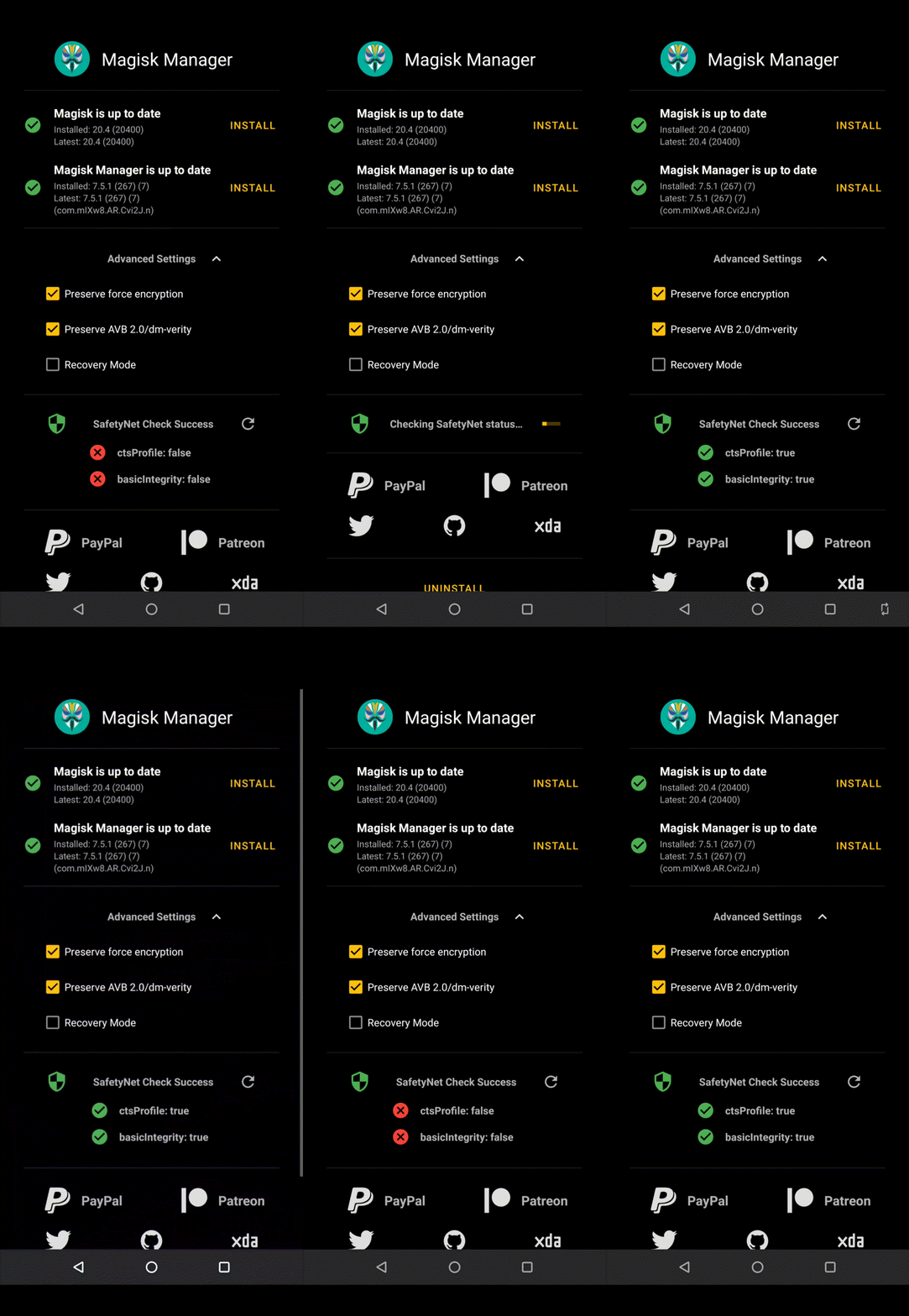
Using a third-party SafetyNet validator gives out the same result - sometimes the verification failed with:
Safety Net Request: success
Response signature validation: fail (Response payload validation failed)
 htfy96
on 27 Apr 2020
htfy96
on 27 Apr 2020
I am noticing on LineageOS 17.1 (Android 10) on my HTC One M8 that Magisk Hide doesn't seem to be working at all. RootBeer is detecting su for some reason, despite it is on the Hide-List and I even tried to disable and enable Magisk Hide but that didn't help. On my OnePlus 3 running Android 9 it is working perfectly fine so I think there might be something going on with Android 10 or that specific LineageOS Version. I didn't find anything except for #1823 which was closed for not providing enough information, but as I am running the same version of Magisk on both devices aswell as the same version of RootBeer I am more and more conviced that this is a bug. Any idea how I can further dig into this issue?
 Flole998
on 11 May 2020
Flole998
on 11 May 2020
Related issues
 Msprg
·
83Comments
Msprg
·
83Comments
 sabpprook
·
62Comments
sabpprook
·
62Comments
 0x192
·
40Comments
0x192
·
40Comments
 kam821
·
52Comments
kam821
·
52Comments
 okij1
·
39Comments
okij1
·
39Comments
Most helpful comment
@Slats2 Just want to put it on record that copy-pasting someone else's work (and there's nothing changed, nothing, you only added the last part about renaming the folder which you also copy pasted from here: https://forum.xda-developers.com/showpost.php?p=79152118&postcount=340) without giving any kind of credit is a crappy move.
Trying to score some kind of confirmation points by piggybacking off of someone else's hard work and research is a big deal. Don't...
If you really did any kind of research into this, that became null and void as soon as you did this. Your credibility is now zero.