Magisk: Manager crash trying to access Modules list with specific numbers of directories
The title of this report should suffice, but if it doesn't I have screen capped what is happening and dumped it here.
The magisk-logs you can find here.
I am using a Samsung Galaxy S6 G920F with LineageOS 17.1 (android 10), both magisk and manager are on the latest canary builds.
If i have missed something or if you require more information/logs/corona lemme know 😊
 QuinTeknoLife
All 37 comments
A logcat of the crash using Canary Manager 282 would be helpful. Only a small number of devices seem to have this issue.
How many modules do you have?
 osm0sis
on 31 Mar 2020
osm0sis
on 31 Mar 2020
magisk_log_20200331_120627.log
Here is a log and I have the same issue
 HTAEDFOLEGNA
on 31 Mar 2020
HTAEDFOLEGNA
on 31 Mar 2020
We need a logcat not a magisk log as it doesn't contain all the necessary information for this particular crash. Make sure to note the exact time when the crash occurred and paste both it here. Thanks.
 diareuse
on 31 Mar 2020
diareuse
on 31 Mar 2020
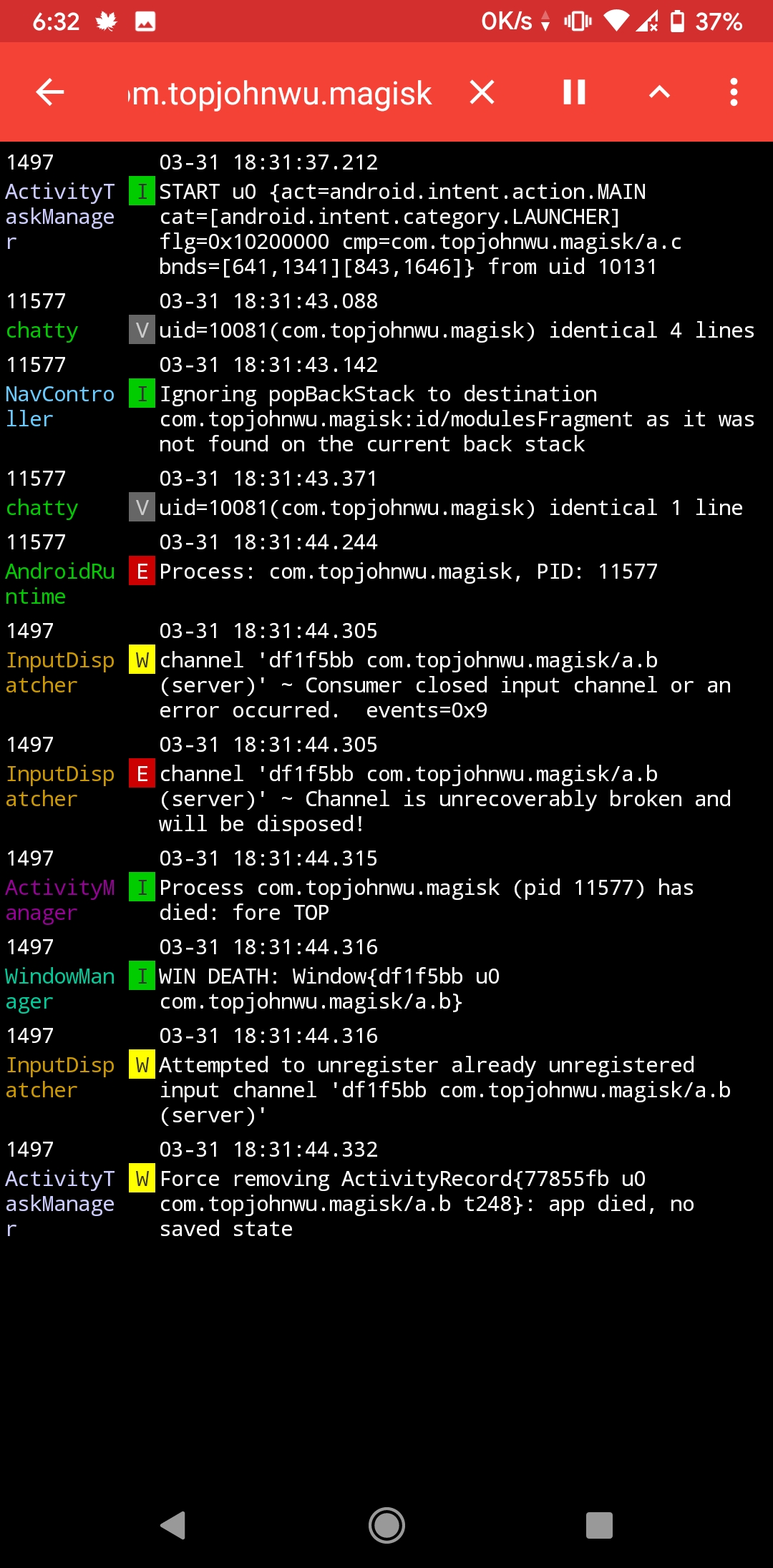
Redmi note 6 pro
Havoc os 3.3
Android 10
 kevin01523
on 31 Mar 2020
kevin01523
on 31 Mar 2020
I got the same problem. Pixel 4, March patch, latest canary.
logcat_03-31-2020_12-54-19.txt
 Charaktor
on 31 Mar 2020
Charaktor
on 31 Mar 2020
here's mine. Oneplus6t Android Q 10.3.2
logcat_03-31-2020_21-49-24.txt
edit:
no crash happens when data or wifi is turned off.
 ghost
on 31 Mar 2020
ghost
on 31 Mar 2020
logcat.txt
same here
latest canary manager 5537b083 (282) & magisk ef9d077c (20401), oneplus 7 pro, latest official havoc os 3.3 march 29 build
 Nolij
on 1 Apr 2020
Nolij
on 1 Apr 2020
We need a logcat not a magisk log as it doesn't contain all the necessary information for this particular crash. Make sure to note the exact time when the crash occurred and paste both it here. Thanks.
https://drive.google.com/file/d/1AMCJurbjyvvmOLUPL10pDjIGtlM1P_yV/view?usp=drivesdk
I triggered the crash a total of three times at timestamps
01:00:22
01:00:47 and
01:01:13
I hope these logs will be useful (:
QuinTeknoLife
on 1 Apr 2020
Doesn't crash when on safety mode.i managed to find out that some modules may be the cause of crashes for me. It does crash if i got app systemizer module and riru storage isolation module installed.it does still crash even if data or wifi is off for me
kevin01523
on 1 Apr 2020
Thanks all. We're good for logs now. I can also reproduce it on both my Galaxy Nexus (Lineage Marshmallow) and OnePlus 5 (Pixel Experience Pie). :+1:
It's definitely that java.lang.ArrayIndexOutOfBoundsException error.
osm0sis
on 1 Apr 2020
I do not know if 5537b083(282)(9) is supposed to address this or whether it's unrelated but the problem is still there, just saying 🤓
QuinTeknoLife
on 1 Apr 2020
If one hour ago I'm saying I reproduced the issue, then you know 282 is still effected. :roll_eyes::wink:
osm0sis
on 1 Apr 2020
If one hour ago I'm saying I reproduced the issue, then you know 282 is still effected.
Touché lol
QuinTeknoLife
on 1 Apr 2020
Is it fixed yet or do you need a logcat from s10 plus too
HTAEDFOLEGNA
on 1 Apr 2020
Thanks all. We're good for logs now. I can also reproduce it on both my Galaxy Nexus (Lineage Marshmallow) and OnePlus 5 (Pixel Experience Pie).
It's definitely that java.lang.ArrayIndexOutOfBoundsException error.
@HTAEDFOLEGNA When it's fixed someone on the dev team will close this issue
QuinTeknoLife
on 1 Apr 2020
😂
 1tuanhasan
on 1 Apr 2020
1tuanhasan
on 1 Apr 2020
decided to do some more testing, removed all installed modules using mm while in TWRP, and suddenly the crashing doesn't occur anymore. I shall now one by one add the modules back and report back what I might find.
QuinTeknoLife
on 5 Apr 2020
BINGO!! I have found the scoundrel that causes this issue (for me)!
It ended up being MagiskHidePropsConf which was making manager crash.
EDIT: seems I was wrong, after installing every module I was using before I am unable to replicate the crash. The crash that happened that made me BINGO seems to only have happened once.
QuinTeknoLife
on 5 Apr 2020
i used mm in twrp and it just sort of fixed itself, didnt install or uninstall anything other than mm
Nolij
on 5 Apr 2020
i used mm in twrp and it just sort of fixed itself, didnt install or uninstall anything other than mm
mm does nothing (besides letting me do what it should) like that for me lol, I love mm (anything CLI in general), has been a livesaver for bootlooping modules so many times
QuinTeknoLife
on 5 Apr 2020
I have one device (GN) with a bunch of modules crashing and one (OP5) with a few less also crashing, so I don't think it's directly related to that.
osm0sis
on 5 Apr 2020
I noticed something that you can access the modules tab if you quickly press the button after opening Magisk manager
 Aduser345
on 7 Apr 2020
Aduser345
on 7 Apr 2020
I noticed something that you can access the modules tab if you quickly press the button after opening Magisk manager
Weird, can confirm that on my OP5!
@diareuse, any chance that helps narrow down the cause of the java.lang.ArrayIndexOutOfBoundsException error?
osm0sis
on 8 Apr 2020
Yeah it is weird but if one switches to other tab and then back it crashes 😅😅
Aduser345
on 8 Apr 2020
That unfortunately doesn't help at all. I know where the issue is, what it causes, but I don't know how to fix it yet.
diareuse
on 8 Apr 2020
On my Samsung Galaxy On7 running API 23, I faced the same issue. It was working fine until I uninstalled the Energized module. After reboot, when I go to the Modules tab, the app instantly crashes.
Here is a logcat obtained using Android Studio. The crash was triggered at around 20:26:44 where you can see the ArrayIndexOutOfBoundsException.
The following is the logcat that has been filtered using "com.topjohnwu.magisk". However, it is at a different time. Note that this one does not show the above exception, but shows that the app has died.
 WrichikBasu
on 8 Apr 2020
WrichikBasu
on 8 Apr 2020
I was able to stop the crash on my Galaxy Nexus by going from 8 modules down to 7. Reproducibly. Didn't matter which module. 🤔
Edit: Also on my OP5. You can even directly delete the /data/adb/modules/* directories down to 7 modules without a reboot and reopen Manager and there won't be a crash anymore.
osm0sis
on 9 Apr 2020
@topjohnwu @diareuse
The conditions to trigger the crash are having exactly 8 or 9 modules. Any device I've tried. Less than 8, or greater than 9 and it works fine. This shouldn't be too hard to fix, knowing this.
osm0sis
on 9 Apr 2020
@topjohnwu @diareuse
The conditions to trigger the crash are having exactly 8 or 9 modules. Less than 8, or greater than 9 and it works fine. This shouldn't be too hard to fix, knowing this.
Really helpful, modules are working again¡😁
 h4rl0ck48
on 9 Apr 2020
h4rl0ck48
on 9 Apr 2020
@topjohnwu @diareuse
The conditions to trigger the crash are having exactly 8 or 9 modules. Any device I've tried. Less than 8, or greater than 9 and it works fine. This shouldn't be too hard to fix, knowing this.
Well, not in my case. I have 16 modules active + 2 disabled but Manager v282 keeps crashing then trying to access module list.
 QBANIN
on 9 Apr 2020
QBANIN
on 9 Apr 2020
Ah, there might be other "magic" numbers..
Edit: For me, I can make empty directories in /data/adb/modules/ and the crashes also exist for exactly 19 and 20 directories. So I have a hunch you miscounted and actually have 19 total.
Then I tested all the way up to 50 and it only triggers again at 41 and 42.
So, the "magic" broken numbers seem to be 7, 8, 19, 20, 41, 42 so far.
CC: @topjohnwu @diareuse
osm0sis
on 9 Apr 2020
Turns out this is an old bug, originally introduced with the redesign in 270 (0dc9f5c3), reported in #2300, and fixed in 272 (1e2de1bb).
It remained fixed as recently as 279 (ef9d077c), but has been mysteriously broken again starting with 280 (be8479fd).
https://github.com/topjohnwu/magisk_files/commits/canary/app-debug.apk
So, since 280 is here on Mar 29 and 279 is at "Update build.py" on Mar 28, most likely the regression happened in one of those 3 Manager commits on Mar 29. :+1:
Edit: On further testing, there's still a "consistently inconsistent" crash in 279, also related to the modules directory count, but the "every-time" crashes were gone and started again on 280. Hopefully both can be fixed. 🤞
osm0sis
on 9 Apr 2020
For me the crashes don't have any pattern at all. Before I'd have to go into the module tab dozens of times before it wouldn't crash. Different amounts of time waiting on the main screen didn't change my chances of crashing.
 gudenau
on 10 Apr 2020
gudenau
on 10 Apr 2020
@diareuse tracked down the underlying bug and will be pushing a fix branch/PR soon. Next Manager Canary after that should work! :+1:
osm0sis
on 11 Apr 2020
@diareuse tracked down the underlying bug and will be pushing a fix branch/PR soon. Next Manager Canary after that should work! 👍
Just out of curiosity, where was the bug?
WrichikBasu
on 11 Apr 2020
The thorough explanation will be posted in the commit message. Please be patient.
diareuse
on 11 Apr 2020
Canary with the fix is now out! 👏
osm0sis
on 19 Apr 2020
Related issues
 DenyDarko
·
53Comments
DenyDarko
·
53Comments
 sgs2ofameer
·
71Comments
sgs2ofameer
·
71Comments
 Akitakek
·
40Comments
Akitakek
·
40Comments
 okij1
·
39Comments
okij1
·
39Comments
 0x192
·
40Comments
0x192
·
40Comments
Most helpful comment
Thanks all. We're good for logs now. I can also reproduce it on both my Galaxy Nexus (Lineage Marshmallow) and OnePlus 5 (Pixel Experience Pie). :+1:
It's definitely that java.lang.ArrayIndexOutOfBoundsException error.