Live-share: Live share not working - no reason why given
Describe what happened:
When I select the share read/write option after I've installed the live share extension pack, nothing happens. In the bottom left I would temporarily see "activating extensions". But that stops running. I don't get a link to share with my contacts, nothing. Funny thing is, this was just working 10 days ago because I just used it recently.
What was your system configuration?
Version: 1.49.1
Commit: 58bb7b2331731bf72587010e943852e13e6fd3cf
Date: 2020-09-16T23:21:17.533Z
Electron: 9.2.1
Chrome: 83.0.4103.122
Node.js: 12.14.1
V8: 8.3.110.13-electron.0
OS: Darwin x64 19.6.0
Target Platform or Language:[Node.js]
Live Share Extension Pack Version: 0.4.0
Steps to Reproduce / Scenario:
- Go to "live share extension menu button on left"
- Click on "share read/write or share read-only, or join... anyone of them"
- Nothing to scroll down to. Nothing happens
Please attach logs to this issue:
You can access them via the Live Share: Export Logs command from the command palette (ctrl + shift + p) and attach them to this issue
liveshareLogs.zip
Screenshots
If applicable, add screenshots to help explain your problem.
 dandra-mo
All 17 comments
Thanks for reporting this issue. Unfortunately there is not enough information in the attached logs to investigate this issue. The logs look completely normal in fact. One thing to try is to uninstall Live Share extension pack and install only Live Share from VSCode markeplace. If the issue still repros, set "Live Share: Diagnostic Logging" to true, reproduce the issue, export and share the logs again.
 IlyaBiryukov
on 21 Sep 2020
IlyaBiryukov
on 21 Sep 2020
I'm having the same issue - clicking the buttons results in absolutely nothing happening. Interestingly, when I attempt to run the commands from the command palette, I do receive an error: 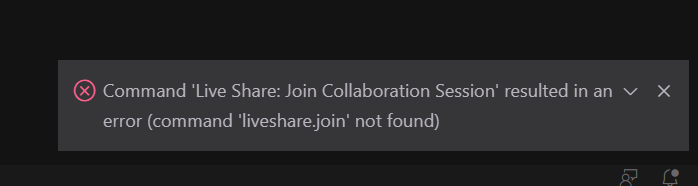
Details:
- OS is Windows 10
- VS Code is fully up to date
- Re-installing the extension did not help
- The Extension Pack version did not help
- Repair installation command did not help
I also don't see the "Live Share" icon in the lower left, so that might be related.
Maybe this additional info is helpful @IlyaBiryukov
 blewisio
on 24 Sep 2020
blewisio
on 24 Sep 2020
Having commands, buttons and viewlet visible means that VSCode integrated the extension. Nothing happening when you click on the buttons / execute the commands means that the extension didn't register handlers for them. Something must be happening on extension activation that Live Share doesn't log.
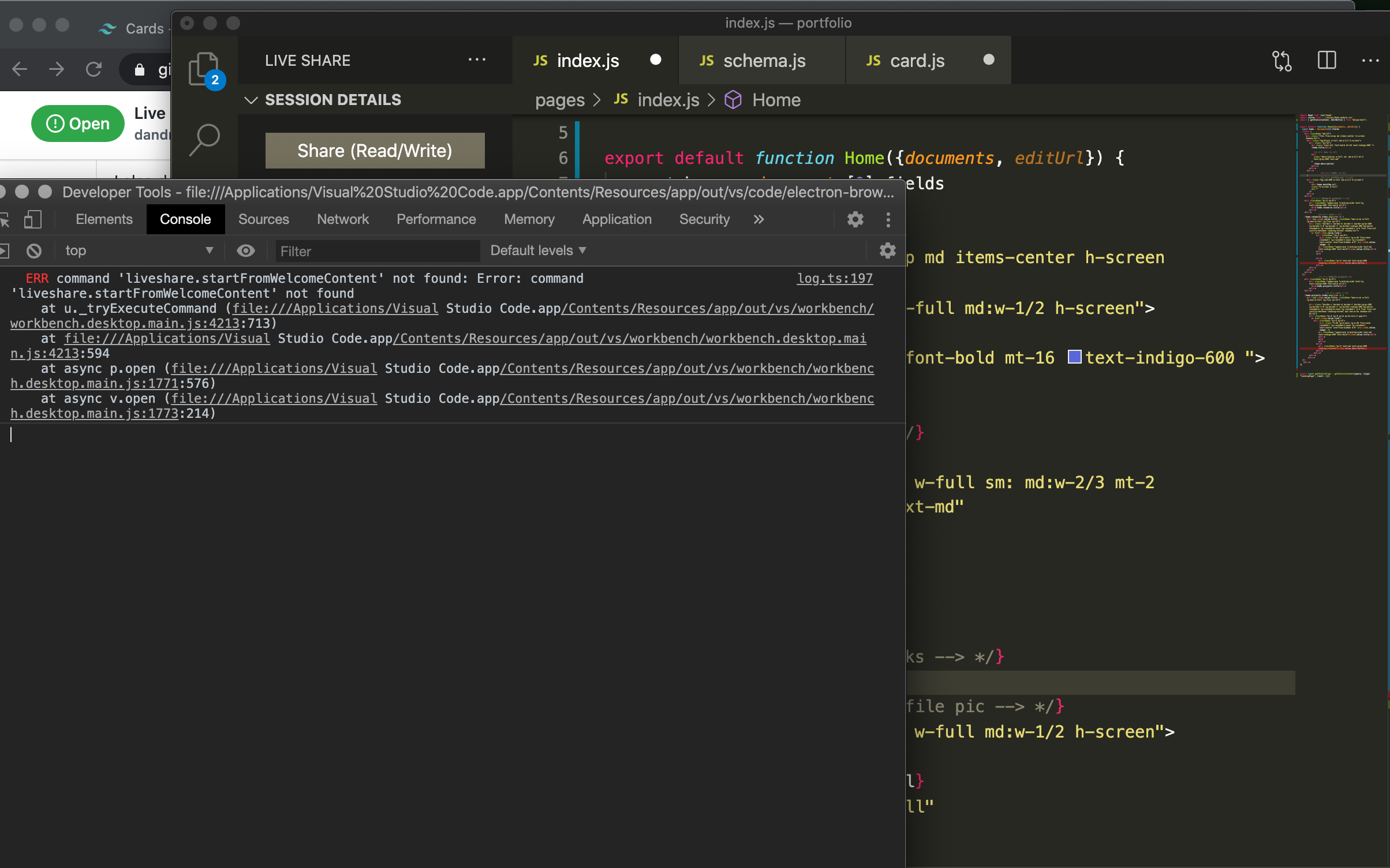
Can you please check developer tools console in VSCode? See if there any errors related to Live Share there.
You can open it with Help -> Toggle Developer Tools, then select "Console" tab.
IlyaBiryukov
on 24 Sep 2020
When I opened my dev tools in VS code after trying to start a Live Share, I got an error. I've attached it here.
dandra-mo
on 24 Sep 2020
Also, after having uninstalled the Extension Pack and only installing Live Share, still nothing. The log is here:
liveShareLogs.zip
As well, here is a screenshot of my console:

dandra-mo
on 24 Sep 2020
It seems to be the Live Share welcome page misbehaving. @aletsdelarosa can you please take a look?
IlyaBiryukov
on 24 Sep 2020
@aletsdelarosa , here is the bug to track this issue
https://devdiv.visualstudio.com/DevDiv/_workitems/edit/1219457
Given that it worked before and just stopped working recently, it may be a regression in 1.0.2740 LS release.
IlyaBiryukov
on 25 Sep 2020
Hello!
@dandra-mo or @blewisio Can you try it with the new release? Version 1.0.2902 released today. I just tried it and I couldn't repro.
 aletsdelarosa
on 29 Sep 2020
aletsdelarosa
on 29 Sep 2020
@aletsdelarosa, I just tried with 1.0.2902 and I'm still seeing it - (command 'liveshare.start' not found).
blewisio
on 29 Sep 2020
@aletsdelarosa could you please provide any update you have here?
 fubaduba
on 13 Oct 2020
fubaduba
on 13 Oct 2020
After updating to VS Code v1.50.0, Live Share seems to be magically working for me now.
blewisio
on 13 Oct 2020
@aletsdelarosa could you please provide any update you have here?
I couldn't repro and it looks like it fails in different commands, not just with the Welcome Page.
@dandra-mo could you check if it's fixed for you in Version 1.50.0?
aletsdelarosa
on 13 Oct 2020
Yes, I will check this as well. I have been traveling, give me til tomorrow
and I'm going to check it out and hopefully it's working
On Tue, Oct 13, 2020, 17:08 Alex de la Rosa notifications@github.com
wrote:
@aletsdelarosa https://github.com/aletsdelarosa could you please
provide any update you have here?I couldn't repro and it looks like it fails in different commands, not
just with the Welcome Page.@dandra-mo https://github.com/dandra-mo could you check if it's fixed
for you in Version 1.50.0?—
You are receiving this because you were mentioned.
Reply to this email directly, view it on GitHub
https://github.com/MicrosoftDocs/live-share/issues/3875#issuecomment-708009775,
or unsubscribe
https://github.com/notifications/unsubscribe-auth/AQOCLY6K5CAVQT26R2KN3I3SKS6TNANCNFSM4RTGYX5Q
.
dandra-mo
on 14 Oct 2020
Ok, so I've updated to 1.50.0 and live share seems to be working just fine now. I can see my contacts, It gives me a link I can copy, I've signed it with Github (all of which it never asked me/allowed me to do before). Later today or tomorrow when I have a collab session and actually use Live share, I can give more feedback that it actually works. Thank you for your follow up! Ill do the same and follow up when I use it.
dandra-mo
on 17 Oct 2020
This is still an issue as of 1.50.1 on Windows 10 and macOS.
 stevenventimiglia
on 3 Nov 2020
stevenventimiglia
on 3 Nov 2020
Still an issue as of VSCode 1.51.1 and LiveShare 1.0.3206 on Windows 10.
 waggonerjake
on 24 Nov 2020
waggonerjake
on 24 Nov 2020
This is still an issue as of VSCode 1.52.1 and a fresh install of LiveShare 1.0.3449 on Pop OS
 BastLast
on 12 Jan 2021
BastLast
on 12 Jan 2021
Related issues
 hez2010
·
4Comments
hez2010
·
4Comments
 jleider
·
3Comments
jleider
·
3Comments
 Luchiwis
·
3Comments
Luchiwis
·
3Comments
 Chuxel
·
3Comments
Chuxel
·
3Comments
 tamuratak
·
3Comments
tamuratak
·
3Comments
Most helpful comment
Still an issue as of VSCode 1.51.1 and LiveShare 1.0.3206 on Windows 10.