Live-share: Shared debugging does not work on Linux hosts
Issue Type: Bug
Starting a debug session (C and Python tested) does not present any option to join the debug session for connected participants.
The debug session also isn't displayed in the session details.
The Python test case in particular was extremely basic (a few lines of Python code, default Python debug launch config)
Some extra testing has shown this is only the case with Linux hosts - a Linux client connecting to a Windows host is able to see shared debug sessions.
Extension version: 1.0.2427
VS Code version: Code 1.47.1 (485c41f9460bdb830c4da12c102daff275415b53, 2020-07-14T00:13:57.513Z)
OS version: Linux x64 5.4.0-40-generic
 skirkham
All 9 comments
Thanks for reaching out. Your logs may provide us with helpful information. You can access them via the Live Share: Export Logs command from the command palette (ctrl + shift + p) and attach them to this issue.
 setaskin
on 17 Jul 2020
setaskin
on 17 Jul 2020
@jramsay assigning to you , feel free to reassign if it is not your area.
setaskin
on 17 Jul 2020
Logs as requested.
livesharelogs.zip
skirkham
on 22 Jul 2020
I have been trying to use both the Live Share and Remote Development extension packs together. Specifically the Remote - Containers extension.
I have tested both the C++ (vscode-remote-try-cpp) and Node (vscode-remote-try-node) samples. The containers are Linux just like this issue.
- Open the sample (https://code.visualstudio.com/docs/remote/containers-tutorial#_get-the-sample)
- Install the Live Share Extension Pack in the Container
- Start a Live Share session
- Have a participant join the session
- The host starts debugging
The debug session it is not available to participants. I expect the session to be available to participants.
I believe the cause of this issue may be how Microsoft.VisualStudio.LiveShare.Debugger.VSCodeHostAdapter is started by the Live Share extension. It exits with the following:
A fatal error occurred. The required library libhostfxr.so could not be found.
If this is a self-contained application, that library should exist in [/home/vscode/.vscode-server/extensions/ms-vsliveshare.vsliveshare-1.0.3014/dotnet_modules/].
If this is a framework-dependent application, install the runtime in the global location [/usr/share/dotnet] or use the DOTNET_ROOT environment variable to specify the runtime location or register the runtime location in [/etc/dotnet/install_location].
The .NET Core runtime can be found at:
- https://aka.ms/dotnet-core-applaunch?missing_runtime=true&arch=x64&rid=debian.10-x64
Adding a /etc/dotnet/install_location file in the container with the value of the DOTNET_ROOT environment variable for the vsls-agent process causes the debug session to correctly appear for participants in VS Code or on the web (e.g. /home/vscode/.vscode-server/data/User/globalStorage/ms-vsliveshare.vsliveshare/dotnet-3.1.1). The debugging experience for participants doesn't fully work correctly with this workaround (current line not highlighted, source files don't open for participants and there is an error notification), but these issues are separate and may be unrelated to Live Share itself.
I followed https://docs.microsoft.com/en-us/visualstudio/liveshare/use/vscode#install-linux-prerequisites using a terminal in the container as a first step but it did not resolve the issue.
VS Code 1.50.0
Windows 10.0.18363.1139
Live Share Extension 1.0.3014
The containers run Linux 4.19.76-linuxkit x86_64
 pgfisico
on 18 Oct 2020
pgfisico
on 18 Oct 2020
I came across this same issue today in Ubuntu:
(The debugging session(F5) was started by the client on the right, yet only the server on the left sees the debug options)
(I faced this issue while doing the live session with a remote user, reproduced it locally after that)
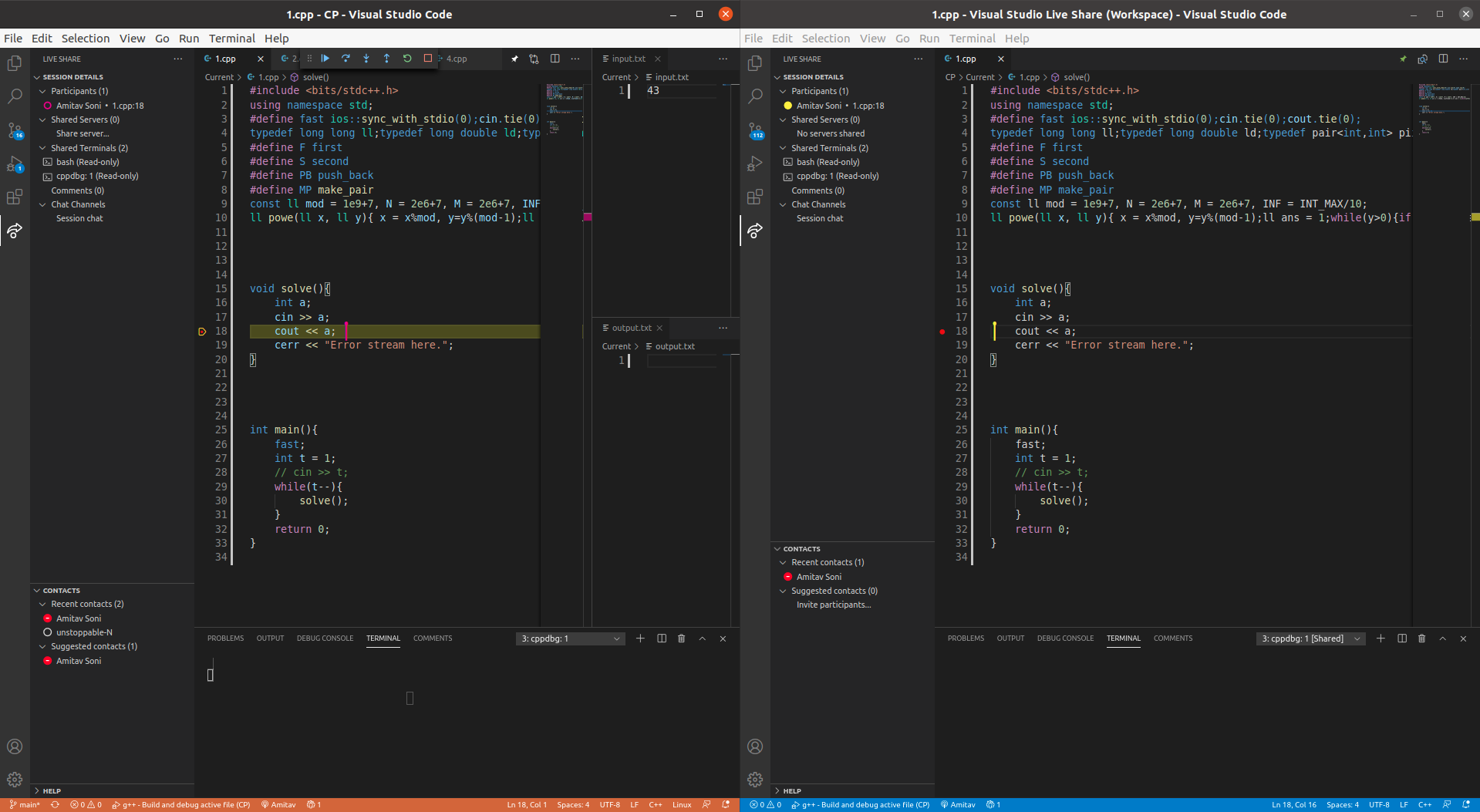
My liveshare settings:
{
    "liveshare.allowGuestDebugControl": true,
    "liveshare.allowGuestTaskControl": true,
    "liveshare.guestApprovalRequired": true,
    "liveshare.languages.allowGuestCommandControl": true
}
 codeict
on 20 Oct 2020
codeict
on 20 Oct 2020
Another Linux host here where debugging sessions don't work. I can provide logs if needed.
 pamarcos
on 25 Oct 2020
pamarcos
on 25 Oct 2020
I had this issue with both host and client on Macs. I can also provide logs if needed.
 rbingham
on 30 Oct 2020
rbingham
on 30 Oct 2020
@rbingham for a similar Mac issue see https://github.com/MicrosoftDocs/live-share/issues/3970
 andig
on 19 Nov 2020
andig
on 19 Nov 2020
Closing this as a duplicate of #3620, so that we can consolidate the conversation. Thanks for your patience here!
 lostintangent
on 22 Dec 2020
lostintangent
on 22 Dec 2020
Related issues
 lockoncode
·
3Comments
lockoncode
·
3Comments
 dec0dOS
·
4Comments
dec0dOS
·
4Comments
 evasgit
·
3Comments
evasgit
·
3Comments
 PranavGPR
·
3Comments
PranavGPR
·
3Comments
 Chuxel
·
4Comments
Chuxel
·
4Comments
Most helpful comment
I came across this same issue today in Ubuntu:

(The debugging session(
F5) was started by the client on the right, yet only the server on the left sees the debug options)(I faced this issue while doing the live session with a remote user, reproduced it locally after that)
My liveshare settings: