Live-share: [VS Code] PowerShell launch config commands aren’t being properly resolved
Product and Version [VS/VSCode]: VSCode v1.25.1
OS Version [macOS/Windows]: Windows 10 1803
Live Share Extension Version: 0.3.423
PowerShell Extesion Version: 1.8.1
Target Platform or Language [e.g. Node.js]: PowerShell
Scenario:
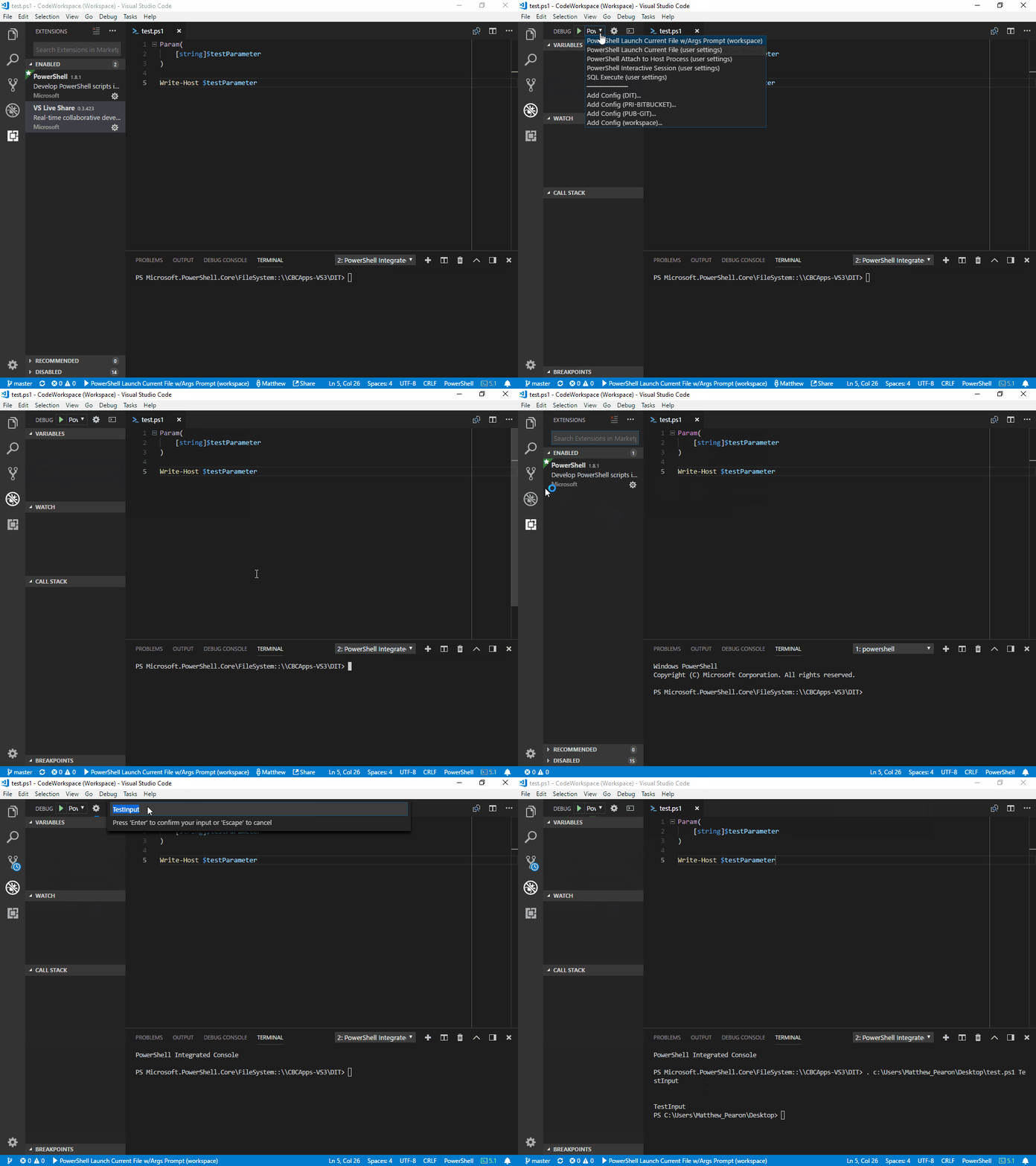
Please see the attached GIF and Logs.
With the vsLiveShare extension enabled, the 'PowerShell Launch Current File w/Args Prompt' configuration is non-functional and returns an error. If you disable the extension, it behaves as expected.
This has been referenced in vscode-powershell #1315, but appears to be isolated to use with the vsLiveShare extension.
Steps to Reproduce
- Install PowerShell Extension
- Install vsLiveShare Extension
- In the debug panel, choose 'PowerShell Launch Current File w/Args Prompt'
- Launch the Debug Session
_In case you don't have the configuration:_
"settings": {
    "launch": {
        "configurations": [
            {
                "type": "PowerShell",
                "request": "launch",
                "name": "PowerShell Launch Current File w/Args Prompt",
                "script": "${file}",
                "args": [ "${command:SpecifyScriptArgs}" ],
                "cwd": "${file}"
            },
        ]
    }
}
 mpearon
All 4 comments
@mpearon Hmm, it looks like we aren't correctly resolving the command:SpecifyScriptArgs command for some reason. If you remove that, it works. We'll look into this right now, and will report back. Apologies for the issue, and thanks for reporting it!
 lostintangent
on 20 Jul 2018
lostintangent
on 20 Jul 2018
Hi, we have a fix for this particular issue and will be part of the release of next week.
 rodrigovaras
on 23 Jul 2018
rodrigovaras
on 23 Jul 2018
@mpearon The fix for this has been resolved in the latest version of Live Share. If you could update your extension, and let us know if that unblocks you, that would be greatly appreciated. Thanks!
lostintangent
on 31 Jul 2018
This is working as expected! Thank you, @lostintangent, @rodrigovaras and team! :)
mpearon
on 1 Aug 2018
Related issues
 tamuratak
·
3Comments
tamuratak
·
3Comments
 Chuxel
·
4Comments
Chuxel
·
4Comments
 dec0dOS
·
4Comments
dec0dOS
·
4Comments
 Luchiwis
·
3Comments
Chuxel
·
3Comments
Luchiwis
·
3Comments
Chuxel
·
3Comments