Live-share: Terminal width bug
Issue Type: Bug
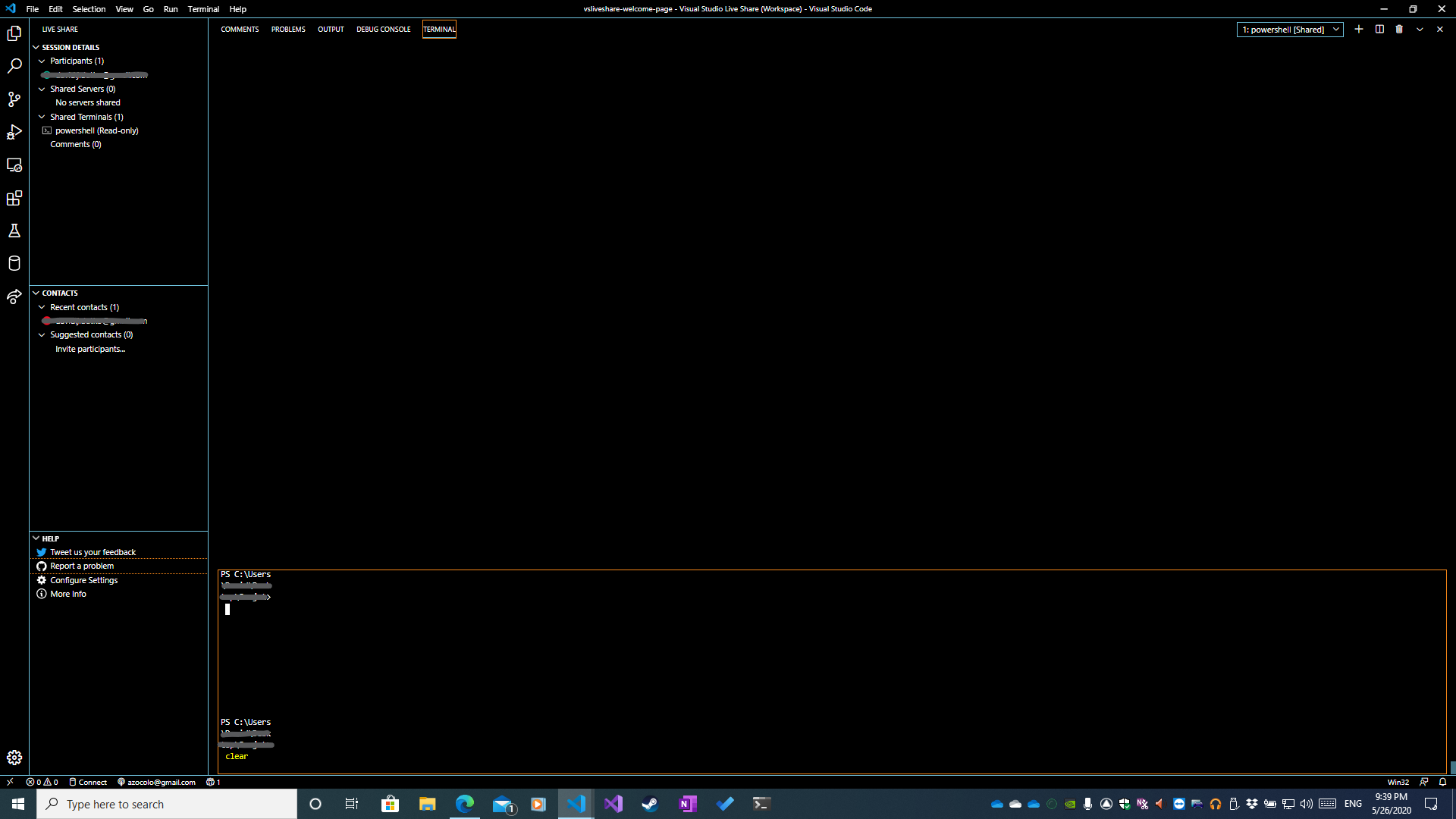
Terminal resizes to about 11 characters wide, regardless of frame size after resizing borders.
Here is a picture of the terminal fully expanded. The frame is not full height, and the actual rendered terminal is only 11 characters wide.
Extension version: 1.0.2236
VS Code version: Code 1.45.1 (5763d909d5f12fe19f215cbfdd29a91c0fa9208a, 2020-05-14T08:27:35.169Z)
OS version: Windows_NT x64 10.0.18363
System Info
|Item|Value|
|---|---|
|CPUs|Intel(R) Core(TM) i7-4770K CPU @ 3.50GHz (8 x 3500)|
|GPU Status|2d_canvas: enabled
flash_3d: enabled
flash_stage3d: enabled
flash_stage3d_baseline: enabled
gpu_compositing: enabled
multiple_raster_threads: enabled_on
oop_rasterization: disabled_off
protected_video_decode: unavailable_off
rasterization: enabled
skia_renderer: disabled_off_ok
video_decode: enabled
viz_display_compositor: enabled_on
viz_hit_test_surface_layer: disabled_off_ok
webgl: enabled
webgl2: enabled|
|Load (avg)|undefined|
|Memory (System)|15.92GB (7.87GB free)|
|Process Argv|-n|
|Screen Reader|no|
|VM|0%|
 AadamZ5
All 7 comments
Hi,
The actual terminal size is the smallest across all participants in the collaboration session. Somebody joined to the session had a very narrow terminal window.
Duplicate of #3143
 IlyaBiryukov
on 27 May 2020
IlyaBiryukov
on 27 May 2020
Hi,
The actual terminal size is the smallest across all participants in the collaboration session. Somebody joined to the session had a very narrow terminal window.
Duplicate of #3143
This seems like a viable explanation, but there was only one other person in the session with me. I was an attendee to the other's session. I asked them multiple times if there terminal was looking extremely narrow, but they had a normal viewport. I believe this to be a bug.
AadamZ5
on 27 May 2020
Other possibility is that their terminal window was narrow at some point, and the narrow text you see is the result of that. If you make terminal show more text, will it be normal width, or still narrow?
IlyaBiryukov
on 27 May 2020
It is possible that their terminal was narrow at one point, but not for the duration of the connection. My shared terminal instance (my view of host's terminal) remained that size, but if the host created another terminal, the new instance would be the correct rendered expected width with the old instance remaining distorted.
I'll try some things out later to experiment. I'll let you know the exact process I did to get there, and what I tried to resolve the issue. I will post back here with that info.
AadamZ5
on 27 May 2020
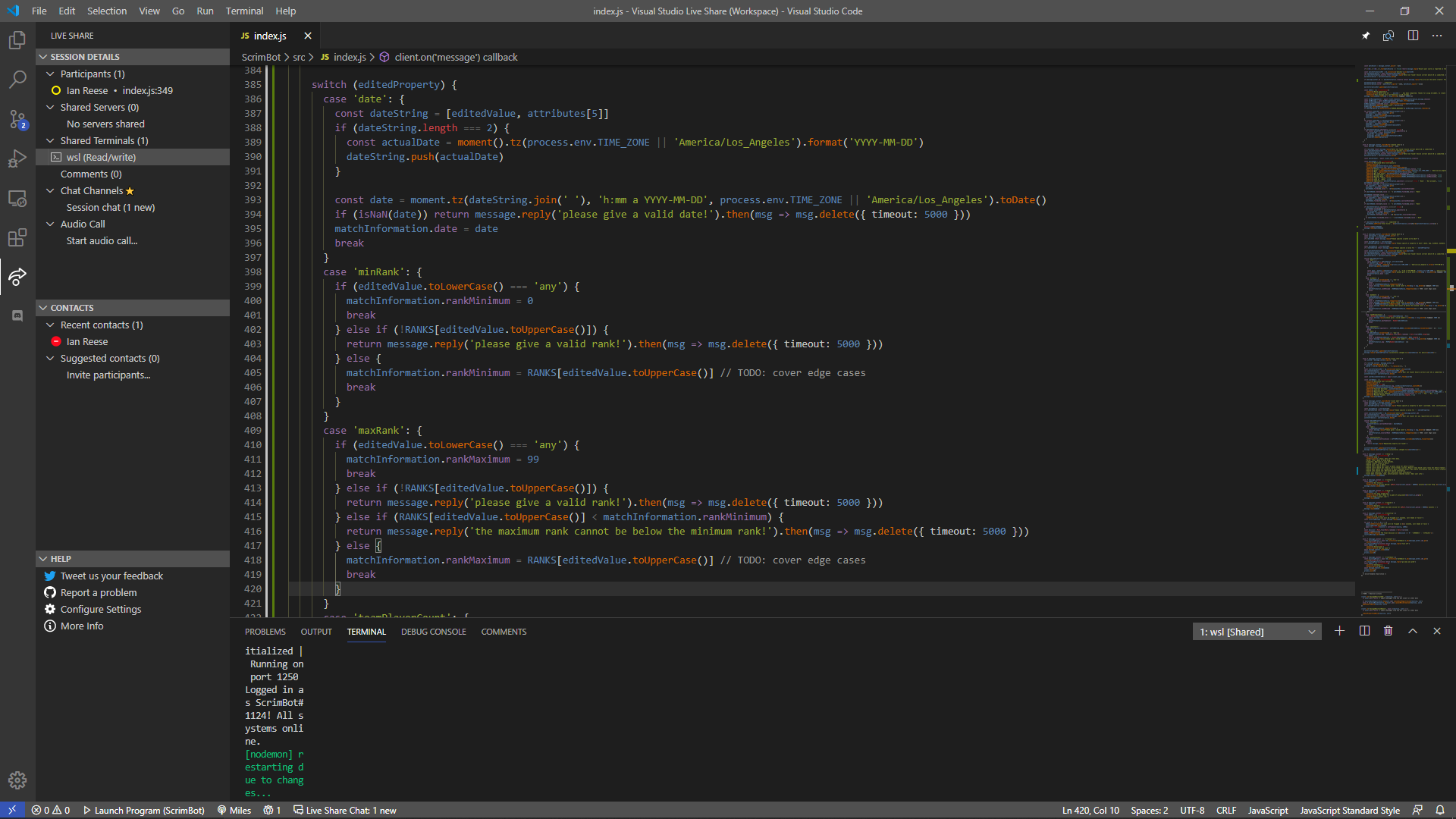
I am also running into the same issue, and there has only been two of us in the terminal the whole time. I closed and reopened the terminal screen (not the actual terminal) and it had the same width bug seen above.
 MomoMiles
on 6 Jun 2020
MomoMiles
on 6 Jun 2020
I can confirm this bug happens in my sessions too. This comment:
The actual terminal size is the smallest across all participants in the collaboration session. Somebody joined to the session had a very narrow terminal window.
Really helped me zero in on a hypothesis (thanks @IlyaBiryukov)
Folks on my team use window managers like Spectacle, Amethyst, etc. to handle the sizing of windows automatically. We get this issue popping up a lot where a terminal is very small in width and no amount of closing/reopening the terminal fixes it. Here's what (we think) is happening:
1) Host initiates a share session and sends me a link on slack
2) i click the link, get to the browser window which attempts to open the share link in vscode
3) a new VSCode window opens with a very narrow width
4) vscode captures my width as i enter the session
5) my window manager expands the VS Code window to my desired width according to how I've set up my window layout.
6) My liveshare session comes online but my terminal is way too narrow.
3-5 happen so quickly that i can't actually see them happening.
I have been able to solve this problem by not opening a new VS Code window. When this issue occurs, I:
- exit the collaboration session,
- open the command palette
- execute "Live Share: Join Collaboration Session" command
- paste link in dialog box
My VS Code window never changes width in this scenario, since my browser doesn't trigger the creation of a new instance of VS Code on my machine. The terminal looks correct and stays correct after this.
Perhaps polling could solve this issue? Periodically polling participants' terminal width during the session and updating the host's terminal width to be the least of all participant widths instead of doing that only once upon joining a session?
Not sure if other users reporting this issue are also using 3rd party software that manages their open windows, but I wouldn't be surprised as tools like Spectacle are pretty popular with folks I work with.
 neilcode
on 10 Jun 2020
neilcode
on 10 Jun 2020
I have seen this when neither person in the session has a terminal that narrow.
 jmacmahon
on 8 Sep 2020
jmacmahon
on 8 Sep 2020
Related issues
 jpopadak
·
3Comments
jpopadak
·
3Comments
 Chuxel
·
3Comments
Chuxel
·
3Comments
 squillace
·
3Comments
squillace
·
3Comments
 mpearon
·
4Comments
mpearon
·
4Comments
 hez2010
·
4Comments
hez2010
·
4Comments
Most helpful comment
I can confirm this bug happens in my sessions too. This comment:
Really helped me zero in on a hypothesis (thanks @IlyaBiryukov)
Folks on my team use window managers like Spectacle, Amethyst, etc. to handle the sizing of windows automatically. We get this issue popping up a lot where a terminal is very small in width and no amount of closing/reopening the terminal fixes it. Here's what (we think) is happening:
1) Host initiates a share session and sends me a link on slack
2) i click the link, get to the browser window which attempts to open the share link in vscode
3) a new VSCode window opens with a very narrow width
4) vscode captures my width as i enter the session
5) my window manager expands the VS Code window to my desired width according to how I've set up my window layout.
6) My liveshare session comes online but my terminal is way too narrow.
3-5 happen so quickly that i can't actually see them happening.
I have been able to solve this problem by not opening a new VS Code window. When this issue occurs, I:
My VS Code window never changes width in this scenario, since my browser doesn't trigger the creation of a new instance of VS Code on my machine. The terminal looks correct and stays correct after this.
Perhaps polling could solve this issue? Periodically polling participants' terminal width during the session and updating the host's terminal width to be the least of all participant widths instead of doing that only once upon joining a session?
Not sure if other users reporting this issue are also using 3rd party software that manages their open windows, but I wouldn't be surprised as tools like Spectacle are pretty popular with folks I work with.