Live-share: Unable to sign-in using github
Product and Version [VS/VSCode]: 1.41.0
OS Version [macOS/Windows]: ubuntu 18.04
Live Share Extension Version: v1.0.1374
Steps to Reproduce / Scenario:
- Go to 'VScode'
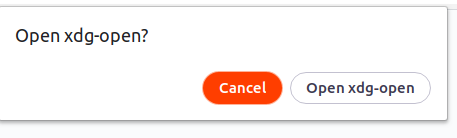
- Click on 'LiveShare option in bottom, click on sign-in using Github. Authorize Github to Liveshare then it will opens xdg-open page and it will be blank page'
Screenshots


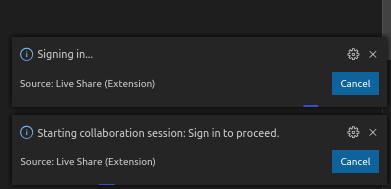
When I come back and check VS code ii will shows
Logs
logs.zip
 AchalaSB
All 17 comments
Any solution to this??
Still facing this issue.
AchalaSB
on 17 Jan 2020
adding , @Moniarchy and @legomushroom
 setaskin
on 17 Jan 2020
setaskin
on 17 Jan 2020
@AchalaSB, what browser are you using to sign in? Also, once you successfully authenticate and are redirected to VS Code, does the message "Signing in..." just hang there until you cancel it?
 Moniarchy
on 17 Jan 2020
Moniarchy
on 17 Jan 2020
@Moniarchy I was seeing this problem as well. For me, the redirection to VS Code didn't work at all because there was no handler for the code-oss URIs. When I hit "Open xdg-open" it just defaulted to open the URI in the browser which does nothing.
Fix for me is to configure XDG for this URI type and I am able to login with the browser:
xdg-mime default code-oss-url-handler.desktop x-scheme-handler/code-oss
Btw, I am using arch linux (OP says they are using Ubuntu) and it may be a packaging issue since it looks like they are patching @@URLPROTOCOL@@ manually before gulp runs.
 aabmass
on 23 Jan 2020
aabmass
on 23 Jan 2020
Also, the vsls URIs for opening a session weren't working either until I did the same thing:
xdg-mime default code-oss-url-handler.desktop x-scheme-handler/vsls
Does the extension need to be updated to configure for vsls URIs?
aabmass
on 23 Jan 2020
@Moniarchy I tried both in brave and chrome.
Yes it is singing in message is hanging. until I press cancel button
AchalaSB
on 24 Jan 2020
@Moniarchy @legomushroom @setaskin Any upadte on this ?
I'm in 1.43 version. When this issue will be fixed? any alternative?
AchalaSB
on 26 Mar 2020
Exact same problem here in Ubuntu
 daviyisu
on 10 Apr 2020
daviyisu
on 10 Apr 2020
@daviyisu Can you try running Live Share: Disable VSCode account authentication and try signing in again? Please let us know if this unblocks you.
 dlebu
on 10 Apr 2020
dlebu
on 10 Apr 2020
@dlebu I fixed it by using Firefox instead of Opera as my browser.
daviyisu
on 10 Apr 2020
I tried Live Share: Disable VSCode account authentication but it says
Starting collaboration session: Could not connect to the server. HTTPS connection failed, verify there are no self-signed certificates or custom cert validation policies blocking Live Share.
I have tried by changing network mode to auto, direct, relay same error
I tried in all browsers like brave, chrome, opera, firefox nothing is worked
AchalaSB
on 12 Apr 2020
I see you have already tried the workaround.
Can you update to recent versions of VS Code and LiveShare and confirm nothing works? The connection failure indicates there is something in your network that prevents from reaching LiveShare services.
 BrunoGuardia
on 15 May 2020
BrunoGuardia
on 15 May 2020
@BrunoGuardia
VSCode version: 1.45
OS Version : ubuntu 18.04
Live Share Extension Version: v1.0.2169 (May 7th, 2020)
Nope, nothing worked.
Tried usercode, disabled account authentication.
AchalaSB
on 17 May 2020
I'm having the same issue. Can't make VsCode prompt browser loggin page
 ralexrdz
on 20 May 2020
ralexrdz
on 20 May 2020
Also experiencing this issue with Ubuntu 20.04. None of the proposed solutions in this thread work in my case.
 rrhodes
on 3 Aug 2020
rrhodes
on 3 Aug 2020
I'm facing the same issue
 toluschr
on 9 Aug 2020
toluschr
on 9 Aug 2020
I noticed that the desktop file was missing.
I fixed it by downloading the code package from another distros repository ( https://www.archlinux.org/packages/community/x86_64/code/download/) and copying code-oss-url-handler.desktop to /usr/local/share/applications.
After that, I ran xdg-mime default code-oss-url-handler.desktop x-scheme-handler/code-oss . It works fine now.
toluschr
on 9 Aug 2020
Related issues
 jleider
·
3Comments
jleider
·
3Comments
 squillace
·
3Comments
squillace
·
3Comments
 Chuxel
·
3Comments
Chuxel
·
3Comments
 tamuratak
·
3Comments
tamuratak
·
3Comments
 Luchiwis
·
3Comments
Luchiwis
·
3Comments
Most helpful comment
@Moniarchy I was seeing this problem as well. For me, the redirection to VS Code didn't work at all because there was no handler for the
code-ossURIs. When I hit "Open xdg-open" it just defaulted to open the URI in the browser which does nothing.Fix for me is to configure XDG for this URI type and I am able to login with the browser:
Btw, I am using arch linux (OP says they are using Ubuntu) and it may be a packaging issue since it looks like they are patching
@@URLPROTOCOL@@manually before gulp runs.