Live-share: Error with salesforce.salesforcedx-vscode-replay-debugger debugger extension
Product and Version [VS/VSCode]: VS Code 1.23.1 (also on VS Code Insiders)
OS Version [macOS/Windows]: macOS (also reproduced on Windows)
Live Share Extension Version: 0.3.114
Target Platform or Language [e.g. Node.js]: Apex Debugger
Attached is the zip file of the results of "Live Share: Export Logs" command
vslive-issue.zip
Steps to Reproduce / Scenario:
- Install the necessary extensions (the zip file has the list of extensions). You don't need to start a VS Live Session. Just having the extension installed is sufficient.
- Check out https://github.com/forcedotcom/sfdx-dreamhouse/tree/nick/trailheadx-debuggers
- Launch "Apex Replay Debugger (Reillustrate Issue).
- Hit the
HandleRequestAsyncerror. - Disable the VS Live extension.
- Launch "Apex Replay Debugger (Reillustrate Issue).
- Notice that you are able to debug as normal.
Attached is the .gif.

I suspect the issue is because we have a special initialization sequence as part of the launch sequence. Basically we augment our language server to also be able to receive an additional getLineBreakpointInfo JSON-RPC request. And the debugger sends this request over to the language server as it starts to get line breakpoint information. We need some special information about our code files that only an active language server can provide before we can set the breakpoints (it's a special artifact of how our system works).
This is only affecting the debugger. Our augmented language server for Apex runs fine with VS Live in VS Code.
Here's the relevant portion of the log:
[2018-05-16 00:56:56.561 Debug.HostAdapter I] Microsoft.Cascade.VSCodeHostAdapter v0.3.114.65050 (pid: 95947)
[2018-05-16 00:56:56.669 Debug.HostAdapter V] ctor proxyType:apex-replay proxyDebugServer:
[2018-05-16 00:56:56.946 Debug.HostAdapter V] [Trace]<--   C (initialize-1): {"command":"initialize","arguments":{"clientID":"vscode","clientName":"Visual Studio Code","adapterID":"vslsShare","pathFormat":"path","linesStartAt1":true,"columnsStartAt1":true,"supportsVariableType":true,"supportsVariablePaging":true,"supportsRunInTerminalRequest":true,"locale":"en"},"type":"request","seq":1}
[2018-05-16 00:56:57.057 Debug.HostAdapter V] HandleRequestWithHostAsync request:InitializeRequest
[2018-05-16 00:56:57.213 Debug.HostAdapter V] LaunchAdapterHostAsync NodeFork on program:/Users/nchen/.vscode/extensions/salesforce.salesforcedx-vscode-replay-debugger-42.14.0/out/src/adapter/apexReplayDebug.js
[2018-05-16 00:56:57.247 Debug.HostAdapter V] < #1 [1] VSCodeAdapterService.nodeFork(<121:c20c1a06>)
[2018-05-16 00:56:57.488 Debug.HostAdapter V] > #1 [1] Result: <>
[2018-05-16 00:56:57.495 Debug.HostAdapter V] LaunchAdapterHostAsync connecting to stdIn:/var/folders/4v/29d6fthd3bv1zmwn9rj7rq2rlc95ms/T/CoreFxPipe_vscode-4be09715f6f7cec4b536.sock stdOut:/var/folders/4v/29d6fthd3bv1zmwn9rj7rq2rlc95ms/T/CoreFxPipe_vscode-956bf3769ebd38469da9.sock
[2018-05-16 00:56:57.523 Debug.HostAdapter V] [Trace]#host# --> C (initialize-1): {"command":"initialize","arguments":{"clientID":"vscode","clientName":"Visual Studio Code","adapterID":"apex-replay","locale":"en","linesStartAt1":true,"columnsStartAt1":true,"pathFormat":"path","supportsVariableType":true,"supportsVariablePaging":true,"supportsRunInTerminalRequest":true},"seq":1,"type":"request"}
[2018-05-16 00:56:57.553 Debug.HostAdapter V] [Trace]#host# <--   E (getLineBreakpointInfo): {"seq":1,"type":"event","event":"getLineBreakpointInfo"}

// I think this is the error, since we do something special here.
[2018-05-16 00:56:57.554 Debug.HostAdapter V] [Warning]#host# No handler registered for event of type 'getLineBreakpointInfo'!

[2018-05-16 00:57:27.125 Debug.HostAdapter V] [Trace]--> R (initialize-1): {"request_seq":1,"success":false,"command":"initialize","message":"HandleRequestAsync timeout","body":{},"seq":1,"type":"response"}
[2018-05-16 00:57:27.129 Debug.HostAdapter V] [Trace]<--   C (disconnect-2): {"command":"disconnect","arguments":{"restart":false},"type":"request","seq":2}
[2018-05-16 00:57:27.136 Debug.HostAdapter V] HandleRequestWithHostAsync request:DisconnectRequest
[2018-05-16 00:57:27.144 Debug.HostAdapter V] [Trace]#host# --> C (disconnect-2): {"command":"disconnect","arguments":{},"seq":2,"type":"request"}
[2018-05-16 00:57:27.146 Debug.HostAdapter V] [Trace]#host# <--   E (output): {"seq":2,"type":"event","event":"output","body":{"category":"stdout","output":"Apex Replay Debugger session terminated.\n","column":0}}
[2018-05-16 00:57:27.163 Debug.HostAdapter V] [Trace]--> E (output): {"event":"output","body":{"category":"stdout","output":"Apex Replay Debugger session terminated.\n","column":0},"seq":2,"type":"event"}
[2018-05-16 00:57:27.172 Debug.HostAdapter V] [Trace]#host# <--   R (disconnect-2): {"seq":3,"type":"response","request_seq":2,"command":"disconnect","success":true}
[2018-05-16 00:57:27.181 Debug.HostAdapter V] [Trace]--> R (disconnect-2): {"request_seq":2,"success":true,"command":"disconnect","body":{},"seq":3,"type":"response"}
Here's the relevant portion of the code: https://github.com/forcedotcom/salesforcedx-vscode/blob/develop/packages/salesforcedx-vscode-replay-debugger/src/index.ts#L45
If my assumptions are right, I suspect that we need to do something with that special sequence. I'm new to the VS Live protocol so any pointers here would be appreciated.
Questions:
- Could we confirm if the extra
getLineBreakpointInfois indeed the issue? It's reported just as a WARNING in the log instead of an error so it's hard to confirm. - Is there a reason why VS Live is blocking the launch of the debugger? Note that there is no live session - this is just a normal session with VS Live installed.
2a. Is there a way we can make VS Live work with our additional special request?
 vazexqi
All 27 comments
@vazexqi Thanks for reaching out! Once installed, the Live Share extension always “injects” itself into the debugging workow, in order to support sharing your project while in the middle of a debugging session. When you aren’t sharing, we’re effectively just a pass through, and once you start sharing, we begin transparently remoting the debugging context to any guests.
We did a ton of work to validate our support with various debug adapters, but we weren’t familiar with this one. Generally, Live Share debugging should “just work”, unless there are protocol issues like you mentioned. Let us take a look at this and get back to you on the best way to support your debug adapter. Stay tuned!
 lostintangent
on 16 May 2018
lostintangent
on 16 May 2018
@vazexqi As an update, the issue was in fact the custom events you were firing. We're in the process of fixing that right now, and will get you another update ASAP!
lostintangent
on 17 May 2018
Please keep us posted and let us know if there is anything we need to provide/change.
We are really like VS Live so far, works perfectly with our language servers and also seamless sharing from Windows <---> Mac.
vazexqi
on 17 May 2018
@vazexqi Will do! Thanks again for reaching out. We're really keen to enable other compelling developer scenarios, so it's exciting to find gaps in our support and have concrete use cases to improve 👍
lostintangent
on 17 May 2018
@vazexqi Hey! In parallel with us making this fix, there's one other thing that will likely be an issue. Right now, you depend on checking the debug adapter type when listening for the custom messages. Unfortunately, since Live Share actually "injects" itself into the debug workflow, the type that you'll see is vslsShare, not apex-replay. This is an issue that we're trying to resolve on our-end, and in practice, it hasn't bitten us much, since the vast majority of debug adapters don't rely on inspecting the active debug session's type.
In lieu of us making the "underlying" debugger type visible, there are a couple of ways to workaround this:
Your extension stops relying on checking the debugger type, and instead, makes the event name more specific, so you can be confident that you're listening to the right event (e.g.
apex-getLineBreakpointInfoas opposed togetLineBreakpointInfo). This isn't ideal, but is simple enough.You could check if the
type===vslsShare, and if so, resolve the actualtypeusing the following code (our debug adapter implements this custom request message):
vscode.debug.onDidChangeActiveDebugSession((e: vscode.DebugSession)=> {
    let type = e.type;

    // The end-user has the Live Share extension installed
    if (type === "vslsShare") {
        // "debugSessionInfo" is a custom request type that the Live Share debug adapter
        // implements in order to retrieve information about the current debug session
        const debugSession = await debugSession.customRequest("debugSessionInfo");
        type =  debugSession.configurationProperties.type;
    }

   // Do something with the "type" property
});
Would either of those solutions be acceptable workarounds? It's not ideal, but we don't have a better answer right now. If those workarounds aren't possible, the other thing we can do, is add apex-replay to our list of debug adapters that we don't inject ourselves with. That would unblock users who have both your extension and Live Share installed, but it would prevent collaborative debugging from working (all other Live Share features would work though).
Let me know what you think!
lostintangent
on 18 May 2018
Proposed approach #2 looks reasonable. I think we can try that. Seems to be suggested in #249 as well.
Questions:
- How stable is the type
"vslsShare"? Is that some that we can get from a constant somewhere instead of hardcoding it in? - "In parallel with us making this fix..." <-- which version should I wait for to test this with?
vazexqi
on 18 May 2018
@vazexqi That string is very stable. We could expose it as a constant from somewhere, but our Live Share extension doesn't currently expose an API to attach it to (which would be the obvious location).
If you make the change proposal in #2, and install this private build of the Live Share extension, that should hopefully unblock you. We just tested it, and it allows custom events/requests to be sent between the extension and the debug adapter when Live Share is installed.
Let me know what you think! If that works for you, then we'll prepare the fix for an upcoming public release of the Live Share extension.
lostintangent
on 18 May 2018
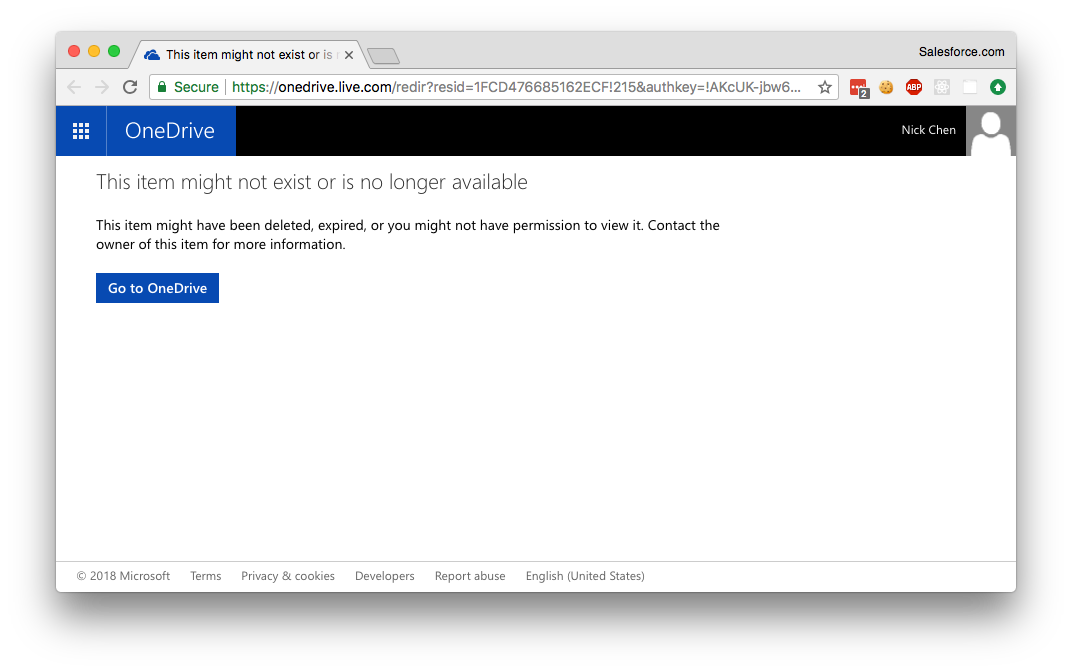
@lostintangent - Could you make the file publicly accessible?
vazexqi
on 18 May 2018
@vazexqi I updated the link after I posted my previous comment, so could you try this again? Sorry!
lostintangent
on 18 May 2018
Hi @lostintangent , this is the response when I tried debugSession.customRequest("debugSessionInfo"):
{"capabilities":null,"configurationProperties":null}
Our debugger sends custom messages as early as when the debug adapter receives initializeRequest. When is configurationProperties populated?
 DatGuyJonathan
on 23 May 2018
DatGuyJonathan
on 23 May 2018
@DatGuyJonathan The configurationProperties is actually the properties of the underlying debug adapter. Until the debug adapter responds to the initializeRequest, I don't believe this object would be populated. Generally, we've recommend the above code as part of a vscode.debug.on* event, where the debug session would have already been started and initialized, so it's very possible that you're calling it too early.
Would you be able to call it after you respond to initializeRequest, at least to see whether that returns the expected data?
lostintangent
on 23 May 2018
@DatGuyJonathan We were just discussing this, and we could add a new custom request type called debugType that simply returns that debug adapter type, as opposed to the full capabilities. This would be able to be called at any time, and therefore, could satisfy your requirements.
So let me know if you're able to defer calling debugSession.customRequest("debugSessionInfo"), and if not, we can pursue the aforementioned solution.
lostintangent
on 23 May 2018
@lostintangent , I tried sending the custom message after initializeRequest and during launchRequest, but configurationProperties is still null. I do receive capabilities though because it was included in my InitializeResponse.
I can't defer the custom message any later than that, so I think we would like to try the new custom request type debugType.
DatGuyJonathan
on 23 May 2018
@DatGuyJonathan Hey! Here's a link to a new private build.This includes a new message type called debugType that simply returns the string name of the underlying debugger. Therefore, you can call const type = await debugSession.customRequest("debugType") if the type is vslsShare. Let me know if that works for you!
lostintangent
on 23 May 2018
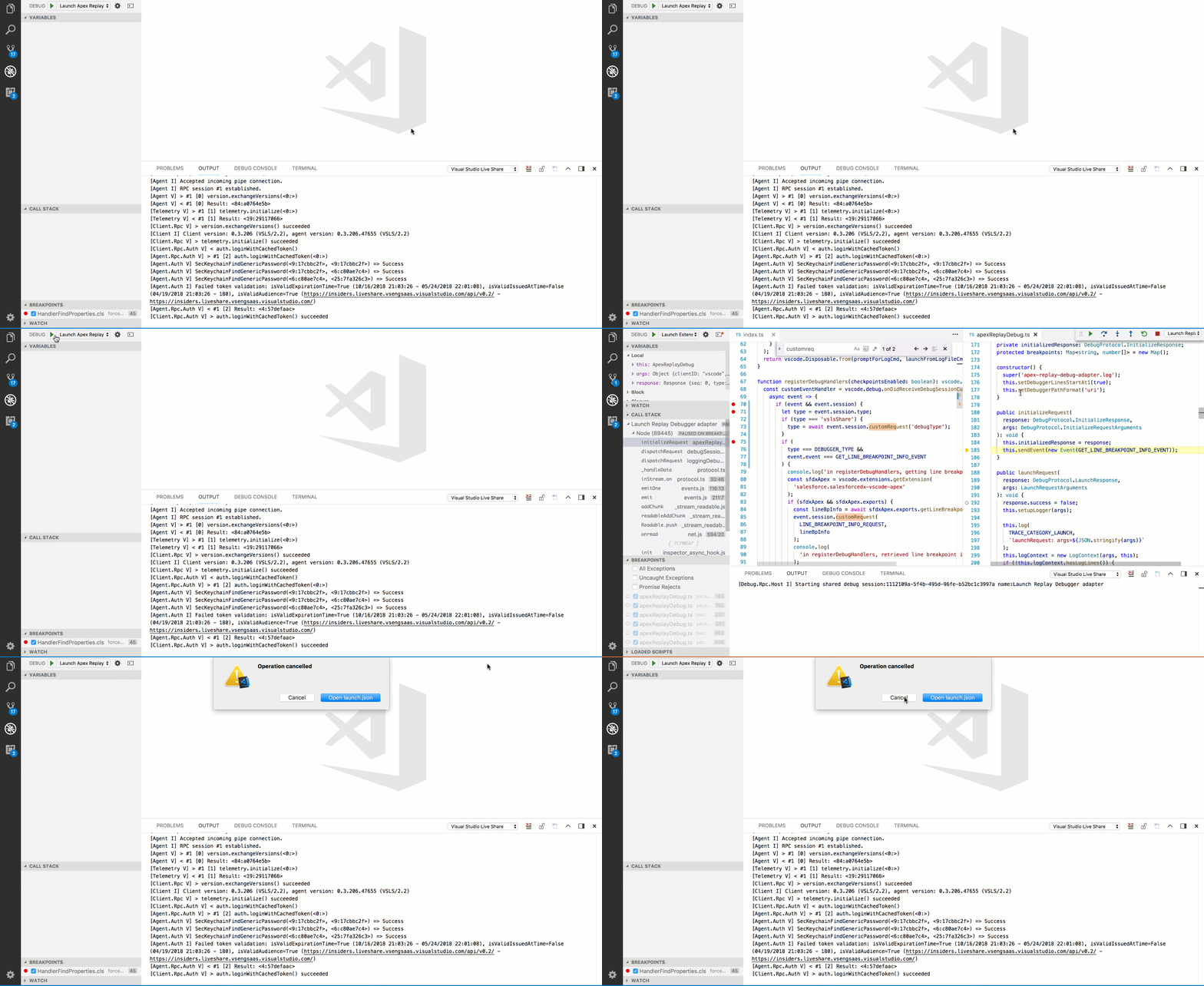
Thanks for the quick turnaround @lostintangent . I tried the new .vsix, but I'm running into an error when the debug adapter sends an event for the debugger extension. With the first .vsix, I was able to get past that and inspect the event received on the debugger extension side. Was there any other changes between those two .vsixs?
Here's a .GIF of it, I tried to include logs from Live Share. Let me know if there are other logs I should look at.
DatGuyJonathan
on 24 May 2018
@DatGuyJonathan I just reproed this, and there's a bug on our end. Could you update the call to this.sendEvent in your intializeRequest handler, to simply pass an empty object as argument and see if that works? (e.g. this.sendEvent(new Event("foo", {}))).
lostintangent
on 24 May 2018
Thanks @lostintangent , adding an empty object works. My adapter can send an event to the extension, but now the extension cannot send a customRequest to my adapter. The customRequest for debugType to the Live Share adapter works though.
In the customRequest to my adapter, I send a pretty large array of custom objects. I use customRequest with various types, but for the array, I see these log lines from Live Share:
[2018-05-24 00:56:53.925 Debug.HostAdapter V] [Warning]Stopping due to fatal error: RuntimeBinderException: Cannot convert type 'Newtonsoft.Json.Linq.JArray' to 'Newtonsoft.Json.Linq.JObject'
[2018-05-24 00:57:23.418 Debug.HostAdapter E] HandleRequestAsync error:HandleRequestAsync timeout
[2018-05-24 00:57:23.421 Debug.HostAdapter V] [Trace]--> R (initialize-1): {"request_seq":1,"success":false,"command":"initialize","message":"HandleRequestAsync timeout","body":{},"seq":3,"type":"response"}
@DatGuyJonathan Ah yeah, that’s the same bug but in reverse :) Could you try wrapping the array of objects in an object with a nested property that includes that array? We’ll fix this bug, but that should be able to unblock you and validate whether the E2E can work once we address this serialization issue.
lostintangent
on 24 May 2018
@lostintangent , that works! Have you seen this error before?
[2018-05-25 15:56:54.521 Debug.HostAdapter E] OnCustomRequestReceivedAsync error:Object reference not set to an instance of an object.
I'm using vscode.debug.activeDebugSession.customRequest('someCommandName'). Adding an empty object doesn't work, but vscode.debug.activeDebugSession.customRequest('someCommandName', { foo: 'anything' }) works.
DatGuyJonathan
on 25 May 2018
@DatGuyJonathan Yeah that’s related to the set of serialization issues you’re hitting as well. We’ve resolved all of these bugs and will be shipping an extension update with it on Tuesday. Can you verify that your E2E works with the workaround that you mentioned? If so, I could send you another private to test removing the dummy object.
lostintangent
on 25 May 2018
@lostintangent , my E2E looks good so far. Please link me to another private; I can test it today :)
DatGuyJonathan
on 25 May 2018
@DatGuyJonathan Awesome! Here's the latest bits that include the debugType request and should remove the need to send dummy objects in requests. Let me know how it goes. If this works, then we should be in a good position, since we'll ship these bits to the marketplace next week.
lostintangent
on 25 May 2018
Looks good @lostintangent . Thanks for the collaboration! Looking forward to the fixes in marketplace next week.
DatGuyJonathan
on 25 May 2018
@DatGuyJonathan Yay! I'm glad we got you unblocked. I really appreciate you working through this. Let me know if you run into anything else. Otherwise, I'll update this issue on Tuesday after we release the update with the fixes 👍
lostintangent
on 25 May 2018
@DatGuyJonathan The marketplace update just went out, so you should be able to update your installation of Live Share and verify your fixes against the publicly available bits 😄If things look good, let us know and we can resolve this issue.
Also, in case it's helpful, I published a super simple NPM module which abstracts the logic for retrieving the right debug type: https://github.com/lostintangent/vsls-debug-type. It does the same thing as the workaround we discussed above, and simply has the benefit of removing the need for your extension to rely on a "magic string" (vslsShare). Just another option!
lostintangent
on 29 May 2018
The marketplace update looks good to me @lostintangent . Thanks again!
DatGuyJonathan
on 29 May 2018
@DatGuyJonathan Great! I'll close this issue as resolved then. Thanks again for your help resolving this.
lostintangent
on 30 May 2018
Related issues
 YardGnomeNinja
·
3Comments
YardGnomeNinja
·
3Comments
 lockoncode
·
3Comments
lockoncode
·
3Comments
 jleider
·
3Comments
jleider
·
3Comments
 Chuxel
·
3Comments
Chuxel
·
3Comments
 dec0dOS
·
4Comments
dec0dOS
·
4Comments
Most helpful comment
@vazexqi Thanks for reaching out! Once installed, the Live Share extension always “injects” itself into the debugging workow, in order to support sharing your project while in the middle of a debugging session. When you aren’t sharing, we’re effectively just a pass through, and once you start sharing, we begin transparently remoting the debugging context to any guests.
We did a ton of work to validate our support with various debug adapters, but we weren’t familiar with this one. Generally, Live Share debugging should “just work”, unless there are protocol issues like you mentioned. Let us take a look at this and get back to you on the best way to support your debug adapter. Stay tuned!