Kibana: Telemetry endpoint does not handle authorization errors correctly
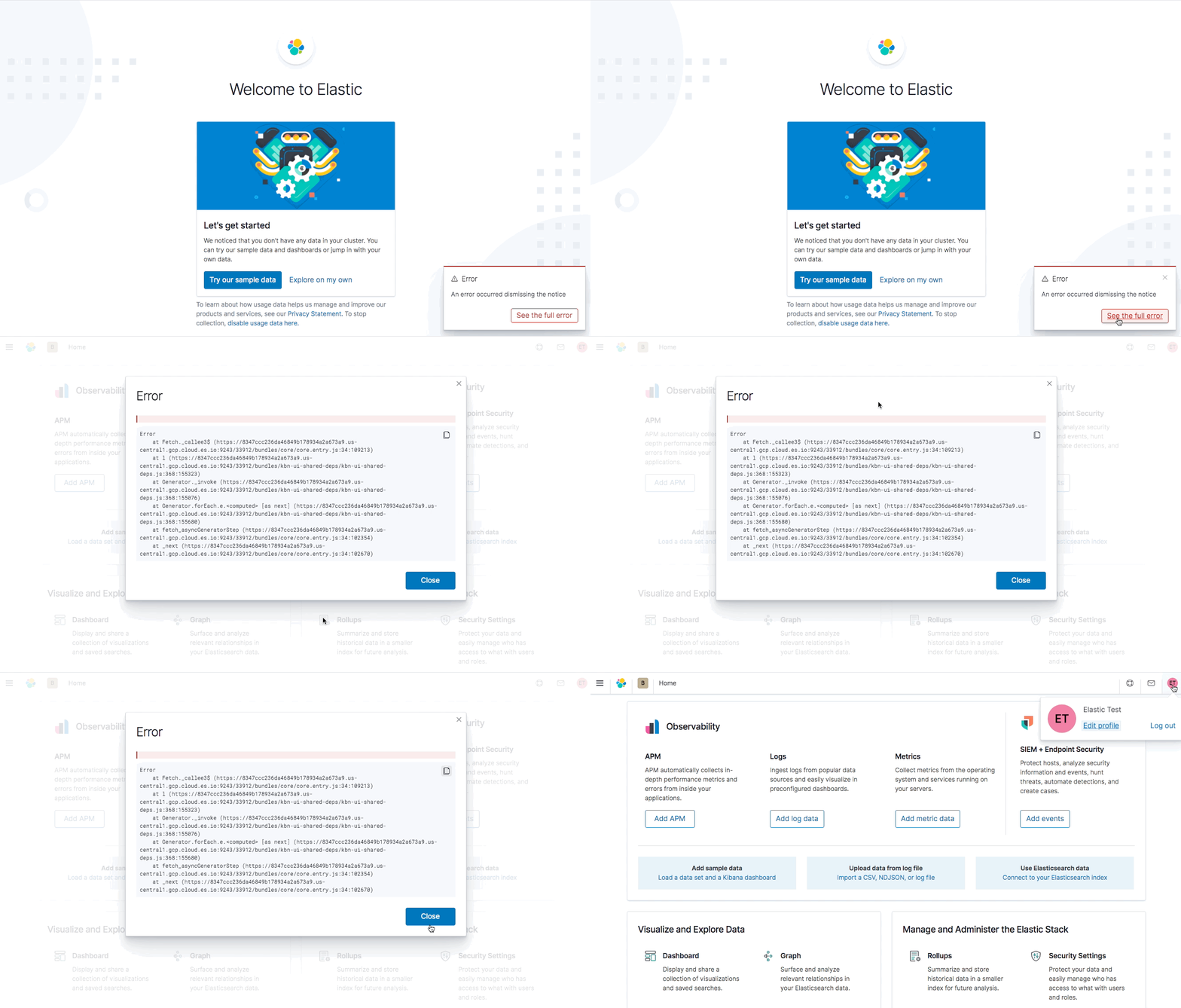
The endpoint to record if the telemetry notice has been seen does not account for users who do not have write access to Kibana.
Users with read-only access are not allowed to update the telemetry saved object, but this endpoint assumes that everyone is authorized to do so.
This results in a rather cryptic error from the end-user's perspective:
I tested on 7.9.1, but this is likely an issue in other versions as well.
 legrego
All 7 comments
Pinging @elastic/kibana-telemetry (Team:KibanaTelemetry)
 elasticmachine
on 30 Oct 2020
elasticmachine
on 30 Oct 2020
Following is the error in its entirety; also of note is that once you log out and login within the same browser session, the error stops appearing after initial login.
Wrapper@https://NNN.us-central1.gcp.cloud.es.io:9243/33912/bundles/core/core.entry.js:28:7854
_createSuperInternal@https://NNN.us-central1.gcp.cloud.es.io:9243/33912/bundles/core/core.entry.js:28:6991
HttpFetchError@https://NNN.us-central1.gcp.cloud.es.io:9243/33912/bundles/core/core.entry.js:28:9621
_callee3$@https://NNN.us-central1.gcp.cloud.es.io:9243/33912/bundles/core/core.entry.js:34:109213
l@https://NNN.us-central1.gcp.cloud.es.io:9243/33912/bundles/kbn-ui-shared-deps/kbn-ui-shared-deps.js:368:155323
s/o._invoke</<@https://NNN.us-central1.gcp.cloud.es.io:9243/33912/bundles/kbn-ui-shared-deps/kbn-ui-shared-deps.js:368:155077
_/</e[t]@https://NNN.us-central1.gcp.cloud.es.io:9243/33912/bundles/kbn-ui-shared-deps/kbn-ui-shared-deps.js:368:155680
fetch_asyncGeneratorStep@https://NNN.us-central1.gcp.cloud.es.io:9243/33912/bundles/core/core.entry.js:34:102354
_next@https://NNN.us-central1.gcp.cloud.es.io:9243/33912/bundles/core/core.entry.js:34:102694
 maggieghamry
on 30 Oct 2020
maggieghamry
on 30 Oct 2020
Thanks for reporting this. We'll have it fixed.
 Bamieh
on 2 Nov 2020
Bamieh
on 2 Nov 2020
Hmm, I thought it was fixed in https://github.com/elastic/kibana/pull/76883. Maybe I missed something?
I'll take a closer look at it.
 afharo
on 2 Nov 2020
afharo
on 2 Nov 2020
@legrego I've just tested it on master and it is working on my end:

For starters, the bit _To stop collection, disable usage here_ is not shown when we detect the user can't update the telemetry saved objects. And the method is not called either.
The PR https://github.com/elastic/kibana/pull/76883 that fixes it, it was backported to 7.10.0 though, as we considered it was an edge case and wasn't worth backporting to 7.9.
The reason for us considering it an edge case is that we show the banner once per installation (when one user has seen/dismissed it, we don't show it for any other users). Typically, we'd expect the administrator to be that first user. We recently introduced another situation when we show it: after an upgrade (minor or major), if telemetry has been previously opted-out, we show the banner again. We would also expect the admin to be the first one to login after an upgrade. But, in case it is not true, 7.10 will already ship with the fix.
@legrego do you think we should still backport it to 7.9 as well, just in case?
afharo
on 2 Nov 2020
@legrego Can you verify that the issue impacts many users or is it an edge case as we suspect? I don't believe another 7.9 build is going out and there is a fix being released in 7.10.
 TinaHeiligers
on 2 Nov 2020
TinaHeiligers
on 2 Nov 2020
@afharo / @TinaHeiligers, thanks for your feedback on this issue. I can also verify that https://github.com/elastic/kibana/pull/76883 solves the issue locally for me.
Can you verify that the issue impacts many users or is it an edge case as we suspect?
I suspect that this is an edge case as well, and I'm comfortable with a fix landing in 7.10. It's really our only option anyway :)
Thanks again!
legrego
on 3 Nov 2020
Related issues
 bradvido
·
3Comments
bradvido
·
3Comments
 LukeMathWalker
·
3Comments
LukeMathWalker
·
3Comments
 timmolter
·
3Comments
timmolter
·
3Comments
 ynux
·
3Comments
ynux
·
3Comments
 ctindel
·
3Comments
ctindel
·
3Comments