Keepassxc-browser: New release seems to break some pages
Expected Behavior
This is the page where I first noticed this problem.

Current Behavior
Stuff which rendered OK before looks just broken when the KeePassXC extension is enabled.

Possible Explanation
I imagine that the plugin is injecting some HTML or CSS into the webpage, which breaks things.
Steps to Reproduce (for bugs)
The link provided above should be enough...
Debug info
KeePassXC - 2.4.3
KeePassXC-Browser - 1.5.0
Operating system: Mac
Browser: Firefox
 pferreir
All 10 comments
Thanks for the report! I'll look into it. We are trying to move all DOM related content to Shadow DOM in the next release, so any HTML or CSS injected shouldn't affect to the page at all.
 varjolintu
on 26 Sep 2019
varjolintu
on 26 Sep 2019
I came here to file the same bug. The issue is in banner.css, where the .separator leaks to pages.
.separator {
    border-left: 1px solid #ccc;
    height: 100% !important;
    margin: 10px !important;
}
 Cqoicebordel
on 26 Sep 2019
Cqoicebordel
on 26 Sep 2019
@Cqoicebordel Yes. That's the issue. A separate kpxc-separator should've been used instead.
varjolintu
on 26 Sep 2019
@Cqoicebordel Yes. That's the issue. A separate
kpxc-separatorshould've been used instead.
My request as a web developer: please name any injected CSS classes as weirdly as possible. If you can add a random extremely-unlikely-to-guess-by-chance string to them, even better 😉
pferreir
on 26 Sep 2019
Everything should be prepended with kpxc-
 droidmonkey
on 26 Sep 2019
droidmonkey
on 26 Sep 2019
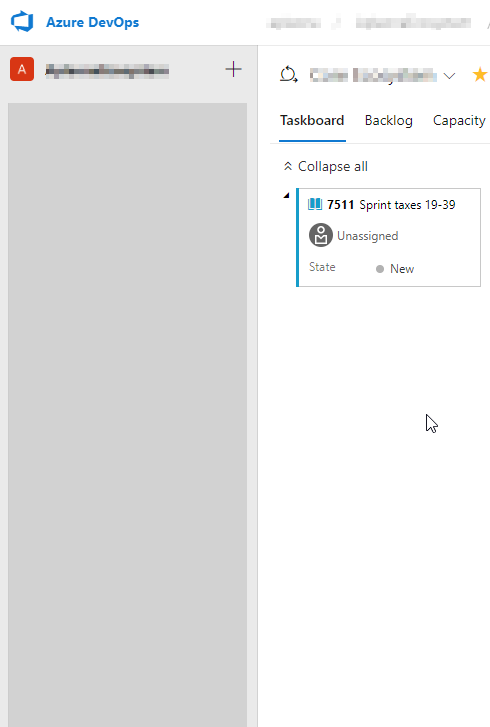
I have the same issue on Azure DevOps - i cannot see left menu items.
 kkoziarski
on 27 Sep 2019
kkoziarski
on 27 Sep 2019
I'm making a fix today, so hold your horses. 🐎
varjolintu
on 27 Sep 2019
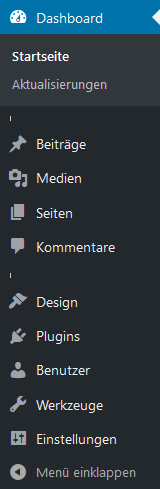
You can see the same problem in the admin area of WordPress:
 novusidea
on 27 Sep 2019
novusidea
on 27 Sep 2019
Same issue about Azure DevOps.
Happy to see that the issue is already fixed.
Waiting the new version ;-)
 pinonpierre
on 27 Sep 2019
pinonpierre
on 27 Sep 2019
Confirmed fixed :)
Thanks !
Cqoicebordel
on 28 Sep 2019
Related issues
 muchqs
·
4Comments
muchqs
·
4Comments
 FWDekker
·
3Comments
FWDekker
·
3Comments
 dgnuff
·
3Comments
dgnuff
·
3Comments
 whit-colm
·
4Comments
whit-colm
·
4Comments
 sliwowitz
·
5Comments
sliwowitz
·
5Comments
Most helpful comment
My request as a web developer: please name any injected CSS classes as weirdly as possible. If you can add a random extremely-unlikely-to-guess-by-chance string to them, even better 😉