Keepassxc-browser: Popup is too small if extension is pinned to overflow menu in Firefox
The popup is too small to be useful after pinning it to the overflow menu in Firefox.
Expected Behavior
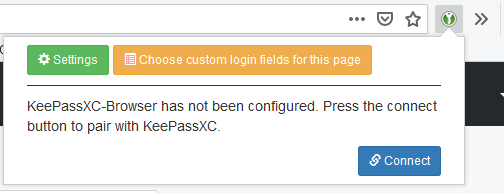
In Firefox I can pin extensions to the overflow menu. That way, they don't take up space when I don't need them to. When I click the KeePassXC icon while it's in the overflow menu I expect it to behave exactly like it would when it isn't pinned to the overflow menu. Observe the normal behaviour in the following screenshot.
Current Behavior
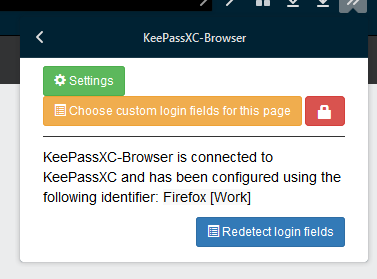
After pinning KeePassXC-Browser to the overflow menu, the popup is much narrower than before, as shown in the screenshot below. As a result, the "Connect" button is now invisible and cannot be pressed. Horizontal scrolling (that is, scrolling while holding Shfit) or dragging my text selection to the right both don't seem to work.

Possible Solution
The best solution would be to make the popup the same size before and after pinning it to the overflow menu. However, an alternative would be to prevent the overflow of elements to make sure elements are never hidden, but this has the drawback that the popup may become too tall. Maybe both should be done.
Steps to Reproduce (for bugs)
- Install the KeePassXC-Browser plugin.
- Pin the plugin icon to the overflow menu.
- Open the plugin popup from the overflow menu.
- Observe its size.
Debug info
KeePassXC - 2.5.1
KeePassXC-Browser - 1.5.4
Operating system: Windows 10
Browser: Firefox 71.0
 FWDekker
All 3 comments
Seems like this is a Firefox bug: https://bugzilla.mozilla.org/show_bug.cgi?id=1373490
 varjolintu
on 19 Dec 2019
varjolintu
on 19 Dec 2019
Removing min-width should help...
https://github.com/keepassxreboot/keepassxc-browser/blob/b08966c6fd709e334962e661e43b40ce1345ddfe/keepassxc-browser/popups/popup.css#L8
https://github.com/keepassxreboot/keepassxc-browser/blob/b08966c6fd709e334962e661e43b40ce1345ddfe/keepassxc-browser/popups/popup.css#L14
 furious
on 26 Feb 2020
furious
on 26 Feb 2020
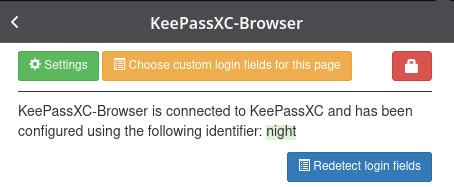
looks fixed in nightly
 xf-
on 28 Feb 2020
xf-
on 28 Feb 2020
Related issues
 maxauvy
·
6Comments
maxauvy
·
6Comments
 muchqs
·
4Comments
muchqs
·
4Comments
 kylesorkness
·
5Comments
kylesorkness
·
5Comments
 gwerbin
·
4Comments
gwerbin
·
4Comments
 dgnuff
·
3Comments
dgnuff
·
3Comments