Keepassxc-browser: Problem with https://www.clippercard.com
This site makes it hard for KeePassXC Browser to find the username and password fields
For all other sites if set up so far, by the time I'm done I can hit the login page, click on the username field, select from the dropdown, and get both username and password auto populated. It wouldbe nice to get that same simple flow on this site.
Current Behavior
At a guess, this is caused by that site's use of some sort of overlay or popup that contains the username and password fields.
As shown in the steps to reproduce, it's somewhat troublesome logging into this site. TL;DR is that automatic login doesn't happen, but there is a way to get this to work. It's just slightly clunky.
Possible Solution
Steps to Reproduce (for bugs)
- Create an entry for https://www.clippercard.com
- Navigate to https://www.clippercard.com
- Allow KeePassXC browser to access the entry
- Click on the "Login" button at the right end of the menu bar. Observe the "popup" that appers.
- Note that the username and password fields are not auto detected.
- Click on "Choose custiom credential fields for this page"
- Note that the standard dimming behavior is seen, but that the username and password entry fields cannot be clicked on.
- Click on "Dismiss"
- Note that most of the screen restores to non-dimmmed, except the popup remains dimmed, and that the username and password flelds can now be clicked on.
- Refresh the page to reset it, and then click "Login" again.
- Now click on "Redect credential fields".
- Click on the username field, and note how it is correctly populated, and that selecting your email address then correctly fills the password.
This last step does allow a workaround, in the event that they are doing something really hideous that isn't possible or easy to work around.
Debug info
These are the only messages displayed during the above process, after clearing the console:
unreachable code after return statement general.js:53:1
Loading failed for the
All 3 comments
At this point our implementation doesn't support detection from iframes (MutationObserver filters only styles). This could be possible to fix. I'll investigate it.
 varjolintu
on 27 Sep 2018
varjolintu
on 27 Sep 2018
@varjolintu I have a similar issue on https://forum.golem.de/login.php , I don't see an iframe but still can't even manually select the input fields.
screenshot
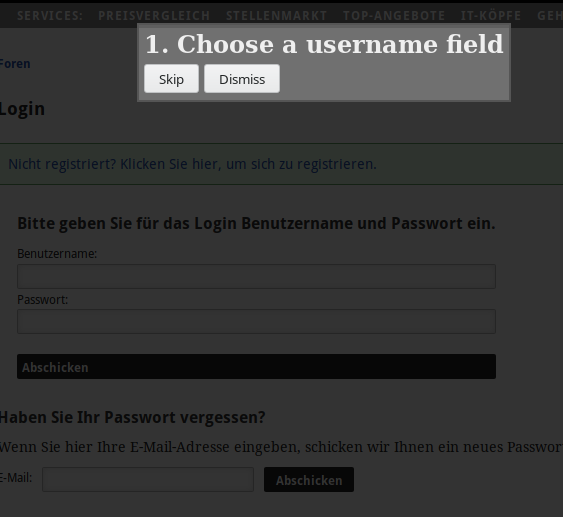
Edit: I've tried around manipulating the website in the DOM but can't figure out what's blocking the detection.
 0xpr03
on 1 Oct 2018
0xpr03
on 1 Oct 2018
@0xpr03 The next extension version works without any problems with that site. So just wait for update.
varjolintu
on 1 Oct 2018
Related issues
 bwbroersma
·
3Comments
bwbroersma
·
3Comments
 mrmeszaros
·
3Comments
mrmeszaros
·
3Comments
 compilenix
·
5Comments
compilenix
·
5Comments
 metaxis
·
3Comments
metaxis
·
3Comments
 ForsakenHarmony
·
4Comments
ForsakenHarmony
·
4Comments