Keepassxc-browser: Extenstion changes font colors on miniflux
This is miniflux: https://github.com/miniflux/miniflux
Expected Behavior

Current Behavior

Possible Solution
Looks like a CSS issue
Steps to Reproduce (for bugs)
- Update Extention from 1.5.x to 1.6.0
- visit self hosted Miniflux application
Debug info
KeePassXC - 2.5.3
KeePassXC-Browser - 1.6.0
Operating system: Win32
Browser: Mozilla Firefox 74.0
This does not affect Google Chrome 80.
I found this using the "Inspect Element" Tool of firefox:
moz-extension://4ebcdf80-7448-4da2-ad3b-eba01d087839/css/colors.css Line 12 or 73
:root {
    --link-color: #3a8233;
    --link-hover-color: #429f14;
}
Switching to light or dark theme does change the result.
 compilenix
All 5 comments
I could replicate this with a test page: https://www.w3schools.com/howto/tryit.asp?filename=tryhow_js_toggle_dark_mode
Just added the following code to the style (+ change the background style to background-color: var(--link-color);):
:root {
    --link-color: #ffffff;
    --link-hover-color: #429f14;
}
With Chromium the white background stays white, but with Firefox the CSS is overridden.
 varjolintu
on 22 Mar 2020
varjolintu
on 22 Mar 2020
The theme CSS bleeds into the browser window and messes up designs. This is very problematic.
All cards on https://www.zoya-coaching.de/ are affected.
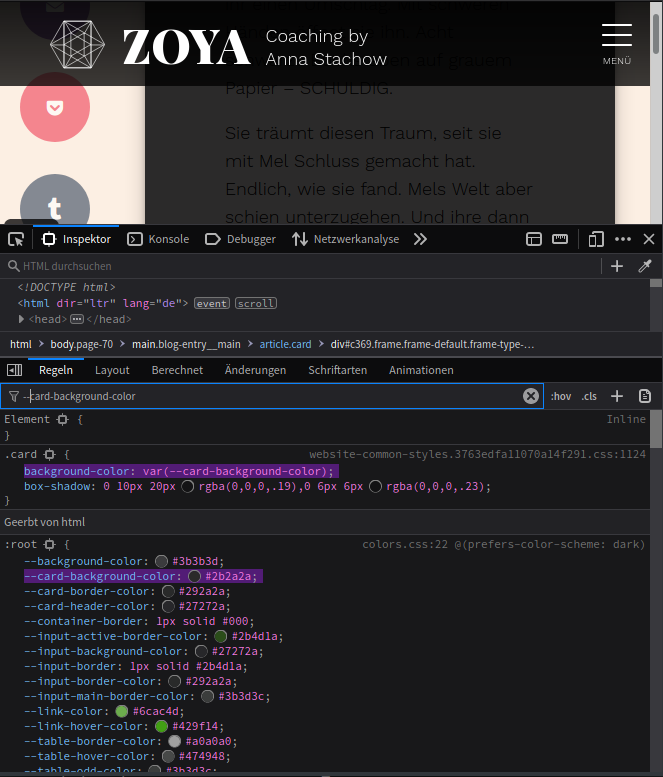
Since --card-background-color is a CSS custom property used by the website, now KeepassXC (not using namespaces or any other means of scoping whatsoever) forces its theme onto the browser's website content, making it unusable (text becomes unreadable).
This issue needs an urgent fix.
 LeoniePhiline
on 22 Mar 2020
LeoniePhiline
on 22 Mar 2020
All due respect, but this is a serious issue on the browser side. Why is it even possible for an extension's css variables to override a Page's variables? Especially so when it is not the intent to do so! That kind of behavior should be explicit.
 droidmonkey
on 22 Mar 2020
droidmonkey
on 22 Mar 2020
1.6.1 has been pushed to the Addon stores. This fix was surely needed.
varjolintu
on 22 Mar 2020
Thank you for your work @varjolintu !
LeoniePhiline
on 22 Mar 2020
Related issues
 kylesorkness
·
5Comments
kylesorkness
·
5Comments
 bwbroersma
·
3Comments
bwbroersma
·
3Comments
 flibustenet
·
4Comments
flibustenet
·
4Comments
 whit-colm
·
4Comments
whit-colm
·
4Comments
 maxauvy
·
6Comments
maxauvy
·
6Comments
Most helpful comment
All due respect, but this is a serious issue on the browser side. Why is it even possible for an extension's css variables to override a Page's variables? Especially so when it is not the intent to do so! That kind of behavior should be explicit.