Keepassxc-browser: Access database without opening main application
I'm not sure if this is a glitch on my end I didn't see an answer to online or if this is in the works or something, but I'm not seeing anything about it online. I want to be able to access my passwords without having to open the main application window.
Expected Behavior
I should be able to click a password field on a browser with my keepassxc-browser plugin hooked up, then enter my master password and fill it in without ever having to open up keepassxc itself.
Current Behavior
As of now, if I want to fill in a password, I have to open keepassxc, unlock it from there, go back to my browser, refresh the database, then finally click and select which password I want to fill, move back to my browser (as that action puts keepassxc's main window in the foreground), then finally enter into the website.
Possible Solution
The current way this works makes the browser extension next to pointless.
Steps to Reproduce (for bugs)
See the Current Behavior section. This has been tested on KDE/Manjaro and macOS Mojave, and Firefox (macOS, Linux), ungoogled-chromium (Linux), and Chrome (macOS)
Debug info
KeePassXC - 2.3.4-1
KeePassXC-Browser - Chromium-1.3.2, Firefox-1.3.2, Chrome-1.3.2.
Operating system:
- macOS
- Linux
Browser:
- Firefox
- Chromium
- Chrome
 whit-colm
All 4 comments
The KeePassXC desktop application is required to be running when you are using the browser extension. The philosophy behind this project is to do and store as little as possible in the browser itself. This is a security measure and ensures your data is protected at all times.
To lessen the burden of using the browser extension I recommend that you enable the following setting:
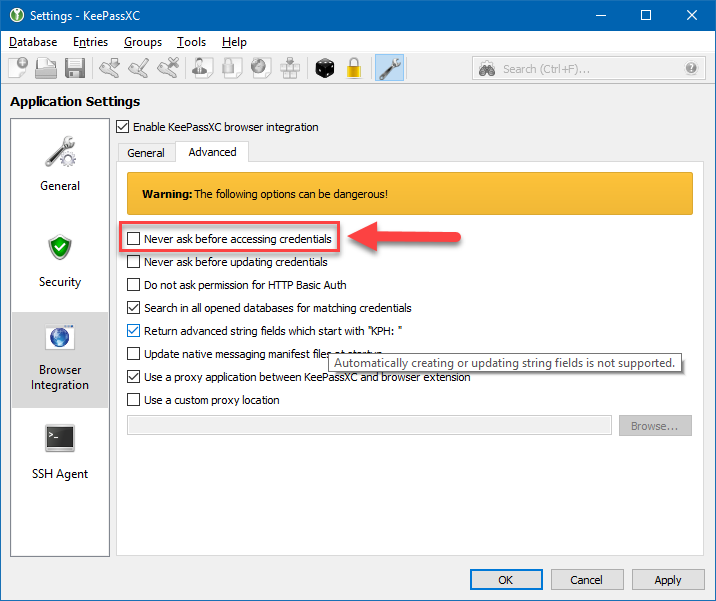
Alternatively, you can enable "Remember this decision" when you allow access to a particular entry.
I do agree that the UX could be a little more seamless, this is something we are actively working on over the next couple of months.
 droidmonkey
on 18 Jan 2019
droidmonkey
on 18 Jan 2019
It would be nice if the extension could directly read/write the database file (although not sure if that works with the WebExtensions API at all). Alternatively it would be cool if the extension could launch KeePassXC headless (or in the background at least).
For the moment I just don't use this addon, but instead manage credentials manually via KeePassXC and let Firefox store the credentials.
 DASPRiD
on 7 Feb 2019
DASPRiD
on 7 Feb 2019
Accessing the database directly from the extension would need an additional library for reading KeePass databases. That would be quite a large job, and please note that there are already extensions which does this.
Another solution would be to use keepassxc-cli directly from the extension (meaning native messaging sends commands to the cli interface instead of keepassxc-proxy) with a master password. But this approach I haven't even tried yet even if it could work.
 varjolintu
on 7 Feb 2019
varjolintu
on 7 Feb 2019
For the moment I just don't use this addon, but instead manage credentials manually via KeePassXC and let Firefox store the credentials.
Whaaaa?
droidmonkey
on 7 Feb 2019
Related issues
 sliwowitz
·
5Comments
sliwowitz
·
5Comments
 FWDekker
·
3Comments
FWDekker
·
3Comments
 brwolfgang
·
4Comments
brwolfgang
·
4Comments
 christophetd
·
4Comments
christophetd
·
4Comments
 bwbroersma
·
3Comments
bwbroersma
·
3Comments
Most helpful comment
The KeePassXC desktop application is required to be running when you are using the browser extension. The philosophy behind this project is to do and store as little as possible in the browser itself. This is a security measure and ensures your data is protected at all times.
To lessen the burden of using the browser extension I recommend that you enable the following setting:
Alternatively, you can enable "Remember this decision" when you allow access to a particular entry.
I do agree that the UX could be a little more seamless, this is something we are actively working on over the next couple of months.