Keepassxc-browser: KeePassXC-Browser can't connect to database
KeePassXC-Browser doesn't connect to the database "No connected databases found." error:
KeePassXC-Browser has encountered an error:
Timeout or not connected to KeePassXC.
No problem with chrome.
Debug info
KeePassXC - 2.3.4
KeePassXC-Browser - 1.3.2
Operating system: Ubuntu 18.10
Browser: Chromium 73.0.3683.75
 ghost
ghost
All 72 comments
Have you enabled the support for Chromium in KeePassXC's Browser Integration settings? If you still have problems after that, check: https://github.com/keepassxreboot/keepassxc-browser/wiki/Troubleshooting-guide
 varjolintu
on 16 Mar 2019
varjolintu
on 16 Mar 2019
Sometimes I'have a similar problem.
I found that if I kill all Chromium processes. (For every Extensionthere is one under details in the Task-Manager), or you kill an running chromium with "kill task" in the processes tab in the "Windows Task-Manager". The probem is after a new start of Chromium away.
Please test it and give me feedback. ;)
If it helps, I will try to debug it on the next time.
 XtraLarge
on 15 May 2019
XtraLarge
on 15 May 2019
Hi, I'm facing the same issue.
But with:
- Debian Buster (10)
- Firefox 66.0.5
- KeepassXC 2.4.3
- KeePassXC-Browser 1.4.6
I just can't connect to the database (The _Connect_ button does nothing at all, not even logs errors).
 diraol
on 27 Jun 2019
diraol
on 27 Jun 2019
@diraol Check the guide linked above.
varjolintu
on 27 Jun 2019
on ubuntu (19.04) I had to manually start keepassxc.proxy
How to start automatically ? (and in the background. I can start with & but that seems like a hack.)
 mandarvaze
on 10 Oct 2019
mandarvaze
on 10 Oct 2019
@mandarvaze Starting the proxy manually will not actually work. Native Messaging API in the browser should start it. If that doesn't happen, the path is wrong.
If you are using KeePassXC as a Snap, please run https://raw.githubusercontent.com/keepassxreboot/keepassxc/master/utils/keepassxc-snap-helper.sh.
varjolintu
on 10 Oct 2019
@varjolintu At first I installed it from snap, but then realized it was "bad" version.
So I installed it via apt-get - got "better" version.
The path changed from /snap/bin to /usr/bin - But same problem.
If I start /usr/bin/keepassxc.proxy the browser extension works.
But I need to keep it in a separate terminal in foreground.
mandarvaze
on 10 Oct 2019
@mandarvaze Please check the path from ~/.mozilla/native-messaging-hosts/org.keepassxc.keepassxc_browser.json file that it really points to the correct binary.
varjolintu
on 10 Oct 2019
Everything looks OK :
mandar@mandar-ubuntu:~$ more ~/.mozilla/native-messaging-hosts/org.keepassxc.keepassxc_browser.json
{
    "allowed_extensions": [
        "[email protected]"
    ],
    "description": "KeePassXC integration with native messaging support",
    "name": "org.keepassxc.keepassxc_browser",
    "path": "/usr/bin/keepassxc-proxy",
    "type": "stdio"
}
mandar@mandar-ubuntu:~$ ls -l /usr/bin/keepassxc-proxy
-rwxr-xr-x 1 root root 30864 Aug 31  2018 /usr/bin/keepassxc-proxy
mandar@mandar-ubuntu:~$ file /usr/bin/keepassxc-proxy
/usr/bin/keepassxc-proxy: ELF 64-bit LSB shared object, x86-64, version 1 (SYSV), dynamically linked, interpreter /lib64/ld-linux-x86-64.so.2, for GNU/Linux 3.2.0, BuildID[sha1]=9abe19d50fe75f65b6ede2c5e23cd2fa82279234, stripped
@mandarvaze Is your Firefox installed via Snap also?
varjolintu
on 11 Oct 2019
I don't know. It came pre-installed with Ubuntu 19.04 "out of the box"
mandarvaze
on 11 Oct 2019
I don't know. It came pre-installed with Ubuntu 19.04 "out of the box"
I had a similar problem. After I uninstalled the snap version and installed the distribution version of chromium everything worked. It seems that the snap version was not able to start and to connect to keepassxc-proxy. Starting it by hand didn't help.
This should probably be mentioned the wiki, as in many distributions Firefox or Chromium will be installed as Snap / Flatpak versions and that might cause problems!
 HorstBaerbel
on 23 Oct 2019
HorstBaerbel
on 23 Oct 2019
BTW, after apt get version, I needed to reboot (Didn't know - accidentlally discovered)
So now everything works fine 🎉
mandarvaze
on 23 Oct 2019
@HorstBaerbel There's a snap helper script availeble at https://keepassxc.org/download/#linux
varjolintu
on 24 Oct 2019
Nice. Thanks! Would be cool if this was linked in the Wiki, or did I miss that?. Where do I copy it? Do I have to check the "native bla" checkbox in KeepassXC?
HorstBaerbel
on 25 Oct 2019
@HorstBaerbel I think it will be in the new documentation when it's finally released. It doesn't matter where you copy it, just run it.
varjolintu
on 25 Oct 2019
I just ran into this; I just upgraded to 19.10 Eoan and the browser extension could no longer even attempt to connect to the KeePassXC database.
According to Ubuntu's upgrade script Chromium is now and from this point forward to be delivered as a snap. I just downloaded the helper script mentioned above, only to be informed by the script that browsers installed as snaps are not supported.
Chrome (installed as deb from Google's repository) obviously still works. If there's a Chromium PPA or something I haven't yet looked for it, but any folks running non-LTS Ubuntu will be seeing this.
KeePassXC - KeePassXC - Version 2.4.3 Revision: 5d6ef0c
KeePassXC-Browser - 1.5.3
Operating system: Linux x86_64
Browser: Chrome/Chromium 78.0.3904.70
 twt2
on 25 Oct 2019
twt2
on 25 Oct 2019
@twt2 Snap would need to accept Native Messaging API creating child processes. If that is something that cannot be configured, there's no way to fix it.
EDIT: Found the following issues related to this:
https://forum.snapcraft.io/t/firefox-support-native-messaging/11068/2
https://bugs.launchpad.net/ubuntu/+source/chromium-browser/+bug/1741074
varjolintu
on 25 Oct 2019
I have the same issue as @twt2. Updated to Ubuntu 19.10, and since then the extension does not work. I have double checked the guide, but the proxy is not running (starting it manually does not help). The json file is in ~/snap/chromium/current/.config/chromium/NativeMessagingHosts as expected, and points to an existing binary. My Chromium is a snap package (as everyone's in 19.10) and KeePassXC is not a snap.
I checked the bugreports that @varjolintu linked, and indeed it seems that the snap Chromium is unable to use the native host connector. Visiting https://extensions.gnome.org/ gives the same error:
Although GNOME Shell integration extension is running, native host connector is not detected. Refer documentation for instructions about installing connector.
Do I understand correctly that there's nothing you can do to fix this? If that is true, I think this should be made very clear in the twiki and on keepassxc.org as well, as @HorstBaerbel said.
 ba32107
on 10 Nov 2019
ba32107
on 10 Nov 2019
@HorstBaerbel There's a snap helper script availeble at https://keepassxc.org/download/#linux
Isn't this script for when KeePassXC is installed as snap? @HorstBaerbel was referring to Chromium being snap - the script won't work in this case.
ba32107
on 10 Nov 2019
The script is only meant for snap version of KeePassXC. Browsers using snap probably won't work great with Native Messaging. Need to investigate how this situation could be solved.
varjolintu
on 10 Nov 2019
I'm by all means no expert in this, but as I understand it NativeMessaging is a crutch anyways. A new interface in snapd would be needed to support NativeMessaging. The problem is it would expose a lot of functionality which undermines encapsulation / security of snap packages (one of the key reasons for snap / flatpak). The maintainers of all snap-packaged apps or the maintainers of plugins for those apps can't do anything about this issue, so I think a general solution needs to be found. I commented on the Launchpad issue.
HorstBaerbel
on 20 Feb 2020
Native messaging is not a crutch, it's a security feature
 droidmonkey
on 20 Feb 2020
droidmonkey
on 20 Feb 2020
Well, I might be wrong about that. Applications could always connect to a service on localhost. Not sure what can be made more secure.
Anyways, snapd needs to build an API of any sort to support this, while not compromising security. All issues here are useless unless something is done in snap.
HorstBaerbel
on 20 Feb 2020
ArchLinux KDE Plasma Vivaldi same problem
 Mogekoff
on 2 Mar 2020
Mogekoff
on 2 Mar 2020
When you are having problems with Linux, one of these is probably the cause:
- Your browser is installed via snap
- KeePassXC is installed via snap but the helper script is not used
XDG_CONFIG_HOMEis used (KeePassXC doesn't respect that setting currently)
If it's not one of those, checking the Troubleshooting Guide is highly recommended.
varjolintu
on 2 Mar 2020
I am having a similar issue with Ubuntu 20:04, and only with Chromium. Firefox and Chrome are both fine. The "Connect button" does nothing and I think the problem is that if a browser was already configured to use a database, and then that connection is manually removed, the extension "remembers" the old connection even through re-installs, and since the Connect button doesn't work there is no way of reconnecting. If you can get the browser extension to ask you for the connection on first run, then it seems fine.
So I think this problem is two-fold:
1) The "Connect" button is broken. Even in the two browsers that work, that button doesn't.
2) Uninstalling the extension does not remove the associated data, and neither does removing the key via the database settings in the KeePassXC GUI.
Further information:
This may have been partially caused by restoring data from my Ubuntu 18:04 laptop as I was migrating to a new laptop with a fresh install of Ubuntu 20:04.I have also noticed something else. In Ubuntu 20:04, the settings end up in a snap subdirectory, not the usual ./config/chromium, but even deleting the whole default profile, I still was not prompted to set up a new connection, so this data must be stored elsewhere.
For reference:
KeePassXC - 2.4.3 (Yes, I know there is a newer version but not released via APT yet, plus it works for two browsers)
KeePassXC-Browser - 1.6.6
Operating system: Linux x86_64
Browser: Chrome/Chromium 84.0.4147.89
 marcovanbeek
on 17 Jul 2020
marcovanbeek
on 17 Jul 2020
@marcovanbeek Make sure you're not using a Chromium installed via Snap. These kind of problems sounds like that you still have a localStorage somewhere else where it cannot be removed or modified. If Snap is not the case here, I suggest you use strace to locate the folder where the local settings are being loaded. This definitely doesn't sound normal.
Also, I strongly suggest that you use our official PPA or AppImage to update to a newer KeePassXC. 2.4.3 is quite old.
varjolintu
on 17 Jul 2020
@varjolintu Thanks. Have added PPA and updated. Not sure what I can do about Chromium. Ubuntu only installs snap version by default. The connect button still does nothing in Firefox and Chrome. Is it supposed to once it is all connected to a database? I am pretty sure I saw somewhere that you could have multiple databases connected so am I right in assuming the connect button allows you to add another database?
In which case there is definitely a problem somewhere.
marcovanbeek
on 17 Jul 2020
@marcovanbeek If you haven't checked the Troubleshooting guide, please do that next:
https://github.com/keepassxreboot/keepassxc-browser/wiki/Troubleshooting-guide
varjolintu
on 17 Jul 2020
Is there an actual problem here or just configuration issues? I'm inclined to close this issue.
droidmonkey
on 17 Jul 2020
@marcovanbeek this is an issue caused by Chromium being a Snap application. The native messaging host functionality just does not work properly, because Snap blocks access. This has nothing to do with Keepassxc, it's a problem with Snap Chromium.
There's a bug open on launchpad:
https://bugs.launchpad.net/ubuntu/+source/chromium-browser/+bug/1741074
ba32107
on 17 Jul 2020
I am using Ubuntu 18.04 with Chromium installed from deb repository, not as snap, am also using:
KeePassXC - 2.6.0
KeePassXC-Browser - 1.6.6
Operating system: Linux x86_64
Browser: Chrome/Chromium 83.0.4103.61
With update to KeePassXC 2.6.0 I experience the issue that after some time the connection between the browser plugin and Keepass gets lost. Reconnecting the database doesn't solve the issue. I have to disable and re-enable the browser plugin in the browser's app settings, then plugin and Keepass connect again.
Re-installing the browser plugin didn't solve the issue. After some time the connection just terminates, although /usr/bin/keepassxc-proxy is running.
And yes, I checked the Troubleshooting guide :-)
 spi43984
on 23 Jul 2020
spi43984
on 23 Jul 2020
@spi43984 Is there any error messages in the background script logs? You can access them by going to chrome://extensions, enabling the Developer mode and choose the "Inspect views _background page_".
varjolintu
on 23 Jul 2020
Will check. I see the DevTools window - what tab should I check for errors? There are so many ... ;-)
spi43984
on 23 Jul 2020
@spi43984 Console.
varjolintu
on 23 Jul 2020
KeePassXC-Browser again lost connection. In the DevTools console I see the following messages:
keepass.js:984 Connecting to native messaging host org.keepassxc.keepassxc_browser
keepass.js:1188 Error: No content script available for this tab.
10browserAction.js:96 Uncaught (in promise) TypeError: Cannot read property 'stack' of undefined
    at Object.browserAction.stackUnshift (browserAction.js:96)
    at Object.browserAction.showDefault (browserAction.js:49)
4keepass.js:1067 Error 7: Die Nachrichtenverschlüsselung ist fehlgeschlagen. Läuft KeePassXC?
6keepass.js:1067 Error 7: Die Nachrichtenverschlüsselung ist fehlgeschlagen. Läuft KeePassXC?
After re-enabling KeePassXC-Browser plugin in Chromium the connection gets re-established.
spi43984
on 24 Jul 2020
@spi43984 That's strange. I assume you are viewing this with chrome://extension page because of the errors. Does the same happens if you use the 2.5.4 AppImage (the easiest way to downgrade)?
varjolintu
on 24 Jul 2020
I've never experienced that issue with prior versions before 2.6.0. The connection only gets lost after the recent update to 2.6.0.
And yes - I saw that in DevTools by enabing DevMode in chrome://extension
spi43984
on 24 Jul 2020
Some more background script logs.
DevTools Console started, KeePassXC 2.6.0. started without entering password for Database. Script log:
Connecting to native messaging host org.keepassxc.keepassxc_browser
keepass.js:608 Server public key: xxx....=
keepass.js:1188 Error: No content script available for this tab.
2keepass.js:1067 Error 15: Keine Anmeldedaten gefunden
keepass.js:1067 Error 1: Datenbank nicht geöffnet
73browserAction.js:96 Uncaught (in promise) TypeError: Cannot read property 'stack' of undefined
    at Object.browserAction.stackUnshift (browserAction.js:96)
    at Object.browserAction.showDefault (browserAction.js:49)
browser-polyfill.min.js:1 Uncaught (in promise) Object
browserAction.js:96 Uncaught (in promise) TypeError: Cannot read property 'stack' of undefined
    at Object.browserAction.stackUnshift (browserAction.js:96)
    at Object.browserAction.showDefault (browserAction.js:49)
keepass.js:1162 Uncaught (in promise) TypeError: Cannot read property 'stack' of undefined
    at Object.keepass.updatePopup (keepass.js:1162)
    at Object.keepass.updateDatabase (keepass.js:1174)
2keepass.js:1067 Error 15: Keine Anmeldedaten gefunden
9browserAction.js:96 Uncaught (in promise) TypeError: Cannot read property 'stack' of undefined
    at Object.browserAction.stackUnshift (browserAction.js:96)
    at Object.browserAction.showDefault (browserAction.js:49)
keepass.js:1067 Error 1: Datenbank nicht geöffnet
13browserAction.js:96 Uncaught (in promise) TypeError: Cannot read property 'stack' of undefined
    at Object.browserAction.stackUnshift (browserAction.js:96)
    at Object.browserAction.showDefault (browserAction.js:49)
After enterinmg password into KeePassXC to open database no further log messages, connection between KeePassXC and browser plugin not established.
Disabling/enabling browser plugin in Chromium re-establishes connection between KeePassXC and browser plugin again.
Script log:
Connecting to native messaging host org.keepassxc.keepassxc_browser
keepass.js:608 Server public key: xxx....=
keepass.js:1188 Error: No content script available for this tab.
Doing the same with 2.5.4 produces this script log:
Connecting to native messaging host org.keepassxc.keepassxc_browser
keepass.js:608 Server public key: xxx...=
keepass.js:1188 Error: No content script available for this tab.
Connection between KeePassXC and browser plugin is established promptly.
spi43984
on 26 Jul 2020
It would be useful if the connect error message would mention the 'no snap' applications pre-condition if it fails to connect to the database
 ianchanning
on 31 Jul 2020
ianchanning
on 31 Jul 2020
It would be useful if the connect error message would mention the 'no snap' applications pre-condition if it fails to connect to the database
Is there anything I can do to enable more verbose logging?
spi43984
on 3 Aug 2020
@spi43984 Sadly no. You need to use strace to see where the connection fails, and what files it's trying to look at.
varjolintu
on 3 Aug 2020
@spi43984 Sadly no. You need to use
straceto see where the connection fails, and what files it's trying to look at.
Ok, would it be something like this you're interested in?
strace: Process 27855 attached
restart_syscall(<... resuming interrupted poll ...>) = 1
read(3, "\1\0\0\0\0\0\0\0", 16)         = 8
write(3, "\1\0\0\0\0\0\0\0", 8)         = 8
write(5, "{\"action\":\"get-databasehash\",\"me"..., 307) = 307
write(3, "\1\0\0\0\0\0\0\0", 8)         = 8
poll([{fd=3, events=POLLIN}, {fd=5, events=POLLIN}], 2, -1) = 1 ([{fd=3, revents=POLLIN}])
read(3, "\2\0\0\0\0\0\0\0", 16)         = 8
poll([{fd=3, events=POLLIN}, {fd=5, events=POLLIN}], 2, -1) = 1 ([{fd=5, revents=POLLIN}])
ioctl(5, FIONREAD, [345])               = 0
read(5, "{\"action\":\"get-databasehash\",\"me"..., 345) = 345
write(1, "Y\1\0\0{\"action\":\"get-databasehash\""..., 349) = 349
poll([{fd=3, events=POLLIN}, {fd=5, events=POLLIN}], 2, -1) = 1 ([{fd=3, revents=POLLIN}])
read(3, "\1\0\0\0\0\0\0\0", 16)         = 8
write(3, "\1\0\0\0\0\0\0\0", 8)         = 8
write(5, "{\"action\":\"get-logins\",\"message\""..., 533) = 533
write(3, "\1\0\0\0\0\0\0\0", 8)         = 8
poll([{fd=3, events=POLLIN}, {fd=5, events=POLLIN}], 2, -1) = 1 ([{fd=3, revents=POLLIN}])
read(3, "\2\0\0\0\0\0\0\0", 16)         = 8
poll([{fd=3, events=POLLIN}, {fd=5, events=POLLIN}], 2, -1) = 1 ([{fd=5, revents=POLLIN}])
ioctl(5, FIONREAD, [1183])              = 0
read(5, "{\"action\":\"get-logins\",\"message\""..., 1183) = 1183
write(1, "\237\4\0\0{\"action\":\"get-logins\",\"mess"..., 1187) = 1187
poll([{fd=3, events=POLLIN}, {fd=5, events=POLLIN}], 2, -
Used strace -p <process # of </usr/bin/keepassxc-proxy>.
spi43984
on 3 Aug 2020
@spi43984 Yes. If you can reproduce the situation where it doesn't have connection anymore, are you still seeing these messages?
varjolintu
on 3 Aug 2020
I got another error today.
The KeePass icon to enter username/password on a website is green. But clicking it doesn't enter any credentials. Strace doesnt show any messages, the devtools console shows:
Connecting to native messaging host org.keepassxc.keepassxc_browser
keepass.js:608 Server public key: xxx...=
keepass.js:1188 Error: No content script available for this tab.
20browserAction.js:96 Uncaught (in promise) TypeError: Cannot read property 'stack' of undefined
    at Object.browserAction.stackUnshift (browserAction.js:96)
    at Object.browserAction.showDefault (browserAction.js:49)
browser-polyfill.min.js:1 Uncaught (in promise) Object
77browserAction.js:96 Uncaught (in promise) TypeError: Cannot read property 'stack' of undefined
    at Object.browserAction.stackUnshift (browserAction.js:96)
    at Object.browserAction.showDefault (browserAction.js:49)
Restarting the Chromium app resolves the issue. Icon is (still) green and clicking it enters credentials.
I am trying to reproduce the other error but fortunately or not I can't at the moment.
spi43984
on 4 Aug 2020
@spi43984 This would need debugging the content script to see where it fails. Those stack errors you see are just because of the extension page you are viewing.
varjolintu
on 4 Aug 2020
@spi43984 This would need debugging the content script to see where it fails. Those stack errors you see are just because of the extension page you are viewing.
Ok, how woould I do that? strace doesn't show anything.
Is there a way to monitor keepassxc-proxy with strace -p <initial pid> and catch the new pid as soon keepassxc-proxy gets restarted? To solve my issues I need to restart keepassxc-proxy, then the pid changes and strace terminates. I have to re-run strace with the new pid but am missing then the initial messages.
spi43984
on 4 Aug 2020
Ok, I got the error again.
Here's the strace from the hanging keepassxc-proxy.
strace: Process 19116 attached
restart_syscall(<... resuming interrupted poll ...>) = 1
read(3, "\1\0\0\0\0\0\0\0", 16)         = 8
poll([{fd=3, events=POLLIN}], 1, -1)    = 1 ([{fd=3, revents=POLLIN}])
read(3, "\1\0\0\0\0\0\0\0", 16)         = 8
poll([{fd=3, events=POLLIN}], 1, -1)    = 1 ([{fd=3, revents=POLLIN}])
read(3, "\1\0\0\0\0\0\0\0", 16)         = 8
poll([{fd=3, events=POLLIN}], 1, -1)    = 1 ([{fd=3, revents=POLLIN}])
read(3, "\1\0\0\0\0\0\0\0", 16)         = 8
poll([{fd=3, events=POLLIN}], 1, -1)    = 1 ([{fd=3, revents=POLLIN}])
read(3, "\1\0\0\0\0\0\0\0", 16)         = 8
poll([{fd=3, events=POLLIN}], 1, -1)    = 1 ([{fd=3, revents=POLLIN}])
read(3, "\1\0\0\0\0\0\0\0", 16)         = 8
futex(0x557fd31fe690, FUTEX_WAKE_PRIVATE, 2147483647) = 1
futex(0x557fd31fe5a0, FUTEX_WAIT_PRIVATE, 0, NULL) = 0
futex(0x557fd31fe550, FUTEX_WAKE_PRIVATE, 1) = 0
exit_group(0)                           = ?
+++ exited with 0 +++
Unfortunately I have to restart keepassxc-proxy in Chromium so it gets a new pid with which I have to run strace again. So I don't catch the initial messages... Here's the strace from the restarted keepassxc-proxy (after restarting I hit F5 twice):
strace: Process 27933 attached
restart_syscall(<... resuming interrupted poll ...>) = 1
read(3, "\1\0\0\0\0\0\0\0", 16)         = 8
write(3, "\1\0\0\0\0\0\0\0", 8)         = 8
write(5, "{\"action\":\"get-databasehash\",\"me"..., 307) = 307
write(3, "\1\0\0\0\0\0\0\0", 8)         = 8
poll([{fd=3, events=POLLIN}, {fd=5, events=POLLIN}], 2, -1) = 2 ([{fd=3, revents=POLLIN}, {fd=5, revents=POLLIN}])
read(3, "\2\0\0\0\0\0\0\0", 16)         = 8
ioctl(5, FIONREAD, [345])               = 0
read(5, "{\"action\":\"get-databasehash\",\"me"..., 345) = 345
write(1, "Y\1\0\0{\"action\":\"get-databasehash\""..., 349) = 349
poll([{fd=3, events=POLLIN}, {fd=5, events=POLLIN}], 2, -1) = 1 ([{fd=3, revents=POLLIN}])
read(3, "\1\0\0\0\0\0\0\0", 16)         = 8
write(3, "\1\0\0\0\0\0\0\0", 8)         = 8
write(5, "{\"action\":\"get-logins\",\"message\""..., 409) = 409
write(3, "\1\0\0\0\0\0\0\0", 8)         = 8
poll([{fd=3, events=POLLIN}, {fd=5, events=POLLIN}], 2, -1) = 1 ([{fd=3, revents=POLLIN}])
read(3, "\2\0\0\0\0\0\0\0", 16)         = 8
poll([{fd=3, events=POLLIN}, {fd=5, events=POLLIN}], 2, -1) = 1 ([{fd=5, revents=POLLIN}])
ioctl(5, FIONREAD, [78])                = 0
read(5, "{\"action\":\"get-logins\",\"error\":\""..., 78) = 78
write(1, "N\0\0\0{\"action\":\"get-logins\",\"erro"..., 82) = 82
poll([{fd=3, events=POLLIN}, {fd=5, events=POLLIN}], 2, -1) = 1 ([{fd=3, revents=POLLIN}])
read(3, "\1\0\0\0\0\0\0\0", 16)         = 8
write(3, "\1\0\0\0\0\0\0\0", 8)         = 8
write(5, "{\"action\":\"get-databasehash\",\"me"..., 330) = 330
write(3, "\1\0\0\0\0\0\0\0", 8)         = 8
poll([{fd=3, events=POLLIN}, {fd=5, events=POLLIN}], 2, -1) = 1 ([{fd=3, revents=POLLIN}])
read(3, "\2\0\0\0\0\0\0\0", 16)         = 8
poll([{fd=3, events=POLLIN}, {fd=5, events=POLLIN}], 2, -1) = 1 ([{fd=5, revents=POLLIN}])
ioctl(5, FIONREAD, [345])               = 0
read(5, "{\"action\":\"get-databasehash\",\"me"..., 345) = 345
write(1, "Y\1\0\0{\"action\":\"get-databasehash\""..., 349) = 349
poll([{fd=3, events=POLLIN}, {fd=5, events=POLLIN}], 2, -1) = 1 ([{fd=3, revents=POLLIN}])
read(3, "\1\0\0\0\0\0\0\0", 16)         = 8
write(3, "\1\0\0\0\0\0\0\0", 8)         = 8
write(5, "{\"action\":\"get-logins\",\"message\""..., 409) = 409
write(3, "\1\0\0\0\0\0\0\0", 8)         = 8
poll([{fd=3, events=POLLIN}, {fd=5, events=POLLIN}], 2, -1) = 1 ([{fd=3, revents=POLLIN}])
read(3, "\2\0\0\0\0\0\0\0", 16)         = 8
poll([{fd=3, events=POLLIN}, {fd=5, events=POLLIN}], 2, -1) = 1 ([{fd=5, revents=POLLIN}])
ioctl(5, FIONREAD, [78])                = 0
read(5, "{\"action\":\"get-logins\",\"error\":\""..., 78) = 78
write(1, "N\0\0\0{\"action\":\"get-logins\",\"erro"..., 82) = 82
poll([{fd=3, events=POLLIN}, {fd=5, events=POLLIN}], 2, -1
@spi43984 Right mouse click on a page, select "Inspect". Switch to "Sources" tab. Using the double arrow at top left, make sure Content Scripts are selected. Put a breakpoint here: https://github.com/keepassxreboot/keepassxc-browser/blob/develop/keepassxc-browser/content/keepassxc-browser.js#L1381
varjolintu
on 4 Aug 2020
Set breakpoint, checked code flow. When clicking on green icon on web page I see:
line 1410: const credentials = await browser.runtime.sendMessage({gets executed- after that code jumps into browser-polyfill.min.js twice and terminates with line 734 without returning anymore to keepassxc-browser.js
Can I somehow record (I don't mean a video ;-) the code debugging for sharing?
Until then some more details:
keepassxc-browser.js, line 1410: const credentials = await browser.runtime.sendMessage({ calls
browser-polyfill.min.js, line 746: if (C in y), returns then to keepassxc-browser.js, line 1410: const credentials = await browser.runtime.sendMessage({ again
Then jumps into browser-polyfill.min.js, line 733: return x.call(z, v, ...A), then executes the lines 849, 851, 853, 854, 858, 860, 862, 734 and ends here.
In case I re-start the app in Chromium code returns from browser-polyfill.min.js, line 734 back to keepassxc-browser.js.
spi43984
on 5 Aug 2020
@spi43984 Use "Step over" with those browser.runtime functions. Debugging the polyfill doesn't help. You can set a breakpoint to line 1416 and see if the credentials and combinations variables are correctly set.
varjolintu
on 6 Aug 2020
@spi43984 Use "Step over" with those browser.runtime functions. Debugging the polyfill doesn't help. You can set a breakpoint to line 1416 and see if the
credentialsandcombinationsvariables are correctly set.
That's what I did - line 1410: const credentials = await browser.runtime.sendMessage({ gets executed but the script then terminates and never reaches line 1416. If I understand line 1410 correctly the browser asks KeePassXC for the credentials. It looks like the browser fails to connect to KeePassXC and never gets an answer. The only thing I saw in debugging, is that the code execution gets stuck in browser-polyfill.min.js.
spi43984
on 6 Aug 2020
@spi43984 This would probably need debugging with the KeePassXC side also. It would be much easier if I could reproduce the issue.
varjolintu
on 6 Aug 2020
@spi43984 This would probably need debugging with the KeePassXC side also. It would be much easier if I could reproduce the issue.
Definitely - I've learned a lot about debugging within the last few days... So thanks a lot for your support so far. I can dig into this issue even further but would need some advice how to do that properly.
I don't know exactly what's different with my setup - but there is no such thing as two identical setups. The error I reported in the beginning seems to be the same I am having now with the difference that the icon looks different now (now it's permanently green).
What I do know is:
- with previous KeePassXC versions I've never had this issue
- issues occured with update of KeePassXC (or Chromium as I keep this at the current version)
- with KeepassXC 2.5.4 (and current Chromium) I don't experience that issue
- I have some Chromium apps/extensions installed, maybe one of them is causing the issue in combination with the new KeePassXC, from a quick review maybe the Chromium extension "The Great Suspender" is causing the troubles now - it's the only one which actively monitors web sites and suspends them after some time to save resources (I disabled it now to see if it is causing the trouble)
spi43984
on 7 Aug 2020
@spi43984 Thanks for you patience. I appreciate the amount of testing and debugging you've made with this issue.
I find it strange that 2.5.4 would still work normally. We made some major refactor changes to the Browser Integration in 2.6.0 but it should make things less problematic, not the other way around. The proxy seems to be running at all time because you don't see error messages related to a Native Messaging disconnect, and looking at the strace logs it really seems the messages are just not passing through properly.
Have you tried if the same happens with another browser, for example Firefox? It could help narrowing down the issue.
varjolintu
on 7 Aug 2020
@spi43984 Thanks for you patience. I appreciate the amount of testing and debugging you've made with this issue.
Thank you for your support!
I find it strange that 2.5.4 would still work normally. We made some major refactor changes to the Browser Integration in 2.6.0 but it should make things less problematic, not the other way around. The proxy seems to be running at all time because you don't see error messages related to a Native Messaging disconnect, and looking at the
stracelogs it really seems the messages are just not passing through properly.
From my previous debugging sessions I get the idea that (and as a rookie this might me complete nonsense)
- the proxy tries to establish a connection with the DB as soon the browser gets started
- with a working connection line 1410 in keepassxc-browser.js does not get execetud (my breakpoint at lines 1410 and 1416 don't hit)
- without a working connection if I re-enable the proxy extension I see the breakpoints being hit
- without a working connection and without re-enabling the proxy extension I see the breakpoints being hit but keepassxc-browser.js just terminates at line 1410
Is there anything in the changed code that could explain the behaviour, that the script just exits with line 1410?
Or are there parts of code from the previous KeePassXC version I could check to narrow it down to a specific changed code block?
Have you tried if the same happens with another browser, for example Firefox? It could help narrowing down the issue.
I've just setup Firefox and will check it too.
spi43984
on 7 Aug 2020
While testing with the disabled extension "The Great Suspender" the issue hasn't turned up yet (and usually it did within minutes). I'll monitor further...
spi43984
on 7 Aug 2020
The error occured again both in Chromium with disabled extension "The Great Suspender" and in Firefox. It happens after some time of inactivity with my notebook going into suspend mode.
spi43984
on 14 Aug 2020
@spi43984 So the suspend is the main problem after all?
varjolintu
on 14 Aug 2020
@spi43984 So the suspend is the main problem after all?
Hard to tell. Might be, might be a timeout as well after some time of inactivity. In any case the issue effects both Chromium and Firefox, so it's not just a Chromium issue.
I wonder why the extension doesn't try and reconnect to KeePassXC. Is there some logic to detect a connection loss?
spi43984
on 14 Aug 2020
@spi43984 There's the experimental Auto-Reconnect feature you can try to enable from extension settings.
varjolintu
on 14 Aug 2020
@spi43984 There's the experimental Auto-Reconnect feature you can try to enable from extension settings.
I saw that feature and if I remember right I've already tried it without success. Will check again.
spi43984
on 15 Aug 2020
@spi43984 There's the experimental Auto-Reconnect feature you can try to enable from extension settings.
I saw that feature and if I remember right I've already tried it without success. Will check again.
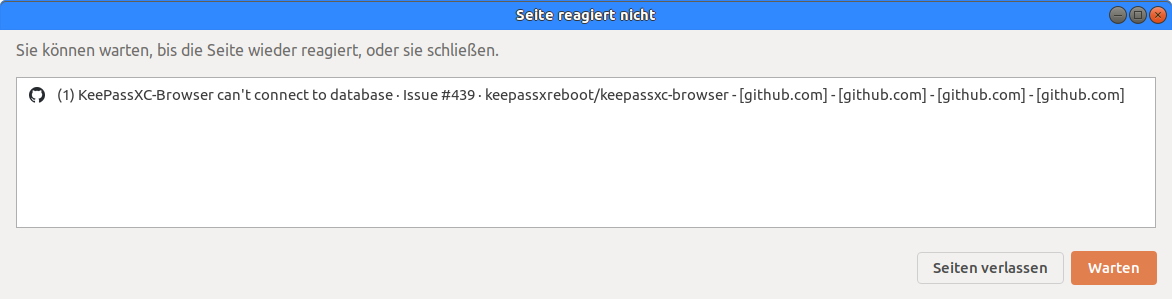
Ok, issue happened again in Chromium, this time with activated experimental feature Auto-Reconnect. Funny though - I got this error by visiting this very github page.
Connection loss happened in Firefox as well - Auto-Reconnect has been enabled as well.
spi43984
on 17 Aug 2020
system: arch linux (rolling)
keepassxc version: 2.6.1
browser: vivaldi (latest version in aur)
keepassxc-browser version: 1.6.6
things that happens to me is :
if i install the extension from google chrome webstore, it works normally;
but if i install it from the *.zip downloaded from github release,
the extension will not able to connect to keepassxc,
although the version is the same 1.6.6 !
 yichangshengwu
on 25 Aug 2020
yichangshengwu
on 25 Aug 2020
@yichangshengwu If you try to load the extension manually the extension ID changes. You need to modify the Native Messaging script file to include the temporary ID. See https://github.com/keepassxreboot/keepassxc-browser/wiki/Loading-the-extension-manually
If you do this, it's also good to disable the advanced Browser Integration setting _Update native messaging manifest files at startup_ because it can override your custom setting on KeePassXC start.
varjolintu
on 26 Aug 2020
@yichangshengwu If you try to load the extension manually the extension ID changes. You need to modify the Native Messaging script file to include the temporary ID. See https://github.com/keepassxreboot/keepassxc-browser/wiki/Loading-the-extension-manually
If you do this, it's also good to disable the advanced Browser Integration setting _Update native messaging manifest files at startup_ because it can override your custom setting on KeePassXC start.
sorry, my bad, didn't read the wiki, thanks!
yichangshengwu
on 26 Aug 2020
disable the advanced Browser Integration setting "Update native messaging manifest files at
startup" because it can override your custom setting on KeePassXC start.
@varjolintu, this helpful tip isn't in the wiki page and editing seems to be disabled.
ghost
on 29 Sep 2020
@anon324875693 Editing should be enabled with non-Snap versions.
varjolintu
on 29 Sep 2020
@varjolintu, I meant I can't edit the wiki page myself to include this information.
ghost
on 29 Sep 2020
Thanks.
ghost
on 29 Sep 2020
For Google Chrome Beta, check ~/.config/google-chrome-beta/NativeMessagingHosts/org.keepassxc.keepassxc_browser.json, which wasn't auto-generated.
 gadflysu
on 27 Oct 2020
gadflysu
on 27 Oct 2020
Related issues
 FWDekker
·
3Comments
FWDekker
·
3Comments
 bwbroersma
·
3Comments
bwbroersma
·
3Comments
 dgnuff
·
3Comments
dgnuff
·
3Comments
 compilenix
·
5Comments
compilenix
·
5Comments
 derula
·
4Comments
derula
·
4Comments