Jupyterlab: Option to display hidden files in the file browser side panel
I couldn't find another issue that mentioned this, so I'll open it here:
It would be nice to be able to view hidden files in the file browser. Perhaps it could be in the File dropdown, although I don't see any other configuration options that it would group naturally with. Maybe a standalone command in the Commands tab would be most appropriate.
 stephenholtz
All 48 comments
Thanks!
stephenholtz
on 20 Apr 2017
I am pretty sure this would require server changes. IOW, the server itself is the one that is filtering out hidden files.
 ellisonbg
on 21 Apr 2017
ellisonbg
on 21 Apr 2017
The steps involved in this are:
- filebrowser uses makes an api call to contents here
- api docs for REST call are here
- ends up calling this
- which filters out hidden files here
- based on this
I'm rather ignorant of the overall configuration system, but it seems like it should be easy to add an option in the notebook api to not skip hidden files, and then the config could live in the frontend and just make a different request accordingly?
 quantology
on 3 Oct 2017
quantology
on 3 Oct 2017
Hi @metaperture, yep, there is a PR open for that: https://github.com/jupyter/notebook/pull/2819.
 blink1073
on 3 Oct 2017
blink1073
on 3 Oct 2017
Now that https://github.com/jupyter/notebook/pull/2819 has been merged is this resolved?
 mrocklin
on 7 Feb 2018
mrocklin
on 7 Feb 2018
Yep, thanks for the nudge @mrocklin!
blink1073
on 7 Feb 2018
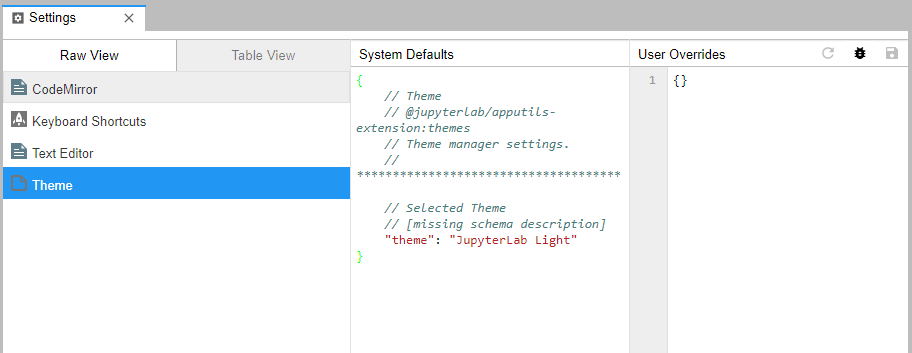
How can this be set? Does it have to be passed as a command-line argument?
It would be great if it could be toggled dynamically in the swish new settings manager:
 dhirschfeld
on 8 Feb 2018
dhirschfeld
on 8 Feb 2018
Same question here, how can this be set? :) I can't find a command which would toggle this, nor a setting, and a quick Ctrl-F of the relevant page in the docs didn't reveal anything either. I think in general, people will want to have the ability to toggle this setting from the UI -- leave the hidden files hidden most of the time to filter out noise, but show them whenever they need to edit their .bashrc or similar. Maybe this should be a new issue though?
 dlukes
on 5 Mar 2018
dlukes
on 5 Mar 2018
The control of showing hidden files is in the server. You can enable it by running jupyter notebook --generate-config and then un-commenting this entry in the created file:
## Allow access to hidden files
#c.ContentsManager.allow_hidden = False
We also still lack a front end setting to toggle hidden files in the file browser.
blink1073
on 5 Mar 2018
I can't get the abovementioned to work, even in a fresh virtualenv :( I also tried to make sure Jupyter was actually using the config file, so what I did was the following:
- Create a virtualenv and install
jupyterlabin it. - Create a file
config.py, putc.ContentsManager.allow_hidden = Truein it. - Run
jupyter lab --config config.py, hidden files remain hidden. - Run
jupyter notebook --config config.pyfor good measure, hidden files remain hidden.
Did setting the allow_hidden option work for you, @blink1073?
dlukes
on 5 Mar 2018
Ah, you are correct. allow_hidden only allows us to serve a hidden folder. Reopening this issue.
blink1073
on 5 Mar 2018
+1
 gsemet
on 8 Mar 2018
gsemet
on 8 Mar 2018
If you want to view files in a hidden folder such as ~/.julia, as I did, you can use the workaround of being in that folder before running jupyter lab.
 pbouffard
on 19 Mar 2018
pbouffard
on 19 Mar 2018
+1
i want to navigate .keras/datasets
 ptah23
on 30 Mar 2018
ptah23
on 30 Mar 2018
+1
 joelkim
on 20 Jun 2018
joelkim
on 20 Jun 2018
+1
 bichopaulinho
on 13 Jul 2018
bichopaulinho
on 13 Jul 2018
+1
 tjbay
on 31 Jul 2018
tjbay
on 31 Jul 2018
To show hidden files, does it work to launch jupyter lab with jupyter lab --ContentsManager.allow_hidden=True?
 jasongrout
on 31 Jul 2018
jasongrout
on 31 Jul 2018
Ah, catching up here. Apparently --ContentsManager.allow_hidden=True allows us to access the hidden files, but the server still does not return files when we ask for a directory listing.
Solving this needs to be done in the notebook server repo: https://github.com/jupyter/notebook/tree/master/notebook
jasongrout
on 31 Jul 2018
+1
 joel-odlund
on 18 Dec 2018
joel-odlund
on 18 Dec 2018
just to stress that this is possibly not "just an enhancement" but rather an essential feature:
directories with posix acls indicating no access rights are seemingly also considered "hidden". Unfortunately on filesystems supporting non-posix acls (e.g. gpfs, beegfs, afs, nfs4) posix acls tend to be fairly meaningless. In such cases directories will not be listed in the file browser despite full read/write access, which can be very confusing from a users point of view.
An option to circumvent posix-acl- or hidden-checks would hence be more than welcome (or alternatively turn it around: show everything unless explicitly restricted, which appears in such "exotic" use cases the more user friendly option).
 schluenz
on 4 Jan 2019
schluenz
on 4 Jan 2019
FYI, the Jupyter notebook server is the project that needs to change to fix this. https://github.com/jupyter/notebook/issues/3812 is tracking this feature request in that project.
jasongrout
on 4 Jan 2019
To clarify, JLab shows what the Jupyter notebook server hands it, and it's the Jupyter notebook server that is not showing the hidden files to the frontend.
jasongrout
on 4 Jan 2019
Useful if your notebook is part of a git repository that other applications look for in a particular location (e.g. a Julia package). That said, @pbouffard's method worked for me
 Jacob-Stevens-Haas
on 17 Jan 2019
Jacob-Stevens-Haas
on 17 Jan 2019
Hello all, I see that jupyter/notebook#3182 has been merged suggesting a fix to this.
Thanks to @minrk for that clever bit of code!
Has anyone been able to confirm this from CLI by jupyter lab --ContentManager.allow_hidden=true?
I'm also curious if it is required that this option be passed by command line when launching the instance, or whether it can be changed/configured within the web interface.
 glass-ships
on 16 Mar 2019
glass-ships
on 16 Mar 2019
yes, a right click option of a menu item would be required, since it is pretty stantard in every file explorer.
gsemet
on 17 Mar 2019
+1
i want to see files like xxx.so
 zhouyangnk
on 11 Jun 2019
zhouyangnk
on 11 Jun 2019
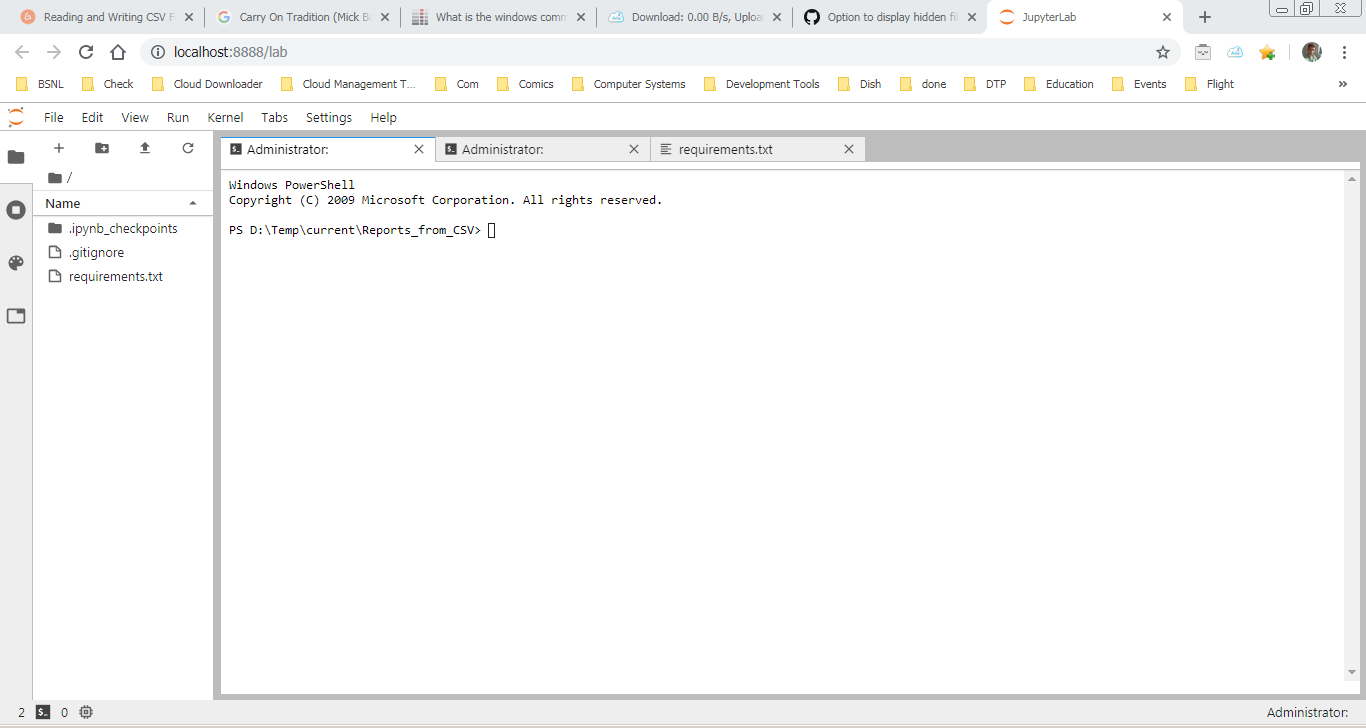
jupyter lab --ContentsManager.allow_hidden=True works.
 Baneeishaque
on 31 Jul 2019
Baneeishaque
on 31 Jul 2019
Hi @Baneeishaque! which Jupyter lab version are you using? that's not working for me. Thanks!
 PARIASML
on 16 Aug 2019
PARIASML
on 16 Aug 2019
Listing hidden files was added in Jupyter notebook server version 6.0. Make sure you have notebook version 6.0 or later.
jasongrout
on 16 Aug 2019
Awesome!
I see that passing the argument in command line enables this option, however in my use case, the JupyterLab is containerized in a Kubernetes pod, and so basically nobody has the ability to pass that argument.
Is it possible to configure this in an already running instance of JupyterLab?
glass-ships
on 16 Aug 2019
Thanks a lot guys!
PARIASML
on 16 Aug 2019
Is it possible to configure this in an already running instance of JupyterLab?
Not yet. This would require a server-side change to either the notebook server or jupyterlab to allow a message from the frontend to change this server setting. This is assuming that you can change this option dynamically in the server.
jasongrout
on 16 Aug 2019
If someone wants to work on this, let us know and we can help guide you to the relevant code.
jasongrout
on 16 Aug 2019
Gotcha, thanks!
Yeah actually, I think the ability to toggle within an instance would be really handy. I'm not sure if I'll be able to solve it on my own, but I'm definitely happy to take a look and maybe start a fork?
glass-ships
on 16 Aug 2019
Instructions for setup for contributing to jlab are at https://github.com/jupyterlab/jupyterlab/blob/master/CONTRIBUTING.md
It looks like there are two parts here:
- verifying that you can change this option at runtime, and doesn't just have to be set at compile time. Relevant code from https://github.com/jupyter/notebook/pull/2819 indicates that
self.contents_manager.allow_hiddenis promising. - Somehow communicating from the frontend to the server to change this option. I can't think of an existing channel to do this, so something will need to be created. Perhaps some new url endpoint for configuring the jlab server.
jasongrout
on 16 Aug 2019
@jasongrout Jason, I'm having the same issue here. My lab is not being able to list the hidden files. However, executing jupyter lab --ContentsManager.allow_hidden=True allows me to list those files from the terminal.
My jupyter versions are:
jupyter core : 4.5.0
jupyter-notebook : 5.7.8
qtconsole : not installed
ipython : 5.8.0
ipykernel : 4.10.1
jupyter client : 5.3.1
jupyter lab : 0.33.12
nbconvert : 5.6.0
ipywidgets : not installed
nbformat : 4.4.0
traitlets : 4.3.2
 scaldarola
on 16 Aug 2019
scaldarola
on 16 Aug 2019
You should always be able to list the files from the terminal. The issue here is about displaying hidden files in the file browser, or really the OP is about toggling that display from the frontend. I think we are to the point that someone needs to design and implement a solution, which may be nontrivial. Help is welcome! Since this probably involves new architecture for communicating between the server and frontend, if you are wanting to work on this, please have a discussion about the design first here.
jasongrout
on 16 Aug 2019
I'm very interested in this feature too so I'll just pipe up with another potential solution to dynamically toggling the display of hidden files:
- Pass the
--ContentsManager.allow_hidden=Trueflag to the server but have a configurable in the frontend (jupyterlab) to filter out the hidden files which the server passed through
...I guess that would depend on whether the information that the file was hidden or not was passed through by the server? It would be useful to have that information in the frontend to e.g. apply some css (e.g. transparency) to hidden files/folders.
dhirschfeld
on 17 Aug 2019
For anyone unable to get the --ContentsManager.allow-hidden=True flag to work, you can use a symbolic link to the hidden folder to sidestep the issue.
ln -s /path/to/.hidden /path/to/unhidden
 ChristopherEeles
on 22 Sep 2019
ChristopherEeles
on 22 Sep 2019
I think it should be default setting like other editors.
 roccqqck
on 27 Oct 2019
roccqqck
on 27 Oct 2019
any progress? This simple feature could help many users
 elisim
on 27 May 2020
elisim
on 27 May 2020
For anyone unable to get the
--ContentsManager.allow-hidden=Trueflag to work, you can use a symbolic link to the hidden folder to sidestep the issue.
ln -s /path/to/.hidden /path/to/unhidden
It's jupyter lab --ContentsManager.allow_hidden=True instead! (underscore)
 NicksonYap
on 5 Jul 2020
NicksonYap
on 5 Jul 2020
+1 for this issue. The work-around proposed to use jupyter lab --ContentsManager.allow_hidden=True is really not ideal in a shared deployment (JupyterHub spawning a personal Jupyter server for each user) since this config will force it on all users.
We have users with different technical levels and personal preferences and it's best to let each user decide if they want to see hidden files or not.
 tlvu
on 4 Dec 2020
tlvu
on 4 Dec 2020
Hi all - checking in on the status of this one and whether anyone is working on it? If not, does @jasongrout or anyone else have a rough idea of whether (given the server now can list these and it can be enabled at start time with the --ContentsManager flag) the remaining work is a) purely Lab UI b) small/medium/large? I'm wondering if I should try to allocate some cycles to this... I'm using Lab 3.x in a teaching-intensive context where this limitation is a problem, as I want students to easily open the built-in editor to access hidden Unix files for tweaking configurations of various sorts. Having to keep symlinks around for .bashrc, .gitignore, etc. is a bit of a pain, so I'd like a cleaner solution I can offer them.
For now I may be able to activate it server-side, but that's not ideal as it shows the hidden files always. Ideally the user experience would be one with a simple run-time toggle, similar to how we teach them the difference between ls and ls -a, which they tend to use _only_ if/when they need to see .dotfiles, but can otherwise ignore...
 fperez
on 22 Jan 2021
fperez
on 22 Jan 2021
Hi all - checking in on the status of this one and whether anyone is working on it?
I don't know of anyone working on it.
given the server now can list these and it can be enabled at start time with the
--ContentsManagerflag
Nice! That's the work that needed to be done to have access to the files. With that flag, JLab displays them just fine (i.e., all jlab is doing is displaying what the contents manager gives back. Now it lists them, so jlab displays them)
Ideally the user experience would be one with a simple run-time toggle, similar to how we teach them the difference between
lsandls -a, which they tend to use _only_ if/when they need to see .dotfiles, but can otherwise ignore...
That would be the extra work needed, then. I imagine this would be pretty straightforward to add an attribute that says whether to list them or not, and a way to toggle that in the UX with a command that is added to a right-click menu, or a setting or something. How much work depends on what what is wanted for this user toggle feature.
jasongrout
on 22 Jan 2021
For now I may be able to activate it server-side
You'll have to enable it server-side. Otherwise the contents manager won't give them to jlab in the first place. It sounds like it's best to enable it server-side, then have an optional filtering in the browser depending on a user toggle.
jasongrout
on 22 Jan 2021
Thx @jasongrout - I'm doing that for now (the server-side config) which will be a decent stop-gap, while I think more about #5056 :)
fperez
on 22 Jan 2021
Related issues
blink1073
·
76Comments
 selimrbd
·
79Comments
selimrbd
·
79Comments
 andyhegedus
·
55Comments
andyhegedus
·
55Comments
 rongmu
·
50Comments
rongmu
·
50Comments
 tom-programming
·
48Comments
tom-programming
·
48Comments
Most helpful comment
any progress? This simple feature could help many users