Jupyterlab: Implement variable inspector for kernels
Hi,
It is useful when doing interactive data analysis to quickly get the name/quick summary (type/ size) of in-memory variables.
I was wondering if having a block for displaying this kind of information could be an interesting feature for JupyterLab ? Such as the one in RStudio:

 selimrbd
All 79 comments
Hi @SelimRaboudi, this feature would be a most welcome contribution.
 blink1073
on 18 Jul 2016
blink1073
on 18 Jul 2016
:+1: Would be a great project for a community developed extension.
 sccolbert
on 18 Jul 2016
sccolbert
on 18 Jul 2016
Great idea and +1 to someone from the community implementing this plugin. A design question: would you want to know the ENV vars for kernels or the main notebook server, or both?
 ellisonbg
on 18 Jul 2016
ellisonbg
on 18 Jul 2016
I'm afraid there is a misunderstanding between the title of this issue and the description.
OP seems to be asking more or less for the "Workspace Variables" block as can be seen in Matlab or similar programs, and not for the Environment variables which are a complete different thing.
Quoting him:
get the name/quick summary (type/ size) of in-memory variables
I suggest changing the title of the issue to accurately reflect the description.
 zertrin
on 19 Jul 2016
zertrin
on 19 Jul 2016
@zertrin : indeed I've used the wrong vocabulary. Correcting the title.
A positive side-effect of my mistake is that the idea of an "ENV vars" block could also be relevant.
I'll look into how I can do a first implementation of the "in-memory vars" block (if you think it still makes sense ?)
selimrbd
on 19 Jul 2016
I heard a couple people at SciPy express interest in a feature like this. Could it be done with a thin wrapper around IPython's who magic? Is there a way to plug into cell execution such that who would be re-run and the widget updated every time a cell is executed?
 danielballan
on 19 Jul 2016
danielballan
on 19 Jul 2016
If not, we can add one ;).
blink1073
on 19 Jul 2016
If you have the kernel, you can connect to iopubMessage, filter on execute_result messages, and take appropriate action.
blink1073
on 19 Jul 2016
(brainstorming here...)
Maybe we should have the concept of "kernel widgets" which are widgets that interact with a single kernel. You could open such a widget from a tab listing all running kernels, or maybe there would be a way to open the widgets from the kernel indication in a document. This variable explorer would be an example of a kernel widget. Likely a kernel widget could depend on the type of kernel, or it could be available for all kernels.
On the other hand, if this variable explorer was a kernel widget, what would we do if the notebook we launched it from started a different kernel? Would we want the variable explorer to automatically know to switch to the new kernel? I think that's probably what the user would expect, so the notebook that launched the kernel widget should keep a handle on it so it could change the kernel.
 jasongrout
on 19 Jul 2016
jasongrout
on 19 Jul 2016
Here again the notion of an "active" kernel could be useful, so the user doesn't need to select the kernel for such a widget. (mentioned in https://github.com/jupyter/jupyterlab/issues/450#issuecomment-233532869)
 svenefftinge
on 19 Jul 2016
svenefftinge
on 19 Jul 2016
I usually have more than one kernel running at a time, and I think I'd have trouble keeping track of which one was "active." I like @jasongrout's idea that kernel widgets like a "variable explorer" could be launched from a notebook and retain references in both directions. Other kernel widgets (like an HDF5 viewer) might close over a private kernel used only by that widget.
danielballan
on 19 Jul 2016
Love the idea of a kernel widget.
In our case, we'd love to develop a widget that knows the state of its kernel and displays information to the user based on it. In this case, the state is user variables, but in the case of a Spark kernel, it might be the connection string that the kernel is using to connect to Spark, as well as general information regarding this Spark instance.
If a user has multiple notebook tabs open, I believe good UX would be to have the widget change contents appropriately as the user selects multiple notebook tabs. One way of achieving this might be that kernel widgets are part of the notebooks JupyterLab panel, and can be minimized/maximized/docked/undocked in the context of the notebook panel.
 aggFTW
on 26 Jul 2016
aggFTW
on 26 Jul 2016
This feature would make JupyterLab a closer Pythonic analogue of Matlab's IDE
 SynapticSage
on 11 Apr 2017
SynapticSage
on 11 Apr 2017
Yes, please. With knobs on. This is absolutely essential for scientific programming as is a visual debugger with breakpoints.
 OldGuyInTheClub
on 8 Jun 2017
OldGuyInTheClub
on 8 Jun 2017
The least it should show somehow is the keys and column names of dicts and tables. Looking up those identifiers happens very often. Maybe in a tooltip or expandable view.
 Gerenuk
on 8 Jun 2017
Gerenuk
on 8 Jun 2017
Spyder IDE already has this for their IPython consoles (Spyder tries to be similar to Matlab IDE), and is licensed under MIT. Even if the language/framework used is different, it could serve as a source of inspiration.
 vidartf
on 8 Jun 2017
vidartf
on 8 Jun 2017
Spyder is ok but a friend recently showed me Rstudio and it was very impressive, very close to Matlab's UI and now has a notebook capability. I don't think it fully supports other kernels though. It is good enough that I am thinking about learning R.
OldGuyInTheClub
on 8 Jun 2017
This is absolutely essential for scientific programming as is a visual debugger with breakpoints.
Is there a separate issue/feature request for a visual debugger? I guess it should have to be developed as an extension. Perhaps this Python 3.7 addition will be of great help:
 astrojuanlu
on 3 Oct 2017
astrojuanlu
on 3 Oct 2017
There isn't an issue for a debugger, please feel free to open one, @Juanlu001.
blink1073
on 3 Oct 2017
astrojuanlu
on 3 Oct 2017
This feature is one of my favorites in RStudio, and would love to see it in JupyterLab. Especially nice if combined with the ability to click dataframes and explore them (similar to View() in RStudio)
 hershelm
on 14 Dec 2017
hershelm
on 14 Dec 2017
I too would love to see this feature. For me, it would put jupyterlab on the same level as other IDEs like Rstudio, Spyder, MATLAB
For the past while I've been wanting to move away from Spyder, but the only thing holding me back is that there arent really any other python IDEs that have a variable explorer. I've been wanting to try jupyterlab for a while now but the lack of a variable explorer is preventing me from migrating over as it would slow down my workflow too much
For example, its really useful to be able to see what data structures I have, their name, their size, data type etc. Seeing that information at a glance is much quicker than having to type code to see the same information (even if it only takes a short line of code)
Also, the ability to interact with data (filtering, sorting, sub selections) is a very common task when analyzing data. So having some interactive panel containing the contents of, say, a dataframe that you can then manipulate is a huge time saver compared to writing code to do the same thing. Sometimes you just want to temporarily eyeball some data, rather than to make a permanent change, and thats where a MATLAB style variable explorer would be extremely useful
Maybe a phosphorJS gridpanel (https://github.com/phosphorjs/phosphor-gridpanel) would be the right framework for this?
 sho-87
on 22 Feb 2018
sho-87
on 22 Feb 2018
Maybe a phosphorJS gridpanel (https://github.com/phosphorjs/phosphor-gridpanel) would be the right framework for this?
Not a gridpanel, but a datagrid (once I add the requisite features) (https://github.com/phosphorjs/phosphor/tree/master/packages/datagrid/src)
(http://phosphorjs.github.io/examples/datagrid/)
That gridpanel repo is old code that I still need to migrate to the 1.0 packages. It's a layout which arranges full blown widgets in a 2-d grid (as opposed to a boxpanel, which is 1d).
sccolbert
on 22 Feb 2018
There is an extension for Jupyter Notebook that does pretty much this. I'm using it extensively. The code is actually quite simple. I don't know how difficult it is to adapt Jupyter Notebook extensions for Jupyterlab.
 jhrmnn
on 24 Feb 2018
jhrmnn
on 24 Feb 2018
It should be pretty straightforward to adapt the code, and actually probably a lot of the window management code will not be needed.
jasongrout
on 24 Feb 2018
(If anyone wants to work on this, please post here and in the gitter channel, and we can help you get started. You can also read the extension developer guide: http://jupyterlab.readthedocs.io/en/stable/user/extensions.html, http://jupyterlab.readthedocs.io/en/stable/developer/extension_dev.html, and peruse the xkcd example: http://jupyterlab.readthedocs.io/en/stable/developer/xkcd_extension_tutorial.html)
jasongrout
on 24 Feb 2018
@jasongrout I'm playing around with this. Nothing serious - mostly just a way for me to learn JS/TS and get familiar with jupyterlab. Doubt anything will come of it but we'll see...
Ive been looking through the docs to try to understand where things are in jupyterlab but its a bit sparse (understandable). How would I get a list of currently active (python) kernels, connect to one so I can execute some code, and receive a message back through iopub?
And are there any other tutorials on extension development that cover more advanced topics like these? Or is it mostly just sifting through the code base at this point and trying to piece things together from there?
sho-87
on 14 Mar 2018
Any news on this? Currently switching from R & RStudio to Python & JupyterLab and this is the only feature that I'm missing every minute.
 tbenschop
on 17 Apr 2018
tbenschop
on 17 Apr 2018
And are there any other tutorials on extension development that cover more advanced topics like these? Or is it mostly just sifting through the code base at this point and trying to piece things together from there?
There is some tutorial-type information in the docs for extension development (such as http://jupyterlab.readthedocs.io/en/stable/developer/extension_dev.html), but I don't think we have a tutorial covering getting access to a kernel. So at this point, it's sifting through the codebase and asking us. Let me dig into this a bit and post back here with some thoughts about writing an extension that gets access to a kernel.
jasongrout
on 17 Apr 2018
@sho-87 - see above.
jasongrout
on 17 Apr 2018
Yes, I agree, this is the only thing stopping me switching from spyder to jupyter.
 Aspire1Inspire2
on 18 Apr 2018
Aspire1Inspire2
on 18 Apr 2018
I've opened #4409 about making a tutorial that covers starting a kernel from an extension.
jasongrout
on 18 Apr 2018
This would be so powerful guys, I think one of the few things left in having this be a serious contender to RStudio (that + support for RNotebooks if not already and RDashboards/Shiny dev)
 uptownfunk
on 2 May 2018
uptownfunk
on 2 May 2018
I've opened #4409 about making a tutorial that covers starting a kernel from an extension.
It sounds like one would want to access an existing (not start a new?) kernel for this. Though please feel free to correct me if I'm misunderstanding.
 jakirkham
on 7 May 2018
jakirkham
on 7 May 2018
Hi all,
Please see the short demo below.
It lists the existing variables and add / remove variables as you keep updating your notebook.
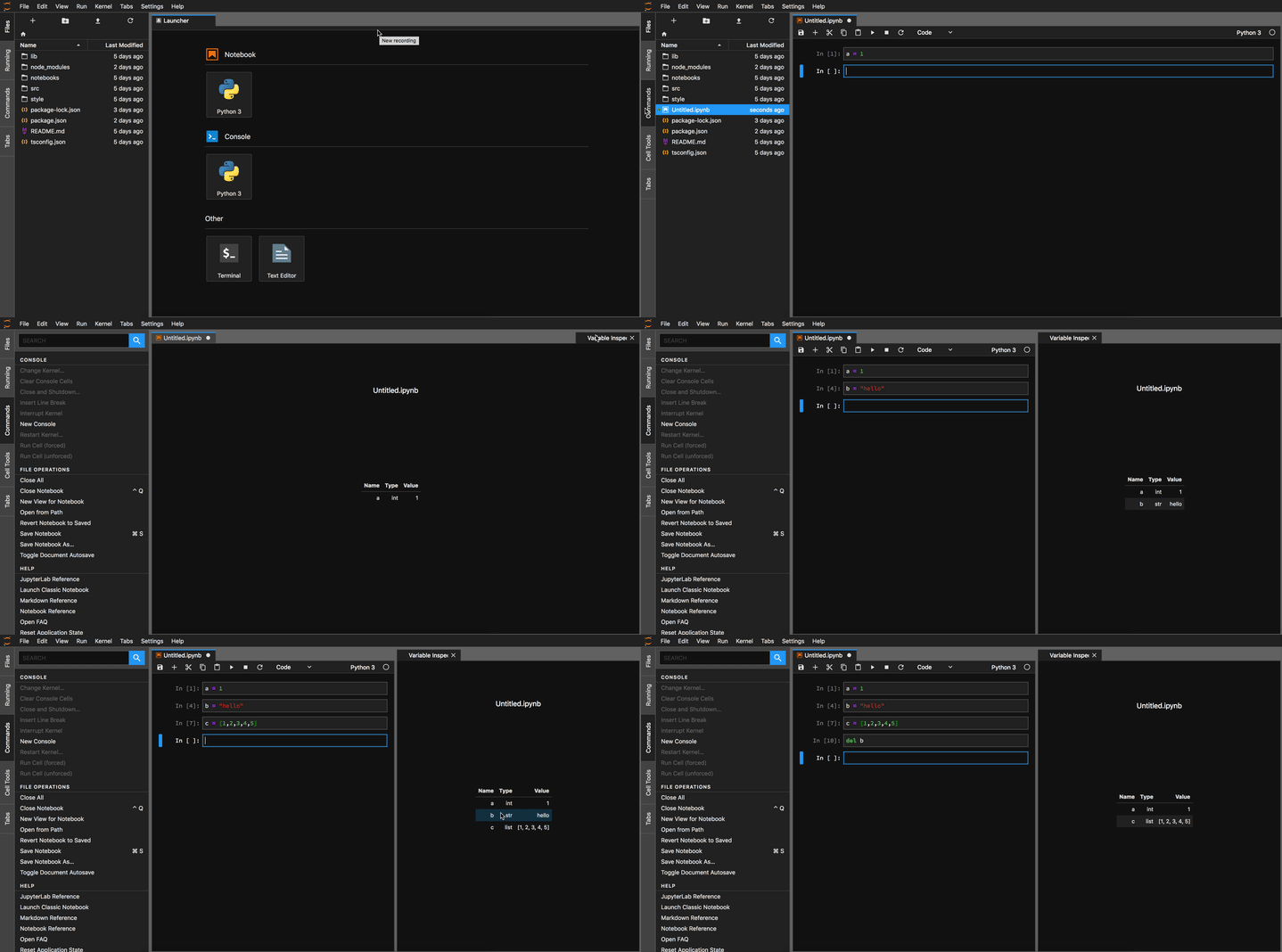
Still have to fix a few bugs before releasing something stable enough, I'll update more about my progress.
 kazuar
on 20 May 2018
kazuar
on 20 May 2018
Neat! Thanks for sharing. What happens if you try a largeish array?
jakirkham
on 20 May 2018
@jakirkham it will probably print all of it in the output field. One more thing to fix 😄
kazuar
on 20 May 2018
nice work @kazuar !
when I was playing around with this, before real life got in the way, I found the old varInspector extension to be a pretty nice starting point (https://github.com/ipython-contrib/jupyter_contrib_nbextensions/tree/master/src/jupyter_contrib_nbextensions/nbextensions/varInspector)
Maybe that will give you some ideas moving forward
Eager to see where you go with this!
sho-87
on 20 May 2018
it will probably print all of it in the output field. One more thing to fix 😄
Maybe. OTOH if it is using repr it just benefits from NumPy's __repr__ implementation, which adds in ... so it just works. Hadn't looked at the code yet. Hence the question. 😉
jakirkham
on 20 May 2018
Still have to fix a few bugs before releasing something stable enough, I'll update more about my progress.
Great! Yes, please keep us up to date. There are a lot of people that would like to see a variable panel like this.
jasongrout
on 20 May 2018
Thanks @sho-87!
I did look at the Jupyter extension and got a few ideas from it.
A few things are different mainly because JupyterLab's extensions are implemented with TypeScript but the general idea is still the same.
kazuar
on 20 May 2018
@jakirkham Yes, putting ... in case of reaching maximum length is exactly what I had in mind 😄
kazuar
on 20 May 2018
@jasongrout Thanks! I've made the switch to JupyterLab a few weeks ago and I wanted to contribute after hearing a lot of great talks at the Jupyter Pop-up conference.
kazuar
on 20 May 2018
Some more progress:
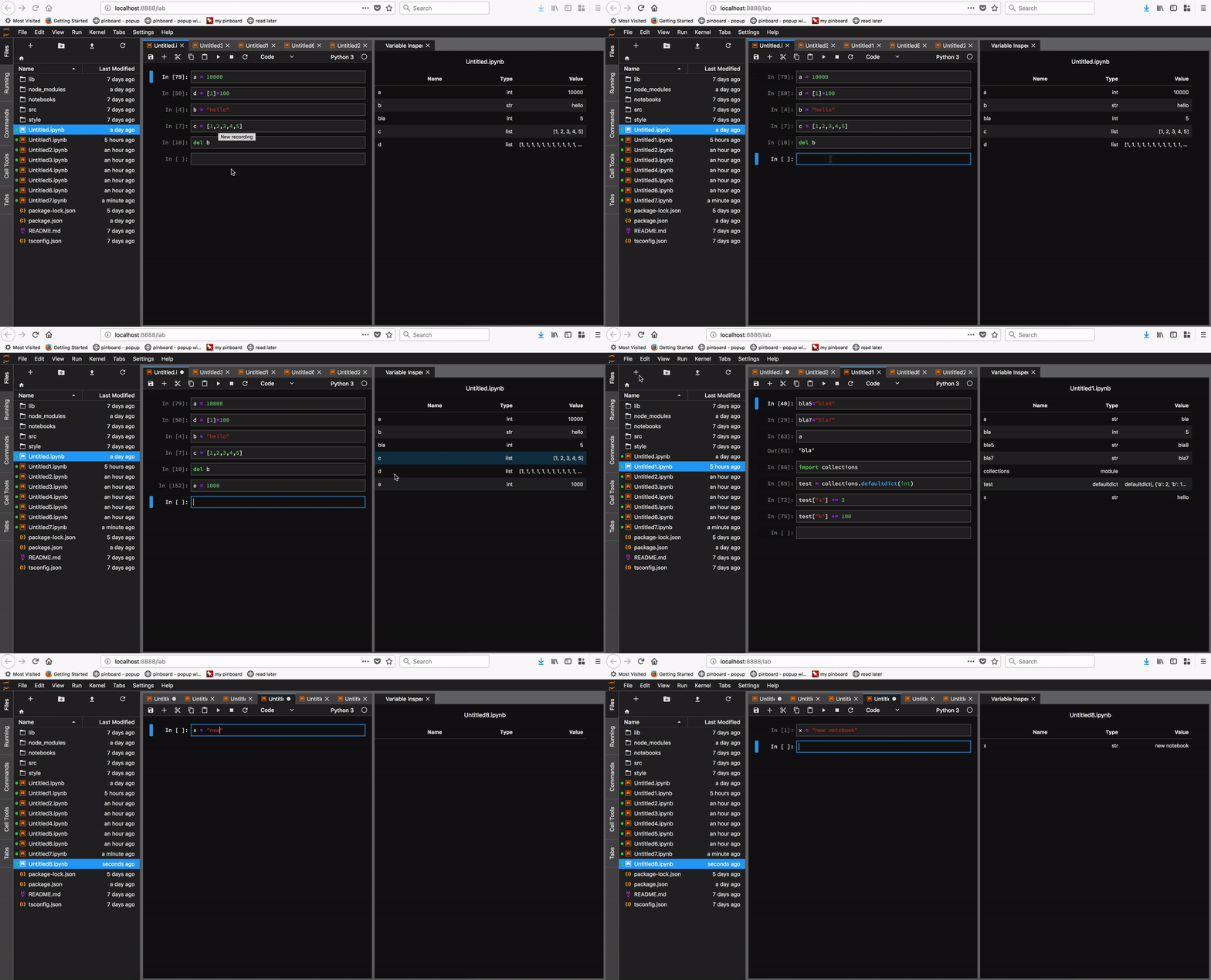
- Support switching between notebooks
- Support opening a new notebook
- Adding ellipsis
...when value is too long to display - A few bug fixes
Just a few more issues to take care of and I'll be able to release the extension and code.
kazuar
on 22 May 2018
Great stuff! Will this also be available for the editor? Or for a specific console?
tbenschop
on 22 May 2018
@tbenschop thanks! I only tested it on notebooks. I guess that for console it will require a few small changes because that would require using different interfaces.
kazuar
on 22 May 2018
Hey @kazuar, any news on the variable inspector? It looks extremely useful! Btw, showing the size of the list or the dataframe could also be an additional cool feature.
Amazing job!
 mlambelho
on 25 May 2018
mlambelho
on 25 May 2018
Hi @mlambelho, thanks for your feedback and suggestion, that would be a great feature to add.
I've been traveling this week so not a lot of progress since last update. Hope to have more soon.
kazuar
on 27 May 2018
Wow that’s a really neat extension. Also a much needed one to put Jupyter Lab in the same league as similar IDEs for the scientific computing audience - please keep us all updated!
 onlyphantom
on 3 Jun 2018
onlyphantom
on 3 Jun 2018
This is certainly on the right path and you are all doing great work. This is the one feature that would take Jupyter Lab to the next level. As suggested by a few other users above, I agree that it would be ideal to implement the R data.frame viewer for Pandas DataFrames and similar objects. Being able to visualize data structures makes working with data just _that_ much easier. For those unfamiliar, below is the way that this it works. The user can click on the data.frame object in the variable explorer, and it brings up a new tab with a sheet-style layout of the data contained in the data.frame.

 mkirch
on 5 Jun 2018
mkirch
on 5 Jun 2018
@kazuar Hello, I am new to jupyterLab and stumbled upon this thread. Have you been able to finalize the extension?
 rehans890
on 6 Jun 2018
rehans890
on 6 Jun 2018
Hello @rehans890, still need to tie a few loose ends. Hoping to have some progress this weekend. Will update soon.
kazuar
on 8 Jun 2018
@kazuar I'm super excited for this!! you rock!
 codestar12
on 9 Jun 2018
codestar12
on 9 Jun 2018
Thanks @codestar12!
You probably rock way more than me 😄
kazuar
on 11 Jun 2018
Would you be open to sharing code/explaining how to install it? 😉 Seems like it has come a long way already and expect this will provide you a lot of useful feedback and contributions at this stage. 😄
jakirkham
on 11 Jun 2018
Good work! If it's easy to implement sorting or filtering the inspector table by type, that would be a useful feature, too.
 rajkar86
on 13 Jun 2018
rajkar86
on 13 Jun 2018
Hey all, I was missing a variable inspector from jlab for a while now. Today I hacked together a solution
and stumbled on this thread afterwards.
My extension supports python for now and is still in a very raw state. Nevertheless I pushed it to a repo here .
I will add some more documentation w/ screenshots tomorrow.
Feel free to take a look and add suggestions. You're very welcome to contribute.
I'm also very interested in your work @kazuar. Maybe we can start a collaboration on this.
 lckr
on 13 Jun 2018
lckr
on 13 Jun 2018
@lckr Good job!
I've been busy every weekend for the last few weeks so it seems like I may have missed the mark on this one 😅.
From a general overview of you code it seems like both of our implementation kinda inspired by the same variable inspector ipwidget and jupyter's lab inspector.
If I'll ever get a free day over any weekend I'll push my code as well and I'll be more than happy to collaborate with you on anything you would like!
kazuar
on 14 Jun 2018
Hi @kazuar, your Demo looks awesome, is there any progress? Also, can we try it out as well? Thanks for your work!
 Dodelo
on 29 Jun 2018
Dodelo
on 29 Jun 2018
@lckr has done a great job on his end: https://github.com/lckr/jupyterlab-variableInspector
As it works with both console and notebooks, and now with ability to inspect numpy and dataframes. There are still some teething issues which I have some suggestions on, but I suggest you guys check it out.
He has a demo in the readme and is shown here:

 chappers
on 7 Jul 2018
chappers
on 7 Jul 2018
Thought I'll give an update if people are still keen on what I'm working on (since, I don't know where is the interest level). I've been slowly adding support for things I use, being spark and keras + tensorflow

Which also supports "peeking" into it based on pd.get_options for spark.

chappers
on 9 Jul 2018
How nicely does this work with the text editor? Can it be used to debug Python code in text editor rather than in notebooks?
 dclong
on 9 Jul 2018
dclong
on 9 Jul 2018
@dclong it will work as expected when you use your text editor and attach a console to it.
chappers
on 9 Jul 2018
I have following error when try to install the extension
Errored, use --debug for full output:
ValueError:
"[email protected]" is not compatible with the current JupyterLab
Conflicting Dependencies:
JupyterLab              Extension            Package
>=0.15.4-0 <0.16.0-0    >=0.16.0-0 <0.17.0-0 @jupyterlab/application
>=0.15.4-0 <0.16.0-0    >=0.16.3-0 <0.17.0-0 @jupyterlab/notebook
>=0.15.4-0 <0.16.0-0    >=0.16.3-0 <0.17.0-0 @jupyterlab/console
I am using jupyterlab 0.32.1
jupyterlab 0.32.1 py36_0 conda-forge
 ajing
on 9 Jul 2018
ajing
on 9 Jul 2018
@ajing probably better to raise it in the actual repo, but as suggested in your error, please try updating your jupyterlab to a version where the extensions are >= 0.16.X
chappers
on 9 Jul 2018
Ran into another variable inspector. So figured I'd share it here.
jakirkham
on 16 Dec 2018
@jakirkham, unfortunately it seems like the latest commit on that one is 3 years ago?
 koenlek
on 16 Dec 2018
koenlek
on 16 Dec 2018
How do you see the possibility to make it a TreeView like in PyCharm debugger?

 edoardogiacomello
on 11 Mar 2019
edoardogiacomello
on 11 Mar 2019
I haven't used Jupyter notebooks for years because it doesn't have a variable inspector. I'd love to use Jupyter for the ability to make my research more shareable but not having an inspector is such a rough development experience.
I don't want this to totally sound like a complaint since this is open source software built thanks to untold thousands of volunteer hours. As an impassioned plea from someone who doesn't know how to build it himself - for the love of interactive computing - please make a native variable inspector! Lots of people want it:
- 75 upvotes on this feature request
- 32,000 views / 100 plus upvotes on this stackoverflow request
- 296 stars on this variable extension that I'm unable to install because I can't seem to get the dependencies working.
Maybe JPMorgan Chase or Bloomberg would sponsor.
 zeluspudding
on 30 Apr 2019
zeluspudding
on 30 Apr 2019
@zeluspudding sorry but your comment indeed sounds like a complaint.
- we can expect dozens of people subscribed to this issue to receive status updates. making _impassionated pleas_ does not add anything useful.
- that stack overflow request describes several alternatives, even if they are not native
- even if you could not install jupyterlab-git, I don't think you opened an issue there describing your problems. or did you? https://github.com/jupyterlab/jupyterlab-git/issues/created_by/zeluspudding
I think the JupyterLab developers are well aware that this is a very requested feature (and Spyder has had it since, well forever). On the other hand, Jupyter has seen _massive_ adoption _despite not having it_, which is also a testament to its value as a project.
:peace_symbol:
astrojuanlu
on 30 Apr 2019
I am sorry my comment came across as such a complaint. Like I said, I've really wanted to use Jupyter for years - a testament that I believe this group's work is incredibly valuable.
I now notice that the roadmap lists this specifically. Can anyone comment as to an estimated time of release or whether this is still in the plans considering that there is an extension out there
zeluspudding
on 30 Apr 2019
I don't know of anyone working on this in core. However, we are having discussions about what a debugging protocol looks like, and that would probably include ways of getting information for a variable inspector. We don't have an estimated time for release for a debugging story (including a variable inspector) in the core extensions.
jasongrout
on 1 May 2019
That said, I'm sure people would be willing to help mentor anybody who says they are willing to commit the time to actually build such an extension.
vidartf
on 1 May 2019
Considering that such an extension exists, I guess I should modify that to "anybody who's developing such an extension ".
vidartf
on 1 May 2019
I have installed the extension and it works perfectly - any chance it could support the Matlab kernel too?
 thbak
on 22 Dec 2019
thbak
on 22 Dec 2019
Hello Guys,
I'm trying to use the variable inspector with R kernel. It shows to me the environment variables perfectly. My doubt is about opening data frames. It is possible with R kernel? In my case, It's only working with python, but with R it is not.
There is some possibility to open a R dataframe?
Thanks,
 nielsenrechia
on 9 Dec 2020
nielsenrechia
on 9 Dec 2020
it seems that the author of the variableinspector extension may not be actively maintaining it and so it's not compatible with JupyterLab3. (see here).
I'd love to see this functionality be rolled into the core JupyterLab functionality, as has been done with the debugger. As is, I'm sticking with JupyterLab2 for now just because I really love the variableinspector extension.
 M00NSH0T
on 14 Jan 2021
M00NSH0T
on 14 Jan 2021
FYI, if I recall correctly, a variable inspector is on the roadmap for the debugger extension.
jasongrout
on 14 Jan 2021
Updating that extension may be as simple as bumping the dependencies at https://github.com/lckr/jupyterlab-variableInspector/blob/50c522c613c6ce59fa19f88e4c7db11fa4b1dd56/package.json#L34-L40
jasongrout
on 14 Jan 2021
Related issues
 cceyda
·
49Comments
cceyda
·
49Comments
 andyhegedus
·
55Comments
andyhegedus
·
55Comments
 rutgerhofste
·
45Comments
rutgerhofste
·
45Comments
 minrk
·
126Comments
minrk
·
126Comments
 nickeubank
·
160Comments
nickeubank
·
160Comments
Most helpful comment
Some more progress:
...when value is too long to displayJust a few more issues to take care of and I'll be able to release the extension and code.