Jetpack: Eventbrite, Calendly: Button style can't be styled without URL
@creativecoder has kindly replied to me on pb5gDS-tx-p2, but I'm opening an issue here to discuss how we could move forward with this.
Currently, these blocks don't let you style the button until you add an embeddable URL. This is a problem when it comes to layout and block patterns. Why?
For example, we want to provide the customer with a block pattern like this that uses the block with its Button & Modal style. The button saying "Buy tickets" is styled with the yellow to blend into the rest of the design.
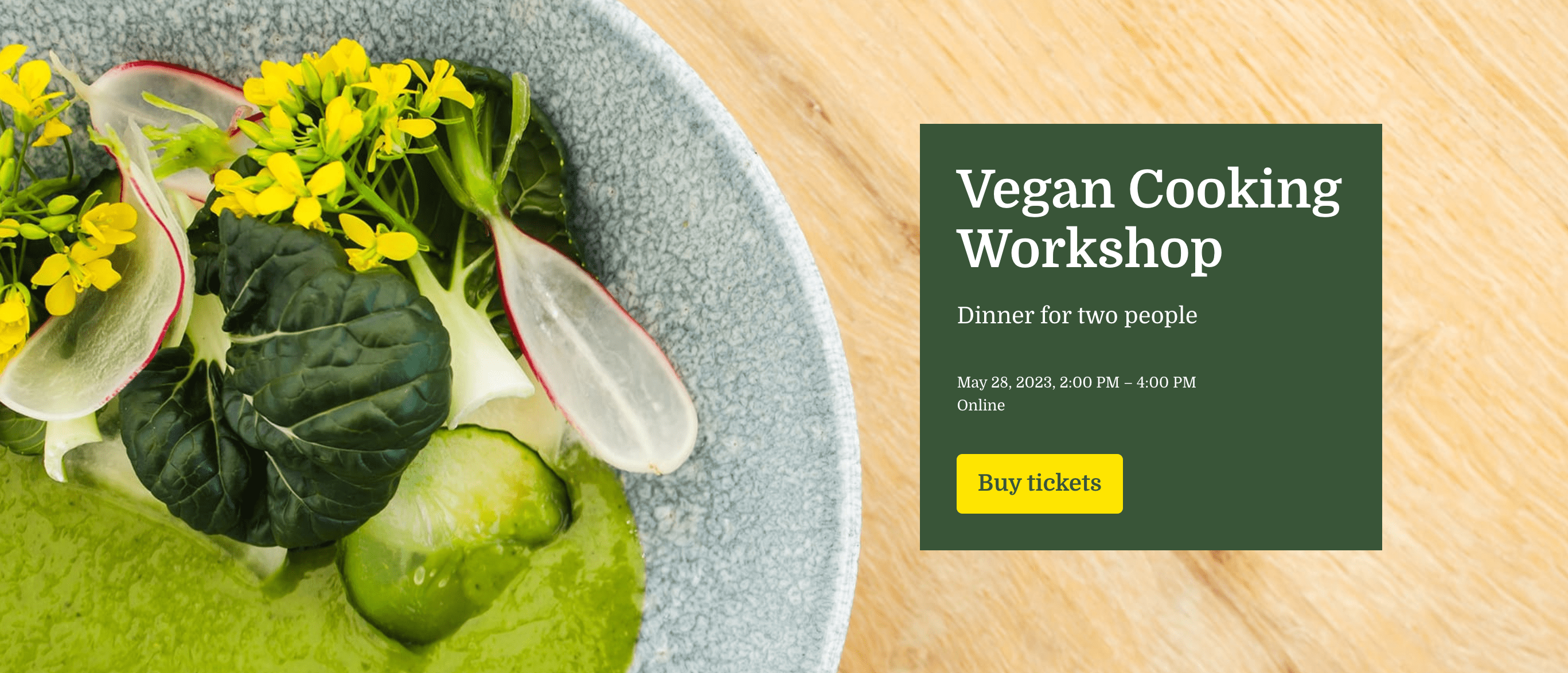
However, we don't include a demo URL in the pattern, therefore we won't be able to style the button with the yellow in the pattern, and when the customer adds an URL they're going to see a button that is style by the activated theme, and it could end up like this if the default button in the theme is green:
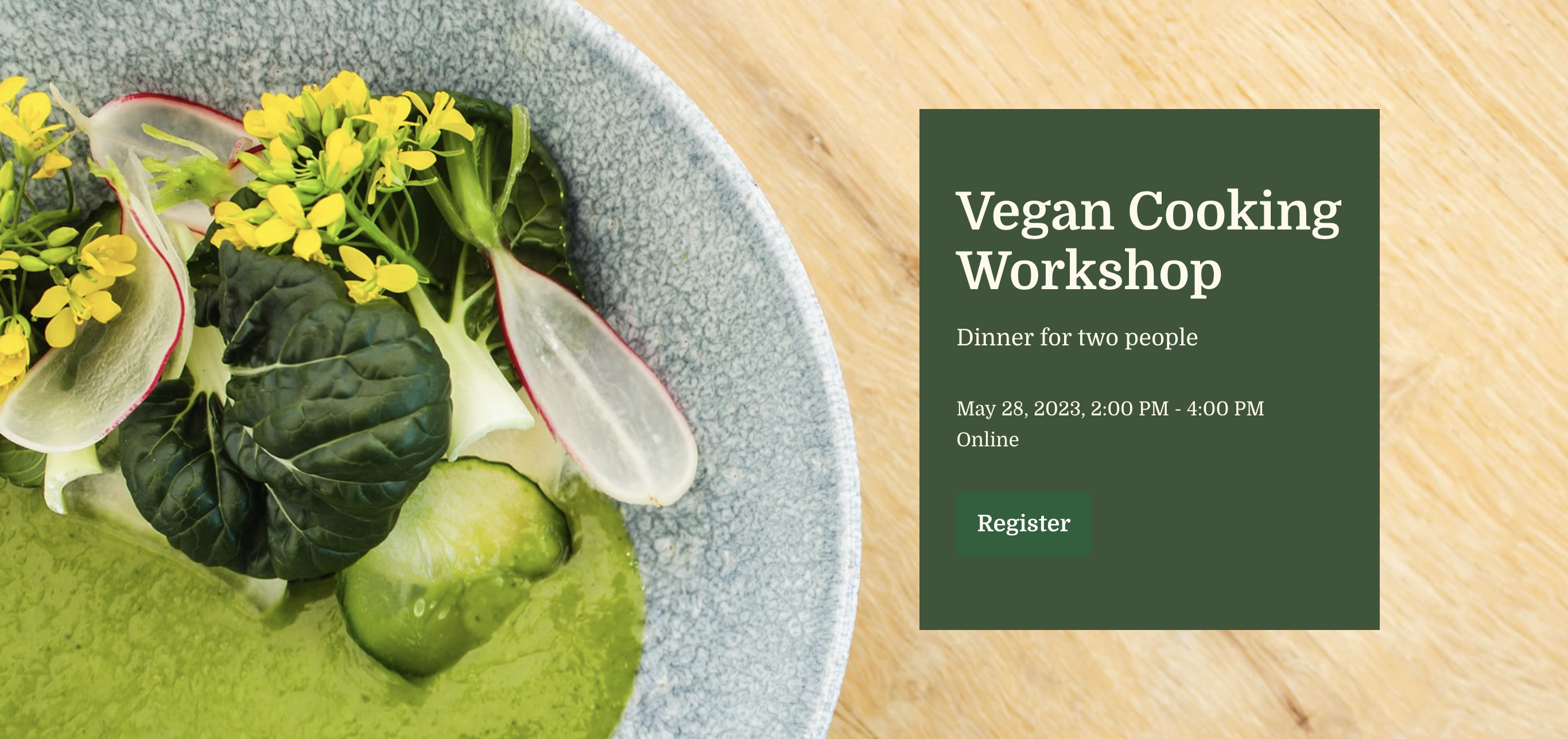
This is not a great experience for the customer.
Also, what they're going to see in the preview is going to be something like this which is not very attractive with the white box either.
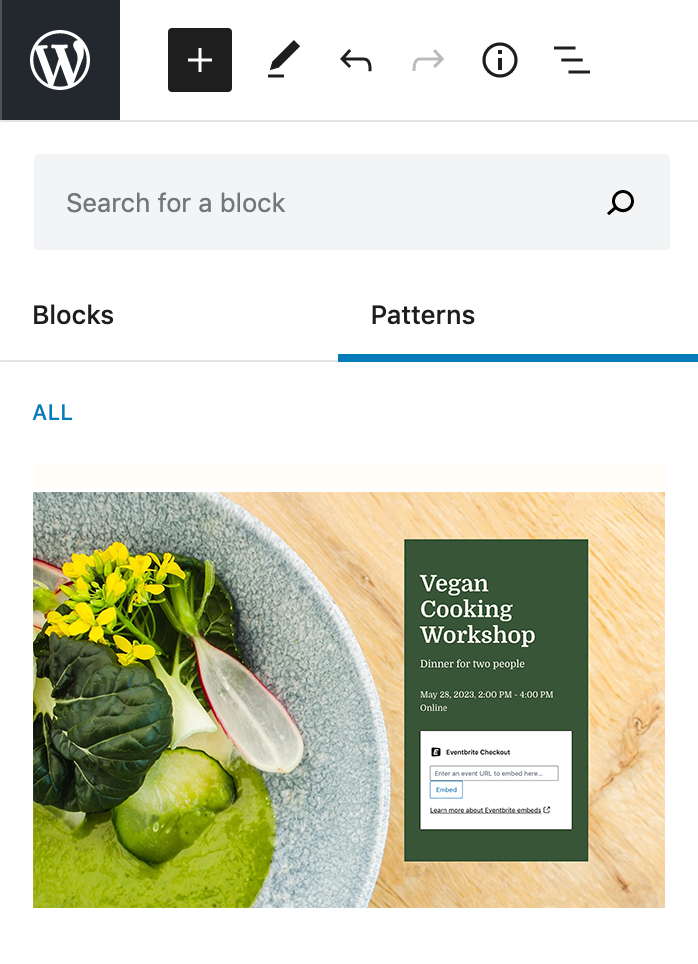
How can we provide a better experience? there might be other blocks that share the same challenge.
While I was testing this, I wasn't able to add an URL if I choose the Button & Modal style before adding the URL. It only accepted the URL when I choose the Inline style. This seems to be a bug —let me know if it's better to open an issue for it.
cc @ianstewart @alaczek
 iamtakashi
All 6 comments
Also, what they're going to see in the preview is going to be something like this which is not very attractive with the white box either.
While it doesn't look attractive, this does make sense to me - this way customers know that they still need to configure the block. But once they add the URL the button colors should be configured as in the screenshot.
 alaczek
on 15 May 2020
alaczek
on 15 May 2020
While it doesn't look attractive, this does make sense to me - this way customers know that they still need to configure the block.
I agree that it helps once the pattern in the editor, but I feel showing the completed state is ideal in the preview.
iamtakashi
on 19 May 2020
Showing the placeholder state in the example is more confusing than helpful. The whole point of the example preview is to show you what the block/pattern looks like — not mimic the editor's UI.
--
There was chatter in Slack the other day related to blocks that have some sort of _required_ setup, like a 3rd party authorization or a URL. One idea I had was to create some sort of "demo mode" (either as a property of all blocks, or a block wrapper) that allows the block to display example content by default, and then show the placeholder when the block is selected.
This might introduce too much complexity, and kind of _breaks_ the purpose of the Placeholder state — which is to signal to a user that the block needs _something_ — but its worth exploring further.
 shaunandrews
on 19 May 2020
shaunandrews
on 19 May 2020
Parsing this issue out, I think there are 2 specific requests
Set block attributes that override the theme defaults
This would allow the button style to be used, with specific colors, after the user enters a url to set up the blockDetect when the block is being shown in a block pattern preview and show the rendered state of the block, rather than the placeholder
 creativecoder
on 22 May 2020
creativecoder
on 22 May 2020
Let's keep this on the Explorers Team backlog for now @creativecoder.
 davemart-in
on 27 Jun 2020
davemart-in
on 27 Jun 2020
One idea I had was to create some sort of "demo mode" (either as a property of all blocks, or a block wrapper) that allows the block to display example content by default, and then show the placeholder when the block is selected. […] This might introduce too much complexity, and kind of breaks the purpose of the Placeholder state — which is to signal to a user that the block needs something — but its worth exploring further.
Could potentially walk back the idea a bit to showing the placeholder when _inserted_. Pattern previews could get "fully rendered" previews and when inserted the placeholder state could do it's job of immediately signalling that there was something to attend to. Like, in various dynamic block scenarios, connecting to another service, setting something up, writing blog posts, etc.
 ianstewart
on 27 Jul 2020
ianstewart
on 27 Jul 2020
Related issues
 beaulebens
·
3Comments
beaulebens
·
3Comments
 jeherve
·
3Comments
beaulebens
·
3Comments
jeherve
·
3Comments
beaulebens
·
3Comments
 kraftbj
·
3Comments
kraftbj
·
3Comments
 chrisaldrich
·
3Comments
chrisaldrich
·
3Comments
Most helpful comment
Showing the placeholder state in the example is more confusing than helpful. The whole point of the example preview is to show you what the block/pattern looks like — not mimic the editor's UI.
--
There was chatter in Slack the other day related to blocks that have some sort of _required_ setup, like a 3rd party authorization or a URL. One idea I had was to create some sort of "demo mode" (either as a property of all blocks, or a block wrapper) that allows the block to display example content by default, and then show the placeholder when the block is selected.
This might introduce too much complexity, and kind of _breaks_ the purpose of the Placeholder state — which is to signal to a user that the block needs _something_ — but its worth exploring further.