Jetpack: Masterbar: Site link from wp-admin is undefined
Steps to reproduce the issue
- Enable the WP.com toolbar (masterbar)
- Go to any page in wp-admin
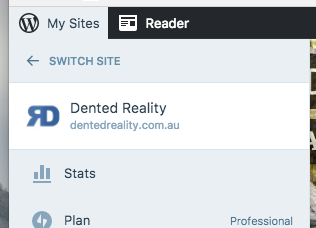
- Click "My Sites" in the top-left
- Click the SiteIcon or label of the site at the top of the menu to visit the site (correct URL is shown in the browser status bar)
- Instead, land on
/wp-admin/undefined
Note that clicking the same icon/link from the frontend of the site works correctly, and returns you to the homepage of the site.
cc @vindl
 beaulebens
All 3 comments
For reference, this site runs 5.6-alpha.
 jeherve
on 29 Nov 2017
jeherve
on 29 Nov 2017
@rodrigoi any chance your latest analytics changes to Masterbar could have caused this?
 vindl
on 29 Nov 2017
vindl
on 29 Nov 2017
@vindl yep. Working on a fix right now.
 rodrigoi
on 29 Nov 2017
rodrigoi
on 29 Nov 2017
👍2
Was this page helpful?
0 / 5 - 0 ratings
Related issues
 BinaryMoon
·
3Comments
BinaryMoon
·
3Comments
 tyxla
·
3Comments
jeherve
·
3Comments
tyxla
·
3Comments
jeherve
·
3Comments
 NicktheGeek
·
3Comments
jeherve
·
3Comments
NicktheGeek
·
3Comments
jeherve
·
3Comments
Most helpful comment
@vindl yep. Working on a fix right now.