Jetpack: (5P) Podcast Player: apply color customization changes to mediaelement player
In addition to the default style let user customize the appearance of the mediaelement player as per latest design:
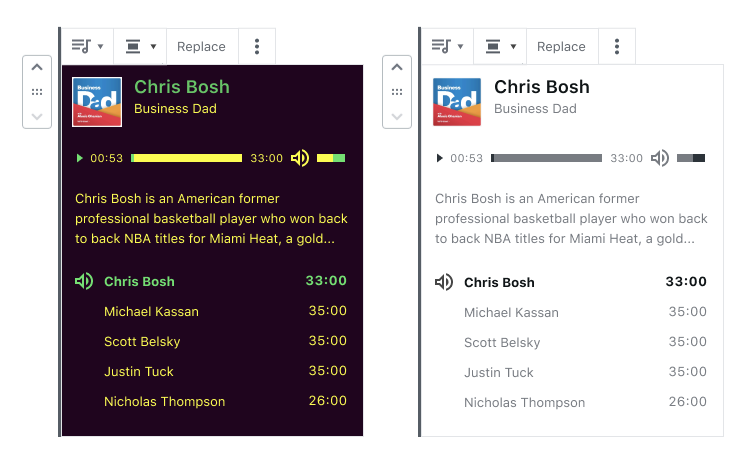
 frontdevde
All 11 comments
A few notes from looking into this:
The mediaelement is very limited when it comes to theming. It is not possible to dynamically update the visual appearance of the player e.g. by passing theme properties. Instead, there's a single stylesheet that declares the default look.
To theme the player, the common approach is to override the default styles with custom styles with higher specificity. This is what we have done as well to style the player default as defined in the design.
While this works well for the default style, this doesn't work for the dynamic color customization.
The current approach we're using for color customization directly adds color classes to each element that needs to be customized. This is so we can support IE11 (otherwise we could just add CSS variables to the component root once).
With the mediaelement player, this is a bit of an issue as the MediaElementPlayer() creates the visual player controls "outside" of our React component.
I'm not set on what the cleanest approach would be. Some of the options that come to mind are:
a) Manipulate DOM directly adding and updating classes each time a different color is selected
b) Dynamically write custom CSS rules to a stylesheet
c) Treat mediaplayer color customization as a progressive enhancement and set color values as CSS variables inline on mediaelement root element. This would allow us to handle everything else in the CSS directly.
Personally, I'd prefer c) but I'm not sure that is acceptable given that the rest of the Podcast Player does change colors in IE11.
I guess we'd probably have to resort to adding the customization classes to the mediaelement controls directly.
That said, regardless of which route we'd go, another important thing to note is that the icons are
This approach, of course, doesn't scale for an infinite number of possible colors we're looking at in the current implementation. This is where it gets messy. In order to be able to style the SVG via the fill property (as we do with the one in the tracklist below), we'd have to find a way to inline the SVG. This would mean directly interfering with mediaelement.js which I'm not sure is a good idea (I think we'd also have to split up the SVG sprite into individual SVGs if we were to inline them).
I might be overlooking something but the buttons part makes me think that this requires more than just adding a few classes in a few places.
Long story short:
What are yall's thoughts on this?
--
Edit: Just to throw it out there, we could also consider not customizing the styles of the mediaelement player beyond the default styles we added.
frontdevde
on 1 Apr 2020
In terms of elements, we'd need to add classes to, I took the following notes while testing locally:
Current time progress bar:
Selector: .mejs-time-current
Classes: has-primary has-name-color
CSS property: background-color: currentColor
Loaded progress bar:
Selector: mejs-time-loaded
Classes: ? not defined in design
CSS property: background-color: currentColor
Total time bar:
Selector: mejs-time-total
Classes: has-secondary has-name-color
CSS property: background-color: currentColor
Little tooltip when hovering progress bar:
Selector: .mejs-time-float
Classes: ? not defined in design
CSS property: background-color: currentColor; border-color: currentColor;
Current volume bar:
Selector: mejs-horizontal-volume-current
Classes: has-primary has-name-color
CSS property: background-color: currentColor
Total volume bar:
Selector: .mejs-horizontal-volume-total
Classes: has-secondary has-name-color
CSS property: background-color: currentColor
Text display of current/remaining time:
Selector: .mejs-time
Classes: has-secondary has-name-color
CSS property: color already set by class
If we were to find a solution for inlining the SVG sprite as individual SVGs:
Play button:
Selector: .mejs-play
Classes: has-primary has-name-color
CSS property: fill: inherit/currentColor
Pause button:
Selector: .mejs-pause
Classes: has-primary has-name-color
CSS property: fill: inherit/currentColor
Replay button:
Selector: .mejs-replay
Classes: has-primary has-name-color
CSS property: fill: inherit/currentColor
Mute button:
Selector: .mejs-mute
Classes: has-primary has-name-color
CSS property: fill: inherit/currentColor
Unute button:
Selector: .mejs-unmute
Classes: has-primary has-name-color
CSS property: fill: inherit/currentColor
frontdevde
on 1 Apr 2020
a) Manipulate DOM directly adding and updating classes each time a different color is selected
I would think this is a big no-no. We are not in control of the player, the dependency can update etc…
b) Dynamically write custom CSS rules to a stylesheet
I wouldn't mind this. It can however only work when we know the hex code, right? With named colors, we will need to look them up somehow. I'm sure @retrofox knows this
c) Treat mediaplayer color customization as a progressive enhancement and set color values as CSS variables inline on mediaelement root element. This would allow us to handle everything else in the CSS directly.
I like this too and it would be my preferred way to tackle this. Probably the same thing as above - we would need to fill variables with hex values, right?
More out of box idea — have you explored the path of completely ignoring me.js styling and writing the CSS for the player in our code? There is an me.js config option that allows you to change the mejs- class prefix to any other prefix you'd like. It doesn't solve the problem but might make it easy to manage it solely by us
 marekhrabe
on 1 Apr 2020
marekhrabe
on 1 Apr 2020
I would think this is a big no-no.
I would also prefer not to do a).
b / c
It can however only work when we know the hex code, right?
That is correct!
More out of box idea — have you explored the path of completely ignoring me.js styling and writing the CSS for the player in our code? There is an me.js config option that allows you to change the mejs- class prefix to any other prefix you'd like. It doesn't solve the problem but might make it easy to manage it solely by us
That could be a nice thing to add to e.g. prevent theme styles from applying but that's more a general thing and afaik doesn't solve the problems outlined above.
frontdevde
on 1 Apr 2020
More out of box idea — have you explored the path of completely ignoring me.js styling and writing the CSS for the player in our code?
I was thinking the same. I think it worths and will allow us to implement the styles, decreasing the dependency of the library styles.
I wouldn't mind this. It can however only work when we know the hex code, right? With named colors, we will need to look them up somehow. I'm sure @retrofox knows this
We can pick up the color in hex and propagate them wherever we need it, just adding new block attributes for this.
 retrofox
on 1 Apr 2020
retrofox
on 1 Apr 2020
More out of box idea — have you explored the path of completely ignoring me.js styling and writing the CSS for the player in our code?
I was thinking the same. I think it worths and will allow us to implement the styles, decreasing the dependency of the library styles.
I might be overlooking something, but even if we were to go to the full length of ditching all styles the player comes with and style it from scratch, we'd still have to find a way to add the custom colors, right?
We can pick up the color in hex and propagate them wherever we need it, just adding new block attributes for this.
That's good to know as that makes b) and c) viable.
frontdevde
on 1 Apr 2020
Noting that c) would (only) help with not having to add classes. It doesn't, however, get us much closer to solving the icon issue. IIRC one can't change the color SVGs in background-image: via fill:.
b) on the other hand would let us dynamically generate the SVG we set background-image: via JS. Not pretty but could work.
frontdevde
on 1 Apr 2020
I agree that c would be our best option.
Noting that c) would (only) help with not having to add classes. It doesn't, however, get us much closer to solving the icon issue. IIRC one can't change the color SVGs in background-image: via fill:.
I might have figured out a way we can do this and it looks like it's actually just a few lines of CSS 😄. TIL that SVGs can be used as a mask for the element. The best part of that is that the background becomes the actual color of the inside of the mask (like you'd do in e.g. Photoshop), which is what we need. To achieve that, all we need to do is replace these styles with:
.mejs-button > button {
    mask: url('/wp-includes/js/mediaelement/mejs-controls.svg'); // this works
    background: red; // can be a var \o/
}

// We need to position the mask for both buttons as we do with SVG sprite:
.mejs-play > button {
    mask-position: 0 0;
}
.mejs-mute > button {
    mask-position: -60px 0;
}
Proof:

What do you think?
Edit:
Pushed it to a branch: https://github.com/Automattic/jetpack/tree/try/podcast-player-mejs-svg-colors
 WunderBart
on 2 Apr 2020
WunderBart
on 2 Apr 2020
I might have figured out a way we can do this and it looks like it's actually just a few lines of CSS 😄. TIL that SVGs can be used as a mask for the element.
Looks like masking support is way better than I remembered it to be: https://caniuse.com/#search=mask
So good that Edge is Chromium now 😍This could actually work. Just to be sure let's try this in all browsers first. Also, of course, we'd want to implement this in a way where any non-supporting browser still sees the default.
frontdevde
on 2 Apr 2020
Opened a PR with the mask trick here: https://github.com/Automattic/jetpack/pull/15257
Just to be sure let's try this in all browsers first.
Tested custom colors via masked background in Chrome, Firefox, Safari & Edge - all lookin' good, the colors are applied as expected.
Also, of course, we'd want to implement this in a way where any non-supporting browser still sees the default.
Added @supports conditional and tested in IE11 and it looks good, too! The fallback is applied as expected.
WunderBart
on 2 Apr 2020
Outstanding tasks for this iteration:
- [ ] get hex color values for selected colors: PR 15321
- [ ] add those colors as CSS variables inline to the root of the block
- [ ] add styles using those color variables to the style.scss (keeping the default colors as default/fallback!)
frontdevde
on 6 Apr 2020
Related issues
 beaulebens
·
3Comments
beaulebens
·
3Comments
beaulebens
·
3Comments
beaulebens
·
3Comments
 htdat
·
3Comments
htdat
·
3Comments
 tyxla
·
3Comments
tyxla
·
3Comments
 abidhahmed
·
3Comments
abidhahmed
·
3Comments
Most helpful comment
I agree that
cwould be our best option.I might have figured out a way we can do this and it looks like it's actually just a few lines of CSS 😄. TIL that SVGs can be used as a
maskfor the element. The best part of that is that the background becomes the actual color of the inside of the mask (like you'd do in e.g. Photoshop), which is what we need. To achieve that, all we need to do is replace these styles with:Proof:
What do you think?
Edit:
Pushed it to a branch: https://github.com/Automattic/jetpack/tree/try/podcast-player-mejs-svg-colors