Jetpack: Gutenberg: Tags Added to Pages and Portfolio Projects are Converted to Numbers
Some WP.com themes add Tags to Pages and Portfolio Projects, usually for featured content. When a Tag is added to a Portfolio Project, it is converted to a string of numbers. I was able to reproduce on WP.com simple sites, but not AT sites.
Steps to reproduce
- On a WP.com simple site, activate the Rebalance theme.
- Go to My Site > Portfolio and add a new Portfolio Project.
- Add a Tag to the Portfolio Project.
- Publish or Update the Portfolio Project.
What I expected
I expected the Portfolio Project to have the Tag I typed in.
What happened instead
The Tag I typed in was converted to a string of numbers.
Browser / OS version
Chrome Version 72.0.3626.119 (Official Build) (64-bit)
macOS Mojave version 10.14.3
Screenshot / Video

Context / Source
user-report #manual-testing
 julsyd
All 36 comments
I ran into this as well on 11032083-hc (1861597-zen), but for pages. I tested extensively and it happens on:
- Gutenberg on Calypso (Gutenframe)
- Gutenberg on wp-admin
It does not happen for pages created on:
- The classic-editor on wp-admin
- Calypso editor on Calypso
WordPress.com Business plan site used for all tests.
Google Chrome Version 72.0.3626.109 (Official Build) (64-bit) with macOS 10.14.2 - Mac OS Mojave, if that is important.
 arunsathiya
on 8 Mar 2019
arunsathiya
on 8 Mar 2019
10938062-hc / cc @nagpai's report.
arunsathiya
on 8 Mar 2019
Just had a case myself in 11048610-hc
 sandymcfadden
on 8 Mar 2019
sandymcfadden
on 8 Mar 2019
Another one reported here: 11147919-HC
In 1858292-zen: feedback that this bug is impacting SEO
 sourourn
on 12 Mar 2019
sourourn
on 12 Mar 2019
I've got another one here: 7072281-HC
I did find another workaround:
- Remove featured tag from Customize > Featured Content.
- Add a tag to pages that should be featured in word form. So I added "featured" as the tag. That tag then gets converted to a number and should be the same on all pages.
- Note the number and add it to Customize > Featured Content.
That worked as a temporary workaround on this particular site.
 sstabrizi
on 12 Mar 2019
sstabrizi
on 12 Mar 2019
Another reported here:
11191758-hc
 katiebethbrown
on 13 Mar 2019
katiebethbrown
on 13 Mar 2019
Another one here: 8088196-hc
 wynwin
on 13 Mar 2019
wynwin
on 13 Mar 2019
Another here: 11156634-hc
 deancroyal
on 13 Mar 2019
deancroyal
on 13 Mar 2019
Initial report was in #1857763-zen
 damiannep
on 14 Mar 2019
damiannep
on 14 Mar 2019
1880190-zen
User provided some step-by-step screenshots to reproduce.
 erricgunawan
on 15 Mar 2019
erricgunawan
on 15 Mar 2019
Re-shared the workaround by @sstabrizi here #1858292-zen and closed until it gets fixed.
 zdenys
on 15 Mar 2019
zdenys
on 15 Mar 2019
Another reported here: 11249841-hc
I tested this on my own site and also found that once it changes it to a number, it won't let me delete it.
I can recreate it by creating a new page as shown here: https://cld.wthms.co/I6VGFs
I have the Eris theme on a Premium site.
 ccwalburn
on 15 Mar 2019
ccwalburn
on 15 Mar 2019
Another case here 1883377-zen. Shared the temporary workaround from above.
zdenys
on 16 Mar 2019
Another report in 1884795-zen.
julsyd
on 17 Mar 2019
Another report in 1885144-zen
sourourn
on 17 Mar 2019
Verified:
- this isn't an issue with Classic
- I can't replicate with posts
- I _can_ replicate with Rebalance and Portfolios on dotcom
- I _cannot_ replicate with Rebalance and Portfolios on a dotorg install (dotorg Rebalance doesn't seem to support tags on pages either?)
I think something's up with the POST API calls to https://public-api.wordpress.com/wp/v2/sites/:siteId/tags.
 kwight
on 18 Mar 2019
kwight
on 18 Mar 2019
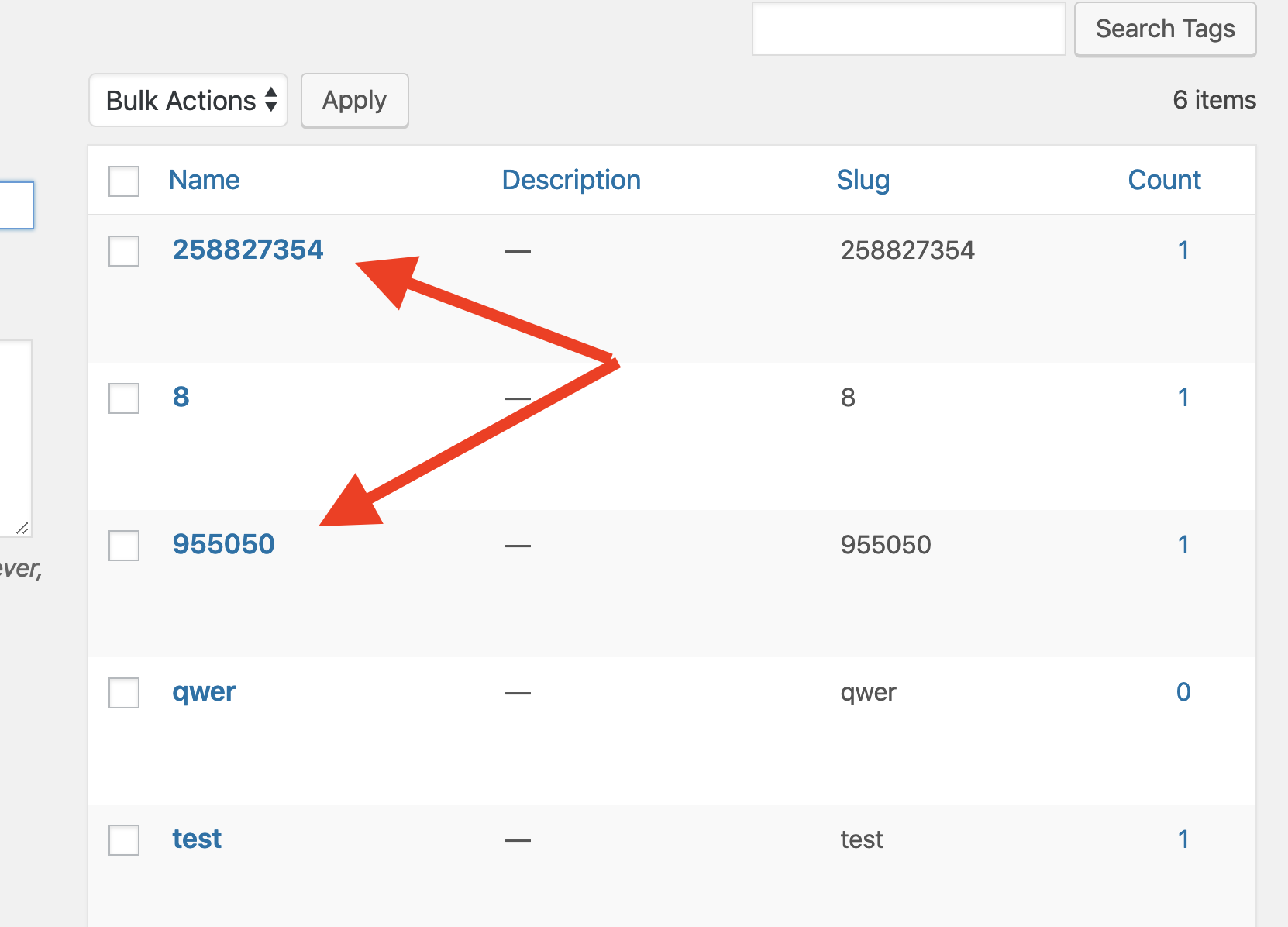
Tags like these are getting created, then faithfully brought back to the interface (as opposed to it being an issue all in the UI).
kwight
on 18 Mar 2019
Duplicate tags are being created with the name of the tag being the ID of the already-created tag.
- Add tag in the UI and hit
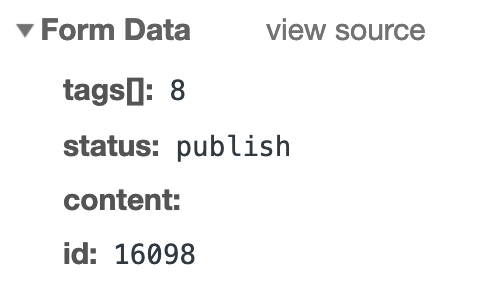
Enter. The tag is added to the db viaPOST https://public-api.wordpress.com/wp/v2/sites/:siteId/tags?_envelope=1&_locale=user. - Publish post. The ID of the above tag is included as form data in the call on publish to
PUT https://public-api.wordpress.com/wp/v2/sites/:siteId/jetpack-portfolio/:postId?_envelope=1&_locale=user.
kwight
on 18 Mar 2019
Hm, maybe related complications and background: p7jreA-20e-p2.
kwight
on 18 Mar 2019
Step 2 above (with the form data) looks like expected behaviour, since this is also how the working tags-on-posts performs. So the likely culprit is that PUT updates calling https://public-api.wordpress.com/wp/v2/sites/:siteId/jetpack-portfolio/postId (or maybe any CPT plus pages) are creating the tag[] value as a new name, rather than using them properly as tag IDs.
kwight
on 18 Mar 2019
another issue on 9992877-HC
 ChrissiePollock
on 18 Mar 2019
ChrissiePollock
on 18 Mar 2019
The problem could be the ID coming through as a string, at least it is when it gets to wp_set_post_terms.
kwight
on 19 Mar 2019
Another issue: #11384762-hc
 retnonindya
on 20 Mar 2019
retnonindya
on 20 Mar 2019
Another case of the same in 11408120-hc / 1894957-zen (for a page).
 jonnyruzek
on 20 Mar 2019
jonnyruzek
on 20 Mar 2019
Another case of pages losing their tags and switching to numbers in 9921188-hc
 GeoJunkie
on 20 Mar 2019
GeoJunkie
on 20 Mar 2019
Another report in 10172122-hc
katiebethbrown
on 22 Mar 2019
+1 11455896-hc
Portfolio projects with Mellow theme
 kristarella
on 22 Mar 2019
kristarella
on 22 Mar 2019
Another report.
Homepage tags - Heart And Style theme
11476631-hc
 davoraltman
on 22 Mar 2019
davoraltman
on 22 Mar 2019
Another report:
1903240-zen
 kylemcph
on 24 Mar 2019
kylemcph
on 24 Mar 2019
Another report in 1903510-zen
sourourn
on 24 Mar 2019
Another report: 1903794-zen
Confirmed it only happens on the Gutenberg editor. Replicated it with the "Caldwell" theme. I could only reproduce it with pages.
 AtrumGeost
on 26 Mar 2019
AtrumGeost
on 26 Mar 2019
another: 9566559-hc
 eoinsav
on 27 Mar 2019
eoinsav
on 27 Mar 2019
11597559-hc
Theme: Arcane
Happens on Pages.
When we enter even the same converted tag number from Calypso/iFramed Gutenberg, the number was turned to be another number again.
So it won't work at all there.
I edited the Page from WP Admin and it works just fine there.
erricgunawan
on 27 Mar 2019
Fix by @mdawaffe is underway on D26092-code.
 rodrigoi
on 27 Mar 2019
rodrigoi
on 27 Mar 2019
Adding another report for posterity: https://fr.forums.wordpress.com/topic/probleme-etiquettes/
 cecilearkay
on 28 Mar 2019
cecilearkay
on 28 Mar 2019
I believe this is now fixed. New updates to pages, portfolios, etc. should work correctly.
 mdawaffe
on 28 Mar 2019
mdawaffe
on 28 Mar 2019
Related issues
 ockham
·
3Comments
ockham
·
3Comments
 BinaryMoon
·
3Comments
BinaryMoon
·
3Comments
 MichaelArestad
·
3Comments
MichaelArestad
·
3Comments
 tyxla
·
3Comments
tyxla
·
3Comments
 Viper007Bond
·
3Comments
Viper007Bond
·
3Comments
Most helpful comment
Fix by @mdawaffe is underway on D26092-code.