Jetpack: Shortcodes: Instagram embed no longer working on site front ends
Steps to reproduce the issue
- Add an Instagram post embedded into a post or page
Example post: https://simplepaymentwidgets.mystagingwebsite.com/2018/07/ig/
What I expected
Embedded instagram post
What happened instead
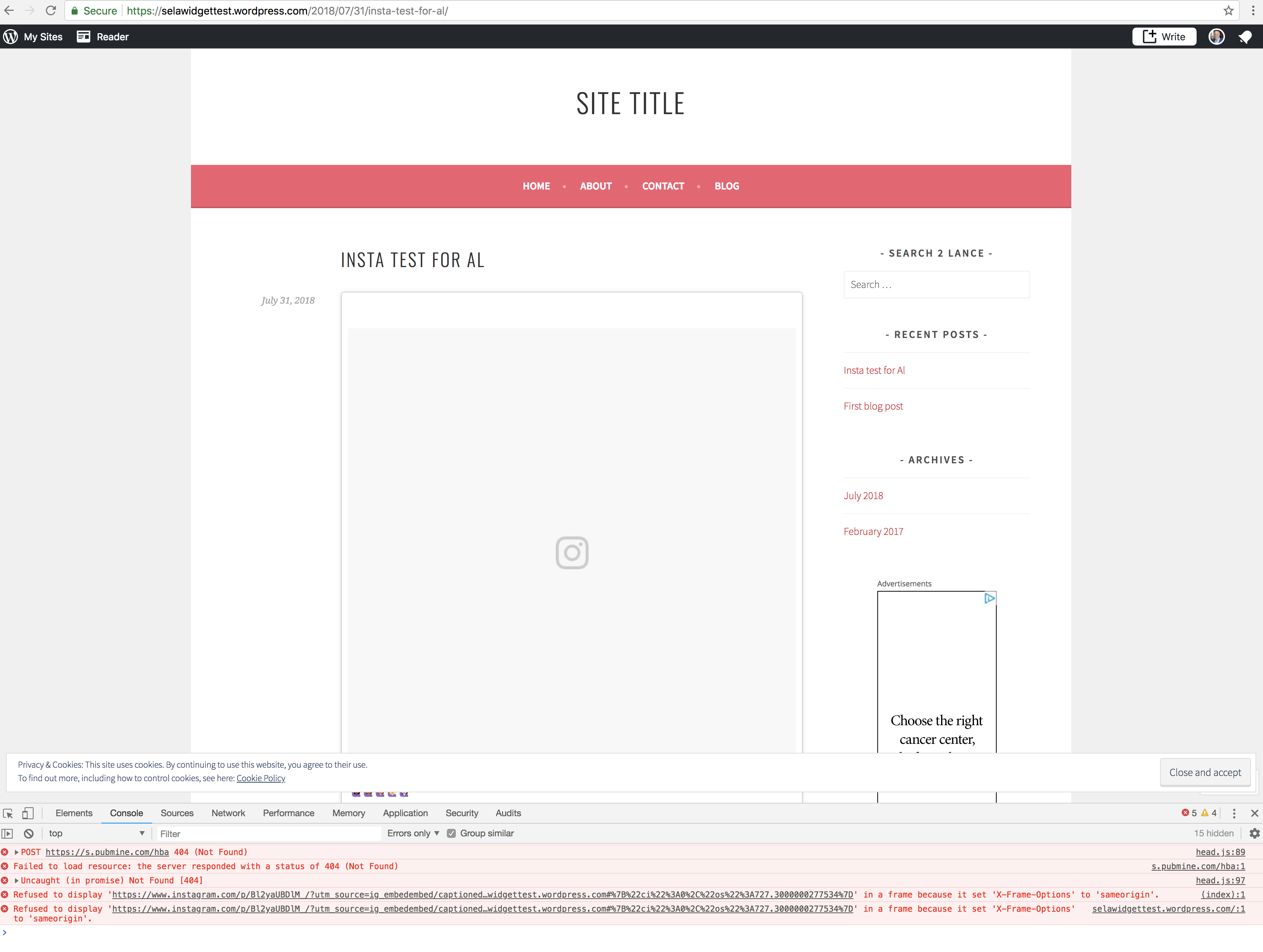
Empty container
Console error: Refused to display 'https://www.instagram.com/p/BlMg3iolq9e/?utm_source=ig_embedembed/captioned/?cr=1&v=9&wp=1044&rd=simplepaymentwidgets.mystagingwebsite.com#%7B%22ci%22%3A0%2C%22os%22%3A975.6000000052154%7D' in a frame because it set 'X-Frame-Options' to 'sameorigin'.
Reproducible on WordPress.com simple, Atomic and P2 sites.
Also happening on support page: https://en.support.wordpress.com/instagram/instagram-images/
Instagram Widget is still working as expected
 alisterscott
All 8 comments
I was able to repeat on a WordPress.com test site (same shortcode handling for PHP and JS as Jetpack)
Editor:

Front-end: https://selawidgettest.wordpress.com/2018/07/31/insta-test-for-al/
 lancewillett
on 1 Aug 2018
lancewillett
on 1 Aug 2018
I've tried Instagram API developer channels and this is the only place I could publicly log a bug: https://developers.facebook.com/support/bugs/534047397026536/?disable_redirect=0
alisterscott
on 1 Aug 2018
I've worked out the problem -
the current iFrame we show is something like this:
<iframe class="instagram-media instagram-media-rendered" id="instagram-embed-0" src="https://www.instagram.com/p/BkuuaBeDUGj/?utm_source=ig_embedembed/captioned/?cr=1&v=9&wp=1316&rd=juiced.blog#%7B%22ci%22%3A0%2C%22os%22%3A1235.7000000192784%7D" allowtransparency="true" frameborder="0" height="795" data-instgrm-payload-id="instagram-media-payload-0" scrolling="no" style="background: white; max-width: 658px; width: calc(100% - 2px); border-radius: 3px; border: 1px solid rgb(219, 219, 219); box-shadow: none; display: block; margin: 0px 0px 12px; min-width: 326px; padding: 0px;"></iframe>
we need to make sure we add an/embed to the URL for it to show:
<iframe class="instagram-media instagram-media-rendered" id="instagram-embed-0" src="https://www.instagram.com/p/BkuuaBeDUGj/embed?utm_source=ig_embedembed/captioned/?cr=1&v=9&wp=1316&rd=juiced.blog#%7B%22ci%22%3A0%2C%22os%22%3A1235.7000000192784%7D" allowtransparency="true" frameborder="0" height="795" data-instgrm-payload-id="instagram-media-payload-0" scrolling="no" style="background: white; max-width: 658px; width: calc(100% - 2px); border-radius: 3px; border: 1px solid rgb(219, 219, 219); box-shadow: none; display: block; margin: 0px 0px 12px; min-width: 326px; padding: 0px;"></iframe>
When I change this in the browser DOM it works:

I just need to work out how to change Jetpack or WP.com to change the embed url to append embedto the URLs now 🤔
alisterscott
on 1 Aug 2018
Actually, this is a problem in core WordPress as well as that supports the Instagram oEmbeds: https://core.trac.wordpress.org/ticket/44688#ticket
alisterscott
on 1 Aug 2018
Another case reported in #5132444-hc
 donalirl
on 1 Aug 2018
donalirl
on 1 Aug 2018
Also #5129765-hc
 sarahcada
on 1 Aug 2018
sarahcada
on 1 Aug 2018
From @pento on Core:
This is caused by Instagram.
Their oEmbed response has added ?utm_source=ig_embed to the URL, which the JavaScript they use to generate the iframe doesn't allow for, hence embed/ appearing after that URL parameter in the iframe src, rather than before. Until they remove the URL param, or update their JS to allow for it, Instagram embeds are going to be broken.
Unfortunately, there's not a lot we can do about this, Instagram have broken embeds for everyone, not just WordPress:
https://twitter.com/search?f=tweets&vertical=default&q=instagram%20embed&qf=off
alisterscott
on 1 Aug 2018
This seems to have been fixed by Instagram now - closing
alisterscott
on 1 Aug 2018
Related issues
 chrisaldrich
·
3Comments
chrisaldrich
·
3Comments
 jeherve
·
3Comments
jeherve
·
3Comments
jeherve
·
3Comments
jeherve
·
3Comments
 tyxla
·
3Comments
tyxla
·
3Comments
 ockham
·
3Comments
ockham
·
3Comments
Most helpful comment
This seems to have been fixed by Instagram now - closing