Jetpack: Connection: Giving Incorrect Error about Site Connected to Another Account when Connection Fails
I've noticed this a few times recently so I think it's something that we should look into. Several users have contacted us when seeing this error:
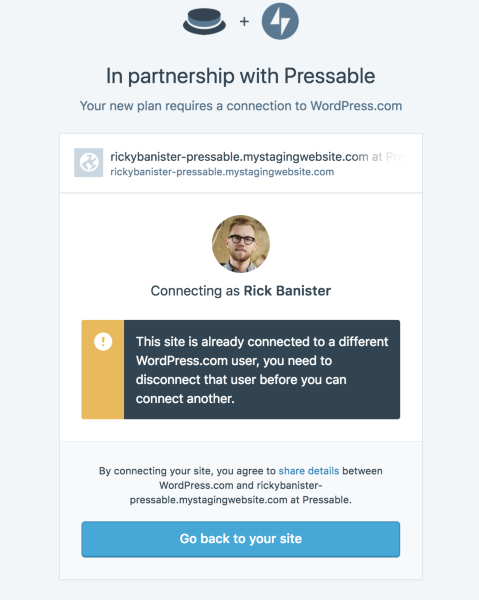
"This site is already connected to a different WordPress.com user, you need to disconnect that user before you can connect another."
But when checking the connection, the site was connected but is actually not currently connected at all. For example:
Debug: https://jetpack.com/support/debug/?url=http%3A%2F%2Fwww.colerainesurestart.org.uk%2F
Internal ref: 753945-hc
It was connected originally on 2014/11/25 but hadn't updated with us since 2017/12/13. The site was connected to the user that is contacting us.
Seems like something's not right with the broken connection and the error message that we're sending when they try to reconnect.
Delete and reinstall has fixed each site experiencing this problem.
Other examples:
1745309-hc (Site: breakmytoys.com )
585295-hc (Site: annabellesattic.net )
1745646-hc (seerssee.com)
753945-hc (www.e-makul.com)
moved from 1697-gh-jpop-issues
 tmmbecker
All 59 comments
1752498-hc / 947656-zen
Site: http://www.fencingmasters.com/
This user was very helpful. We could not get Jetpack activated. It installed, but upon clicking Activate user's site went 500 error. I got him to send us the log file, here is copy/paste:
[08-Feb-2018 08:16:49 UTC] PHP Fatal error:  Call to undefined function request_filesystem_credentials() in /home/fencingm/public_html/fmw/wp-admin/includes/class-wp-upgrader-skin.php on line 93
[08-Feb-2018 12:35:08 UTC] PHP Fatal error:  Allowed memory size of 67108864 bytes exhausted (tried to allocate 122880 bytes) in /home/fencingm/public_html/fmw/wp-content/plugins/jetpack/modules/widgets/milestone/milestone.php on line 391
[08-Feb-2018 12:35:13 UTC] PHP Fatal error:  Allowed memory size of 67108864 bytes exhausted (tried to allocate 122880 bytes) in /home/fencingm/public_html/fmw/wp-includes/class-wp-xmlrpc-server.php on line 5679
[08-Feb-2018 12:35:32 UTC] PHP Fatal error:  Allowed memory size of 67108864 bytes exhausted (tried to allocate 122880 bytes) in /home/fencingm/public_html/fmw/wp-includes/class-wp-xmlrpc-server.php on line 5679
[08-Feb-2018 12:45:37 UTC] PHP Fatal error:  Allowed memory size of 67108864 bytes exhausted (tried to allocate 122880 bytes) in /home/fencingm/public_html/fmw/wp-includes/class-wp-xmlrpc-server.php on line 5025
[08-Feb-2018 12:56:22 UTC] PHP Fatal error:  Allowed memory size of 67108864 bytes exhausted (tried to allocate 122880 bytes) in /home/fencingm/public_html/fmw/wp-content/plugins/jetpack/modules/widgets/milestone/milestone.php on line 391
[08-Feb-2018 13:06:41 UTC] PHP Fatal error:  Allowed memory size of 67108864 bytes exhausted (tried to allocate 122880 bytes) in /home/fencingm/public_html/fmw/wp-includes/class-wp-xmlrpc-server.php on line 6399
Asking user to raise memory limit, as that seems to be the issue in this case.
 joendotcom
on 8 Feb 2018
joendotcom
on 8 Feb 2018
1752498-hc
Site: N/A, never connected yet and user disappeared from chat. Followed up by ticket: 947695-zen
joendotcom
on 8 Feb 2018
1752173-hc
joendotcom
on 8 Feb 2018
@jenhooks noted:
For the users I’ve encountered, a deactivate > reactivate > reconnect has been working to sort this out.
joendotcom
on 8 Feb 2018
1753998-hc
Site: pembrokeshirebikes.co.uk
Confirmed that this user was able to connect after using @jenhooks' suggestion of deactivating and reactivating.
joendotcom
on 8 Feb 2018
1751209-HC
Lost them during the chat but they seem to have had the issue. I tried to get them to connect again but they stopped responding and left so I'm not sure if they were done on their end.
 NujabesSoul
on 8 Feb 2018
NujabesSoul
on 8 Feb 2018
1755447-hc
 jenhooks
on 8 Feb 2018
jenhooks
on 8 Feb 2018
1432030-hc
https://www.sosviaggiatore.it/
EDIT: The user reports that deactivating/reactivating fixed it for them.
 chaselivingston
on 8 Feb 2018
chaselivingston
on 8 Feb 2018
947180-zen
asking them to deactivate and reactivate; will edit if that fixes things.
 ntpixels
on 9 Feb 2018
ntpixels
on 9 Feb 2018
Also in 1760856-hc
 jeherve
on 9 Feb 2018
jeherve
on 9 Feb 2018
953743-HC
Asked them to reinstall
NujabesSoul
on 9 Feb 2018
1764997-hc. cycled the connection fixed it.
tmmbecker
on 9 Feb 2018
1766173-hc
deactivating/reactivating fixed it
chaselivingston
on 9 Feb 2018
1784014-hc
delete/reinstall fixed it.
 danjjohnson
on 12 Feb 2018
danjjohnson
on 12 Feb 2018
1784448-hc
delete/reinstall worked
tmmbecker
on 12 Feb 2018
951913-zen
Asked them to deactivate/reactivate
chaselivingston
on 12 Feb 2018
1634311-hc
chaselivingston
on 12 Feb 2018
1790049-hc
chaselivingston
on 12 Feb 2018
1790127-hc
EDIT: Delete/reinstall fixed it.
chaselivingston
on 12 Feb 2018
1793310-hc
jeherve
on 13 Feb 2018
1296763-hc
 annezazu
on 14 Feb 2018
annezazu
on 14 Feb 2018
1801730-hc
_RC for the site showed it was connected with [email protected] email address_
 gaurav1984
on 14 Feb 2018
gaurav1984
on 14 Feb 2018
1802606-hc
gaurav1984
on 14 Feb 2018
1804453-hc
RC for the site shows it connected to [email protected]
tmmbecker
on 14 Feb 2018
957037-zen
chaselivingston
on 14 Feb 2018
1789613-hc
RC shows Admin Email: [email protected]
danjjohnson
on 14 Feb 2018
1806428-hc
chaselivingston
on 14 Feb 2018
1807103-HC and 1807542-HC same user, same issues.
NujabesSoul
on 14 Feb 2018
This seems to be a lot of issues all centering around the past week. I'm investigating currently, but my guess is something bad went out with the latest update.
Have any of these problems occurred with a prior version of Jetpack?
 georgestephanis
on 14 Feb 2018
georgestephanis
on 14 Feb 2018
The string spotted comes from here:
The const being tested for ( ALREADY_CONNECTED_BY_OTHER_USER ) maps as follows:
alreadyConnectedByOtherUser doesn't seem to appear as a string anywhere but in Calypso, so my guess is that it's just used elsewhere in calypso as a const and passed around, without having any external pattern matches.
It's getting fired off by:
That conditional also reads similar to:
the bulk of which seems to trace back to https://github.com/Automattic/wp-calypso/commit/b86e401086f6fbf46ae31ff74719abb0b6b25a32 from this pull request by @roccotripaldi
https://github.com/Automattic/wp-calypso/pull/15852
My working theory right now (with admittedly little evidence to validate it) is that the error is saying the site is already connected to a different wpcom user, but the conditionals aren't testing if the connected user !== the current user -- so it just means it's already connected, and would need an extra conditional to verify the user ids aren't the same.
@roccotripaldi -- any thoughts / input / hot takes?
georgestephanis
on 14 Feb 2018
In addition to all of that, is there some reason why a lot of these sites are showing as connected to these strange user email addresses?
tmmbecker
on 14 Feb 2018
947512-zen
tmmbecker
on 14 Feb 2018
@tmmbecker So, possibly of interest, WP Core defaults the admin_email option to [email protected] --
georgestephanis
on 14 Feb 2018
Minor tweak: looks like @roccotripaldi is out until 2/19, paging anyone at @Automattic/poseidon that may have some history with this code to offer hot takes?
georgestephanis
on 14 Feb 2018
Another one here 952365-zen
Asked to reinstall JP
 StefMattana
on 15 Feb 2018
StefMattana
on 15 Feb 2018
cc @johnHackworth and @Automattic/luna as they have been fighting the connection process lately.
 lezama
on 15 Feb 2018
lezama
on 15 Feb 2018
One more report here: https://wordpress.org/support/topic/jetpack-set-up-site-already-connected-no-access/
 zinigor
on 15 Feb 2018
zinigor
on 15 Feb 2018
952823-zen
Asked to reinstall
StefMattana
on 15 Feb 2018
1753440-hc
https://obvioveiculos.com.br/
joendotcom
on 15 Feb 2018
1814408-hc
joendotcom
on 15 Feb 2018
953257-zen
jeherve
on 16 Feb 2018
1824497-hc
NujabesSoul
on 16 Feb 2018
Got another internal report from @rickybanister --
I just one second ago hit this
in this case, that error is not true I don’t think. I created a PRessable test site, signed up for pressable with wpcom, so the account matches, and I saw that.
 georgestephanis
on 16 Feb 2018
georgestephanis
on 16 Feb 2018
1827523-hc
annezazu
on 16 Feb 2018
1124776-hc
jeherve
on 19 Feb 2018
802067-hc
tmmbecker
on 19 Feb 2018
Oof! I think I found the problem.
I say oof, because the problem is in Jetpack with this line:
https://github.com/Automattic/jetpack/blob/master/class.jetpack-connection-banner.php#L87
i'm working on a PR to fix
 roccotripaldi
on 19 Feb 2018
roccotripaldi
on 19 Feb 2018
1851549-hc
annezazu
on 20 Feb 2018
1851647-hc
annezazu
on 20 Feb 2018
1852369-HC
NujabesSoul
on 20 Feb 2018
1854401-hc
danjjohnson
on 20 Feb 2018
1854438-hc
jeherve
on 20 Feb 2018
8881 Should fix the problem.
Until that is released, I suspect that a workaround via Calypso-initiated connections should be ok. The users can manually enter their URL at https://wordpress.con/jetpack/connect.
 sirreal
on 20 Feb 2018
sirreal
on 20 Feb 2018
Just checked that ^^ (YAY) but meanwhile I got this ticket so reporting it: 964309-zen
StefMattana
on 20 Feb 2018
We've deployed a Calypso-side patch to mitigate this problem (https://github.com/Automattic/wp-calypso/pull/22609). We'll plan to revert that when there's a Jetpack release with the fix from #8881
Documented here p7rd6c-1gh-p2
sirreal
on 20 Feb 2018
Even after the new version of Jetpack ships, folks may be continuing to use the old version to connect and thereby break things -- so it may be best to leave the conditional in Calypso until affected versions drops to negligible levels according to plugin version tracking. https://wordpress.org/plugins/jetpack/advanced/
georgestephanis
on 20 Feb 2018
@georgestephanis but people using old versions of Jetpack will be already connected (probably)
 oskosk
on 20 Feb 2018
oskosk
on 20 Feb 2018
Yeah, I know, I'm more thinking about edge cases, which at our scale is still a decent bit. We'll see -- hopefully I'm overthinking it.
georgestephanis
on 20 Feb 2018
We're considering removing the Calypso-side workaround and restoring the original behavior. Anyone care to weigh in?
https://github.com/Automattic/wp-calypso/pull/22613#issuecomment-396521051
sirreal
on 12 Jun 2018
Related issues
 abidhahmed
·
3Comments
abidhahmed
·
3Comments
 kevinlisota
·
3Comments
kevinlisota
·
3Comments
 MichaelArestad
·
3Comments
MichaelArestad
·
3Comments
 NicktheGeek
·
3Comments
NicktheGeek
·
3Comments
 BinaryMoon
·
3Comments
BinaryMoon
·
3Comments
Most helpful comment
We've deployed a Calypso-side patch to mitigate this problem (https://github.com/Automattic/wp-calypso/pull/22609). We'll plan to revert that when there's a Jetpack release with the fix from #8881
Documented here p7rd6c-1gh-p2