Jetpack: Sharing: Add a filter to allow modifying the email share Subject Line
Originally suggested here:
https://wordpress.org/support/topic/edit-subject-line-in-sharing-emails/
We don't have a way of filtering the subject line; it could be useful to avoid cases such as these where the host is blocking such emails based on the subject line (likely because of #448 ).
 richardmtl
All 8 comments
Somewhat related: #419
 jeherve
on 15 Nov 2017
jeherve
on 15 Nov 2017
Reopening that as the user is having the same issue again, and Richard's suggestion isn't working anymore. I asked the user if they can hold on and try Richard's workaround again in a few days when our new plugin updates gets released, but I wonder if that's another solution we can suggest?
@zinigor kindly pinging you as you were the last one on the thread, closing it. Any input will be appreciated!
 StefMattana
on 29 Jun 2018
StefMattana
on 29 Jun 2018
Getting another report of this by a different user in the forums.
 pmciano
on 30 Jul 2018
pmciano
on 30 Jul 2018
Another potential case on 1549730-zen
Jetpack v.6.7
Can replicate the issue with my email address
StefMattana
on 8 Nov 2018
You can use this filter to customize the subject line to your needs:
https://developer.jetpack.com/hooks/wp_sharing_email_send_post_subject/
You can use the example I posted there, add it to your site as explained here and you will be all set.
jeherve
on 8 Nov 2018
@jeherve Reopening as your last suggestion didn't work for the user on 1549730-zen :(
Do you have any other options to try, perhaps?
StefMattana
on 14 Nov 2018
@StefMattana The filter works, I've tested it on a test site of mine. I would recommend trying to get more information about what the site owner expects will change when using the filter, how and where they've added the filter, what exact code they used, and how they currently check that the filter works.
jeherve
on 14 Nov 2018
The user in 1549730-zen was complaining that emails were not received, so they expect that adding the code will allow them to be received. They added the code via Code Snippets, but it looks wrong, so I suggested removing the code outlined in red:
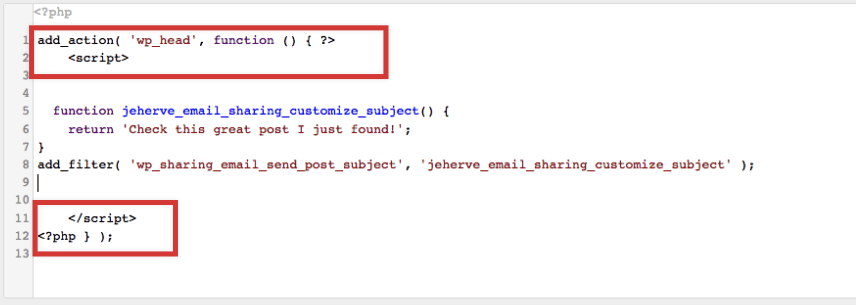
If that still doesn't work, I suggested a Mail Log plugin so we can see if the mail is being sent.
 danjjohnson
on 27 Nov 2018
danjjohnson
on 27 Nov 2018
Related issues
 chrisaldrich
·
3Comments
chrisaldrich
·
3Comments
 dougaitken
·
3Comments
dougaitken
·
3Comments
 beaulebens
·
3Comments
beaulebens
·
3Comments
 tyxla
·
3Comments
tyxla
·
3Comments
 kraftbj
·
3Comments
kraftbj
·
3Comments