Heidisql: MacOS Catalina + Wine 5.6 Shows "File does not exist" error dialog on startup, however HeidiSQL launches fine
Steps to reproduce this issue
- Download HeidiSQL Portable 64bit and extract.
- Run heidisql.exe inside the extracted folder with
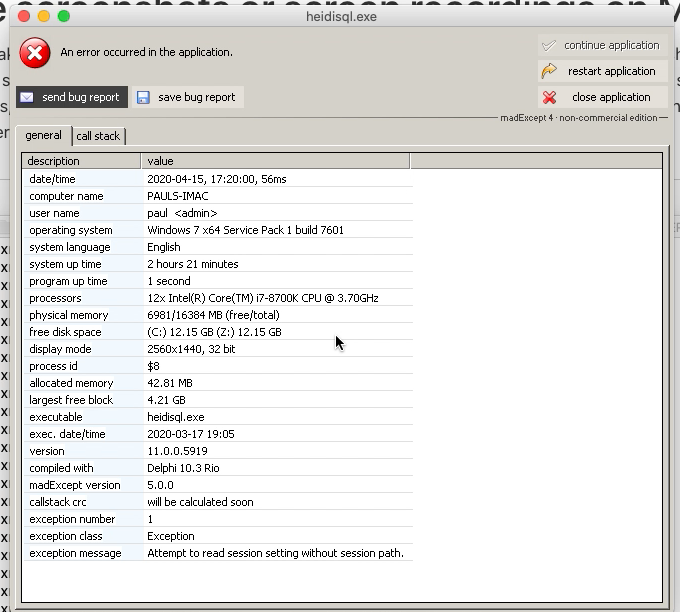
wine64. - Error message shows up:

- Then the program launches normally, regardless of error:

Current behavior
Irrelevant (maybe?) error window shows up, even though program launches fine.
Expected behavior
I don't think the error window should show up since it doesn't have an issue finding HeidiSQL.
Possible solution
I'm not sure, could be a simple logic test that fails or something.
Environment
MacOS Catalina 10.15.4 (19E287) with Wine version wine-5.6 from wine-develop.
- HeidiSQL version: Version 11.0.0.5956 (64 Bit)
- Operating system: MacOS Catalina 10.15.4 (19E287)
 PaulBGD
All 16 comments
Possibly related, after I add a new connection it works perfectly, until I exit HeidiSQL and reopen. Then this screen flashes open, and closes very quickly:
0033:fixme:ntdll:NtQuerySystemInformation info_class SYSTEM_PERFORMANCE_INFORMATION
Assertion failed: sz > 0, file ../../../wine/dlls/dbghelp/stabs.c, line 118
I tested with Wine Stable now, which has the same issue but the exception window stays open this time. Let me know if you need any more information.
PaulBGD
on 16 Apr 2020
Support for Wine versions newer than 4.x is knowingly broken. I already spent various hours in debugging that stuff, nothing helped so far.
Please use Wine 4 if you can, for HeidiSQL.
 ansgarbecker
on 16 Apr 2020
ansgarbecker
on 16 Apr 2020
Alright. I might look into this myself from the Wine side.
PaulBGD
on 16 Apr 2020
There is the same problem with wine-4.0

bugreport.txt
date/time : 2020-05-20, 14:39:57, 338ms
computer name : wanggaoyuandeMa
user name : gy.wang
operating system : Windows 7 x64 Service Pack 1 build 7601
system language : English
system up time : 3 days 3 hours
program up time : 3 minutes 9 seconds
processors : 8x Intel(R) Pentium(R) 4 CPU 2.40GHz
physical memory : 5629/16384 MB (free/total)
free disk space : (C:) 91.89 GB
display mode : 1440x900, 32 bit
process id : $8
allocated memory : 37.42 MB
largest free block : 131069.99 GB
executable : heidisql.exe
exec. date/time : 2020-03-17 19:05
version : 11.0.0.5919
compiled with : Delphi 10.3 Rio
madExcept version : 5.0.0
callstack crc : $45045e5a, $59bf9a99, $59bf9a99
exception number : 1
exception class : Exception
exception message : Attempt to read session setting without session path.
main thread ($9):
009f4cc5 heidisql.exe apphelpers 3958 +12 TAppSettings.Read
7b42da80 KERNEL32.dll RaiseException
Environment
wine64 --version
wine-4.0
MacOS Catalina 10.15.4 (19E287)
 GYWang1983
on 20 May 2020
GYWang1983
on 20 May 2020
That crash callstack is not Wine specific, I believe. Instead, I think this is the same as described in the forum. I already fixed that issue in 54757760f96c60f7420cf00d3b8f20806bb14c4f , and introduced a -l/--library command line parameter in f11a81e3b500ce508d690fa50f31fef20e1f7efb . So, could you please update HeidiSQL to the latest build and retry.
ansgarbecker
on 20 May 2020
Hi @ansgarbecker - I'm seeing the same issue as the others. Have tested using 11.0.0.5992 and see the exact sae behaviour. Happy to assist debug if there are specific things to collect.
Thanks
 dotbill
on 1 Jun 2020
dotbill
on 1 Jun 2020
@dotbill means you still get the above "File does not exist" message on startup, and you use Wine 4?
ansgarbecker
on 2 Jun 2020
Currently on wine-5.0.. having issues getting Wine 4 running on my mac (running Catalina - so only able to test the 64bit version).
Will update as/when I can get the older version of Wine.
dotbill
on 11 Jun 2020
After upgrading to the new Delphi 10.4 IDE, I suddenly saw the same error on my Windows machine. I fixed that one in 96c16f18a6368810b187b2b01a1b87af005fd45a , so this may also help on Wine against that "File does not exist" message. (I think it does not matter if you run Wine 4 or 5 here)
ansgarbecker
on 11 Jun 2020
You could try the new build (6005) and see if that fixes it for you.
ansgarbecker
on 11 Jun 2020
Perfect - that's fixed it! Thankyou. That's now working on Wine 5 (on Catalina 10.15.3).
Interestingly, I downloaded your 64bit build, but it was not finding a driver dll - for that I downloaded your 64bit portable version and copied the dll's / plugins out - not sure if that is correct/expected?
dotbill
on 11 Jun 2020
That's the second best way to get all required libraries. The best way is to download the nightly build installer, not the just the main executable. But the portable from v11 has the most libraries up-to-date, so that's ok.
Thanks for your feedback! Glad to have that fixed.
ansgarbecker
on 11 Jun 2020
May I ask a further question - if that's the second best way.... re the best way, the installer is 32bit and so can't run on my version of Wine (ie. as its on Catalina which no longer supports 32bit code, I have to use wine64).. Do you have any plans to make a 64bit only installer (ie. where the installer + build is 64bit)
dotbill
on 11 Jun 2020
Yes, the installer itself is 32bit, but contains both the 32bit and 64bit version of HeidiSQL. Which is perfectly running on Windows. Maybe it's anyway time to drop the 32bit version, or I should really provide a 64bit only version. Not sure.
ansgarbecker
on 12 Jun 2020
As a Windows user - the current one is fine, however also as an OS X user, if you were able to provide a 64bit only installer - I'd appreciate it (as would others!)
Thanks again
dotbill
on 12 Jun 2020
This issue appeared to me with latest portable version from downloads page and replacing the binary with the latest nightly build solved the issue.
 rcdmk
on 8 Sep 2020
rcdmk
on 8 Sep 2020
Related issues
 rkmaier
·
5Comments
rkmaier
·
5Comments
 cautionbug
·
4Comments
cautionbug
·
4Comments
 chrysler5798
·
5Comments
chrysler5798
·
5Comments
 yz778
·
4Comments
yz778
·
4Comments
 andreybatalof
·
4Comments
andreybatalof
·
4Comments