Heidisql: Move background color setting to session manager
Use case
When working with multiple databases across different servers and environments it's easy to make mistakes, so i would like to have an option to show warnings when working with a production server and also highlighting in some way that I am currently connected to a production server. Some similar feature is present in almost all of the standalone tools which manage mysql databases.
Possible solutions
- An option in the session manager to mark it as production server.
- An option to enable/disable warning message when executing modifications that permanently alter
the data on the current production server - A color to highlight production servers
 rkmaier
All 5 comments
Isn't this already there?
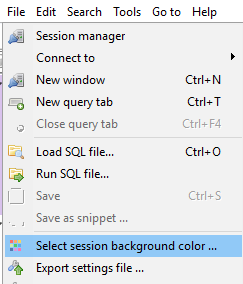
I use green for sandbox and development servers and red for production.
Also I recommend creating a second user for yourself on the production server which cannot drop or delete. That you can mark with yellow.
 penCsharpener
on 2 Oct 2018
penCsharpener
on 2 Oct 2018
@penCsharpener Thanks for the tip, i was looking for something like this. I would include this option inside the Session Manager > Settings also.
rkmaier
on 3 Oct 2018
Yes, this is definitely reasonable.
 ansgarbecker
on 3 Oct 2018
ansgarbecker
on 3 Oct 2018
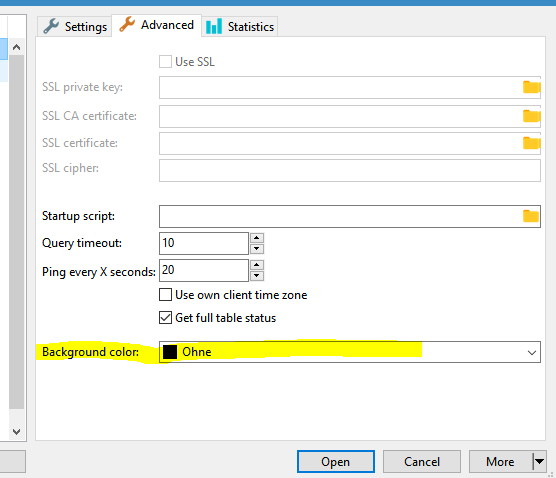
I just moved the color setting to the Advanced tab:
ansgarbecker
on 30 Mar 2019
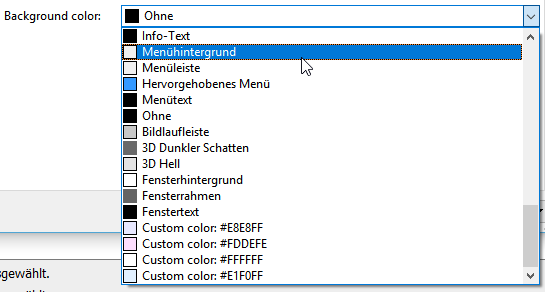
That background color selector now additionally shows all colors you defined for any of your sessions:
ansgarbecker
on 14 Jul 2019
Related issues
 naoma123
·
3Comments
naoma123
·
3Comments
 Ivan-Perez
·
3Comments
Ivan-Perez
·
3Comments
 jorisrobijn
·
5Comments
jorisrobijn
·
5Comments
 yz778
·
4Comments
yz778
·
4Comments
 rentalhost
·
5Comments
rentalhost
·
5Comments
Most helpful comment
Yes, this is definitely reasonable.