Heidisql: Popup for enter passphrase without input-element
Steps to reproduce this issue
- Create new session
- Choose network type "MySQL SSH-tunnel"
- Go to SSH-tunnel settings, set host, port, username, choose private key file (which contain passphrase)
- Go to Settings, set hostname, username, password, port
- Click "open"
Current behavior
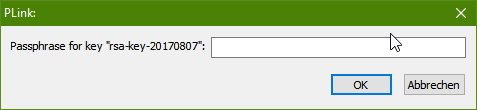
Popup without input-element, only "ok" button.

[Window Title]
Information
[Main Instruction]
PLink:
[Content]
Passphrase for key "rsa-key-20170807":
[OK]
Expected behavior
Similar popup, but with input-element for passphrase write.
Possible solution
add input-element
Environment
OS Windows 10 professional 64 bit
HeidiSQL version:
versions 9.5.0.5196, 9.4.0.5125Operating system:
OS Windows 10 professional 64 bit
 andreybatalof
👍18
All 4 comments
I'm suffering from the same issue. This is a needed feature.
 baranelitez
on 28 Jun 2019
baranelitez
on 28 Jun 2019
👍4
I'm suffering from the same issue. This is a needed feature.
Me too!
 marcuslsouza
on 28 Jul 2019
marcuslsouza
on 28 Jul 2019
;-;
 AskAlice
on 9 Sep 2019
AskAlice
on 9 Sep 2019
Should work now, at least if the message does not change in newer plink versions:
 ansgarbecker
on 30 Nov 2019
ansgarbecker
on 30 Nov 2019
😄2
👍2
Was this page helpful?
0 / 5 - 0 ratings
Related issues
 slaFFik
·
3Comments
slaFFik
·
3Comments
 catamphetamine
·
3Comments
catamphetamine
·
3Comments
 mpaland
·
5Comments
mpaland
·
5Comments
 chrysler5798
·
5Comments
chrysler5798
·
5Comments
 dzintb
·
3Comments
dzintb
·
3Comments
Most helpful comment
Should work now, at least if the message does not change in newer plink versions: