Heidisql: Regression: Retina fonts are broken in 10.3, were working in 10.2
Steps to reproduce this issue
Installed 10.3.0.5771 today — retina fonts broke (look pixelated).
Previously was using some 10.2.x version.
Installed HeidiSQL_10.2.0.5725_Setup.exe — fonts aren't rendered correctly.
Installed HeidiSQL_10.2.0.5599_Setup.exe — it renders fonts correctly.
Current behavior
Fonts are pixelated.
Expected behavior
Fonts being smooth.
Possible solution
Use HeidiSQL_10.2.0.5599_Setup.exe.
https://www.heidisql.com/installers/HeidiSQL_10.2.0.5599_Setup.exe
Environment
Windows 10, 4k screen at 200% scaling.
 catamphetamine
All 3 comments
This is due to the given up high DPI awareness. There were numerous bugs left in high DPI mode, which I could not solve, so I finally reverted the code for it.
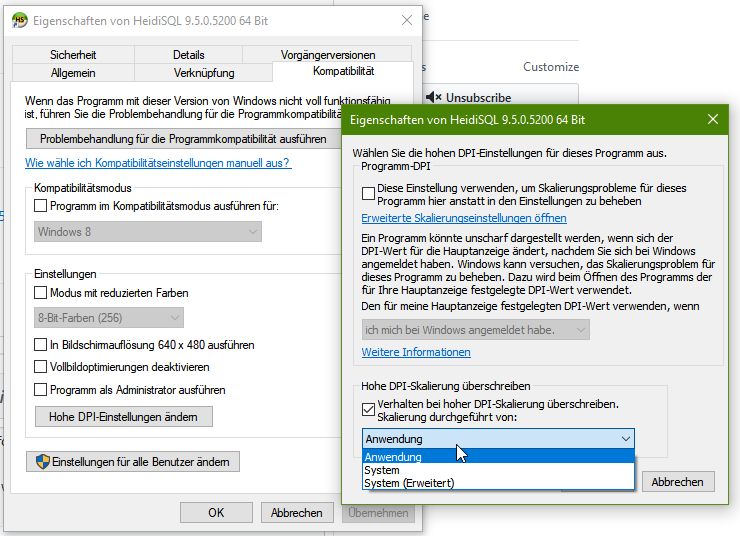
I think you can still activate application based scaling, when you rightclick your taskbar icon for HeidiSQL, then click "Properties", then click "Compatibility" tab, then click "High DPI settings":
 ansgarbecker
on 13 Dec 2019
ansgarbecker
on 13 Dec 2019
@ansgarbecker Ok, thx. 10.2 is fine, it'll be enough for 202x.
catamphetamine
on 13 Dec 2019
Note that the above overriding should also work on HeidiSQL v10.3. HeidiSQL should look sharp on scaled screens then, but this will include the same bugs as v10.2 also had.
ansgarbecker
on 13 Dec 2019
Related issues
 chrysler5798
·
5Comments
chrysler5798
·
5Comments
 cammudito
·
3Comments
cammudito
·
3Comments
 cautionbug
·
4Comments
cautionbug
·
4Comments
 altmvogi
·
5Comments
altmvogi
·
5Comments
 yz778
·
4Comments
yz778
·
4Comments
Most helpful comment
Note that the above overriding should also work on HeidiSQL v10.3. HeidiSQL should look sharp on scaled screens then, but this will include the same bugs as v10.2 also had.