Heidisql: Auto-select fitting SQL colors when switching theme
Steps to reproduce this issue
- Have the default theme and SQL colors activated, then switch to a dark theme
- Watch out for font colors in the log panel
Current behavior
Unreadable text, due to bad fitting colors
Expected behavior
Readable text :)
Possible solution
Auto-select a dark SQL color preset when selecting a dark theme, and vice versa.
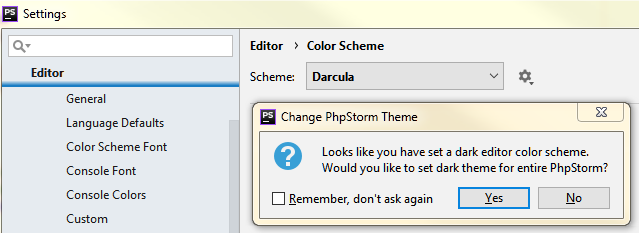
Or, gracefully ask the user if that should be done, via yes/no dialog. Similar to what PHPStorm does, see attached screen.
Environment
- HeidiSQL version:
9.5.0.5362
 ansgarbecker
All 17 comments
After selecting a new theme, Heidi could examine its clWindow color via GetLightness, and decide whether to auto-select dark or bright SQL font colors. Also, grid text colors should be auto-selected then, although there are no predefined color sets for grid colors.
ansgarbecker
on 25 Dec 2018
Ideas for theme text colors:
Maybe you could use some popular themes here : http://color-themes.com
And propose themes with background colors AND text colors.
(Personal request: That'd be great if you could include Material Theme: http://color-themes.com/?view=theme&id=5746be34333ecc1800c39714
because it's my VSCode Theme)
 CharlieEtienne
on 26 Dec 2018
CharlieEtienne
on 26 Dec 2018
I thought I add some color preset dropdown to Preferences > Grid formatting, where currently there is just a color selector for each data type group (numeric, text, ...). In that color preset dropdown, I should probably add the seme predefinitions as in SQL color presets: Light, Dark, Black, White. Of course I could also add some more here, like that Material theme, but my first goal is to make colors compatible to dark themes at all.
ansgarbecker
on 29 Dec 2018
I have just added a color preset dropdown to the preferences dialog, in bd8cc07bc82b4d277f6db18f7857f4ece51fb789 - and forgot to mention the issue id in the log message, so here it is :)
ansgarbecker
on 30 Dec 2018
By the way, if you'd like a Material theme, you could define the Pascal code colors here. The color codes are represented as integer values. Here's the definition of the current dark scheme:
  object SynSQLSyn_Dark: TSynSQLSyn
    Options.AutoDetectEnabled = False
    Options.AutoDetectLineLimit = 0
    Options.Visible = False
    CommentAttri.Foreground = 8710076
    ConditionalCommentAttri.Foreground = 8710076
    DataTypeAttri.Foreground = 11184895
    DelimitedIdentifierAttri.Foreground = 6460927
    FunctionAttri.Foreground = 15792639
    IdentifierAttri.Foreground = 6460927
    KeyAttri.Foreground = 15792639
    NumberAttri.Foreground = 4610525
    StringAttri.Foreground = 5293907
    SymbolAttri.Foreground = 15792639
    TableNameAttri.Foreground = 16755327
    VariableAttri.Foreground = clPurple
    SQLDialect = sqlMySQL
    Left = 200
    Top = 352
  end
You may be able to generate the right color codes using a converter like the one on shodor.org. You will need to exchange the blue and red parts, as the order in a Pascal color is BGR, not RGB.
ansgarbecker
on 31 Dec 2018
Here it is:
  object SynSQLSyn_Dark: TSynSQLSyn
    Options.AutoDetectEnabled = False
    Options.AutoDetectLineLimit = 0
    Options.Visible = False
    CommentAttri.Foreground = 5533306
    ConditionalCommentAttri.Foreground = 7193272
    DataTypeAttri.Foreground = 13079274
    DelimitedIdentifierAttri.Foreground = 8565247
    FunctionAttri.Foreground = 12832483
    IdentifierAttri.Foreground = 8565247
    KeyAttri.Foreground = 12832483
    NumberAttri.Foreground = 16733040
    StringAttri.Foreground = 12839047
    SymbolAttri.Foreground = 8440772
    TableNameAttri.Foreground = 16217705
    VariableAttri.Foreground = 16763755
    SQLDialect = sqlMySQL
    Left = 200
    Top = 352
  end
But it is a non sense without the appropriate background color, which is 2503224.
I don't know if it is easy for you to integrate new themes (I mean global themes like Carbon) in HeidiSql, maybe I could help if it's not too complicated because I don't know Pascal.
Also I'm not sure about the BGR / RGB thing, I used this converter (shrodor one was down yesterday)...
If it happens to be the actual default dark theme colors
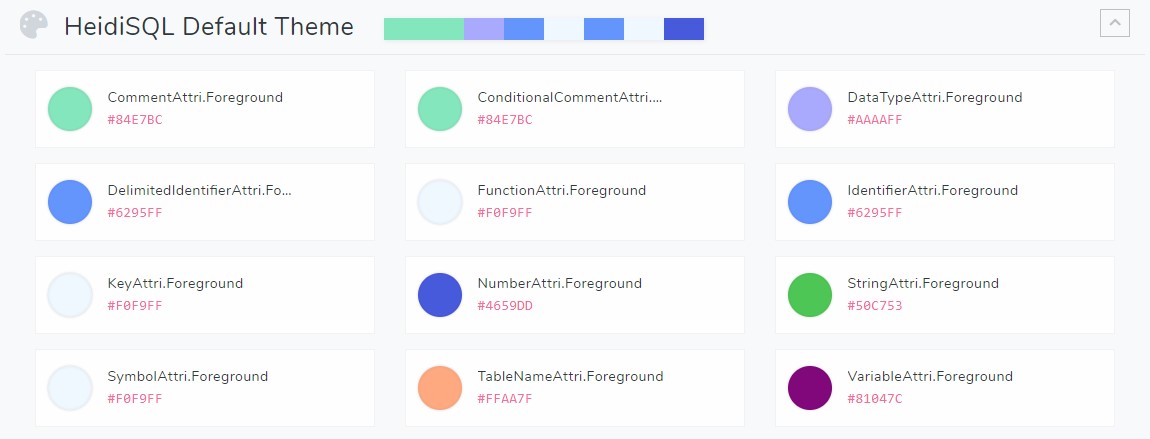
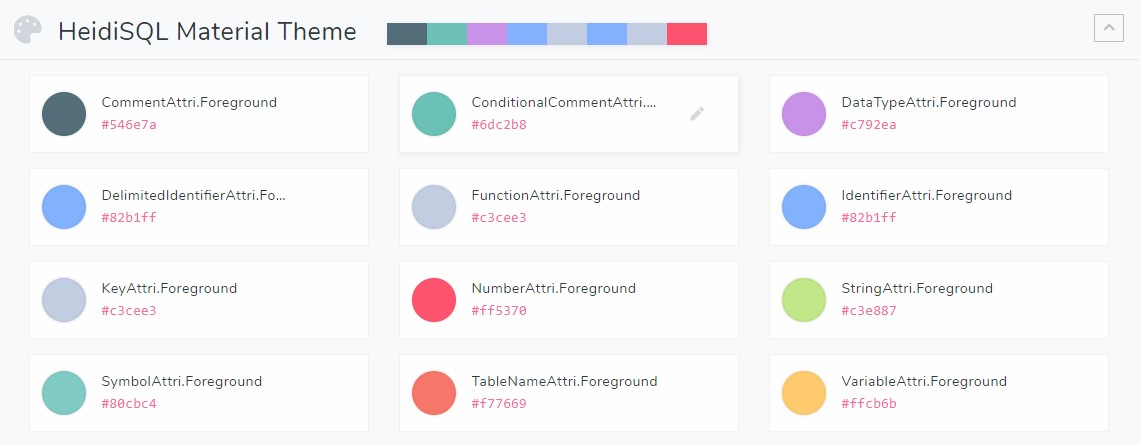
CharlieEtienne
on 1 Jan 2019
The styles are predefined in Delphi. I never created one myself. In Delphi, under "Tools", there is a Bitmap style designer, which I guess must be used to create such .vsf files / themes. You could of course download the Community edition of Delphi and create themes with it for HeidiSQL, I would be glad if someone does that.
The crux is that these themes don't include SQL text colors, nor do they include data type colors used in HeidiSQL.
I will overtake your color definitions from above into a new SQL colors preset, and call it "Material". I guess it's nicer than my "Dark" preset, so I can also make it the default preset when switching to a dark theme.
ansgarbecker
on 1 Jan 2019
Here's a documentation for that "Bitmap style designer": http://docwiki.embarcadero.com/RADStudio/XE6/en/Bitmap_Style_Designer
ansgarbecker
on 3 Jan 2019
I made a material.vsf file with the Bitmap style designer tool. Of course, I couldn't test it on HeidiSQL, but it seems to work correctly with default ui components.
I'm quite new to Github (never did a PR), so I don't know how to submit you the file for review...
EDIT: I've forked, then merge a Pull Request on my side, so here is the file
CharlieEtienne
on 4 Jan 2019
Also I just test material code color scheme you've included in 9.5.0.5437 and I think Red and Blue are inverted. My bad (I thought my converter was doing this for me).
Please use these codes instead:
  object SynSQLSyn_Dark: TSynSQLSyn
    Options.AutoDetectEnabled = False
    Options.AutoDetectLineLimit = 0
    Options.Visible = False
    CommentAttri.Foreground = 8023636
    ConditionalCommentAttri.Foreground = 12108397
    DataTypeAttri.Foreground = 15372999
    DelimitedIdentifierAttri.Foreground = 16757122
    FunctionAttri.Foreground = 14929603
    IdentifierAttri.Foreground = 16757122
    KeyAttri.Foreground = 14929603
    NumberAttri.Foreground = 7361535
    StringAttri.Foreground = 8906947
    SymbolAttri.Foreground = 12897152
    TableNameAttri.Foreground = 6911735
    VariableAttri.Foreground = 7064575
    SQLDialect = sqlMySQL
    Left = 200
    Top = 352
  end
I just overtook your new material vcl style, and the changed colors for the SQL color preset.
Please keep further things out of this issue. Instead, better file a new one if there is an issue or if you have more to contribute.
You could also fix the material style, as I see there is no background color for menu items which the mouse just hovers.
ansgarbecker
on 5 Jan 2019
I see in the latest HeidiSQL Nightly that the SQL formatting's colors are changed.
Here is a screenshot:

My settings are already set to Light:
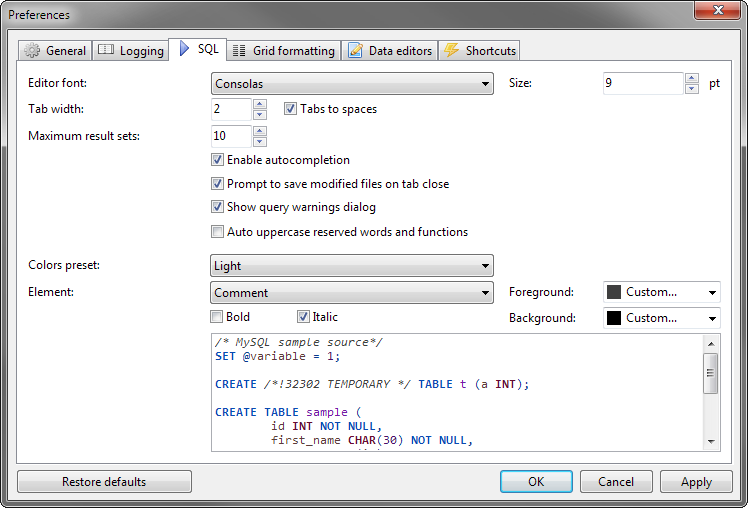
Is there any way to get the old color scheme back? The new scheme's contrast between elements is too low for me.
 igitur
on 7 Jan 2019
igitur
on 7 Jan 2019
To get the default colors, you could select the "Light" preset. For reverting to the default colors of an old Heidi version: exit Heidi, delete the values starting with "SQL Attr*" via regedit from the key HKEY_CURRENT_USER\Software\HeidiSQL. Then restart the old HeidiSQL version to load the default values. You could use the last release for it.
ansgarbecker
on 7 Jan 2019
Could you possibly add the old scheme as a preset entry?
igitur
on 7 Jan 2019
Hm, why not. But you should file a new issue for that.
ansgarbecker
on 7 Jan 2019
@CharlieEtienne : I just modified the installer script, so it provides "Material" instead of "Carbon" as an alternative to the default Windows theme. I hope that's fine with you?
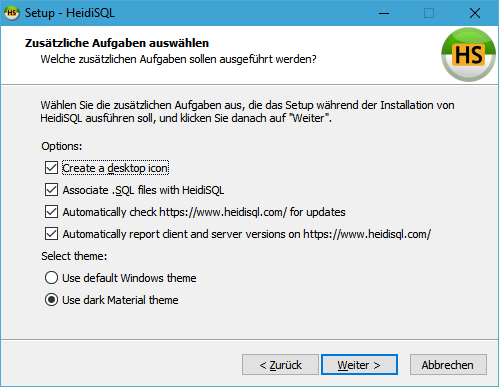
I also intended to add your username (CharlieEtienne or tell me your real name?) to the credits section on https://www.heidisql.com/help.php#credits
ansgarbecker
on 15 Jan 2019
Wow, so cool! Thanks @ansgarbecker ! My real name is Charlie Etienne (France)
Also, for reference here's the repo for VCL Material Dark.
I planned to add these variants for this theme:
- Material Darker
- Material Lighter
- Material Ocean
- Material Palenight
as defined in official Material Theme by Mattia Astorino
Any help is welcome!
CharlieEtienne
on 16 Jan 2019
Related issues
 andreybatalof
·
4Comments
andreybatalof
·
4Comments
 UnicornsRock420
·
4Comments
UnicornsRock420
·
4Comments
 rkmaier
·
5Comments
rkmaier
·
5Comments
 BraveOtter
·
4Comments
BraveOtter
·
4Comments
 cautionbug
·
4Comments
cautionbug
·
4Comments