Heidisql: Versions after 5203 crash in Linux+Wine
Expected behaviour
Application would start normally.
Current behaviour
It crashes immediately.
Failure information (for bugs)
Immediately crashes upon launching the software after the installer is finished.
Also tried launching the software from outside the installer and it crashes the same way.
Consistently crashes on two different computers. Both are running the same Linux and Wine versions, but on one the crash was seen after upgrading from HeidiSQL 9.5.0.5202, while on the other it was a fresh installation of both Wine and HeidiSQL, so prior configs cannot be an issue.
Once I install version 9.5.0.5203 then it works properly again.
Steps to reproduce
- Download the full installer for any version from 9.5.0.5204 to the most recent (5219).
- Install it and launch after installing.
Context
- 9.5.0.5204 or later
- DB version is not applicable since it crashes before ever seeing the Session Manager
- Antergos (Arch) Linux with Wine 3.0-rc5
Failure Logs
 babudro
All 26 comments
5204 was the SynEdit component update 2.1.0-beta, so I guess this should be reported in their tracker.
At least we have a callstack, which says the crash happens in line 4 of TCustomSynEdit.WMSize
 ansgarbecker
on 9 Jan 2018
ansgarbecker
on 9 Jan 2018
The relevant lines 3 + 4 look like this:
Size := D2D1SizeU(ClientWidth, ClientHeight);
FRenderTarget.Resize(Size);
So the crash possibly happens due to missing Direct2D API on Wine. Could that be the case? I read that Wine 1.8 introduced Direct2D support, but you wrote you are already on 3.0-rc5. Hm.
ansgarbecker
on 17 Jan 2018
I use Wine 2.20 and it still happens to me. It might be a Wine issue, but I can't tell.
 lourdas
on 17 Jan 2018
lourdas
on 17 Jan 2018
I've upgraded to Wine 3.0 and the issue still exists. Could there be some workaround? What changed with respect to 2D after v.5203?
lourdas
on 25 Jan 2018
I just found the cause, by tracking the above lines back in the code history of SynEdit. It's the commit SynEdit/SynEdit@ae47e3bb1d959ebf2e63b6fc8c9977eb2b2e995e . I just left a hopefully precise comment in that commit, so we have a chance to get a fix for Wine.
ansgarbecker
on 25 Jan 2018
I have opened a ticket for this topic in the SynEdit tracker: SynEdit/SynEdit#91
ansgarbecker
on 25 Jan 2018
Not sure how we get around this issue but this is a must for the next release.
ansgarbecker
on 18 Feb 2018
@ansgarbecker Can you patch the SynEdit component manually and include it in the next test build so that we can test it against Wine?
lourdas
on 10 Mar 2018
@lourdas I have currently no clue how to change the SynEdit code so it works in Wine again - apart from downgrading. My suggestion for detecting Wine in the above mentioned ticket is just a fragment of a solution.
ansgarbecker
on 11 Mar 2018
@ansgarbecker Ok, so, would you consider downgrading or even maintaining another build with the older version of the component...? It's a pity we can't run the latest version in Linux. I will try to ping the SynEdit committer, but I don't see anything moving there...
lourdas
on 11 Mar 2018
I had progress with this issue. By tweaking the Wine configuration, the latest HeidiSQL version runs without any issue. I'm attaching a screenshot:
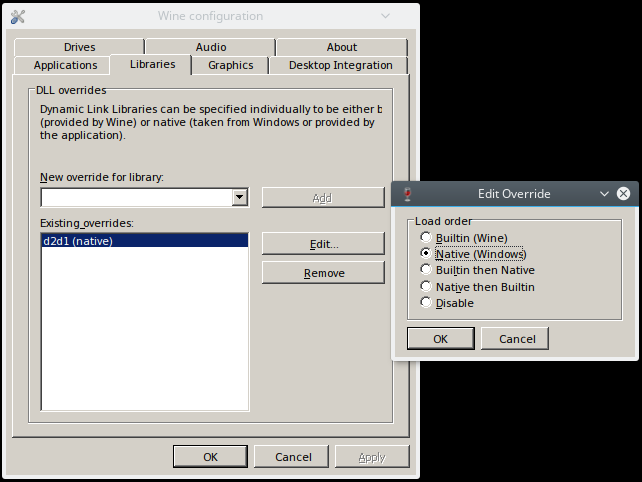
So, you must run winecfg, go to Libraries, add d2d1, click on edit and select Native (Windows). All other options did not work and crashed the application. I'm happy this workaround works for me and HeidiSQL runs fine.
@ansgarbecker It would be nice if there would be a way to alert other Wine users about this workaround.
lourdas
on 25 Mar 2018
Awesome finding. Thanks a lot!
I would like to set this override automatically, so the user doesn't have to care about it. Here's a thread talking about setting the WINEDLLOVERRIDES environment variable to "d2d1=n" for a shell. I thought I can probably set this in heidisql.exe in a very early stage, but I think that's already to late, as dlls are loaded before the application's code is executed.
ansgarbecker
on 25 Mar 2018
Just write a paragraph explaining this in https://www.heidisql.com/help.php and I think we'll be ok. :)
lourdas
on 25 Mar 2018
Thank you, Vasillis. That work-around was successful for me, too.
On Sun, 25 Mar 2018 06:05:18 -0700 Vasilis Lourdas wrote:
>
I had progress with this issue. By tweaking the Wine configuration,
the latest HeidiSQL version runs without any issue. I'm attaching a
screenshot:
wine_config_for_heidisql
https://user-images.githubusercontent.com/397916/37875326-e1181b40-3045-11e8-8509-0b15f9dd620b.png
So, you must run winecfg, go to Libraries, add |d2d1|, click on edit
and select |Native (Windows)|. All other options did not work and
crashed the application. I'm happy this workaround works for me and
HeidiSQL runs fine.@ansgarbecker https://github.com/ansgarbecker It would be nice if
there would be a way to alert other Wine users about this workaround.—
You are receiving this because you authored the thread.
Reply to this email directly, view it on GitHub
https://github.com/HeidiSQL/HeidiSQL/issues/83#issuecomment-375969129,
or mute the thread
https://github.com/notifications/unsubscribe-auth/ASdS5D3EPcaTukuKByFb8AT-xHF2p3kKks5th5YOgaJpZM4RYL5j.
babudro
on 26 Mar 2018
I just placed a paragraph with a link back to your nice screenshot, @lourdas .
Please shout if someone has an idea how to automatically apply this setting.
ansgarbecker
on 7 Apr 2018
I added that note to the download page as well now. The help page is long and probably not read by the relevant users.
ansgarbecker
on 1 May 2018
If I understand correctly, the crash happens only after calling a missing API. If that is a correct assumption, a fix can be applied on program startup early enough so that it is being executed before the crash occures.
For example, it can show a message box explaining on how to resolve the issue or if GUI rendering is not yet possible it can open a txt file with an explanation that is distributed along the program.
 alexalok
on 24 Aug 2018
alexalok
on 24 Aug 2018
@alexalok IMHO, a missing API function that doesn't exist in a emulated host environment (Wine) is not an excuse to put such a fix you mention inside the program's code. HeidiSQL is written for Windows and it works excellent there. Since a workaround is found for Wine, I guess that's all it matters.
@ansgarbecker What do you think?
lourdas
on 24 Aug 2018
I still would not have any problem with some additional code, only if that would fix this annoyance finally. But without technical alternatives, for the moment the solution is a hint on the download and help pages.
ansgarbecker
on 24 Aug 2018
I have no d2d1 in that list of DLL overrides. I can type it by hand and apply, but it doesn't seem to work. Should I have it? If yes, do I have to install something? Thanks.
 lorenzos
on 9 Nov 2018
lorenzos
on 9 Nov 2018
@lorenzos I'm using Gentoo with the wine-vanilla package (currently at 3.19). I don't know about other Linux distributions if you need to install additional packages, so you will need to search a bit more.
lourdas
on 9 Nov 2018
HeidiSQL_9.5.0.5196_Setup.exe runs fine using wine-3.18 (Staging) in Sabayon, there was no need to twiddle with d2d1.
 Beep6581
on 7 Jan 2019
Beep6581
on 7 Jan 2019
HeidiSQL_9.5.0.5196_Setup.exe runs fine using wine-3.18 (Staging) in Sabayon, there was no need to twiddle with d2d1.
The issue refers to versions after 5203. So, yes, version 5196 runs just fine, without any tweaks.
lourdas
on 7 Jan 2019
I was getting similar issues with running latest HeidiSQL (10.0.0.5460) under the vanilla wine packages in ubuntu 16.04 .. moved to using the ubuntu repo supplied by wineHQ (https://wiki.winehq.org/Ubuntu) and it worked a treat.
 foftoogs
on 24 Jan 2019
foftoogs
on 24 Jan 2019
Im using Ubuntu 18.04, after updating to Heidi v10 everytime I would get an error regarding MySQL syntax etc, then Heidi would through a crash window, with the continue, restart, close heidi option.
What fixed that for me was under the wine cfg changing the windows version to Windows 10
 sayajin101
on 27 Mar 2019
sayajin101
on 27 Mar 2019
I'm able to run HeidiSql 9.5 on MacOS with Wine, but 10 and newer will not install.
 jredwards
on 3 Sep 2019
jredwards
on 3 Sep 2019
Related issues
 catamphetamine
·
3Comments
catamphetamine
·
3Comments
 hrvoj3e
·
4Comments
hrvoj3e
·
4Comments
 rkmaier
·
5Comments
rkmaier
·
5Comments
 andreybatalof
·
4Comments
andreybatalof
·
4Comments
 slaFFik
·
3Comments
slaFFik
·
3Comments
Most helpful comment
I had progress with this issue. By tweaking the Wine configuration, the latest HeidiSQL version runs without any issue. I'm attaching a screenshot:

So, you must run winecfg, go to Libraries, add
d2d1, click on edit and selectNative (Windows). All other options did not work and crashed the application. I'm happy this workaround works for me and HeidiSQL runs fine.@ansgarbecker It would be nice if there would be a way to alert other Wine users about this workaround.