Handbrake: Unknown Error Alert When Starting Program in Version 1.2.0
Hi, I would like to report an unknown error message in version only 1.2.0. This issue does not exist in previous versions!
OS: Windows 7 SP1 Ultimate 64 bit (Updated)
Setup File: HandBrake-1.2.0-x86_64-Win_GUI.exe
PC Driver Status: GPU driver and all other drivers updated
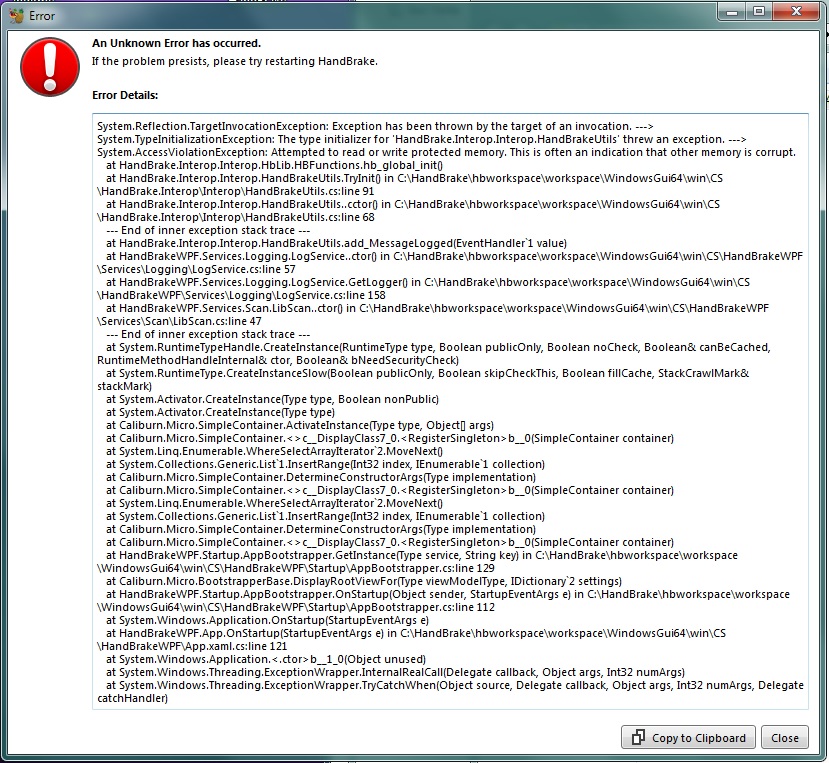
Error Message: When starting the program, it gives this error.

I wish conveniences. Good days.
 Batu-64
All 46 comments
Unfortunately this is a system issue and not a problem with HandBrake. Also unfortunately I've not been able to get sufficient information from anyone else experiencing this to figure out what it is on certain systems that cause this.
If your able to, I'd like to know
- Your full system hardware, (and Driver versions for any GPU's)
- what other software you have installed.
I'm not sure if there is some common factor that I can extract from this but I'll try mimic an environment if possible to see if I can't reproduce it.
We've seen a lot of problems in the past year with other software installing broken shell extensions into windows, so certain shell and direct3d APIs crash the system when called. I'm not sure if this is related here or not but that's why I'm asking for the software list.
 sr55
on 17 Jan 2019
sr55
on 17 Jan 2019
Just checking back in. I'd really like to do some more investigation but unfortunately without more information we can't do anything. If I don't hear back I'll close this out. If anyone else has this info, please do post.
sr55
on 21 Jan 2019
I'm sorry for answering late.
I've uploaded Aida64 software and hardware reports to Google Drive:
https://drive.google.com/file/d/19-zPDog_QQ09DeOqBDhX3Ifjp5dlFNC4/view?usp=sharing
GPU driver: Adrenalin Edition 18.9.3 (not beta)
I can share if you need any other information. I wish you success.
Batu-64
on 22 Jan 2019
Thank you for this!
Any chance you could download a nightly build (https://handbrake.fr/nightly.php) and then replace hb.dll (see attached) in "C:\Program Files\HandBrake Nightly" (or wherever you install this to)
Then run "HandBrake Nightly" from the start menu.
It's a slightly crippled build with some functionality turned off just to see if we can isolate an affected area. Also check the activity log window to see if anything is printed there.
If this works, I'll probably have to throw a few builds your way to narrow it down.
sr55
on 22 Jan 2019
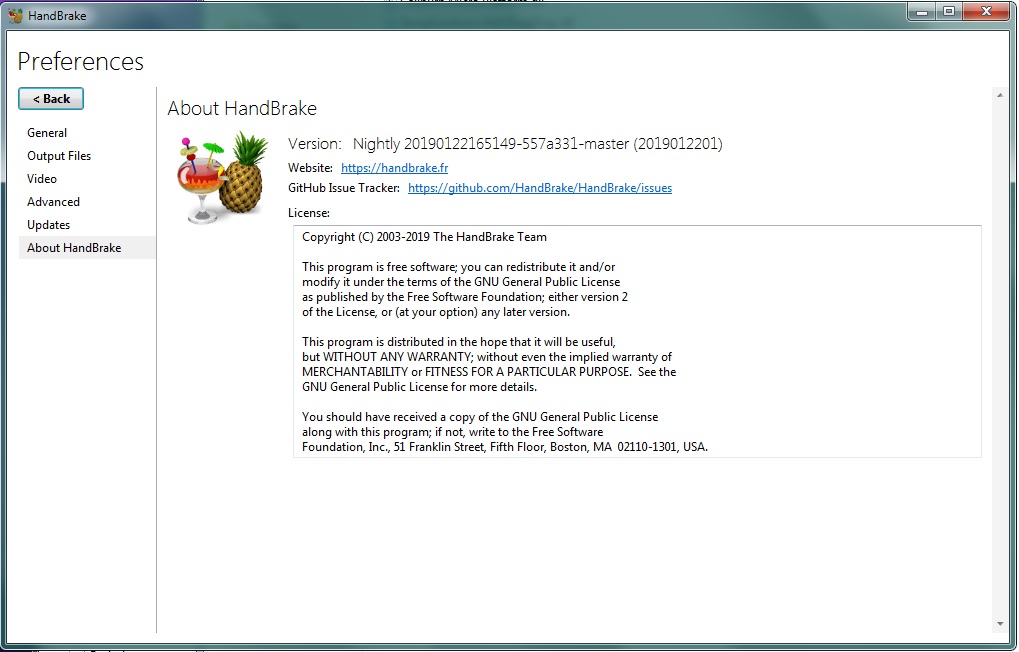
After replacing the dll file, it worked normally. :+1:
Batu-64
on 22 Jan 2019
I'll prepare a couple of DLL's to throw your way tomorrow if you don't mind.
Looks like the hardware probe is causing an issue so we probably have a driver issue of some kind. (Which explains why it works in safe mode for some)
We should be able to narrow this down to the particular check and figure out what's wrong now.
Thanks for testing!
sr55
on 22 Jan 2019
Of course I would like to help for other tests. It is a good thing that such a useful program is stable.
Note: I apologize if there is a mistake in my English.
Batu-64
on 23 Jan 2019
Can you please try these in order by dropping hb.dll in and running HandBrake each time.
sr55
on 23 Jan 2019
I'il try, but now I hesitated! Because I had done the previous test on Nightly Builds HandBrake-20190122165149-557a331_x86_64-Win_GUI.exe. I uninstalled Nightly Builds for a folder conflict problem with HandBrake-1.1.1-x86_64-Win_GUI.exe, which was preinstalled yesterday. Now, I can't find the Nightly Builds HandBrake-20190122165149-557a331_x86_64-Win_GUI.exe file in the site archive! I'm doing these tests on Nightly Builds HandBrake-20190123-557a331_x86_64-Win_GUI.exe instead. I archived it.
If you need to do the tests with the Nightly Builds HandBrake-20190122165149-557a331_x86_64-Win_GUI.exe file, if you upload this file I can repeat the tests.
Setup File:
HandBrake-20190123-557a331_x86_64-Win_GUI.exeTest-1 Result:
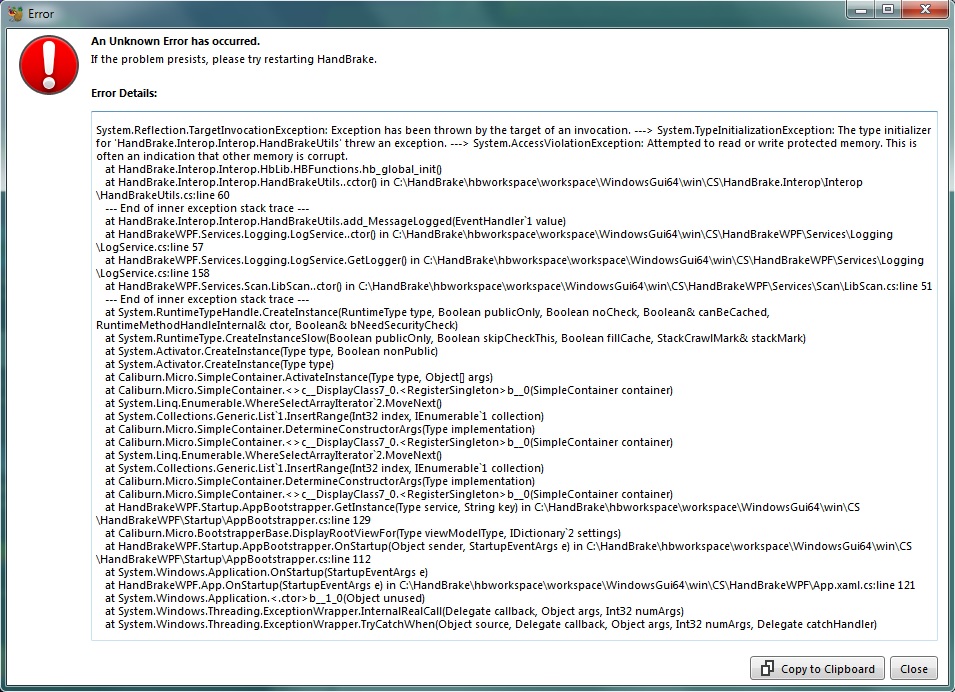
NOTE:
The reason for the error in the following 3 tests is that it is caused by the Comodo Firewall block. It was detected later!
- The Same Result for Test-2, Test-3 and Test-4:
Handbrake Stopped Working
Problem signature:
Problem Name: BEX64
Application Name: HandBrake.exe
Application Version: 1.3.0.0
Application Time Stamp: 5c47cc5f
Error Module Name: StackHash_1dc2
Error Module Version: 0.0.0.0
Error Module Time Stamp: 00000000
Special Condition: 0000000000000000
Special Case Code: c0000005
Special Occasion Data: 0000000000000008
OS Version: 6.1.7601.2.1.0.256.1
Local Identity: 1055
Additional Information 1: 1dc2
Additional Information 2: 1dc22fb1de37d348f27e54dbb5278e7d
Additional Information 3: eae3
Additional Information 4: eae36a4b5ffb27c9d33117f4125a75c2
Read our online privacy statement:
http://go.microsoft.com/fwlink/?linkid=104288&clcid=0x041f
If you don't have an online privacy statement, please read our offline privacy statement:
C: \ Windows \ system32 \ en-US \ erofflps.txt
Batu-64
on 24 Jan 2019
Have a feeling the crash is in the QSV detect code, but I'm surprised you didn't see similar results to https://forum.handbrake.fr/viewtopic.php?f=11&p=182389#p182385
Might throw you another build that fully disables QSV rather than just hardware detect to see if that works for you.
Any recent nightly build is fine.
sr55
on 24 Jan 2019
To confirm that theory, throw this hb.dll onto your nightly.
sr55
on 24 Jan 2019
Test-5 Result (with HandBrake-20190123-557a331_x86_64-Win_GUI.exe):

The same result also gave for HandBrake-20190124-2986505_x86_64-Win_GUI.exe.
Batu-64
on 24 Jan 2019
So, overlaying the original hb.zip I uploaded is still working? (No need to install / reinstall the nightly. you can just overlay the file)
This is extremely odd. 4 should be equivalent to hb.zip
hmm, I wonder if your system is failing at multiple points.
sr55
on 24 Jan 2019
Can you please try these in order by dropping hb.dll in and running HandBrake each time.
Have a feeling the crash is in the QSV detect code, but I'm surprised you didn't see similar results to https://forum.handbrake.fr/viewtopic.php?f=11&p=182389#p182385
Might throw you another build that fully disables QSV rather than just hardware detect to see if that works for you.
Any recent nightly build is fine.
I found the cause of the problem now! Test-2, Test-3 and Test-4, "Stopping the Hand Brake Stop" error was caused by the blocking of the Comodo Firewall. I excluded the Handbreake folder from the Comodo Firewall. Test-2, Test-3 and Test-4 files worked successfully now. (Same Result: https://forum.handbrake.fr/viewtopic.php?f=11&p=182389#p182385)
2 More if you have time.
Test-6 and Test-7 also worked successfully. In summary: Except Test-1 and Test-5, all worked without errors.
I'm here to help if you need other tests to improve the program. Good works.
Batu-64
on 26 Jan 2019
I've created a debug pack. It's a little more involved.
If HandBrakeCLI.exe --help crashes for you, then would you mind running this:
https://download.handbrake.fr/DebugPack.zip (Instructions included) 233MB download, extracts to 826MB
This will hopefully provide a stack traces.
It's looking an awful lot like we have a problem that's only showing up on AMD APU's
sr55
on 26 Jan 2019
I applied. Some information showed:

Batu-64
on 27 Jan 2019
Huh, it didn't crash. I'm pretty sure it's calling the same hb_global_init that's crashing from the GUI.
This is HandBrakeCLI 1.2 or the nightly build right?
sr55
on 27 Jan 2019
I have downloaded HandBrakeCLI.exe from the above link.
Handbrake 1.1.1 and Nigthly Buids 20190123-557a3311.0 versions were installed on the Pc together.
If necessary, I can install version 1.2 and repeat the test?
Batu-64
on 27 Jan 2019
Maybe try this another way. I was hoping HandBrakeCLI had the issue too, but if the one I included isn't crashing, the other way we can do this is to drop gdb.exe into your currently install of the nightly build in program files (the one that crashes).
From command line:
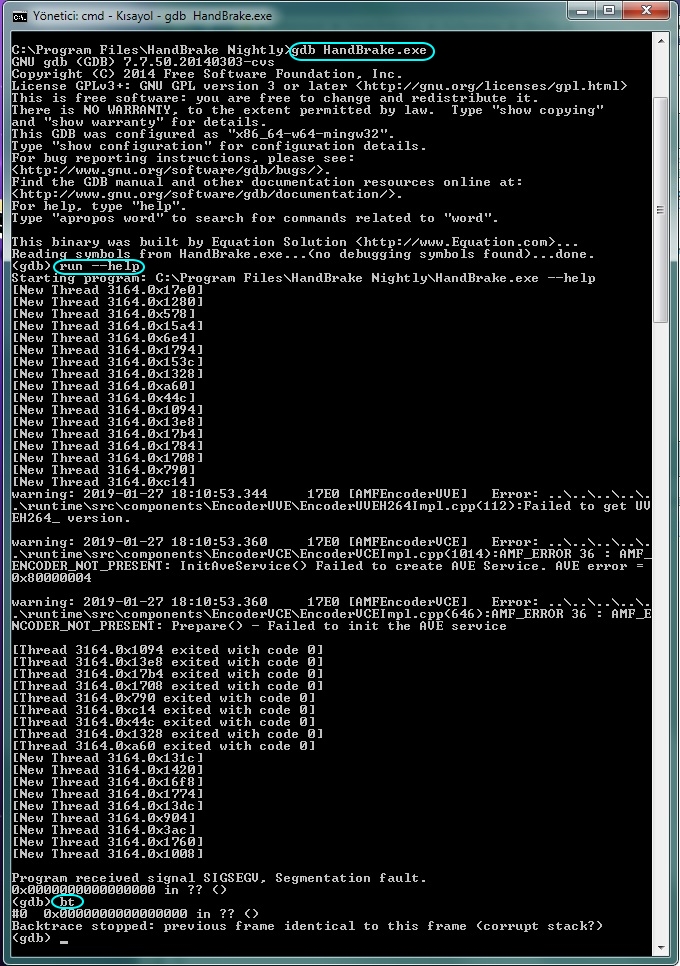
gdb HandBrake.exe (not handbrakecli.exe)
The GUI will launch but it'll be quite slow
Hopefully it crashes.
when it does, run the "bt" command again.
I may need to provide you an hb.dll with symbols. Hopefully it gives me enough to go on without
sr55
on 27 Jan 2019
I hope I did right...
Batu-64
on 27 Jan 2019
You didn't need --help but the GUI would ignore that anyway.
OK, good, so it's crashed out inside GDB and it looks like it's happened at or shortly after the AMD VCE hardware probe concurs.
I'm prepping a symbols build, as "bt" didn't actually tell us exactly where. Kind of expected since the hb.dll didn't include symbols needed.
Give me 40 minutes to build and package a new hb.dll that you can drop into that folder.
sr55
on 27 Jan 2019
Okay, I have time, no problem...
Batu-64
on 27 Jan 2019
https://download.handbrake.fr/hb.zip
Drop that in your existing nightly install. Verify it still crashes.
Then run it via gdb and do bt when it crashes.
Appreciate you taking the time to help out :)
sr55
on 27 Jan 2019
I thank you too, so I'm learning new things :)
After replacing the hb.dll file:
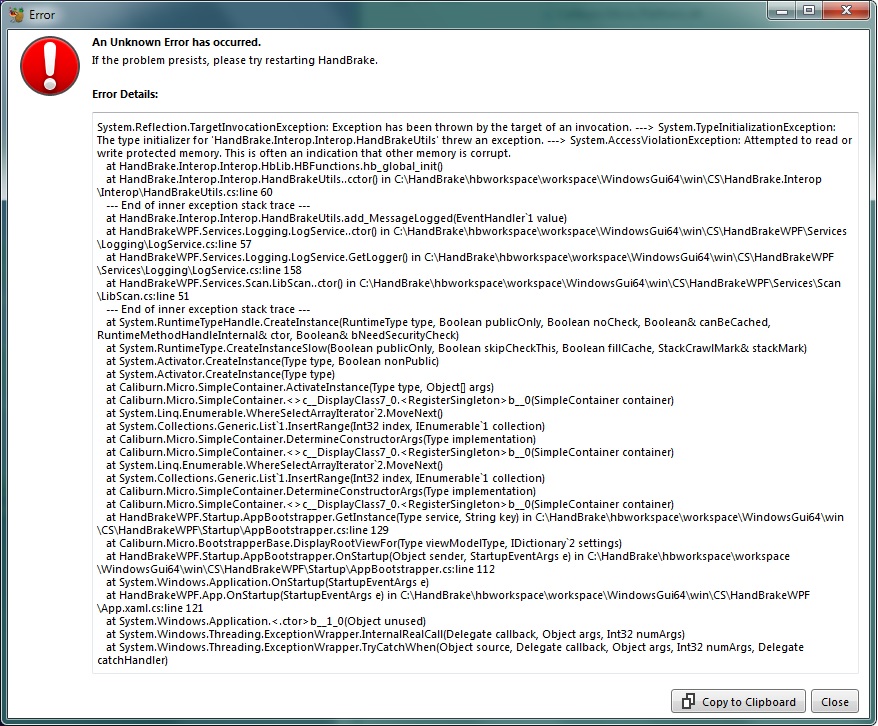
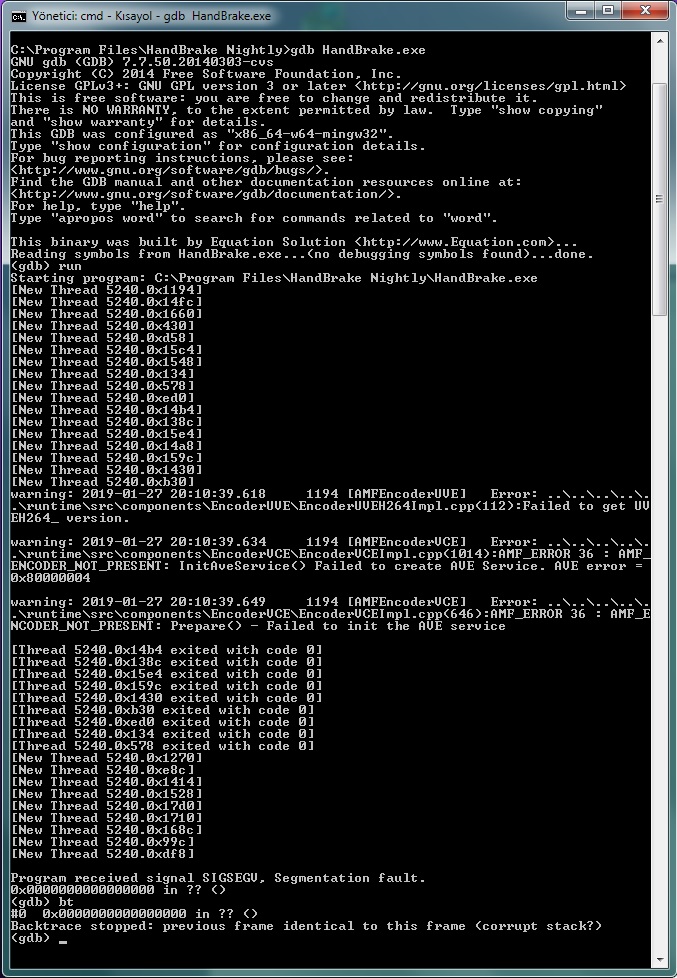
After running gdb:
Batu-64
on 27 Jan 2019
Thanks.
It's interesting that we are not getting a trace here. I'd have thought it would at the very least give us a line where it exists HandBrake and goes into the system.
There is another user on the forum running the same test.
I've also got someone lending me some AMD APU hardware to test on as well. Hopefully it crashes :)
Worst case I'll add a second shortcut to launch HandBrake without ASIC encoders enabled. That should be a fairly trivial change and will get this working for these cases. (Shouldn't be needed but something fairly low level breaking here :()
Going to puzzle over the code for a bit to see if I can't spot the problem. I atleast have a general area to look in now.
sr55
on 27 Jan 2019
This is HandBrakeCLI 1.2 or the nightly build right?
I downloaded HandBrakeCLI-1.2.0 from the link below (https://handbrake.fr/rotation.php?file=HandBrakeCLI-1.2.0-win-x86_64.zip).
After runnig it with Gdb:

Batu-64
on 27 Jan 2019
1.2.0 doesn't have symbols so that's pretty much expected. Wasn't expecting it from my larger build though :/
I don't have anything immediately I need tested but I'll drop updates if I figure anything out.
sr55
on 27 Jan 2019
So, we have a user in the forum that's traced a crash back to amfrt64.dll but is running much older driers (due to lack of support from AMD) which I suspect is just an incompatibility issue that we can probably workaround.
However, your running 18.9 so that doesn't explain things for you. They did however get a bit further in gdb.
So, again with the crashing version of the app:
gdb HandBrake.exe
(gdb) run
_- Wait for crash-_
(gdb) where
0 0x0000000000000000 in ?? ()
Backtrace stopped: previous frame identical to this frame (corrupt stack?)
(gdb) set $pc = (void *)$rsp
(gdb) set $rsp = $rsp + 8
(gdb) bt
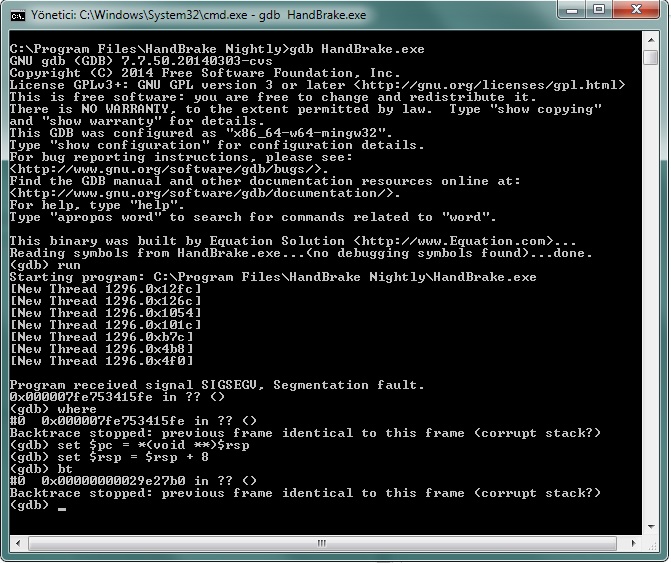
Would be interesting to see if you also get:
0 0x00007ffe4a046c10 in ?? () from C:\WINDOWS\SYSTEM32\amfrt64.dll
sr55
on 27 Jan 2019
However, your running 18.9 so that doesn't explain things for you.
I'm sorry, I forgot to notify: On January 23, I upgraded the GPU driver to Adrenalin 2019 Edition 19.1.1 (not beta). Does that change things?
So, again with the crashing version of the app:
I added Hb.dll to Nightly Builds. (https://download.handbrake.fr/hb.zip).
gdb HandBrake.exe
(gdb) run
_- Wait for crash-_(gdb) where
0 0x0000000000000000 in ?? ()
Backtrace stopped: previous frame identical to this frame (corrupt stack?)
(gdb) set $pc = (void *)$rsp
(gdb) set $rsp = $rsp + 8
(gdb) btWould be interesting to see if you also get:
0 0x00007ffe4a046c10 in ?? () from C:\WINDOWS\SYSTEM32\amfrt64.dll
I'm not sure I did it right or wrong. Result:
Batu-64
on 28 Jan 2019
I assume that's with the hb.dll I provided that's 800ish MB?
sr55
on 28 Jan 2019
I assume that's with the hb.dll I provided that's 800ish MB?
Yes it is... File Size: 799 MB (838.617.119 bytes)
I downloaded it from your link:
Batu-64
on 28 Jan 2019
Scott, does the Segmentation fault here mean a crash?
Batu-64
on 28 Jan 2019
Yes.
Normally, you get a trace of method calls before the crash occurs. This give you an idea where it crashed. In your case your not getting it at all. gdb gets a bit funny when the crash isn't happening inside the app it's watching. It's basically just telling us it was a crash.
I was kinda hoping we'd see the same amfrt.dll line that the user on the forum got as it'd confirm it's the same issue. We may still be dealing with 2 issues. I'm not 100% sure.
I've pinged a contact at AMD to see if they have any open issues regarding this on APUs. Failing that I've had some ideas regarding hardware checks to change how things are ordered to make it easy to disable them that might end up being the solution.
sr55
on 28 Jan 2019
30ae1c01c231ac07e798be2b1c0ccb8d5069f968
4e343a88bacfdc1d48d79442e81611bade6ab29a
Introduce a "fallback" mode that HandBrake will attempt (Where possible) if the hardware detection causes a driver level crash.
Depending on how the driver crashes or errors, there is no guarantee this will work but it's worth a shot.
If you still get the crash before it tries fallback, then I'll add an additional explicit option to flat out disable hardware encoding rather than "Attempt and fallback".
Can you guys let me know if the next build helps at all?
sr55
on 11 Feb 2019
Sorry, Scott. I don't know enough, I did not understand and my English is not good.
There isn't a patch here. Do I need to create a patch from the codes here? I don't know how to test it?
Can you guys let me know if the next build helps at all?
Is next build the last nightly builds or the patch made of these codes?
Batu-64
on 15 Feb 2019
Just grab the latest nightly from https://handbrake.fr/nightly.php
sr55
on 15 Feb 2019
When it is starting:
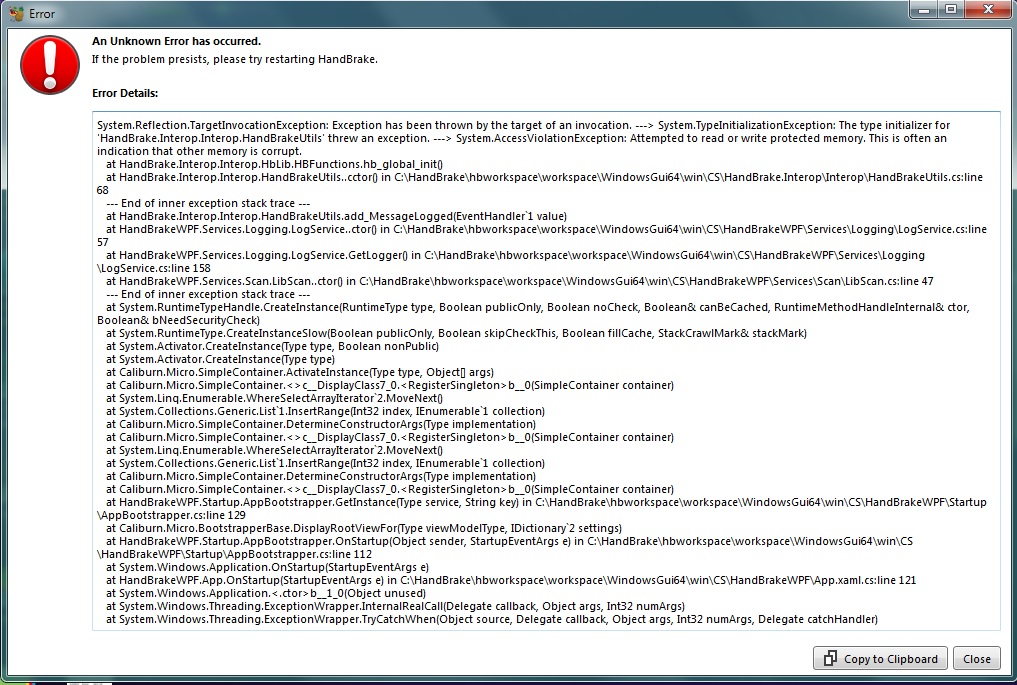
I wanted to test with Gdb command; but the result when running HandBreakeCLI:
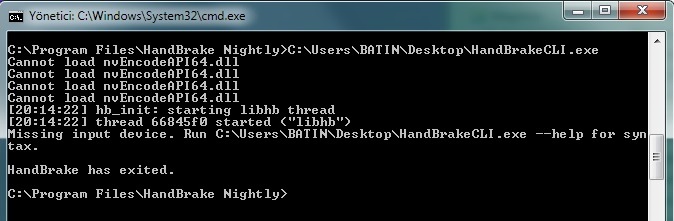
I may have forgotten something, but I don't understand.
Batu-64
on 16 Feb 2019
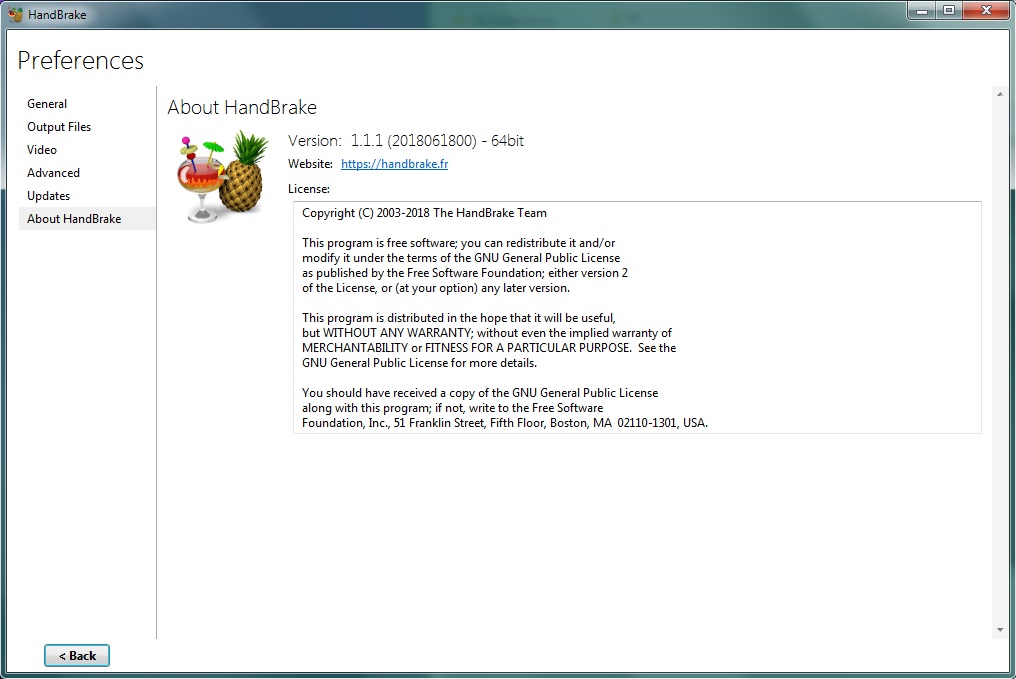
Do me a favour and screenshot the Help -> About page
sr55
on 16 Feb 2019
Ah, I think I see why it didn't auto-fallback.
I've pushed another nightly build to the site. Can you try again with the latest build from https://handbrake.fr/nightly.php
sr55
on 16 Feb 2019
Do me a favour and screenshot the Help -> About page
Currently only 2 are installed:
HandBrake-1.1.1-x86_64-Win_GUI.exe and
Nightly Build (HandBrake-20190216-7c4b319_x86_64-Win_GUI.exe)
I cannot send an image of the About menu because Nightly build has not been opened.
For HandBrake-1.1.1-x86_64-Win_GUI.exe:
Batu-64
on 16 Feb 2019
I've pushed another nightly build to the site. Can you try again with the latest build from https://handbrake.fr/nightly.php
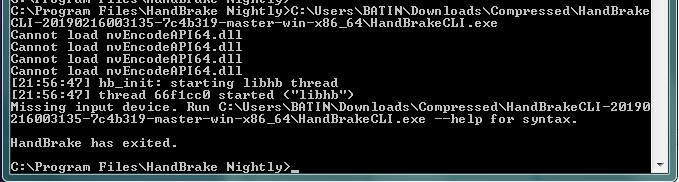
I installed HandBrake-20190216-ce66024_x86_64-Win_GUI.exe when running:
Similar error when running the HandBrakeCLI-20190216003135-7c4b319-master-win-x86_64:
Batu-64
on 16 Feb 2019
Sigh. Still didn't get it quite right. If this doesn't work I'm running outa ideas :/
Once more please. New Nightly pushed.
sr55
on 16 Feb 2019
Of course... I installed HandBrake-20190216-e6cd082_x86_64-Win_GUI.exe.
Before the beginning; Ram usage 25%,
After the start: Ram usage 75% to 95%. There is no warning about Hanbrake and the program does not start.
When I stopped the HandBrake process from the task manager and run it again, it gave the same result.
- Maybe I should mention that:
> https://download.handbrake.fr/DebugPack.zip (Instructions included) 233MB download, extracts to 826MB
3 days ago I had formatted PC. The Gpu driver I use is still the same: Adrenaline 2019 Edition 19.1.1
But, was the Debug Pack required for the Gdb command to work? I wanted to download the package this night but the link didn't work.
Batu-64
on 17 Feb 2019
You don't need that debug package anymore. At this point, I'm just trying to get the app to run by not initialising any of the hardware support. (And apparently I'm failing at that :/)
Defiantly wasn't expecting the behaviour your seeing here. cyko confirmed on the forums he saw the same thing with the no-ui and memory leak. Not sure how that's possible but I'll look into it.
sr55
on 17 Feb 2019
Unfortunately since I don't have any further options, I'll have to close this out.
When we eventually release 1.3, I'll produce a substitute "hb.dll" that has the hardware encoders stripped out for both Intel an AMD users that run into issues caused by faulty upstream drivers. Seems there isn't a better solution at this time :(
sr55
on 14 Jul 2019
Related issues
 iburunat
·
3Comments
iburunat
·
3Comments
 d4rkne55
·
5Comments
d4rkne55
·
5Comments
 Vuurvlieg
·
5Comments
Vuurvlieg
·
5Comments
 AnotherDimension-Ex
·
4Comments
AnotherDimension-Ex
·
4Comments
 toam-plus
·
3Comments
toam-plus
·
3Comments