Handbrake: Is there no filter to prevent PGS-Subtitles from being burnt-in?
Description of problem or feature request
It's great to be able to filter the subtitles by language, but with many files, you have e.g. an english .srt but also an english .sub (PGS) one. Latter is always burnt in as there's (currently?) no way of passing it through.
I would like to filter out PGS subtitles instead as to not ruin the output video with hardcoded subs. Sadly, I don't see an option for that anywhere. Selecting Burn-In behaviour to "none" doesn't prevent this!
The only options we currently have:
- add no subtitles per default and extract+mux them seperately after the fact
- let handbrake add the subtitles and then manually remove them before encoding
- live with burnt-in subtitles which may not even be the language you prefer
HandBrake version
20180318202418 nightly
Operating system
Windows 10
 Cagliostrooo
All 3 comments
PGS pass through isn’t supported in MP4, hence the forced burn in. You can switch the container to MKV. Otherwise, there currently is not an easy way to filter out subtitles by type; something we will have to consider.
 bradleysepos
on 1 May 2018
bradleysepos
on 1 May 2018
Ties into #1312
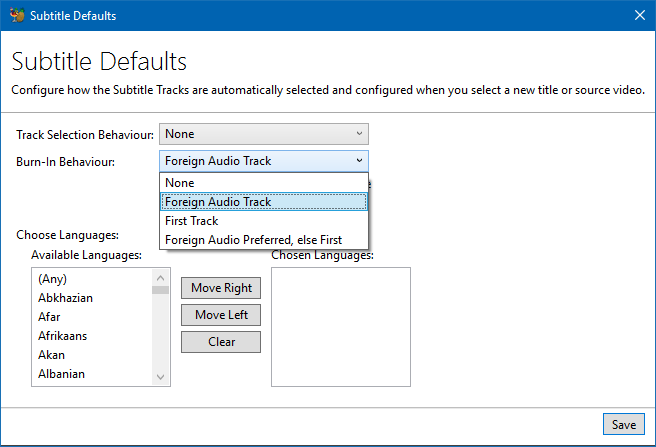
We probably want to expand that behaviour.
Change "None" -> "Prefer Passthru, Fallback to Burn-in"
Add "Passthru, Drop Incompatible Tracks"
Covers the basis.
I don't see any real good solution for users doing large batches. You'll always need to sanity check what it does.
 sr55
on 1 May 2018
sr55
on 1 May 2018
Add "Passthru, Drop Incompatible Tracks"
That would be very helpful! I regularly batch convert with the CLI version of handbrake to h265 and it would be a lot of help to not have to check every file before that. I prefer to use mp4 instead of mkv because it is more compatible (more devices support it).
 Technofrikus
on 12 Jul 2019
Technofrikus
on 12 Jul 2019
Related issues
 YammYcoding
·
4Comments
YammYcoding
·
4Comments
 jeremymeyers
·
4Comments
jeremymeyers
·
4Comments
 AnotherDimension-Ex
·
4Comments
AnotherDimension-Ex
·
4Comments
 rajibkhan
·
5Comments
rajibkhan
·
5Comments
 n2bisex4u
·
3Comments
n2bisex4u
·
3Comments
Most helpful comment
Ties into #1312

We probably want to expand that behaviour.
Change "None" -> "Prefer Passthru, Fallback to Burn-in"
Add "Passthru, Drop Incompatible Tracks"
Covers the basis.
I don't see any real good solution for users doing large batches. You'll always need to sanity check what it does.