Gvr-unity-sdk: iOS stereo image incorrect due to wrong phone orientation before starting VR mode
If the phone orientation is set to a portrait rotation when entering VR mode, the VR stereo image will not be rendered correctly.

 fredsa
All 9 comments
Here's a workaround for getting 2D/VR working, which I tested in Unity 5.6.4p1.
Create a hybrid 2D/Cardboard app with:
- Player Settings > iOS > Other Settings > Virtual Reality Support == enabled
- Player Settings > iOS > Other Settings > Virtual Reality SDKs == ["None", "Cardboard"]
Use the general purpose approach described in developers.google.com/vr/develop/unity/guides/hybrid-apps to switch between VR and 2D modes. For example, for testing purposes you could automatically switch between modes every 10 seconds:
```C#
IEnumerator Start() {
// Every 10 seconds toggle VR mode
while (true) {
yield return new WaitForSeconds(10f);
yield return SwitchToVR();
  yield return new WaitForSeconds(10f);
  yield return SwitchTo2D();
}
}
3. Modify the `SwitchToVR()` method to programmatically disable auto rotation and wait for landscape left before loading the `"cardboard"` VR device:

```C#
  IEnumerator SwitchToVR() {
    // Disable auto rotation, except for landscape left.
    Screen.autorotateToLandscapeLeft = true;
    Screen.autorotateToLandscapeRight = false;
    Screen.autorotateToPortrait = false;
    Screen.autorotateToPortraitUpsideDown = false;

    // Wait for landscape left / right orientation.
    while (Screen.orientation != ScreenOrientation.LandscapeLeft && Screen.orientation != ScreenOrientation.LandscapeRight) {
      // **********************************************************************
      // TODO: Ask the user to turn their phone to landscape orientation,
      // otherwise this while loop may run forever since the phone may not
      // auto rotate when held in portrait or portrait upside down orientation.
      // **********************************************************************

      Debug.Log("Screen.orientation = " + Screen.orientation + " -> ScreenOrientation.LandscapeLeft…");
      Screen.orientation = ScreenOrientation.LandscapeLeft;

      // Debug.Log("yield return null…");
      yield return null;
    }

    Debug.Log("LoadDeviceByName('cardboard')");
    VRSettings.LoadDeviceByName("cardboard");

    // Wait one frame!
    Debug.Log("yield return null…");
    yield return null;

    // Now it's ok to enable VR mode.
    Debug.Log("VRSettings.enabled = true…");
    VRSettings.enabled = true;
  }
Modify
SwitchTo2D()to (re-)enable auto rotation after loading the""(None) SDK:
```C#
IEnumerator SwitchTo2D() {
Debug.Log("LoadDeviceByName('')…");
VRSettings.LoadDeviceByName("");// Wait one frame!
Debug.Log("yield return null…");
yield return null;// Not needed, loading the None (
"") device automatically setsVRSettings.enabledtofalse.
// VRSettings.enabled = false;// If you only have one camera in your scene, you can just call
Camera.main.ResetAspect()instead.
ResetCameras();// Enable auto rotation
Screen.autorotateToLandscapeLeft = true;
Screen.autorotateToLandscapeRight = true;
Screen.autorotateToPortrait = true;
Screen.autorotateToPortraitUpsideDown = true;Screen.orientation = ScreenOrientation.AutoRotation;
}
5. Don't forget to add the `ResetCameras()` method used by `SwitchTo2D()`, from [developers.google.com/vr/develop/unity/guides/hybrid-apps](https://developers.google.com/vr/develop/unity/guides/hybrid-apps):

```C#
  void ResetCameras() {
    …
  }
- In
Awake()make sure screen auto rotation is enabled if "None" is your first / default VR SDK:
C#
  void Awake() {
    // Is "None" listed first in 'Player Settings > iOS > Other Settings > Virtual Reality SDKs'?
    if (VRSettings.loadedDeviceName == "") {
      // Ensures auto rotation is set correctly.
      StartCoroutine(SwitchTo2D());
    }
  }
fredsa
on 17 Jan 2018
WORKAROUND:
Deployment Info Tab >> under Device Orientation only select one of them.
 prakashg
on 22 Apr 2018
prakashg
on 22 Apr 2018
I am having the same issue with Iphone device.. how can i debug this?
when my application is entering VR mode, the VR stereo video will not be rendered correctly. what should I do to achieve same orientation for both VR zone? I am sharing the image here..
Wanna show the same display on both scene, How to I achieve that?
https://koenig-media.raywenderlich.com/uploads/2016/06/vr_mode.png
 suchitabohra
on 19 Jun 2018
suchitabohra
on 19 Jun 2018
@suchitabohra, the screenshot you posted is correctly rendered for the small screen of your iPhone. Cardboard headsets have been designed for larger screens, so on smaller screens like yours the projection geometry mismatch means the distortion renderer maps to an asymmetric projection like you see here. That should look fine when you put it in a headset and look through it.
 rusmaxham
on 28 Jun 2018
rusmaxham
on 28 Jun 2018
This should fixed in the latest iOS Cocoapod. To get the fix:
- Use the latest Google VR SDK for Unity
- Then run
pod updatefrom the command line
(Note, this requires that you have Cocoapods installed.)
Final note: Until Unity has updated the bundled version of the iOS pod, you will need to run pod update to get this fix.
fredsa
on 16 Oct 2018
It's not entirely fixed. If you repeatedly en-/disable VR (from portrait mode), the native overlay UI/buttons break.
My setup: Unity 2018.2.12f1 with bundled GVRSDK; after build I invoked pod update, so according to Podfile.lock I use GVRSDK 1.170.
Steps:
- Start Hybrid app with "None" XR device in 2D
- In Portrait, start VR (XRDevice.enable=true)
- Observation: VR opens just fine (back button, settings button and white line in the middle of screen are well placed)

- exit VR (via custom back button handler)
- Rotate device back to Portrait
- Enter VR again
- Observation: settings button is gone; white moved to top middle of right eye field; back button is fine.
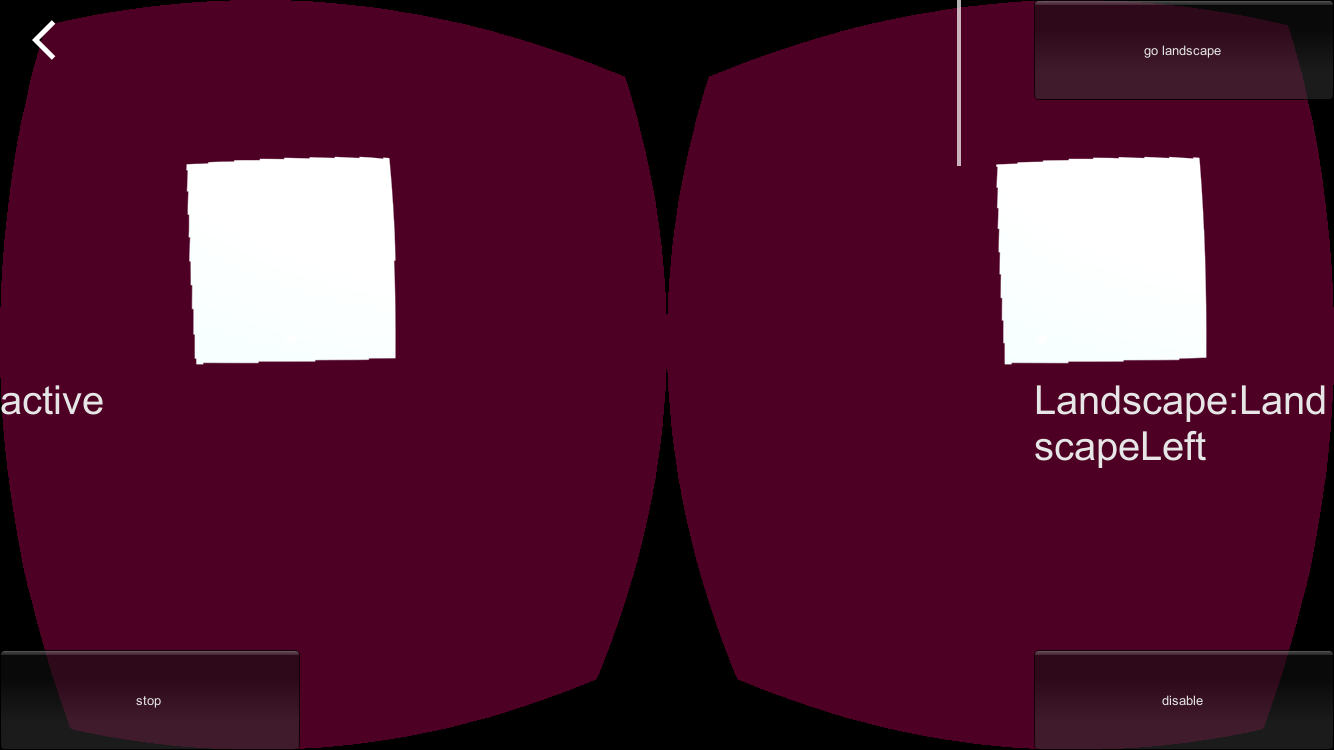
- exit VR
- Rotate device back to Portrait
- Enter VR again
- Observation: settings button still gone; white line gone; back button visually correct, but has no more effect when pressed.

- From now on it stays like this if you Exit/Reenter VR
I'd be willing to provide the project, if necessary.
 atteneder
on 11 Dec 2018
atteneder
on 11 Dec 2018
Thank you for the detailed notes. This sounds like a new bug. Could you please share your repro project in a new bug?
 chaosemer
on 7 Jan 2019
chaosemer
on 7 Jan 2019
Thank you for the detailed notes. This sounds like a new bug. Could you please share your repro project in a new bug?
did so: #995
atteneder
on 9 Jan 2019
I am having the same issue which you have attached. did you get any solution for this? For android it's working fine but when I build the ipa and install it, I am getting this issue
 ila124
on 6 Jun 2019
ila124
on 6 Jun 2019
Related issues
 guneyozsan
·
6Comments
guneyozsan
·
6Comments
 linglonglinglong
·
6Comments
linglonglinglong
·
6Comments
 qiaonifengxue
·
5Comments
qiaonifengxue
·
5Comments
 TonGarcia
·
4Comments
TonGarcia
·
4Comments
 synthercat
·
4Comments
synthercat
·
4Comments
Most helpful comment
WORKAROUND:
Deployment Info Tab >> under Device Orientation only select one of them.