Gvr-unity-sdk: Launching at default vertical "None" mode is horizontal and cropped on iOS first launch.
- Unity 5.6.0f3 and GVR 1.30 on iOS.
- VR settings is None & Cardboard, "None" on top being default.
Screen.orientation = ScreenOrientation.Portrait;is used in Awake() or Start().
Launching the app on iOS for the first time causes the vertical screen rotated 90 degrees and cropped. It happens regardless of starting the app horizontal or vertical. It launches normal after force quit and relaunch.
I tried to put this on Awake() or Start(), issue remains.
Screen.orientation = ScreenOrientation.Portrait;

 guneyozsan
All 6 comments
Why you put a None there? Does it work if you only have Cardboard in the VR settings?
 bopangzz
on 7 Jun 2017
bopangzz
on 7 Jun 2017
I put None because the app starts in 2D mode and switches to VR mode later. Unity launches the app in the topmost mode.
guneyozsan
on 7 Jun 2017
I think I got it. Although it says Virtual Reality support overrides the orientation settings, if I don't set "Device Orientation" to "Portrait" in Xcode this bug happens.
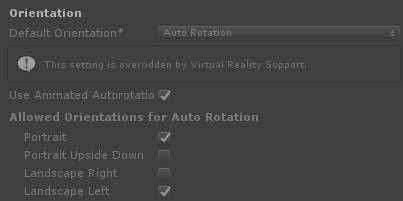
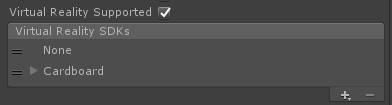
Xcode defaults to "Landscape Right" after building in Unity and building with this setting causes the bug:
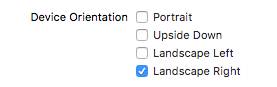
Setting it manually to "Portrait" fixes the bug:
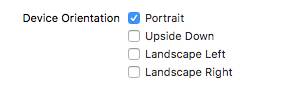
Using this code on Awake() or Start() doesn't make any difference:
Screen.orientation = ScreenOrientation.Portrait;
guneyozsan
on 8 Jun 2017
I get the exact same issue here. Xcode seems to always be defaulting to Landscape Right. Hope the issue can get fixed soon. Slightly annoying that we can't even even change the settings on the Unity side either.
 aschau
on 9 Jun 2017
aschau
on 9 Jun 2017
Here's a workaround for getting 2D/VR working, which I tested in Unity 5.6.4p1.
Create a hybrid 2D/Cardboard app with:
- Player Settings > iOS > Other Settings > Virtual Reality Support == enabled
- Player Settings > iOS > Other Settings > Virtual Reality SDKs == ["None", "Cardboard"]
Use the general purpose approach described in https://github.com/googlevr/gvr-unity-sdk/wiki/Switching-between-VR-and-non-VR-at-runtime to switch between VR and 2D modes. For example, for testing purposes you could automatically switch between modes every 10 seconds:
```C#
IEnumerator Start() {
// Every 10 seconds toggle VR mode
while (true) {
yield return new WaitForSeconds(10f);
yield return SwitchToVR();
  yield return new WaitForSeconds(10f);
  yield return SwitchOutOfVr();
}
}
3. Modify the `SwitchToVR()` method to programmatically disable auto rotation and wait for landscape left before loading the `"cardboard"` VR device:

```C#
  IEnumerator SwitchToVR() {
    // Disable auto rotation, except for landscape left.
    Screen.autorotateToLandscapeLeft = true;
    Screen.autorotateToLandscapeRight = false;
    Screen.autorotateToPortrait = false;
    Screen.autorotateToPortraitUpsideDown = false;

    // Wait for landscape left / right orientation.
    while (Screen.orientation != ScreenOrientation.LandscapeLeft && Screen.orientation != ScreenOrientation.LandscapeRight) {
      // **********************************************************************
      // TODO: Ask the user to turn their phone to landscape orientation,
      // otherwise this while loop may run forever since the phone may not
      // auto rotate when held in portrait or portrait upside down orientation.
      // **********************************************************************

      Debug.Log("Screen.orientation = " + Screen.orientation + " -> ScreenOrientation.LandscapeLeft…");
      Screen.orientation = ScreenOrientation.LandscapeLeft;

      // Debug.Log("yield return null…");
      yield return null;
    }

    Debug.Log("LoadDeviceByName('cardboard')");
    VRSettings.LoadDeviceByName("cardboard");

    // Wait one frame!
    Debug.Log("yield return null…");
    yield return null;

    // Now it's ok to enable VR mode.
    Debug.Log("VRSettings.enabled = true…");
    VRSettings.enabled = true;
  }
Modify
SwitchOutOfVr()to (re-)enable auto rotation after loading the""(None) SDK:
```C#
IEnumerator SwitchOutOfVr() {
Debug.Log("LoadDeviceByName('')…");
VRSettings.LoadDeviceByName("");// Wait one frame!
Debug.Log("yield return null…");
yield return null;// Not needed, loading the None (
"") device automatically setsVRSettings.enabledtofalse.
// VRSettings.enabled = false;// If you only have one camera in your scene, you can just call
Camera.main.ResetAspect()instead.
ResetCameras();// Enable auto rotation
Screen.autorotateToLandscapeLeft = true;
Screen.autorotateToLandscapeRight = true;
Screen.autorotateToPortrait = true;
Screen.autorotateToPortraitUpsideDown = true;Screen.orientation = ScreenOrientation.AutoRotation;
}
5. Don't forget to add the `ResetCameras()` method used by `SwitchOutOfVr()`, from https://github.com/googlevr/gvr-unity-sdk/wiki/Switching-between-VR-and-non-VR-at-runtime:

```C#
  void ResetCameras() {
    …
  }
- In
Awake()make sure screen auto rotation is enabled if "None" is your first / default VR SDK:
C#
  void Awake() {
    // Is "None" listed first in 'Player Settings > iOS > Other Settings > Virtual Reality SDKs'?
    if (VRSettings.loadedDeviceName == "") {
      // Ensures auto rotation is set correctly.
      StartCoroutine(SwitchOutOfVr());
    }
  }
 fredsa
on 25 Oct 2017
fredsa
on 25 Oct 2017
Will continue tracking this issue as #838.
fredsa
on 17 Jan 2018
Related issues
 qiaonifengxue
·
5Comments
qiaonifengxue
·
5Comments
 zet23t
·
6Comments
zet23t
·
6Comments
 vinhui
·
6Comments
fredsa
·
5Comments
vinhui
·
6Comments
fredsa
·
5Comments
 TonGarcia
·
4Comments
TonGarcia
·
4Comments
Most helpful comment
I think I got it. Although it says Virtual Reality support overrides the orientation settings, if I don't set "Device Orientation" to "Portrait" in Xcode this bug happens.




Xcode defaults to "Landscape Right" after building in Unity and building with this setting causes the bug:
Setting it manually to "Portrait" fixes the bug:
Using this code on Awake() or Start() doesn't make any difference:
Screen.orientation = ScreenOrientation.Portrait;