Gnome-shell-extension-gsconnect: gsconnect causes gnome-shell to lag and possibly memory leak
Describe the bug
When GSConnect extension is enabled the whole desktop stops responding for a second or two every minute or a few minutes. Only mouse moves. Video in chrome stops, sound keeps playing. I also noticed slowly increasing MEM% value in htop. (under 1 when gsconnect disabled, ~1.2 when enabeld, over 4 after some time of running). It probably started after a gnome update.
Steps To Reproduce:
- just enable the extension and try to use desktop normally (google-chrome, and other apps -- it is not chrome related, it happens also with chrome not running)
Expected behavior
no lags, no memleak
Screenshots
Support Log
System Details (please complete the following information):
- GSConnect version: 44
- Installed from: GNOME Extensions Website (not sure, sorry)
- GNOME/Shell version: 3.38.2
- Distro/Release: debian
GSConnect environment (if applicable):
- Paired Device(s): xiaomi android phone
- KDE Connect app version:
- Plugin(s): all enabled, didn't tested to disable some
Additional Notes:
 premek
All 35 comments
I'd like to investigate more or help fix it if anyone can direct me what to look for, thanks
premek
on 11 Dec 2020
The memory value in htop does not go back down after disabling the extension but it does after Alt-F2, r, Enter. And when the extension is disabled it stays low. (0.6% for me)
premek
on 11 Dec 2020
sorry the log is collected incorrectly, probably not useful. Now i deleted .cache/gsconnect, restarted and now I cannot reproduce it
premek
on 11 Dec 2020
Like I said in my last comment it started working fine (i dont know what I did to make it work) but then I left my pc running for a few hours and after coming back to it the lag is happening again.
I updated the original issue with a log collected correctly when the issue happened. I can't see anything in the log but when I look at journalctl output it looks like it lags every time there is some network transfer. (/service/device.js log entry, not the /service/backends/lan.js)
There is a line in the log mentioning my keyboard (called Planck) so I tried to disconnect it and it is still happening when the keyboard is not connected (I'm on a laptop)
premek
on 12 Dec 2020
It's pretty unlikely GSConnect is causing a memory leak in GNOME Shell, but to find it you'll either have to review the code line-by-line or maybe use a tool like heaptrack.
Since GSConnect doesn't do any blocking work in GNOME Shell it's also unlikely it's causing the whole desktop to lag, but either way you'd need a reliable way to reproduce it before you could attempt a fix.
 andyholmes
on 14 Dec 2020
andyholmes
on 14 Dec 2020
Thanks for your your reply and your time.
I'm not sure exactly what are the steps to reprocude but it happens almost every time I enable the extension. I tried to run heaptrack but not sure what to look for there. Also it is probably not useful without debug symbols enabled (?) sorry I don't know almost anything about that.
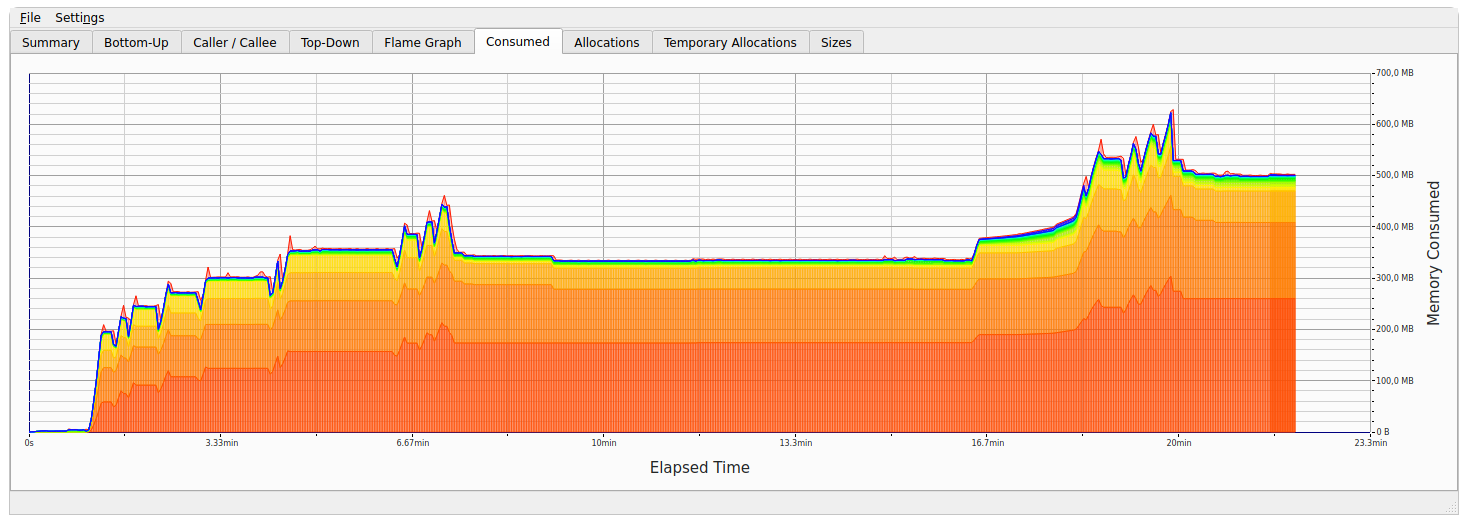
The flat parts in the middle and on the end of the graph are when the extension was disabled.
The spikes are when the lag also happens.
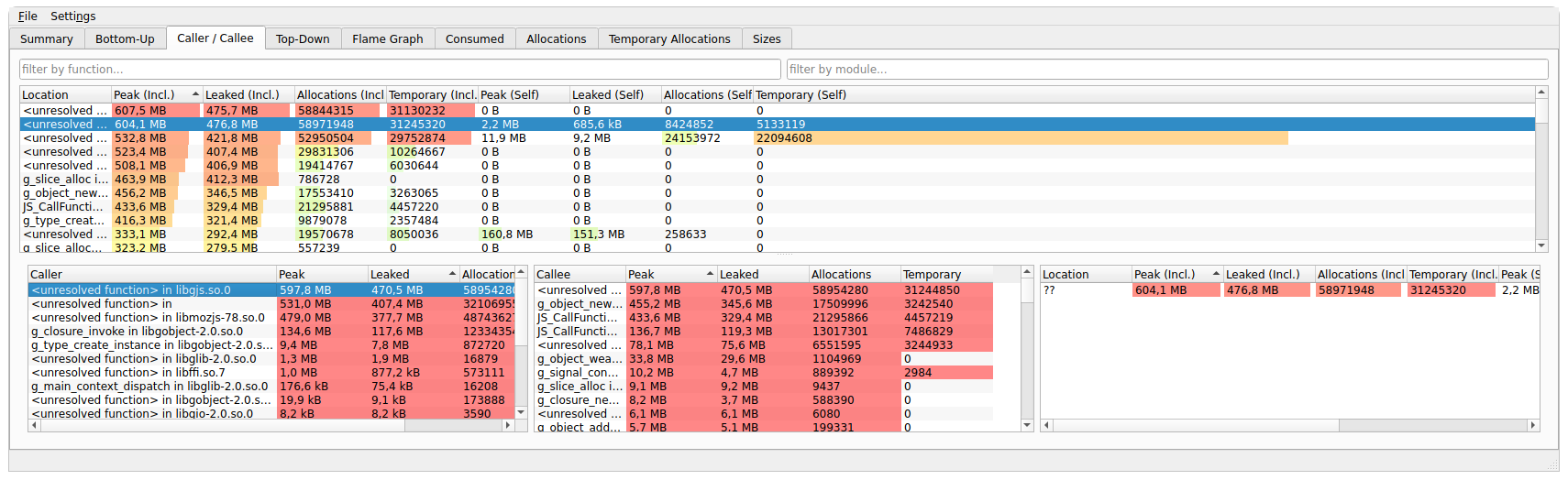
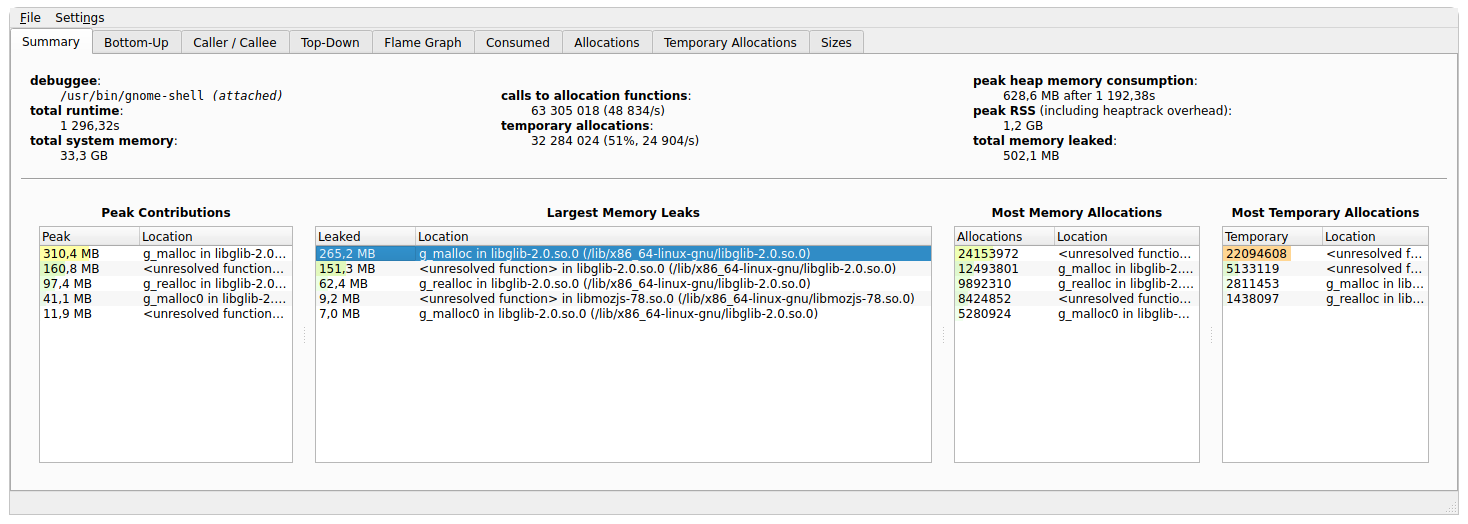
There is libgjs mentioned in some of the leaks but again im not sure what exactly all this mean.
Does it look more like a gnome bug?
premek
on 16 Dec 2020
I really don't know. I don't use GSConnect anymore, but I'm sure I would have noticed if it were leaking that much memory.
The shell extension doesn't really allocate memory at all since it just consumes GMenu and GActionGroup interfaces exported by the service. In other words, it's just a series of menus and menu items. All the real work is done in the service.
You'll probably have to do some digging to find the source of this, maybe sysprof can help? I guess having debug symbols might help, but if you think it's the extension leaking memory you're probably more interested in the JavaScript anyways.
andyholmes
on 16 Dec 2020
I too have been experiencing this issue for the past few months but haven't had time to look into it. Seemed pretty odd to me too.
 bertin0
on 17 Dec 2020
bertin0
on 17 Dec 2020
Same problem on Ubuntu 20.10 since a few months. I tested it myself and came to the same conclusion (disabled extensions and then re-enabled one-by-one until I noticed GSConnect is causing the memory leak). Restarting gnome-shell on X11 (Alt+F2, r) resets memory usage back to normal.
It worked fine before on the same system. So any (gnome?) update broke it...
 darkdragon-001
on 24 Dec 2020
darkdragon-001
on 24 Dec 2020
I too was having a very laggy machine. It couldn't keep up with my typing, wouldn't respond to the mouse clicks, and was just painful. After trying a lot of things, I went and disabled all the gnome-shell extensions and that fixed it. Then I re-enabled them one by one, and with GS-Connect enabled, it slowed to a crawl again. I'm really sad, because I was using GS-Connect a lot. I'm using Ubuntu 20.10, and was using GS-Connect 44. Sorry to read this really neat extension is looking for another maintainer. If there is some testing I can do to help solve the issue, let me know
 frohro
on 5 Feb 2021
frohro
on 5 Feb 2021
@daniellandau took over as maintainer. Would be awesome if he could have a look.
I disabled the extension on my system until this issue is fixed. Looking forward to enable it again and use this awesome extension!
darkdragon-001
on 5 Feb 2021
For some reason it didn't happen for me recently. Maybe it was just a combination of versions of something. I'm on Debian testing
premek
on 5 Feb 2021
It's very sad for me that I had to disable this extention. I was having the same issue. I wasn't even able to use keyboard after a while from boot. Manjaro, Gnome (both x11 and wayland, kernel 5.8, 5.9, 5.10, 5.11.
 yemrearslan
on 10 Feb 2021
yemrearslan
on 10 Feb 2021
I can confirm this memory leak is also present on both an old and also a fresh fedora 33 install (gnome 3.38, kernel 5.10).
It was so bad, I had to turn the extension off (which fixed the issue).
Ping @daniellandau
 Yannik
on 10 Feb 2021
Yannik
on 10 Feb 2021
For some reason it didn't happen for me recently. Maybe it was just a combination of versions of something. I'm on Debian testing
Really? Which operating system / configuration are you using?
I just tried again on Ubuntu 20.10 and I the memory leak still appears...
darkdragon-001
on 11 Feb 2021
For me it seems to always happen after I have my computer suspended.
bertin0
on 11 Feb 2021
For me it seems to always happen after I have my computer suspended.
Yeah, that seems to have an impact for me as well.
Yannik
on 11 Feb 2021
I regularly suspend my machine as well.
darkdragon-001
on 11 Feb 2021
When disabling the daemon (_Mobile Devices > Turn Off_), the memory leak doesn't occur for me. So the problem is in the extension part and _not_ the daemon part. Can somebody confirm?
darkdragon-001
on 21 Mar 2021
- By the way can confirm. It took me much till I realized this extension was the issue, but today I realized it was the issue.
- Can confirm that disabling the extension most of the time will do nothing, unless you reload gnome-shell (alt+f2, r)
- Also can confirm that after disabling the extension, gnome-shell doesn't show signs of high memory usage anymore
- Exactly after enabling the extension, my mouse starts lagging every ~10 seconds, and the more the extension is used, the more regularly it seems to happen and the bigger the lag spikes are. So, it is also probably some kind of loop or garbage collection that happens every T seconds and a memory leak.
- After enabling the extension, gnome-shell also starts being the process with the highest memory-usage as well.
Tested by disabling all the extensions, leak disappeared, enabled GSConnect, suddenly mouse started lagging and memory usage started growing significantly as well.
I will update if I find anything more significant to log back to or you guys think I could provide some better information.
 exapsy
on 12 Apr 2021
exapsy
on 12 Apr 2021
I can confirm the problem too. It's definitely there and 100 % reproducible: When I have the extension on, after a couple of minutes Gnome Shell starts to consume a increasing amount of memory. After an hour or so it eats up several GB. Restarting Gnome Shell apparently flushes the memory. But if the extension is still on, it starts eating up my memory again.
I happy to help debugging if some one with more insight can point me to the right direction.
 gunwald
on 14 Apr 2021
gunwald
on 14 Apr 2021
For me the problem magically disappeared after some time. Right now I'm on Gnome 3.38.4 (X11) and GSConnect 45 and it works fine now.
Those of you who encounter this issue, could you write your gnome and gsconnect versions? Could you try if it still happens on a newer version?
premek
on 14 Apr 2021
Can you give us more insight on how we might be able to feproduce the issue on our machines. Anything you can tell about the machine running GSConnect, the phone, which features are you using, etc
 daniellandau
on 14 Apr 2021
daniellandau
on 14 Apr 2021
Here are the Details:
Computer
OS: Ubuntu 20.10 x86_64
Host: nimbus rev1
Kernel: 5.8.0-48-generic
Uptime: 11 days, 12 hours, 40 mins
Packages: 4875 (dpkg), 42 (flatpak)
Shell: bash 5.0.17
Resolution: 1920x1080
DE: GNOME 3.38.2
WM: Mutter
WM Theme: Adwaita
Theme: Adwaita [GTK2/3]
Icons: Papirus [GTK2/3]
Terminal: tilix
CPU: Intel i5-3570T (4) @ 3.300GHz
GPU: Intel HD Graphics
Memory: 5039MiB / 15827MiB
Phone
Galaxy A40
Extension config
Version: 45
I have all modules on, except »Old message support« (Alte SMS-Unterstützung)
gunwald
on 14 Apr 2021
Somebody who can reliably reproduce: Can you check if it happens when the phone is switched off (or in airplane mode with no communication)?
daniellandau
on 14 Apr 2021
It happens also when the phone isn't around. Maybe slower. When I switch the extension on, the memory usage jumps from about 240 MB to about 300 MB instantly. Then it grows slowly.
gunwald
on 14 Apr 2021
sorry the log is collected incorrectly, probably not useful. Now i deleted .cache/gsconnect, restarted and now I cannot reproduce it
Maybe this is something. People who are still seeing the issue: what is the size of .cache/gsconnect? Does moving it to a backup location help for a while?
daniellandau
on 14 Apr 2021
My cache dir was 10MB, and so far it looks promising! In retrospective I should probably have kept a backup of the cache dir for further investigation, but in my eagerness to try it I out didn't think of that :/
Edit: Now a few days later I an confirm that it works smoothly since I removed the cache dir.
 j0s
on 15 Apr 2021
j0s
on 15 Apr 2021
I have memory leak always after sleep/suspend
 alex-eri
on 21 Apr 2021
alex-eri
on 21 Apr 2021
I'm having the same problem, fixed by disabling the extension but I want to keep using it as I did for a long time
Here my data:
$ du -hs ~/.cache/gsconnect/
3.8M    /home/me/.cache/gsconnect/

$ lsb_release -a
No LSB modules are available.
Distributor ID: Ubuntu
Description:    Ubuntu 20.04.2 LTS
Release:    20.04
Codename:   focal

$ uname -a
Linux connettizb 5.4.0-72-generic #80-Ubuntu SMP Mon Apr 12 17:35:00 UTC 2021 x86_64 x86_64 x86_64 GNU/Linux

$ dpkg -l gnome-shell
Desired=Unknown/Install/Remove/Purge/Hold
| Status=Not/Inst/Conf-files/Unpacked/halF-conf/Half-inst/trig-aWait/Trig-pend
|/ Err?=(none)/Reinst-required (Status,Err: uppercase=bad)
||/ Name           Version                 Architecture Description
+++-==============-=======================-============-=====================================
ii  gnome-shell    3.36.7-0ubuntu0.20.04.1 amd64        graphical shell for the GNOME desktop

$ cat metadata.json
{
  "_generated": "Generated by SweetTooth, do not edit",
  "description": "GSConnect is a complete implementation of KDE Connect especially for GNOME Shell with Nautilus, Chrome and Firefox integration. It does not rely on the KDE Connect desktop application and will not work with it installed.\n\nKDE Connect allows devices to securely share content like notifications or files and other features like SMS messaging and remote control. The KDE Connect team has applications for Linux, BSD, Android, Sailfish and Windows.\n\nPlease restart GNOME Shell after updating!\n\nPlease report issues on Github!",
  "name": "GSConnect",
  "shell-version": [
    "3.36",
    "3.38"
  ],
  "url": "https://github.com/andyholmes/gnome-shell-extension-gsconnect/wiki",
  "uuid": "[email protected]",
  "version": 43
}
How can I help?
 pmontrasio
on 25 Apr 2021
pmontrasio
on 25 Apr 2021
I've been trying to observe memory leakage with the following one-liner:
while true; do echo "$(date) $(ps -o rss -C gnome-shell | tail -1)" | tee -a gnome-usage.txt; sleep 1; done
No success on my machines, but posting this log along with a log from journalctl might help.
You could also try moving your cache directory somewhere else (please don't delete it) and see if that helps. If it helps, does moving the cache directory back bring the issue back immediately? If yes, move it back out, and see how long does it take to manifest again, perhaps taking snapshots of the cache while it's not causing problems.
Anything you can think of that might help me reproduce the issue on my computer would go a long way towards solving it.
daniellandau
on 25 Apr 2021
I attach a zip with two files:
journalctl SYSLOG_IDENTIFIER=gnome-shell --since today > gnome-shell.log
while true; do echo "$(date) $(ps -o rss -C gnome-shell | tail -1)" | tee -a gnome-usage.txt; sleep 1; done
I collected the data for a few hours, with a pause in between (I put the laptop to sleep and resumed.)
At the end htop was showing gnome-shell as the top process by RSS and with some spikes of CPU usage between 50% to 98%, but mostly of the time in the 0.x% range.
The computer had started to lag noticeably every 10 to 30 seconds or so almost as soon as I enabled the extension and was getting worse. It got snappy again when I disabled the extension. The memory was recovered when I restarted the shell with ALT-F2 r.
I made a copy of .cache/gsconnect right now
$ tar czf cache.gsconnect.tgz .cache/gsconnect/

$ ll cache.gsconnect.tgz
-rw-rw-r-- 1 me me  2772854 Apr 26 15:51 cache.gsconnect.tgz

$ du -hs .cache/gsconnect/
3.8M    .cache/gsconnect/
I'm afraid that I can't send it to you for debugging because it contains plenty of images with the faces of my friends and potentially other personal data. However I can do any local experiment with it.
A strange behavior I noticed the first time I disabled gsconnect: somehow the laptop is still showing notifications from my phone, I guess from the KDE Connect Android app. I believed that gsconnect was the receiving endpoint.
Gsconect on the laptop is switched off now and I already restarted Gnome Shell. And yet I can control a video on the phone (the NewPipe app) from the notifications menu of the laptop. It's not a Bluetooth thing because BT is switched off on both devices. Maybe some connections survive the extension in the shell. Could that be the leak?
But maybe this is a totally different issue.
pmontrasio
on 26 Apr 2021
A strange behavior I noticed the first time I disabled gsconnect: somehow the laptop is still showing notifications from my phone, I guess from the KDE Connect Android app. I believed that gsconnect was the receiving endpoint.
Gsconect on the laptop is switched off now and I already restarted Gnome Shell. And yet I can control a video on the phone (the NewPipe app) from the notifications menu of the laptop. It's not a Bluetooth thing because BT is switched off on both devices. Maybe some connections survive the extension in the shell. Could that be the leak?
But maybe this is a totally different issue.
I noticed that too, some JS process was still running after disabling the extension. I believe it was gjs .../daemon.js Maybe related, maybe not
premek
on 26 Apr 2021
I've got a daemon.js and another gsconnect process running since my last reboot.
UID      PID    PPID  C STIME TTY          TIME CMD
me      2376    1926  0 Apr19 ?        00:05:58 gjs /home/me/.local/share/gnome-shell/extensions/[email protected]/service/daemon.js
me      4325    3792  0 Apr19 ?        00:00:17 gjs /home/me/.local/share/gnome-shell/extensions/[email protected]/service/nativeMessagingHost.js /home/me/.mozilla/native-messaging-hosts/org.gnome.shell.extensions.gsconnect.json [email protected]
Process 1926 is /lib/systemd/systemd --user and 3792 is /usr/lib/firefox/firefox -new-window (maybe for the gsconnect icon in Firefox's toolbar? It still works: I sent this tab to my phone)
From cat /proc/2376/status
VmPeak:  3679948 kB
VmSize:  3671464 kB
VmLck:         0 kB
VmPin:         0 kB
VmHWM:     76200 kB
VmRSS:     70276 kB
RssAnon:       38580 kB
RssFile:       31628 kB
RssShmem:         68 kB
VmData:   115660 kB
VmStk:       132 kB
VmExe:        16 kB
VmLib:     34556 kB
VmPTE:       836 kB
VmSwap:        0 kB
From cat /proc/4325/status
VmPeak:  2922712 kB
VmSize:  2856360 kB
VmLck:         0 kB
VmPin:         0 kB
VmHWM:     27512 kB
VmRSS:     23404 kB
RssAnon:        5044 kB
RssFile:       18360 kB
RssShmem:          0 kB
VmData:    39472 kB
VmStk:       132 kB
VmExe:        16 kB
VmLib:     21988 kB
VmPTE:       264 kB
VmSwap:        0 kB
Swap is 0 because I have no swap (32 GB RAM.)
I'll leave them running in case it could help this investigation.
pmontrasio
on 27 Apr 2021
FYI daemon.js is the GSConnect service that actually does all the work.
Since gnome-shell is the process showing the increase in memory usage and it happens when the computer suspends, smart money is on an operation in the Shell extension that doesn't resolve by the time the computer suspends.
andyholmes
on 28 Apr 2021
Related issues
 nikolowry
·
4Comments
nikolowry
·
4Comments
 didierga
·
5Comments
didierga
·
5Comments
 mavit
·
6Comments
mavit
·
6Comments
 amivaleo
·
5Comments
amivaleo
·
4Comments
amivaleo
·
5Comments
amivaleo
·
4Comments
Most helpful comment
For me it seems to always happen after I have my computer suspended.