Gnome-shell-extension-gsconnect: GUI: Download path - dropdown menu
Hi!
My eyes are bleeding because of that dropdown-menu that selects the download path:
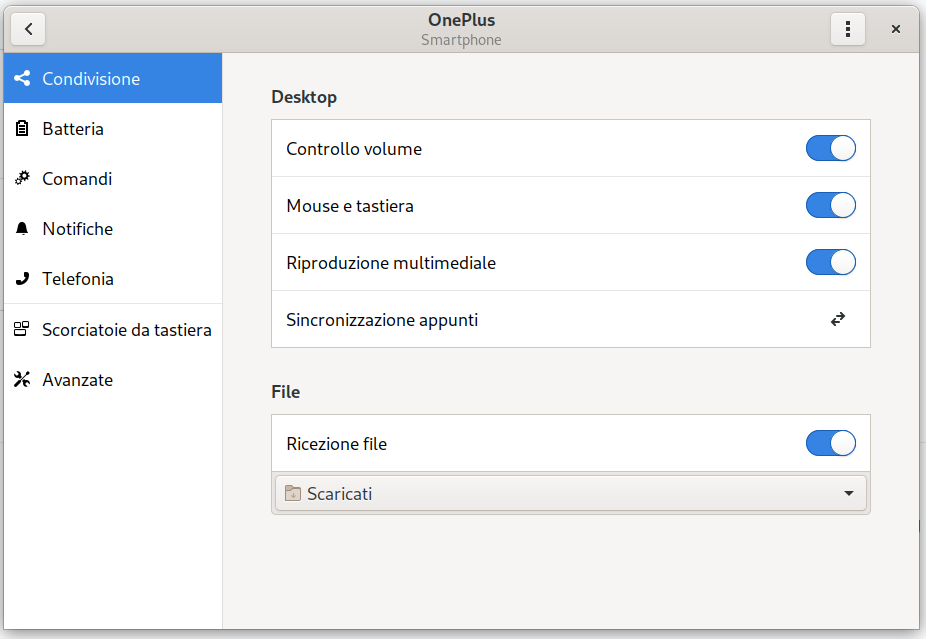
Can you please consider to make it look like this? 😶

The label on the right left (it looks like I still have to think twice about left/right. That's weird, I haven't this issue when speaking my native language) could be "Save Folder" / "Download Path" or similar.
Thank you! 😄
 amivaleo
All 5 comments
Why my name is a label? o.O
Is my name a synonim of "boring stuff from that noisy guy"? 😄😄
amivaleo
on 4 Nov 2019
Haha, it only seems fair now: JX = Jimmy Experience :D
 andyholmes
on 4 Nov 2019
andyholmes
on 4 Nov 2019
Apparently there are no other core apps using a "Download something" string, so I followed Firefox and used "Save files to". If you have a better wording, you can change it in the github editor before the translations get regenerated.
andyholmes
on 7 Nov 2019
Apparently there are no other core apps using a "Download _something_" string
GNOME core apps, allow the user to _control_ where things get saved? LOL. Maybe in 1998. :rofl:
 ferdnyc
on 7 Nov 2019
ferdnyc
on 7 Nov 2019
Apparently there are no other core apps using a "Download _something_" string, so I followed Firefox and used "Save files to". If you have a better wording, you can change it in the github editor before the translations get regenerated.
gnome-web/epiphany! Look at that, in Preferences:
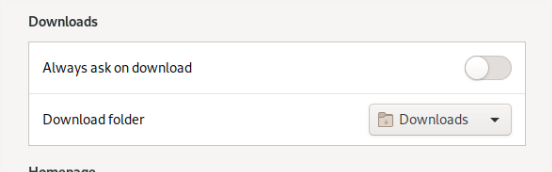
GNOME core apps, allow the user to control where things get saved? LOL. Maybe in 1998.
I deplore such an attitude! u.u
😃
amivaleo
on 7 Nov 2019
Related issues
 daleosm
·
6Comments
amivaleo
·
3Comments
daleosm
·
6Comments
amivaleo
·
3Comments
 calvaris
·
7Comments
calvaris
·
7Comments
 paulo8448
·
4Comments
paulo8448
·
4Comments
 ricvelozo
·
4Comments
ricvelozo
·
4Comments
Most helpful comment
Haha, it only seems fair now: JX = Jimmy Experience :D