Gnome-shell-extension-gsconnect: Editing the computer name field
Hi!
I thought about two opposite ideas about the computer name (which is th editable title in the headearbar of the main window of gsconnect).
the first is more like a question: I remember that the gui for editing such name was a bit different at some point. You clicked on the pencil-icon on the headerbar and the title became an entry text field. Now a popover appears instead. I can't really see the benefit in using such approach. I see some redundant information instead, since the title appears twice (both in the popover and in the headerbar), and I also believe that it is a more common gui that the editing is perfomed on the same area/field which gets affected. What do you thing about reverting to that approach?
what if, instead of being able of editing the computer name/headerbar title, gsconnect used the computer name in Settings > Details > About? In that case, the pencil icon could open that tab in Settings. 🤔 This is a more polished solution, which would also avoid several names for the machine. What's your opinion?
 amivaleo
All 3 comments
Hi!
I thought about two opposite ideas about the computer name (which is th editable title in the headearbar of the main window of gsconnect).
- the first is more like a question: I remember that the gui for editing such name was a bit different at some point. You clicked on the pencil-icon on the headerbar and the title became an entry text field. Now a popover appears instead. I can't really see the benefit in using such approach. I see some redundant information instead, since the title appears twice (both in the popover and in the headerbar), and I also believe that it is a more common gui that the editing is perfomed on the same area/field which gets affected. What do you thing about reverting to that approach?
The decision to move the edit field into a popover was a conscious one, made in commit c7c3961db303b222e4d87161adeb61f1584f2ce2. Personally I think it makes a lot of sense, you say it's redundant information but I disagree. The title only "appears twice" _until you start editing_, and then rather than having a "redundant" field what you have is the ability to see both the previous name and your edited name at the same time, which can be very useful. It also means that the headerbar always reflects the actual current state of the name setting: It doesn't _actually_ change until you submit your edit.
Nautilus, for example, provides the same interface when renaming files and folders:
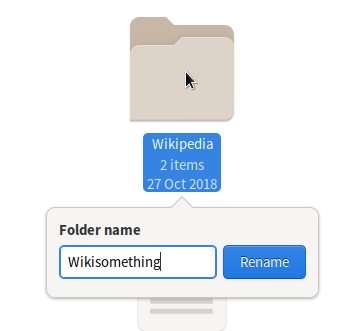
I find it quite handy to be able to refer to the previous name, when editing.
In-place editing also typically implies immediate effect: The value is edited "live" and will be whatever you change it to as soon as you dismiss the edit field. But that's not the case with GSConnect's name field1, just as it's not the case with Nautilus file renames. The name is only changed when you submit the new entry, so the headerbar always reflects the actual current value _in use_, and the edit field is a staging area for modifications to that value.
- what if, instead of being able of editing the computer name/headerbar title, gsconnect used the computer name in Settings > Details > About? In that case, the pencil icon could open that tab in Settings. thinking This is a more polished solution, which would also avoid several names for the machine. What's your opinion?
Oh, I think that's a _very_ bad idea — GSConnect shouldn't be encouraging users to change their _hostname_ simply because they want to relabel their device in GSConnect. (That's what that field ultimately represents, in gnome-control-center — modifying it updates the contents of /etc/hostname.) In many network environments, the name of the system is assigned by the network administrator and isn't permitted to be changed. That field also isn't modifiable by standard users — editing it requires admin rights (because it saves to /etc/hostname).
GSConnect's device name field is more analogous to the Bluetooth alias that most devices support, and also make editable for convenience and privacy reasons. Many people understandably don't wish to broadcast their hostname in the clear so that it's discoverable by anyone who's listening {in Bluetooth range, on the local network}.
(Which is why it surprises me that G-C-C _doesn't_ offer the ability to set the local Bluetooth device alias. In fact, it _ignores_ any alias that's been set on the local Bluetooth device, which leads to buggy behavior where G-C-C claims the local system is "Visible as 'such-and-such-name'…" when in reality, the name being advertised by the device is aliased to something completely different.)
Notes
In fact, even clicking outside of the popover won't apply changes to GSConnect's device name, it simply hides the popover (which can subsequently be reopened, to resume an in-progress edit operation). As such, GSConnect's edit popover should probably have an explicit Rename or Submit button, just like Nautilus does, to avoid relying exclusively on Enter to commit modifications.
It's been proposed in the past that Nautilus auto-apply renames, something I argued against for the exact same reason I think it would be a bad idea in GSConnect: Auto-apply is only safe if paired with a data model that relies on journaled change history, so that every action is reversible. Without Undo (or with only a single undo level, like Nautilus), auto-apply and in-place editing are dangerous opportunities for accidental loss of data.
 ferdnyc
on 10 Sep 2019
ferdnyc
on 10 Sep 2019
I really really really wasn't expecting such a nice, exhaustive, complete, convincing reply. 😮
Thank you A LOT, Frank! I'm really grateful for that. It's definitely a lot more than I expected! 😮
You would have convinced me with much less words. 😂 And you didn't even close the issue!
I completely agree now and I also feel a bit dumb for not considered your arguments before asking!
Thanks. :)
amivaleo
on 10 Sep 2019
@amivaleo Mmm, I've often thought I missed my calling as a bureaucrat, or a legislator. I've never been one to say in 10 words what I could say in 37 pages.1
Glad to hear we're on the same one! Your question/request inspired me to talk myself into #616, BTW. :laughing:
- (I'm also one of the reasons why, at some point in the educational process, instructors typically start assigning papers with not only a _minimum_ page/word length, but a _maximum_.)
ferdnyc
on 10 Sep 2019
Related issues
 daleosm
·
6Comments
daleosm
·
6Comments
 mavit
·
6Comments
mavit
·
6Comments
 rugk
·
4Comments
rugk
·
4Comments
 Noobsai
·
4Comments
Noobsai
·
4Comments
 wada3n
·
7Comments
wada3n
·
7Comments