Gnome-shell-extension-gsconnect: GSConnect Preferences icon not rendering
Describe the bug
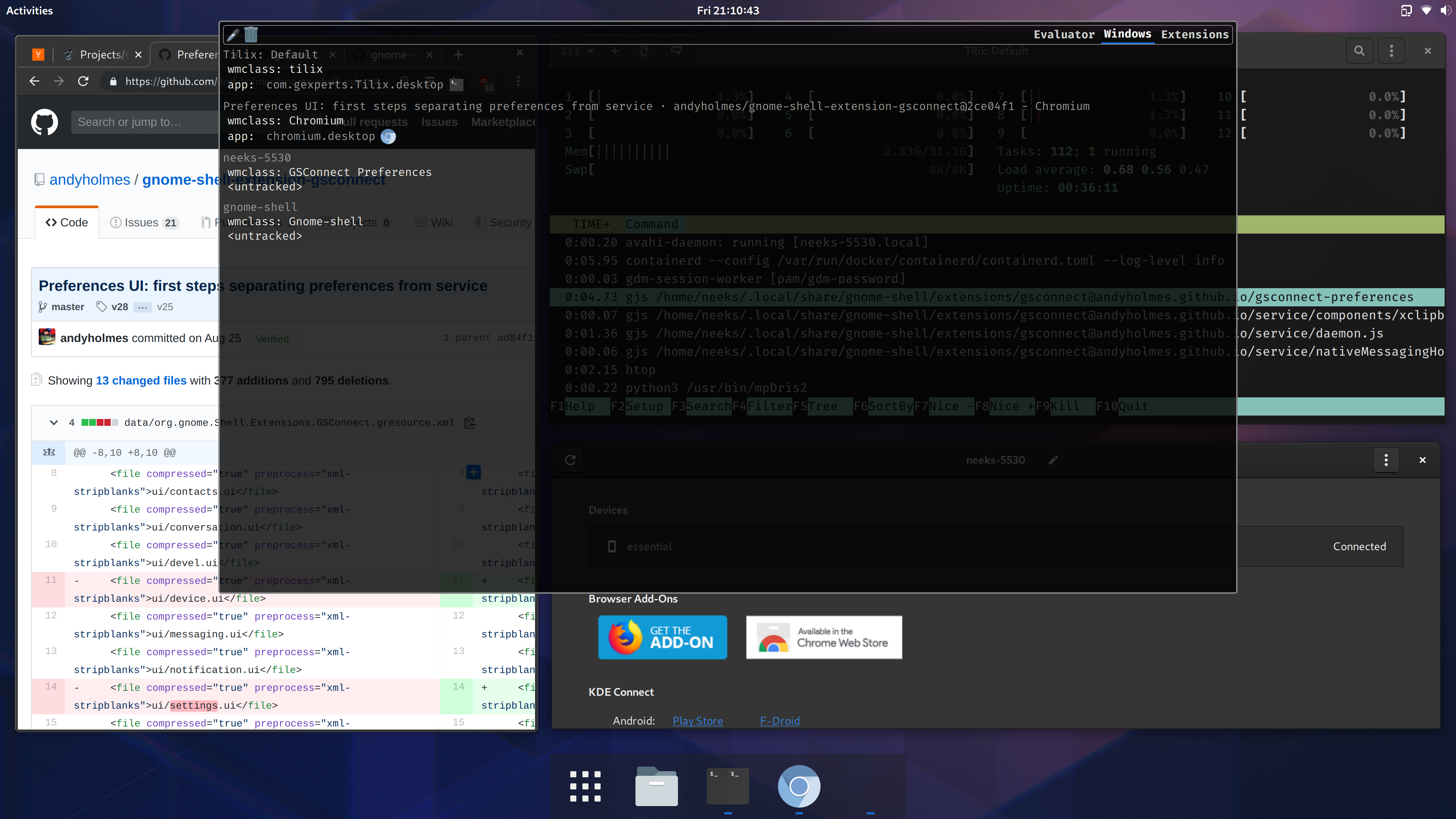
Since GNOME 3.34 (don't know whether that's coincidental or not) GSConnect Preference windows stopped rendering an application icon in dash. An icon is rendering for Messaging windows though.
After launching Looking Glass > Windows, GSConnect displays:
wmclass: GSConnect Preferences
<untracked>
But I believe it needs to be:
wmclass: GSConnect Preferences
app: org.gnome.Shell.Extensions.GSConnect
Looking Glass screenshot is attached.
Related: I've also experimented with removing NoDisplay from the desktop file located in ~/.local/share/applications and nothing happens when trying to run GSConnect directly from GNOME Shell (didn't see anything too obviously in journalctl, I can check again though)
Screenshots
System Details (please complete the following information):
- GSConnect version: 28
- Installed from: GNOME Extensions Website (same behavior with AUR packages)
- GNOME/Shell version: 3.34.1 Wayland
- Distro/Release: Arch Linux
 nikolowry
All 4 comments
gsconnect-preferences is now a distinct process, so it has to have it's own application ID. We do set the window icon, but I guess maybe it needs a .desktop file? I'm not sure because I don't have this issue on Fedora 31.
The .desktop entry for GSConnect's server really only exists so we can send notifications, so it's not really intended to do anything. However, you could test this by just copying the desktop file to org.gnome.Shell.Extensions.GSConnect.Preferences.desktop.
If that works, it's not a big deal to add it to the install process, and we could make it visible and actually launch the preferences. To do that, you'd just change NoDisplay to false, the Exec line to:
gapplication action org.gnome.Shell.Extensions.GSConnect preferences
And probably remove the MimeType entry completely.
If that fixes your problem, let me know and I can either accept a PR or make the change myself before v29.
 andyholmes
on 9 Nov 2019
andyholmes
on 9 Nov 2019
Creating a symbolic link of ~/.local/share/applications/org.gnome.Shell.Extensions.GSConnect.desktop to ~/.local/share/applications/org.gnome.Shell.Extensions.GSConnect.Preferences.desktop resolves this -- no changes are needed to the .desktop file's contents.
So whether you want to symlink or have two distinct .desktop files for v29 is up to you @andyholmes. Feel free to close this whenever you like and thanks for the quick response!
nikolowry
on 10 Nov 2019
I guess I should probably just install a desktop file for it, since there's a few distros that use our meson build. Thanks for testing :)
andyholmes
on 10 Nov 2019
Ah, I definitely see this bug now. It appears to happen in Wayland, probably because GtkWindow uses some old X hints to pass the icon to the window manager.
andyholmes
on 16 Nov 2019
Related issues
 didierga
·
5Comments
didierga
·
5Comments
 sk0gen
·
4Comments
sk0gen
·
4Comments
 danieldeng2
·
4Comments
danieldeng2
·
4Comments
 neumannjan
·
3Comments
neumannjan
·
3Comments
 rugk
·
4Comments
rugk
·
4Comments