Gltf-blender-io: Misaligned UV coordinates after Draco compression
Describe the bug:
All mesh UVs are misaligned after the very first mesh in the scene while using Draco compression
Steps to reproduce the behavior:
Compare two objects with and without Draco comprasion.
Expected behavior:
UVs must be aligned properly for each mesh in the scene.
Video description of the issue:
https://www.youtube.com/embed/UAbaHDGpXJY
.blend file/ .gltf
Misaligned UV coordinates after Draco compression.zip
Version
- OS: [Windows 10 Pro]
- Blender Version [2.82a]
Additional context: Temporary solution
The issue is caused by the TEXCOORD_0 attribute if you change the value of it to the value of the first mesh TEXCOORD_0 value. The issue will be fixed. (You can do it for all meshes in the scene).
see the image:

similar issues:
- Exporting 2 cubes with UV maps + Draco compression => WebGL Error #917
- Exporting object with correct UV map defined in Shader Editor [DRACO] #916
 Rawdreen
All 13 comments
Can you please have a look @McNopper?
 julienduroure
on 25 Mar 2020
julienduroure
on 25 Mar 2020
@UX3D-eckerlein Can u ps have a look at it.
 UX3D-nopper
on 26 Mar 2020
UX3D-nopper
on 26 Mar 2020
I can corroborate this bug. It only happens when exporting multiple meshes with DRACO compression.
When I enable DRACO compression, the exporter matches the TEXCOORD_0 value from "attributes" to "extensions". Notice in the first primitive, this value is 2 (works), the second is 6 (does not work), and the third is 10 (does not work). After importing to Three.js, this gives me one populated UV array for the first primitive, and two empty arrays for the other two:

However, if I manually change all TEXCOORD_0 values in "extensions" to read 2, the UV arrays populate as expected:
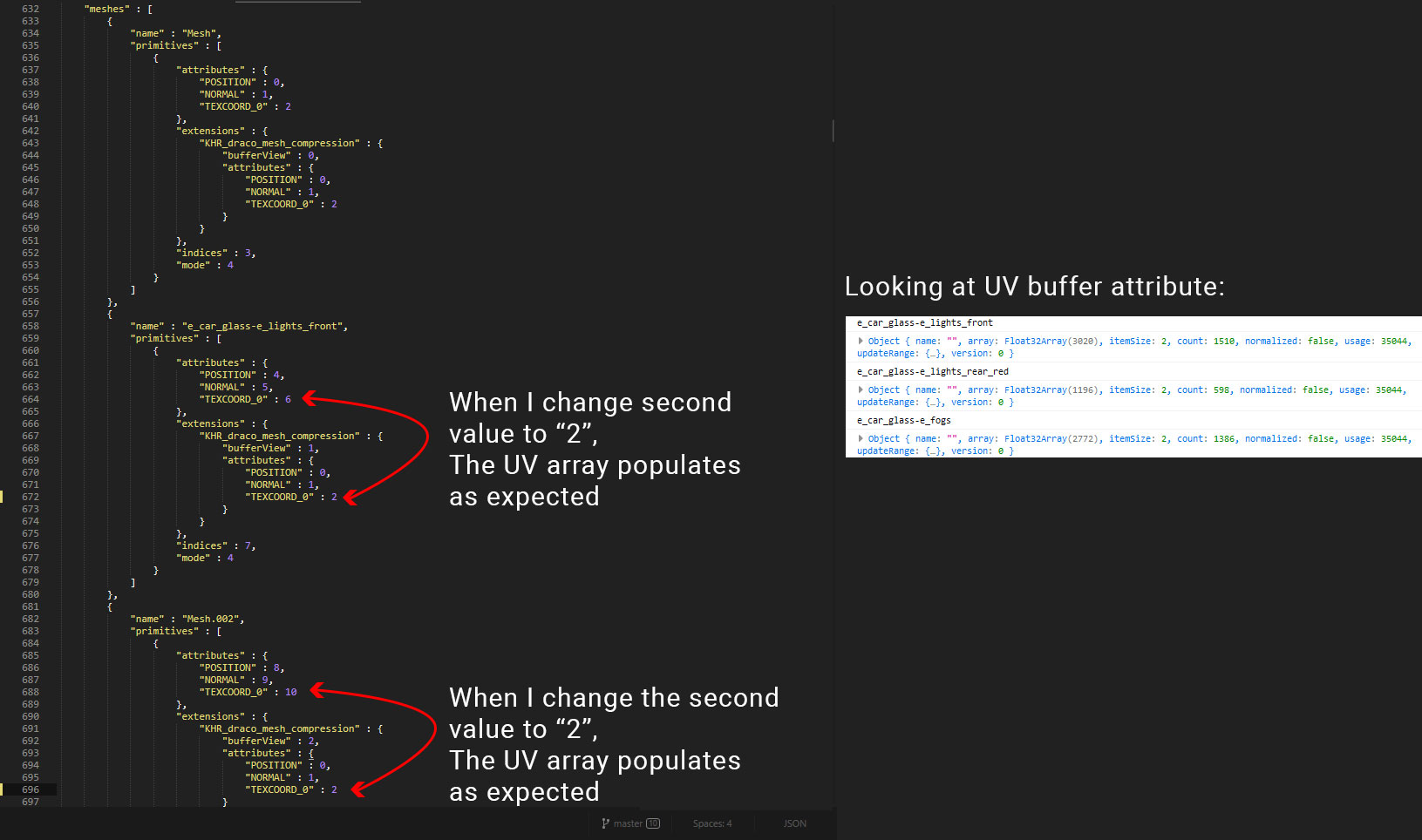
In essence, the way I fixed is to manually update the file so the compression attributes values are 0, 1, 2
"extensions" : {
    "KHR_draco_mesh_compression" : {
        "bufferView" : nnnnn,
        "attributes" : {
            "POSITION" : 0,
            "NORMAL" : 1,
            "TEXCOORD_0" : 2
        }
    }
},
I encountered this error in two versions:
glTF-Blender-IO v1.1.45glTF-Blender-IO v1.2.57
I'm using Blender v2.82 on a Windows 10 machine.
 marquizzo
on 10 Apr 2020
marquizzo
on 10 Apr 2020
Hi, having the same problem, but unfortunately it seems it can't be solved the same way.
Do you have any suggested solution when the data looks like this:
"meshes" : [
    {
        "name" : "SM_Truck_01.009",
        "primitives" : [
            {
                "attributes" : {
                    "POSITION" : 0,
                    "NORMAL" : 1,
                    "TEXCOORD_0" : 2,
                    "TEXCOORD_1" : 3,
                    "TEXCOORD_2" : 4,
                    "TEXCOORD_3" : 5
                },
                "extensions" : {
                    "KHR_draco_mesh_compression" : {
                        "bufferView" : 0,
                        "attributes" : {
                            "POSITION" : 0,
                            "NORMAL" : 1,
                            "TEXCOORD_0" : 2,
                            "TEXCOORD_1" : 3,
                            "TEXCOORD_2" : 4,
                            "TEXCOORD_3" : 5
                        }
                    }
                },
                "indices" : 6,
                "material" : 0,
                "mode" : 4
            },
            {
                "attributes" : {
                    "POSITION" : 7,
                    "NORMAL" : 8,
                    "TEXCOORD_0" : 9,
                    "TEXCOORD_1" : 10,
                    "TEXCOORD_2" : 11,
                    "TEXCOORD_3" : 12
                },
                "extensions" : {
                    "KHR_draco_mesh_compression" : {
                        "bufferView" : 1,
                        "attributes" : {
                            "POSITION" : 0,
                            "NORMAL" : 1,
                            "TEXCOORD_0" : 9,
                            "TEXCOORD_1" : 10,
                            "TEXCOORD_2" : 11,
                            "TEXCOORD_3" : 12
                        }
                    }
                },
                "indices" : 13,
                "material" : 1,
                "mode" : 4
            },
 Mykita
on 2 Jun 2020
Mykita
on 2 Jun 2020
As you can see, it already uses the compression attributes values 0, 1, 2 as default which already matches the attributes above
Mykita
on 2 Jun 2020
@Mykita did you read the solution that I posted just above your question? You have to manually change the attributes within the "extensions" of your second primitive so they follow an incremental order. Instead of letting them jump from 0, 1, 9, 10, 11, 12, change it to:
"KHR_draco_mesh_compression" : {
    "bufferView" : 1,
    "attributes" : {
        "POSITION" : 0,
        "NORMAL" : 1,
        "TEXCOORD_0" : 2,
        "TEXCOORD_1" : 3,
        "TEXCOORD_2" : 4,
        "TEXCOORD_3" : 5
    }
}
Thank you for your reply @marquizzo. Yes I tried that. The model has 3 primitives. I change their extensions values into the incremental order:
                "extensions" : {
                    "KHR_draco_mesh_compression" : {
                        "bufferView" : 0,
                        "attributes" : {
                            "POSITION" : 0,
                            "NORMAL" : 1,
                            "TEXCOORD_0" : 2,
                            "TEXCOORD_1" : 3,
                            "TEXCOORD_2" : 4,
                            "TEXCOORD_3" : 5
                        }
                    }
                },
                "indices" : 6,
                "material" : 0,
                "mode" : 4
            },
            {
                "attributes" : {
                    "POSITION" : 7,
                    "NORMAL" : 8,
                    "TEXCOORD_0" : 9,
                    "TEXCOORD_1" : 10,
                    "TEXCOORD_2" : 11,
                    "TEXCOORD_3" : 12
                },
                "extensions" : {
                    "KHR_draco_mesh_compression" : {
                        "bufferView" : 1,
                        "attributes" : {
                            "POSITION" : 0,
                            "NORMAL" : 1,
                            "TEXCOORD_0" : 2,
                            "TEXCOORD_1" : 3,
                            "TEXCOORD_2" : 4,
                            "TEXCOORD_3" : 5
                        }
                    }
                },
                "indices" : 13,
                "material" : 1,
                "mode" : 4
            },
            {
                "attributes" : {
                    "POSITION" : 14,
                    "NORMAL" : 15,
                    "TEXCOORD_0" : 16,
                    "TEXCOORD_1" : 17,
                    "TEXCOORD_2" : 18,
                    "TEXCOORD_3" : 19
                },
                "extensions" : {
                    "KHR_draco_mesh_compression" : {
                        "bufferView" : 2,
                        "attributes" : {
                            "POSITION" : 0,
                            "NORMAL" : 1,
                            "TEXCOORD_0" : 2,
                            "TEXCOORD_1" : 3,
                            "TEXCOORD_2" : 4,
                            "TEXCOORD_3" : 5
                        }
                    }
                },
Might be that I have misunderstood something? 🤔
Mykita
on 3 Jun 2020
@Mykita the truck file from above seems to load fine on my end. You can also drag your file to the Three.js editor, attach any texture to the material's .map attribute, and you'll see that the UVs load fine.
Are you sure you're binding the DRACOLoader to the GLTFLoader as recommended in the docs, and you're using the latest versions of everything? If you're still running into problems, feel free to ask and ping me on StackOverflow, since yours is a debugging issue, not a GLTF-Blender issue (after you fixed the UV indices ).
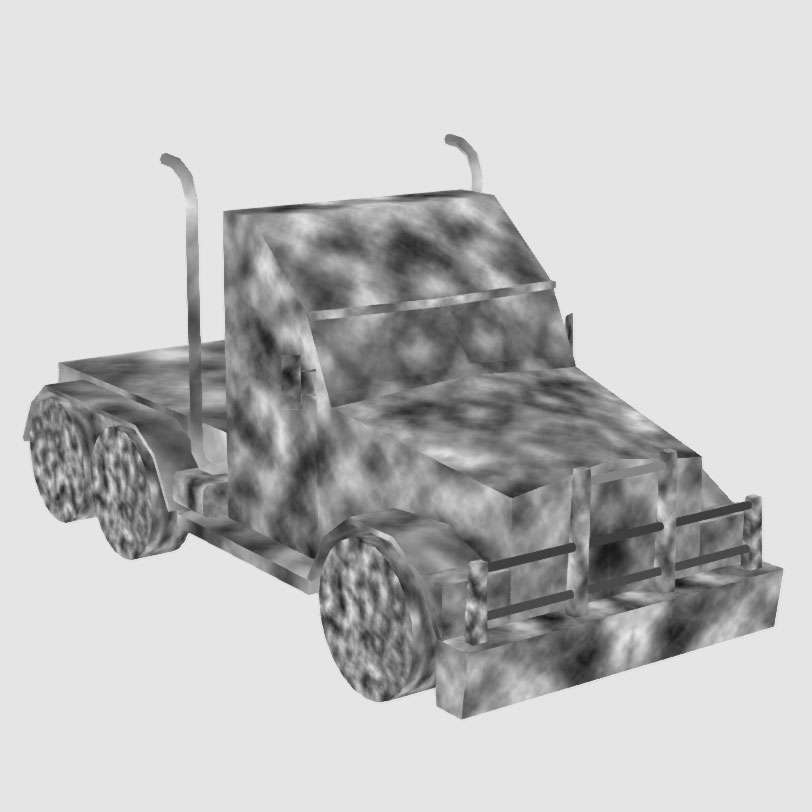
marquizzo
on 4 Jun 2020
Thanks a lot for your reply @marquizzo.
This is how the Truck looks when it's exported without Draco enabled:
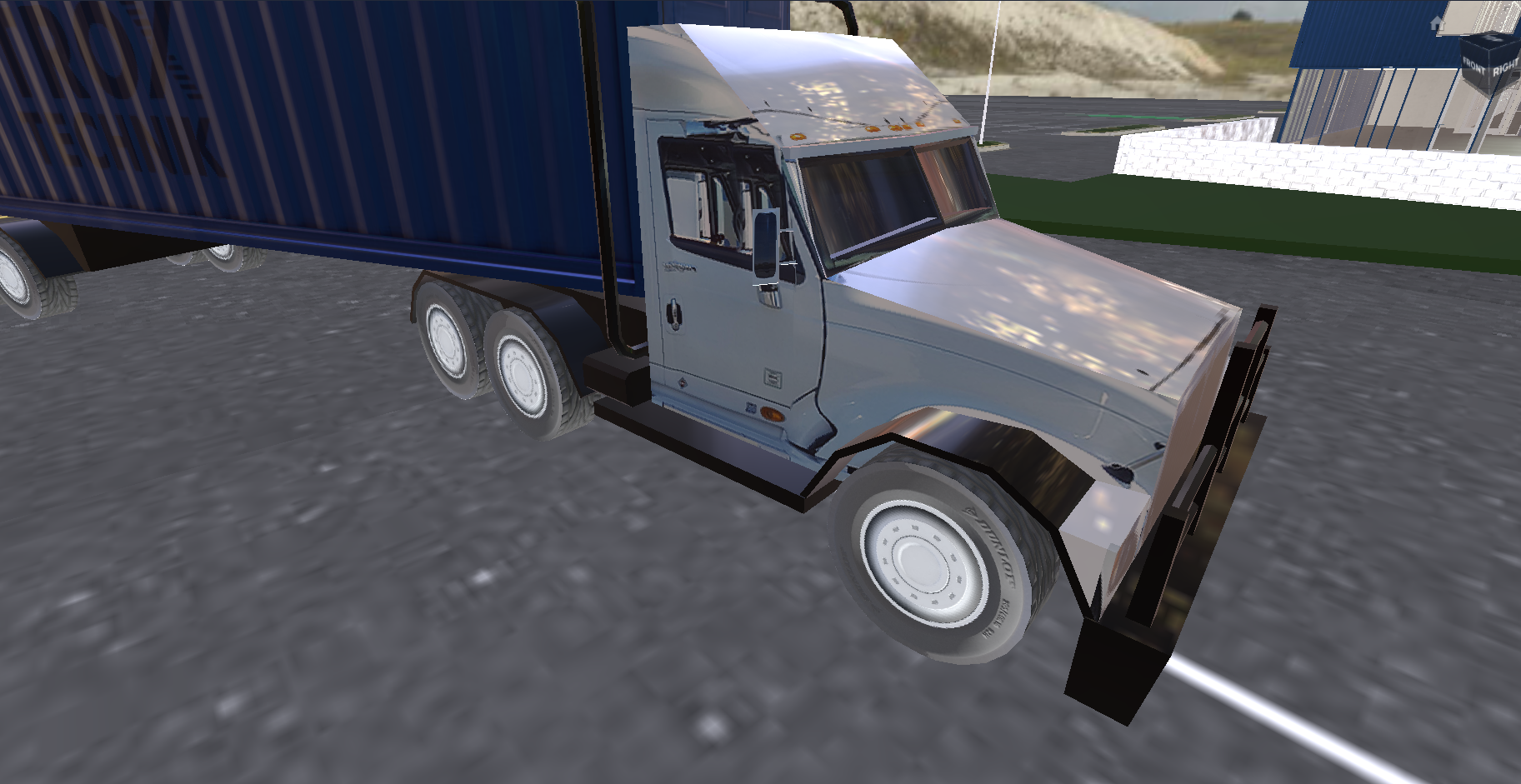
Regarding the versions. Using Blender v2.82.7. Am I correct that when I updated Blender that automatically updated the glTF-Blender-IO to the latest version as well? In that case, my versions should be alright
Mykita
on 4 Jun 2020
I did some more tests. The bug is only occurring when the asset have more than 1 primitive.
Take a look at this model, it has 1 primitive = Draco went fine:
Draco_OK.zip
Then there's this file, it has more primitives = Draco errors:
Draco_notok.zip
Probably because it doesn't have incremental orders as you mention, however I am not able to see the correct textures after reodering it accordingly
Mykita
on 4 Jun 2020
I meant you should update your Three.js and DRACO versions to the latest, not Blender. Please feel free to ask this question on StackOverflow. You are taking over this bug report to ask for personal troubleshooting.
marquizzo
on 4 Jun 2020
@marquizzo thank you. Here's the StackOverflow question
https://stackoverflow.com/questions/62203564/misaligned-uv-coordinates-after-draco-compression
Sorry for bringing this bug report a little into personal debugging. Parallel to that I appreciate the help. Thanks to that i'm on my way to solve this. Thank you.
Mykita
on 4 Jun 2020
Related issues
 spiraloid
·
5Comments
spiraloid
·
5Comments
 scurest
·
4Comments
UX3D-nopper
·
4Comments
scurest
·
4Comments
UX3D-nopper
·
4Comments
 Quinten123
·
4Comments
Quinten123
·
4Comments
 viperscape
·
3Comments
viperscape
·
3Comments
Most helpful comment
I can corroborate this bug. It only happens when exporting multiple meshes with DRACO compression.
When I enable DRACO compression, the exporter matches the

TEXCOORD_0value from"attributes"to"extensions". Notice in the first primitive, this value is 2 (works), the second is 6 (does not work), and the third is 10 (does not work). After importing to Three.js, this gives me one populated UV array for the first primitive, and two empty arrays for the other two:However, if I manually change all

TEXCOORD_0values in"extensions"to read2, the UV arrays populate as expected:In essence, the way I fixed is to manually update the file so the compression attributes values are
0, 1, 2I encountered this error in two versions:
glTF-Blender-IO v1.1.45glTF-Blender-IO v1.2.57I'm using Blender v2.82 on a Windows 10 machine.