Gltf-blender-io: Diffuse BSDF and use_nodes=False are not supported.
Describe the bug
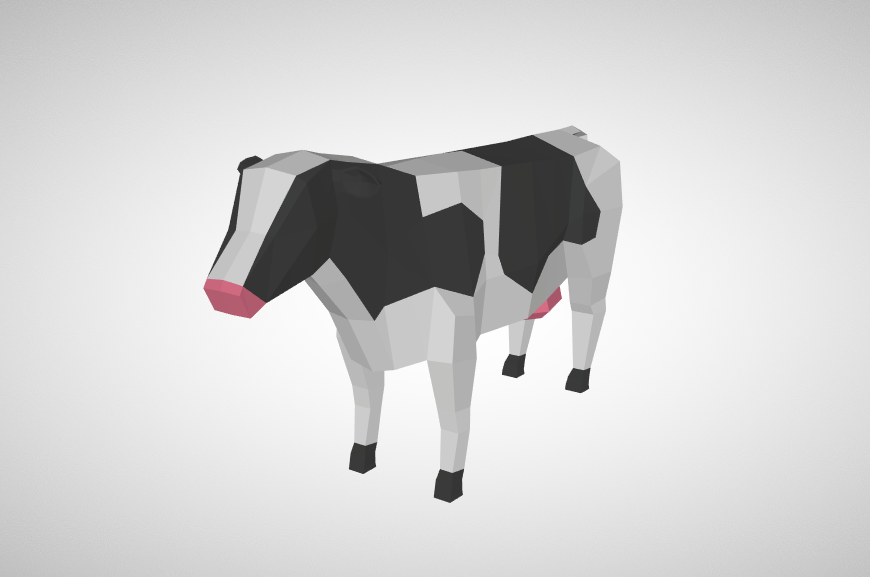
Materials colors are not exported
Taking this file
Exporting with the old exporter I get this

With the current export (cloned from the repo) I get this

To Reproduce
Steps to reproduce the behavior:
- Download the attached file, unzip, double click the .blend file
- File->Export->glTF 2.0
- Export
- Load in a viewer
Expected behavior
There are material colors
Checking the gltf data the old exporter has this
    "materials" : [
        {
            "name" : "Black",
            "pbrMetallicRoughness" : {
                "baseColorFactor" : [
                    0.02327823673603291,
                    0.02327823673603291,
                    0.02327823673603291,
                    1.0
                ],
                "metallicFactor" : 0.0
            }
        },
        {
            "name" : "Pink",
            "pbrMetallicRoughness" : {
                "baseColorFactor" : [
                    0.640000066757203,
                    0.1408390542989828,
                    0.1733517791830268,
                    1.0
                ],
                "metallicFactor" : 0.0
            }
        },
        {
            "name" : "White",
            "pbrMetallicRoughness" : {
                "baseColorFactor" : [
                    0.6400000190734865,
                    0.6400000190734865,
                    0.6400000190734865,
                    1.0
                ],
                "metallicFactor" : 0.0
            }
        }
    ],
the new exporter only this
    "materials" : [
        {
            "name" : "White",
            "pbrMetallicRoughness" : {}
        },
        {
            "name" : "Black",
            "pbrMetallicRoughness" : {}
        },
        {
            "name" : "Pink",
            "pbrMetallicRoughness" : {}
        }
    ],
yes, export materials was checked
Version
- OS: macOS
- Blender Version 2.79
 samanthajo2
All 15 comments
Testing in Blender 2.8, the exporter is struggling with two things I think:
- Materials assigned to individual faces. Vertex groups are present but not related to the material assignments.
- Expect best results with the Principled BSDF material, rather than Diffuse BSDF.
After splitting the mesh (Separate by Material) and using Principled BSDF, the materials export correctly. That said, I realize that splitting the mesh may negatively affect your animation (which seems broken on export as a separate issue?).
 donmccurdy
on 27 Jun 2019
donmccurdy
on 27 Jun 2019
Which "old exporter" are you referring to?
donmccurdy
on 27 Jun 2019
Sorry, Old exporter = https://github.com/KhronosGroup/glTF-Blender-Exporter
The animation exports just fine if animation sampling is on in the latest exporter. Of course sadly the files get significantly larger which is not so good for web tech but beggars can't be choosers
samanthajo2
on 28 Jun 2019
Thanks! Good to know the animation sampling fixes the animation issue, at least. I've added it to the list on https://github.com/KhronosGroup/glTF-Blender-IO/issues/558. Our main priority for animation right now is to get everything working, and sampling animation is the most robust way to do that. There are ways to optimize the animation later, and of course we'd like to get things working with this option turned off too.
donmccurdy
on 28 Jun 2019
It seems to me that the problem happens when the material doesn't use nodes. Each property of gltf2_io.MaterialPBRMetallicRoughness returned by gather_material_pbr_metallic_roughness is set to None if use_nodes is false.
 kocsis1david
on 20 Jul 2019
kocsis1david
on 20 Jul 2019
I can confirm that that remaining issue (material issue) is because of the material on the .blend file :
- use_nodes must be checked
- we have to use principled shader, as requested in user manual.
So it seems that we can close this ticket!
 julienduroure
on 4 Aug 2019
julienduroure
on 4 Aug 2019
I am confused. I don't see any option in the exported called "use_nodes". I don't know what it means to use principled shader
Are you saying the export won't support these files? They work fine in both Unreal (.fbx) and Unity (.blend). It would be a shame if they didn't work in glTF.
samanthajo2
on 15 Aug 2019
In the material settings panel of the object, you can choose to use nodes and there you can also choose the shader to be the principled bsdf.
kocsis1david
on 15 Aug 2019
So you're saying unlike Unity and Unreal, to use files with glTF I have to learn blender and modify the files? Up until this point all I had to learn was load->export. Now I have to modify the files, and either remember each time to modify them or save new ones. If I tell others "hey, there's some cool models at coolmodels.org" I also have to tell them instructions how to actually get them to work.
Wouldn't it be better of the exporter just worked. In fact this is arguably a regression is it used to work.
samanthajo2
on 16 Aug 2019
I've also bumped into this issue, but I don't know other way, I guess you need to modify files like these.
kocsis1david
on 16 Aug 2019
@samanthajo2 @kocsis1david In blender, use_node is most of the time enable by default.
You provided only .blend file, so I don't know what file format you imported, and I can't check what happpen at import level.
The aim of an exporter is not to export exactly what was imported, but to export what is inside Blender. If use_node is not checked, and render in blender, you will not see the same render than if use_node is checked. Exporter should take this into account to export was use can see when he renders. ( of course modulo specification of the file format, that can't handle everything done in blender)
julienduroure
on 16 Aug 2019
For more detail on what we support, and recommended settings, see https://docs.blender.org/manual/en/2.80/addons/io_scene_gltf2.html.
donmccurdy
on 16 Aug 2019
I'm still unclear on why you don't consider this a regression. I can go get the old exporter, load the same .blend file into blender and get the correct material colors. Then I use the new exporter and don't get the correct colors.
samanthajo2
on 4 Sep 2019
Let's keep this open to track that Diffuse BSDF and use_nodes=False are not supported.
This exporter was rewritten — involving a very, very large number of changes — for Blender 2.80, and support for Blender 2.80-standard settings is currently higher priority. But supporting Diffuse BSDF and use_nodes=False again would be nice, if it's not a major change from the current material export.
donmccurdy
on 4 Sep 2019
The title talks about Diffuse BSDFs, but the Cow.blend file only uses use_nodes=False. I filed #1148 to fix use_nodes=False.
If Diffuse BSDF needs to be exported, I think a separate issue should be filed with an example .blend.
 scurest
on 27 Jul 2020
scurest
on 27 Jul 2020
Related issues
 KannebTo
·
3Comments
KannebTo
·
3Comments
 WindyDarian
·
5Comments
WindyDarian
·
5Comments
 UX3D-nopper
·
4Comments
donmccurdy
·
3Comments
UX3D-nopper
·
4Comments
donmccurdy
·
3Comments
 viperscape
·
3Comments
viperscape
·
3Comments
Most helpful comment
@samanthajo2 @kocsis1david In blender, use_node is most of the time enable by default.
You provided only .blend file, so I don't know what file format you imported, and I can't check what happpen at import level.
The aim of an exporter is not to export exactly what was imported, but to export what is inside Blender. If use_node is not checked, and render in blender, you will not see the same render than if use_node is checked. Exporter should take this into account to export was use can see when he renders. ( of course modulo specification of the file format, that can't handle everything done in blender)