Gltf-blender-io: If multiple meshes are using the same armature before export, only one mesh will have armature modifier upon import
If multiple meshes are using the same armature before export, only one mesh has armature modifier upon import. It seems that the issue may relate to d8aa684 (#280), as checking out to 7954d2e fixes the issue.
In the .zip attachment there are the .blend file and exported .gltf that has the issue - there are 3 cubes with armature modifier in the .blend file. But only 1 will have armature modifier if import from the .gltf file.
skinned_cubes.zip
Blender version is 2.80 beta 54ffc4e19dc4 (2019-02-25 20:59), with glTF-Blender-IO at 1e8debf .
Export settings:

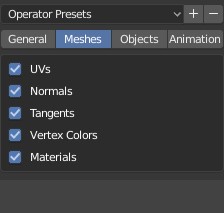
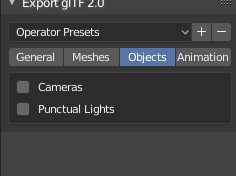
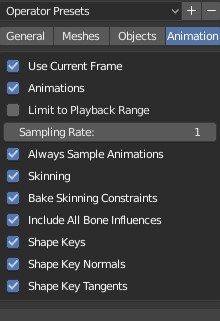
 WindyDarian
All 5 comments
Some checks / questions about this case :
- Import : There is 3 different skin id, all 3 have a joint tab with same join (only 1 bone in example file).
Currently, in importer implementation, a joint node can only be in 1 and only 1 armature.
How to manage the case where a bone is in multiple armature ? Creating a bone by armature?
How to manage the case where joint tabs are strictly identical in each skin? (like in this example). Creating 3 armatures, or only 1 ?
- Exporter part: In example there is 3 different skin id in glTF generated, with exactly same bone in each. If an armature has influence on multiple objects, we only have to create 1 skin, or multiple ?
 julienduroure
on 27 Feb 2019
julienduroure
on 27 Feb 2019
Personally I would like both importer and exporter to try their best to respect their sources, which is to have exporter to merge if skins have identical joints AND they are from the same armature, while importer create 1 armature per skin - I don’t have thoughts about how shared bones should be handled, though
WindyDarian
on 28 Feb 2019
It seems the exporter creates a separate armature for each mesh. Here I have 2 meshes on a single armature:
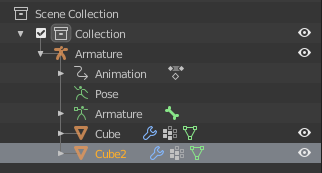
After exporting to glTF and importing in Godot, I have 2 armatures. All the bones and animation data appear to be duplicated in each armature:
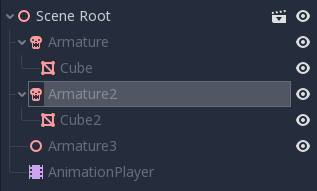
Reimporting into blender structures things differently, so not sure how much of this is a problem with the importer and how much is the exporter:
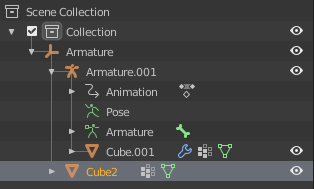
An additional "Armature" is added to the tree, but the animation data doesn't appear to be duplicated.
 jitspoe
on 13 Jun 2019
jitspoe
on 13 Jun 2019
Here's a me too. I face this issue when the skinned meshes aren't children of the armature and only one mesh is skinned in the glTF export. The opposite case, where the skinned meshes are children of the armature is described in issue #566.
Some checks / questions about this case :
- Import : There is 3 different skin id, all 3 have a joint tab with same join (only 1 bone in example file).
Currently, in importer implementation, a joint node can only be in 1 and only 1 armature.How to manage the case where a bone is in multiple armature ? Creating a bone by armature?
IMO, this is a problem caused by the exporter and the situation shouldn't exist, but most importantly, not considered for the issue at hand. There is a single armature in Blender and it should export to a single skin in glTF too.
How to manage the case where joint tabs are strictly identical in each skin? (like in this example). Creating 3 armatures, or only 1 ?
- Exporter part: In example there is 3 different skin id in glTF generated, with exactly same bone in each. If an armature has influence on multiple objects, we only have to create 1 skin, or multiple ?
I have worked with content like this on FBX without trouble before. It's always one armature/skin in Blender in both directions, import and export. When I gave glTF2 a test with the same content is when I first saw this problem.
 dpalacio
on 26 Jun 2019
dpalacio
on 26 Jun 2019
Exporter is now solved, only 1 armature will be exported
julienduroure
on 3 Oct 2019
Related issues
 UX3D-nopper
·
3Comments
UX3D-nopper
·
3Comments
 KannebTo
·
3Comments
KannebTo
·
3Comments
 viperscape
·
3Comments
julienduroure
·
3Comments
viperscape
·
3Comments
julienduroure
·
3Comments
 donmccurdy
·
3Comments
donmccurdy
·
3Comments